
1. Introduction
Thank you for choosing the Charmast 20W PD3.0 23800mAh Powerbank. This portable charger is designed to provide reliable and fast power to your electronic devices on the go. Featuring a high-capacity battery, multiple output ports including USB-C Power Delivery (PD3.0) and Quick Charge 3.0 (QC3.0) USB-A ports, and an intuitive LED display, this power bank ensures your devices stay charged efficiently.
2. Product Overview
Familiarize yourself with the components and features of your Charmast Powerbank.

Image 1: The Charmast 20W PD3.0 23800mAh Powerbank, showcasing its sleek black design and integrated LED display.

Image 2: Detailed diagram of the power bank's ports, including three USB-A outputs (one with QC 3.0), a Micro-USB input (QC2.0/3.0), and a versatile USB-C input/output (QC/PD 3.0).

Image 3: Close-up view of the LED digital display, which accurately shows the remaining battery percentage from 1% to 100%.
3. What's Included
Upon unboxing, please ensure all items are present:

Image 4: The power bank, user manual, and a USB-C cable as included in the product packaging.
- 1 x Charmast 23800mAh Powerbank
- 1 x User Manual
- 1 x USB-C Cable
4. Setup
4.1 Initial Charging
Before first use, it is recommended to fully charge your Charmast Powerbank. This ensures optimal battery performance and accuracy of the LED display.
- Connect the provided USB-C cable to the USB-C input/output port on the power bank.
- Connect the other end of the USB-C cable to a compatible USB wall charger (not included). For faster charging, use a Quick Charge 3.0 or Power Delivery compatible charger.
- The LED display will show the charging progress, indicating the battery percentage.
- Once the display shows "100%", the power bank is fully charged and ready for use.
5. Operating Instructions
5.1 Charging Your Devices
The power bank features multiple output ports to charge various devices simultaneously.
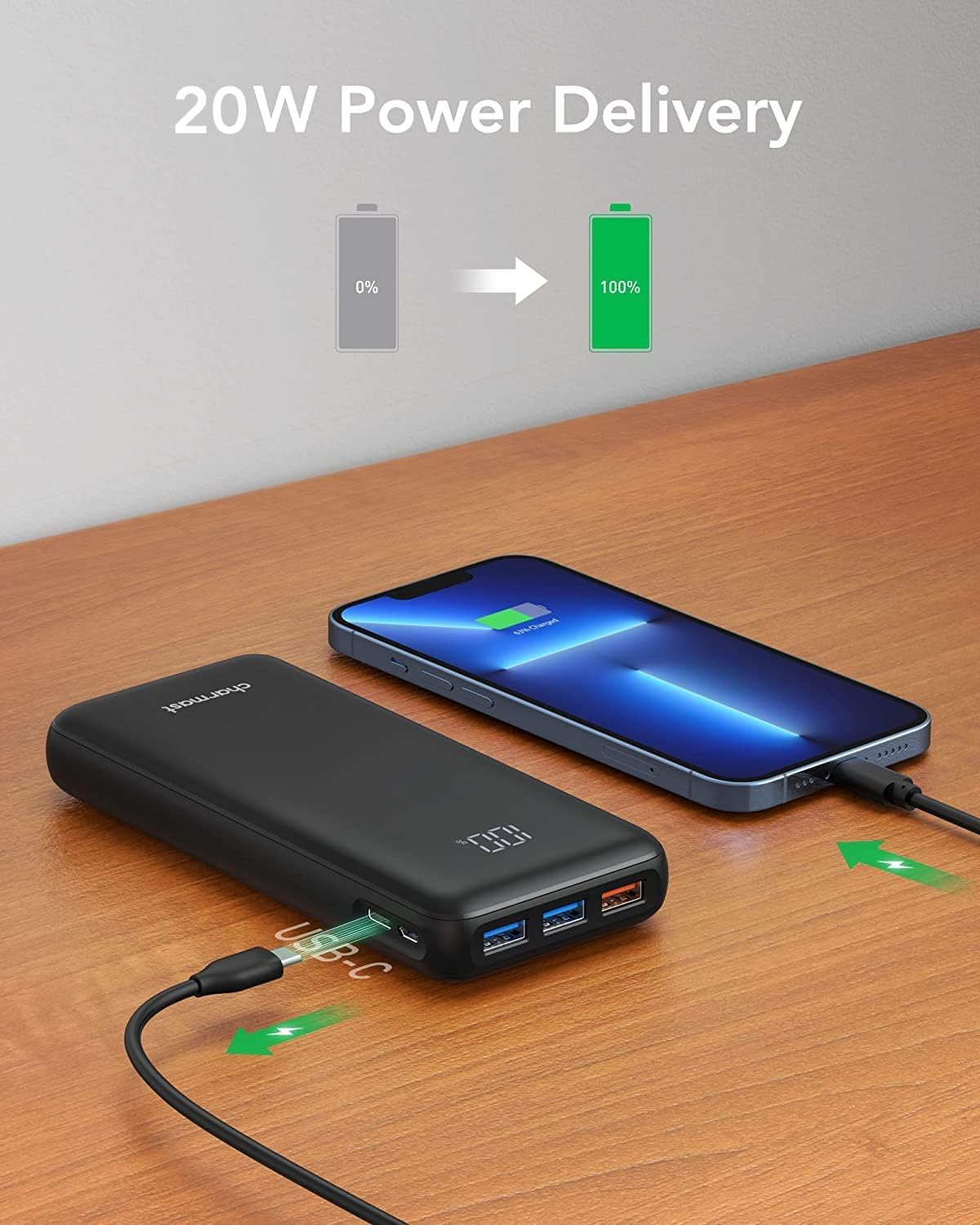
Image 5: Illustrates the 20W Power Delivery capability, showing a smartphone being charged rapidly from the power bank.

Image 6: Demonstrates the power bank's ability to charge up to four devices concurrently, including smartphones, tablets, and other USB-powered gadgets.
- Connect your device's charging cable to one of the available output ports on the power bank (USB-A or USB-C).
- The power bank will automatically detect the connected device and begin charging.
- The LED display will show the remaining battery percentage of the power bank.
- For optimal fast charging, use the USB-C PD3.0 port for compatible devices or the QC3.0 USB-A port for Quick Charge enabled devices.
5.2 Recharging the Powerbank
When the power bank's battery is low, recharge it using either the Micro-USB or USB-C input port.
- Connect a compatible charging cable (USB-C or Micro-USB) to the respective input port on the power bank.
- Connect the other end of the cable to a USB wall charger. For faster recharging, use a QC3.0 or PD compatible charger with the USB-C port.
- The LED display will show the charging status, indicating the battery percentage as it recharges.
5.3 LED Display Functionality
The integrated LED display provides real-time information about the power bank's battery level. It shows the remaining charge from 1% to 100%, allowing you to monitor its status accurately.
6. Capacity Information
The 23800mAh high capacity of this power bank allows for multiple charges of various devices.

Image 7: Examples of charging capacity, showing how many times the power bank can charge devices like a Galaxy S8 (5.2 times), iPhone 13 (5 times), and iPad Air (2.1 times).
7. Universal Compatibility
The Charmast Powerbank is designed for broad compatibility with a wide range of electronic devices.

Image 8: Visual representation of universal compatibility, highlighting various devices compatible with the USB-C (QC/PD Fast Charging) and USB-A (QC 3.0 Fast Charging) ports, including iPads, iPhones, Huawei, Samsung, Nintendo Switch, Nokia, Sony, and LG devices.
8. Maintenance
Proper care and maintenance will extend the lifespan of your power bank.
- Cleaning: Use a soft, dry cloth to clean the surface of the power bank. Avoid using harsh chemicals or abrasive materials.
- Storage: Store the power bank in a cool, dry place away from direct sunlight and extreme temperatures.
- Charging Cycle: For optimal battery health, fully charge and discharge the power bank at least once every three months if not in regular use.
- Avoid Drops: Protect the power bank from drops and impacts, which can damage internal components.
9. Troubleshooting
If you encounter issues with your power bank, refer to the following common problems and solutions:
9.1 Power Bank Not Charging
- Ensure the charging cable is securely connected to both the power bank's input port and the wall charger.
- Verify that the wall charger is functioning correctly and plugged into a live power outlet.
- Try using a different charging cable or wall charger.
9.2 Device Not Charging from Power Bank
- Check if the power bank has sufficient charge remaining (indicated by the LED display).
- Ensure the charging cable connecting your device to the power bank is securely connected and not damaged.
- Try using a different output port on the power bank.
- Verify that your device's charging port is clean and free of debris.
9.3 Slow Charging
- Ensure you are using a fast-charging compatible cable and your device supports fast charging.
- For optimal speed, use the USB-C PD3.0 port or the QC3.0 USB-A port with compatible devices.
- Charging multiple devices simultaneously may reduce the charging speed for individual devices.
10. Specifications
Detailed technical specifications for the Charmast 20W PD3.0 23800mAh Powerbank.
| Feature | Specification |
|---|---|
| Brand | Charmast |
| Capacity | 23800 mAh |
| Connector Type | USB Type C |
| Color | Black |
| Special Feature | Portable |
| Voltage | 5 Volts |
| Battery Composition | Lithium-polymer |
| Power Source | Corded Electric |
| Item Weight | 386 Grams |
| Amperage | 3 A |
| Number of Ports | 5 (3 USB-A outputs, 1 Micro-USB input, 1 USB-C input/output) |
11. Safety Information
Please read and follow these safety guidelines to prevent injury or damage to the product.
- Do not disassemble, open, or attempt to repair the power bank.
- Keep the power bank away from water, moisture, and extreme temperatures (above 45°C or below 0°C).
- Avoid exposing the power bank to direct sunlight for extended periods.
- Do not use the power bank if it has been damaged or shows signs of swelling, leakage, or overheating.
- Keep out of reach of children.
- Dispose of the power bank responsibly according to local regulations. Do not dispose of it in household waste.
12. Warranty and Support
Charmast products are designed for reliability and performance. For warranty information or technical support, please refer to the contact details provided with your purchase or visit the official Charmast website. Please retain your proof of purchase for warranty claims.


