1. Introduction
This manual provides detailed instructions for the assembly, operation, and maintenance of your MARS HYDRO TS600 2x2 Grow Tent Kit. Please read this manual thoroughly before setting up and operating your system to ensure proper function and longevity of the product.
2. What's Included
Your MARS HYDRO TS600 2x2 Grow Tent Kit includes the following components:
- TS600 LED Grow Light
- 24"x24"x55" Grow Tent (1680D High Reflective Mylar)
- 4-inch 205 CFM Inline Fan
- Ventilation Speed Controller
- Carbon Filter
- 25ft Ducting
- 6-inch Clip Fan
- Grow Room Glasses
- Elastic Trellis Netting
- 2pcs Vent Covers
- 3pcs Stainless Clamps
- 3pcs Grow Bags
- Timer
- Humidity Thermometer
- Pruning Shear
- 2pcs Corner Shelf
- 2pcs Rope Hangers


3. Setup Instructions
3.1. Grow Tent Assembly
Follow these steps to assemble your grow tent:
- Verify all components and assemble the metal frame.
- Position the tent frame horizontally and drape it with the tent fabric.
- Stand the tent upright.
- Install the hanging bars and position the floor tray inside the tent.

3.2. Ventilation System Installation
Proper ventilation is crucial for maintaining optimal growing conditions. Install the inline fan, carbon filter, and ducting as follows:
- Connect the 25ft ducting to the carbon filter using a stainless clamp. Tighten securely with a Phillips screwdriver.
- Attach the carbon filter to one of the hanging bars using the provided belts.
- Connect the inline fan to another hanging bar using the rope ratchets.
- Connect the ducting from the carbon filter to the inline fan using another stainless clamp.
- Route the remaining ducting from the inline fan out through one of the tent's ventilation ports.
3.3. LED Grow Light Installation
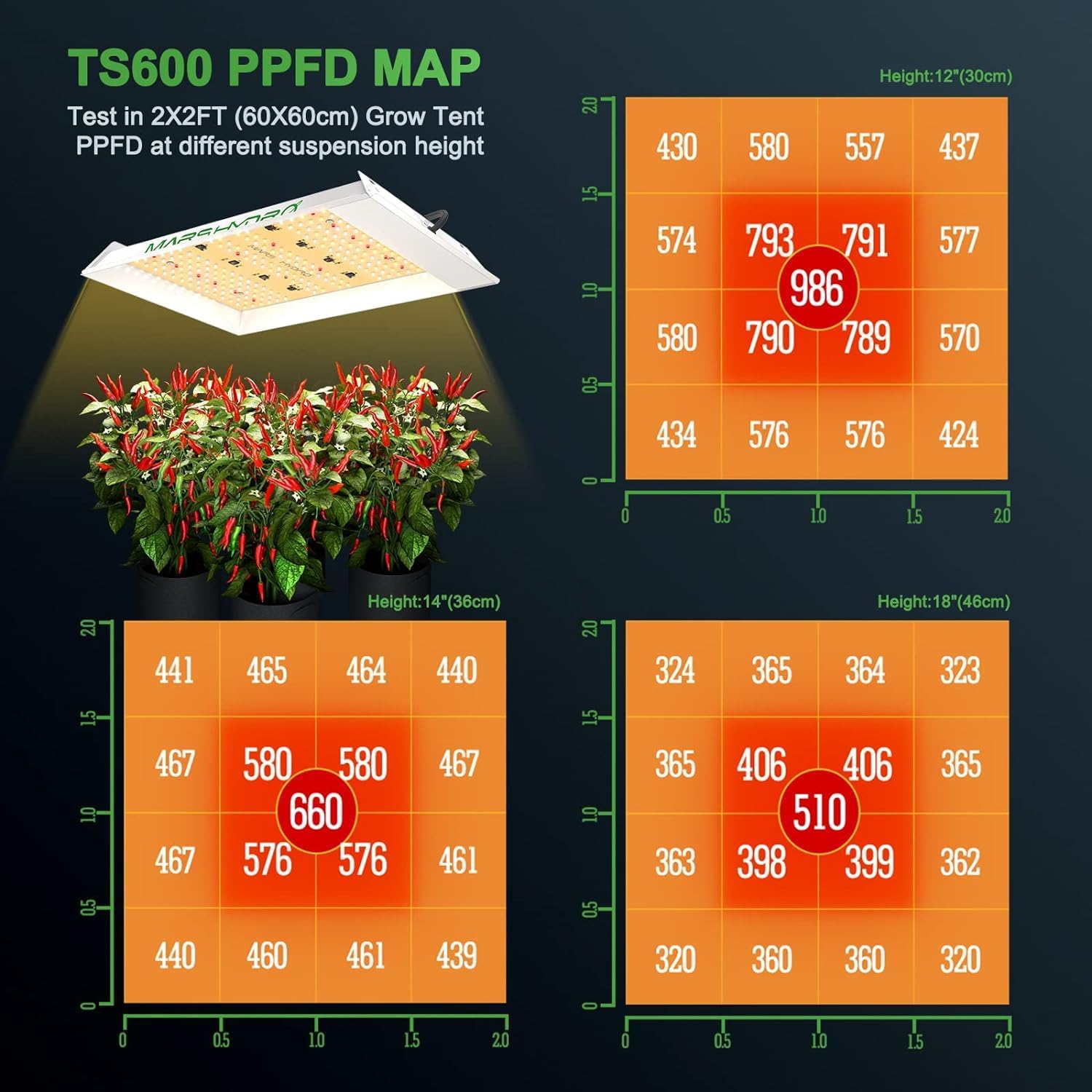
Hang the TS600 LED grow light using the provided rope hangers. Adjust the height according to your plant's growth stage. Ensure the light is securely fastened to the tent's support bars.
3.4. Clip Fan Installation
Install the 6-inch clip fan inside the tent to promote air circulation and heat dissipation. Clip it to a tent pole at a suitable height to ensure even airflow without directly blasting plants.

3.5. Smart Ventilation System Setup
The 2025 upgraded smart ventilation kit allows for intelligent monitoring and control. To enable app control, you need to purchase the Iconconnect USB (not included) and connect it to the Mars Hydro app via Bluetooth/WiFi.
4. Operating Instructions
4.1. Grow Light Operation
The TS600 LED grow light provides a full spectrum suitable for all growth stages. It consumes 100 Watts with 225 LEDs, offering high PAR/LUMEN output. Use the included timer to set your desired light schedule.

4.2. Ventilation System Operation
The 4-inch inline fan has a speed of 2550 RPM and an airflow of 205 CFM, with a noise level of 26.8dB. Use the ventilation speed controller to adjust the fan's operation. The carbon filter, with 1050+RC 48 Australian virgin charcoal, effectively filters impurities and odors.

4.3. Smart Control (App Integration)
If you have the Iconconnect USB, you can use the Mars Hydro app to control your ventilation system. The app offers three smart control strategies: Auto, Cycle, and Timer modes.
- Auto Mode: Set target temperature and humidity. The fan will activate when conditions are met. Utilize the 'dead zone' setting to prevent frequent on/off cycling.
- Cycle Mode: Program the fan to run for specific durations followed by rest periods, repeating for a set number of cycles.
- Timer Mode: Set up to five stages throughout the day, customizing fan behavior (speed, standby) for each stage.
4.4. Environmental Monitoring
Use the included humidity thermometer to monitor the temperature and humidity inside your grow tent. This helps you make informed adjustments to your ventilation and lighting settings.
5. Maintenance
- Grow Tent: Regularly inspect the tent for any tears or light leaks. Clean the interior mylar with a damp cloth as needed. The detachable floor piece simplifies cleaning.
- Carbon Filter: The carbon filter's lifespan depends on usage and air quality. Replace the filter when odors are no longer effectively removed.
- Inline Fan: Periodically check the fan for dust buildup and clean as necessary to maintain optimal airflow and prevent noise.
- LED Grow Light: Keep the light surface clean from dust and debris to ensure maximum light output.
6. Troubleshooting
- Light Leaks: Ensure all zippers are fully closed and the light-blocking fabric is properly positioned. Check ventilation ports for secure connections.
- Fan Noise: Verify that the inline fan is securely hung and not vibrating against tent poles. Ensure ducting is properly connected and not kinked.
- Light Not Turning Off Completely: If the grow light remains dimly lit when off, check the timer. Some budget timers may not completely cut power. Consider using a higher quality timer if this issue persists.
- Temperature/Humidity Fluctuations: Adjust fan speed and consider the 'dead zone' settings in the smart control app to stabilize environmental conditions.
7. Specifications
| Feature | Specification |
|---|---|
| Brand | MARS HYDRO |
| Model Number | MARS-TS600-SET |
| Product Dimensions | 24"L x 24"W x 55"H |
| Item Weight | 350 Grams (Tent components) / 12.3 ounces (Overall) |
| Frame Material | Metal |
| Inner Material | Mylar-like material (1680D Diamond Mylar) |
| Outer Material | Canvas |
| Light Source Wattage | 100 Watts (TS600 LED) |
| Weight Limit (Tent) | 40 Kilograms (88lb) |
| Inline Fan Airflow | 205 CFM |
| Inline Fan Noise Level | 26.8dB |
| Clip Fan Airflow | 315 CFM |
| Clip Fan Noise Level | 40 dB |
8. Warranty and Support
MARS HYDRO offers a 5-year after-sales maintenance for the Grow Light. For any product inquiries, technical support, or warranty claims, please contact MARS HYDRO customer service through their official website or the retailer where the product was purchased.


