1. Introduction
This manual provides detailed instructions for the safe and effective use of your Stabila LAR 160 G Green Rotation Self-Leveling Laser Set. This professional-grade tool is designed for precise leveling tasks in both interior and exterior applications, featuring a highly visible green laser beam and robust construction.
Please read this manual thoroughly before operating the device and keep it for future reference.
2. Safety Information
Always observe the following safety precautions to prevent injury and damage to the device.
- Laser Radiation: This product emits Class 2 laser radiation. Do not stare directly into the laser beam. Avoid direct eye exposure.
- Operating Environment: Use the laser level only in well-ventilated areas. Keep the device away from moisture, dust, and extreme temperatures.
- Battery Safety: Use only recommended battery types. Ensure correct polarity when inserting batteries. Do not mix old and new batteries or different types of batteries. Dispose of batteries according to local regulations.
- Maintenance: Do not attempt to modify or repair the device yourself. Refer all servicing to authorized Stabila service personnel.
- Children and Unauthorized Personnel: Keep the device out of reach of children and unauthorized personnel.
3. Package Contents
Verify that all items are present and undamaged upon unpacking:
- Stabila LAR 160 G Green Rotation Laser
- REC 160 R/G Set Receiver
- BST-S Construction Tripod (height-adjustable from 39"–63" / 100–160 cm)
- Hi/Lo Elevation Rod (from 31.5"- 75'' / 80-190 cm)
- Magnetic High-Visibility Plastic Target Plate with Cross-Hair
- Hard Shell Carrying Case
- User Manual

4. Product Features
The Stabila LAR 160 G offers a range of features for professional leveling applications:
- Fully Automatic, Motor-Driven Rotation Laser: Ensures high leveling accuracy of ± 0.1 mm/m (1/8 inch @ 100 ft).
- Fast Self-Leveling Function: Achieves level within 20 seconds.
- STABILA GREENBEAM Technology: Green laser beams are four times more visible to the human eye than red beams, improving visibility in various conditions.
- Four Laser Functions: Supports horizontal rotation, vertical rotation, plumb-line function, and square (90°) in vertical operation for versatile use.
- IP 65 Protection Class: Dustproof and waterproof, suitable for demanding job site conditions.
- Shock-Absorbent Casing: STABILA soft grip casing provides protection against impacts, with a stable housing cover protecting the laser optics.
- Easy Control: Operated via three control buttons: on/off, tilt mode, and manual mode.
- Accessible Battery Drawer: Allows for easy battery replacement, even when the device is mounted on a tripod.
- Large Working Area: Up to 600 m (2000 ft) in diameter when used with the REC 160 R/G set receiver.
- Versatile Mounting: Two 5/8" x 11 threads integrated in the housing for vertical and horizontal applications.

5. Setup
5.1 Battery Installation
- Locate the battery drawer on the side of the laser unit.
- Open the battery drawer and insert the required D-type batteries, ensuring correct polarity (+/-).
- Close the battery drawer securely.
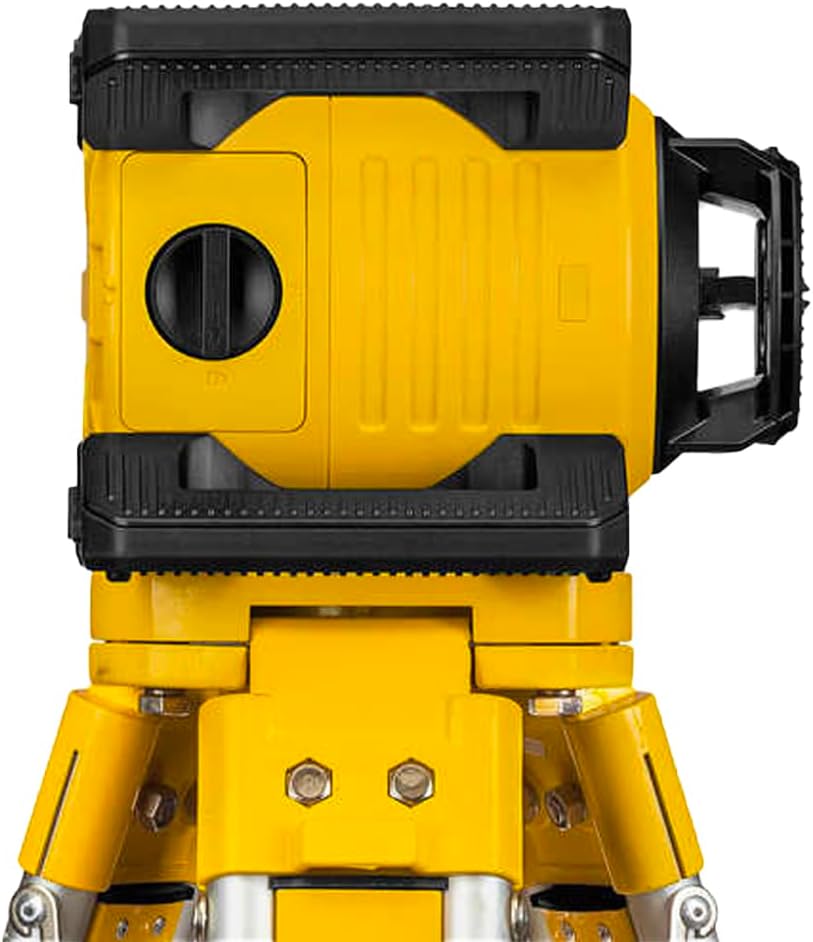
5.2 Mounting the Laser on the Tripod
- Extend the legs of the BST-S construction tripod to a stable position.
- Place the Stabila LAR 160 G laser unit onto the tripod head, aligning the 5/8" x 11 thread.
- Securely fasten the laser unit to the tripod by turning the tripod's mounting screw.
- Adjust the tripod height as needed for your application.
5.3 Positioning the Laser
Place the tripod with the laser unit on a firm, level surface. Ensure the area is clear of obstructions that could interfere with the laser beam.
6. Operating Instructions
6.1 Power On/Off and Self-Leveling
- Press the On/Off button (marked with a power symbol) to power on the device.
- The laser will automatically begin its self-leveling process. This typically takes about 20 seconds.
- Once leveled, the laser beam will rotate continuously.
- To power off, press the On/Off button again.
6.2 Laser Functions
The LAR 160 G supports four primary laser functions:
- Horizontal Rotation: For creating a level plane across a large area. This is the default mode after self-leveling.
- Vertical Rotation: Mount the laser vertically using the side 5/8" thread. The laser will project a vertical plane.
- Plumb-Line Function: In vertical operation, the laser can project a plumb-line (vertical point) for alignment.
- Square (90°) Function: In vertical operation, the laser can project a second beam at 90 degrees to the main vertical plane for squaring applications.
6.3 Tilt Mode
The tilt mode allows for manual slope setting. Press the Tilt button (labeled 'tilt') to activate. In this mode, the laser will maintain its current angle even if the device is slightly disturbed, but it will not self-level. Use this for setting specific grades.
6.4 Manual Mode
Press the Manual button (labeled 'man') to disable self-leveling and manually adjust the laser plane. This is useful for specific non-level applications or when working with a grade rod for slope calculations.
6.5 Using the REC 160 R/G Receiver
For outdoor use or when the laser beam is not visible, use the REC 160 R/G receiver:
- Power on the receiver.
- Move the receiver into the path of the rotating laser beam.
- The receiver will indicate when it detects the laser beam, typically with visual and audible signals.
- Adjust the receiver's position until the center indicator is active, marking the exact level.
6.6 Using the Hi/Lo Elevation Rod
The elevation rod is used in conjunction with the receiver to measure and transfer heights:
- Attach the REC 160 R/G receiver to the elevation rod.
- Extend the rod to the desired height.
- Use the receiver to find the laser plane on the rod, then read the measurement.
7. Maintenance
7.1 Cleaning
Wipe the device with a soft, damp cloth. Do not use harsh cleaning agents or solvents. Ensure the laser optics are clean and free of dust for optimal performance.
7.2 Battery Care
Remove batteries if the device will not be used for an extended period to prevent leakage. Replace batteries when the low battery indicator appears or performance degrades.
7.3 Storage
Store the laser set in its hard shell carrying case in a dry, cool place, away from direct sunlight and extreme temperatures.
7.4 Calibration
Regularly check the calibration of your laser level. If you suspect inaccuracies, contact an authorized Stabila service center for professional calibration.
8. Troubleshooting
| Problem | Possible Cause | Solution |
|---|---|---|
| Laser does not power on. | Dead or incorrectly inserted batteries. | Check battery polarity. Replace with fresh D-type batteries. |
| Laser does not self-level or flashes. | Device is outside its self-leveling range (±5°). | Reposition the laser on a more level surface. |
| Inaccurate readings. | Device out of calibration or unstable setup. | Ensure the tripod is stable. If issues persist, contact Stabila service for calibration. |
| Laser beam not visible outdoors. | Ambient light too bright. | Use the REC 160 R/G receiver for detection. |
9. Specifications
| Feature | Detail |
|---|---|
| Brand | Stabila |
| Model | LAR 160 G |
| Part Number | 04500TR |
| Laser Class | 2 |
| Output | < 1 mW |
| Laser Wavelength | 510 - 530 nm (Green) |
| Self-Leveling Range | ±5° |
| Leveling Accuracy | ±0.10 mm/m (1/8 in @ 100 ft) |
| Working Area Diameter (with receiver) | 600 m (2000 ft) |
| Operating Life | 20 hours |
| Battery Type | D |
| Protection Class | IP 65 (Dustproof and Waterproof) |
| Tripod Connection | 5/8" |
| Product Dimensions (Packaging) | 56 x 25 x 10 inches |
| Item Weight (Laser Unit) | 5.6 ounces (approx. 160 grams) |
10. Warranty and Support
The Stabila LAR 160 G Green Rotation Self-Leveling Laser Set is covered by a 2-year limited warranty from the date of purchase. This warranty covers defects in materials and workmanship under normal use.
For warranty claims, technical support, or service inquiries, please contact Stabila customer service or visit the official Stabila website. Please have your product model number (LAR 160 G) and part number (04500TR) available when contacting support.
For more information, visit: www.stabila.com


