
CAT CJ10000DCP
CAT 3-in-1 Professional Power Station Instruction Manual
Model: CJ10000DCP
Brand: CAT
Introduction
This manual provides detailed instructions for the safe and effective operation, maintenance, and troubleshooting of your CAT 3-in-1 Professional Power Station. This versatile unit combines a jump starter, an air compressor, and a portable power source, designed to assist with various automotive and power needs.
The product features 500 instantaneous amps and 1000 peak amps of battery starting power, capable of jump-starting most 120V vehicles. It also includes a 120-volt AC outlet and 2-amp USB ports for charging and powering devices such as phones, tablets, and laptops. The integrated 120 psi air compressor, equipped with a heavy-duty bronze safety nipple, securely connects to tires, sports equipment, and more.
Safety Information
Always read and understand all safety warnings and instructions before using this product. Failure to follow these instructions may result in electric shock, fire, and/or serious injury.
- Keep children and unauthorized persons away from the work area.
- Wear appropriate personal protective equipment, including eye protection.
- Do not operate the unit in explosive atmospheres, such as in the presence of flammable liquids, gases, or dust.
- Ensure proper ventilation when operating the air compressor.
- Do not expose the unit to rain or wet conditions.
- Always disconnect the unit from the power source before performing any maintenance or cleaning.
- Do not use the unit if it has been dropped or damaged.
- Refer to your vehicle's owner's manual for specific jump-starting procedures and precautions.
Setup
Before first use, fully charge the power station. It should be charged regularly when not in use to maintain battery health.
- Unpacking: Carefully remove the power station and all accessories from the packaging. Inspect for any damage.
- Initial Charge: Connect the power station to a standard AC wall outlet using the integrated AC charging adapter. Allow the unit to charge until the battery indicator shows a full charge. This may take several hours.
- Familiarization: Identify the main components: jump starter cables, air compressor hose, AC outlet, USB ports, control panel, and light.

Figure 1: Front view of the CAT 3-in-1 Professional Power Station, showing the control panel, USB ports, AC outlet, and jump starter clamps.

Figure 2: Packaging of the CAT 3-in-1 Professional Power Station, highlighting key features and components such as the jump starter switch, LCD display, USB ports, AC outlet, and air compressor hose storage.
Operating Instructions
Jump Starting a Vehicle
- Preparation: Ensure the vehicle's ignition is off and all accessories are turned off. Place the power station on a flat, stable surface near the vehicle's battery.
- Connect Positive: Connect the red (positive, +) clamp of the power station to the positive (+) terminal of the vehicle's battery.
- Connect Negative: Connect the black (negative, -) clamp to a non-moving metal part of the vehicle's engine block or chassis, away from the battery and fuel lines. Do not connect directly to the negative battery terminal.
- Activate Jump Start: Turn the jump starter switch on the power station to the "ON" position.
- Start Vehicle: Attempt to start the vehicle. If it does not start within 5-8 seconds, wait at least 1 minute before trying again.
- Disconnect: Once the vehicle starts, immediately turn the jump starter switch to "OFF". Disconnect the black (negative) clamp first, then the red (positive) clamp.

Figure 3: The power station positioned next to a car engine, with jump starter clamps connected to the vehicle's battery terminals, ready for jump-starting.
Using the Air Compressor
- Attach Hose: Remove the air compressor hose from its storage compartment and securely attach the bronze safety nipple to the tire valve stem or sports equipment valve.
- Set Pressure: Use the control panel to set the desired pressure (in PSI).
- Start Compressor: Press the "AIR" button to start the compressor. The unit will automatically shut off once the set pressure is reached.
- Monitor: Observe the pressure gauge on the display during inflation.
- Disconnect: Once inflation is complete, disconnect the hose from the valve and return it to its storage.
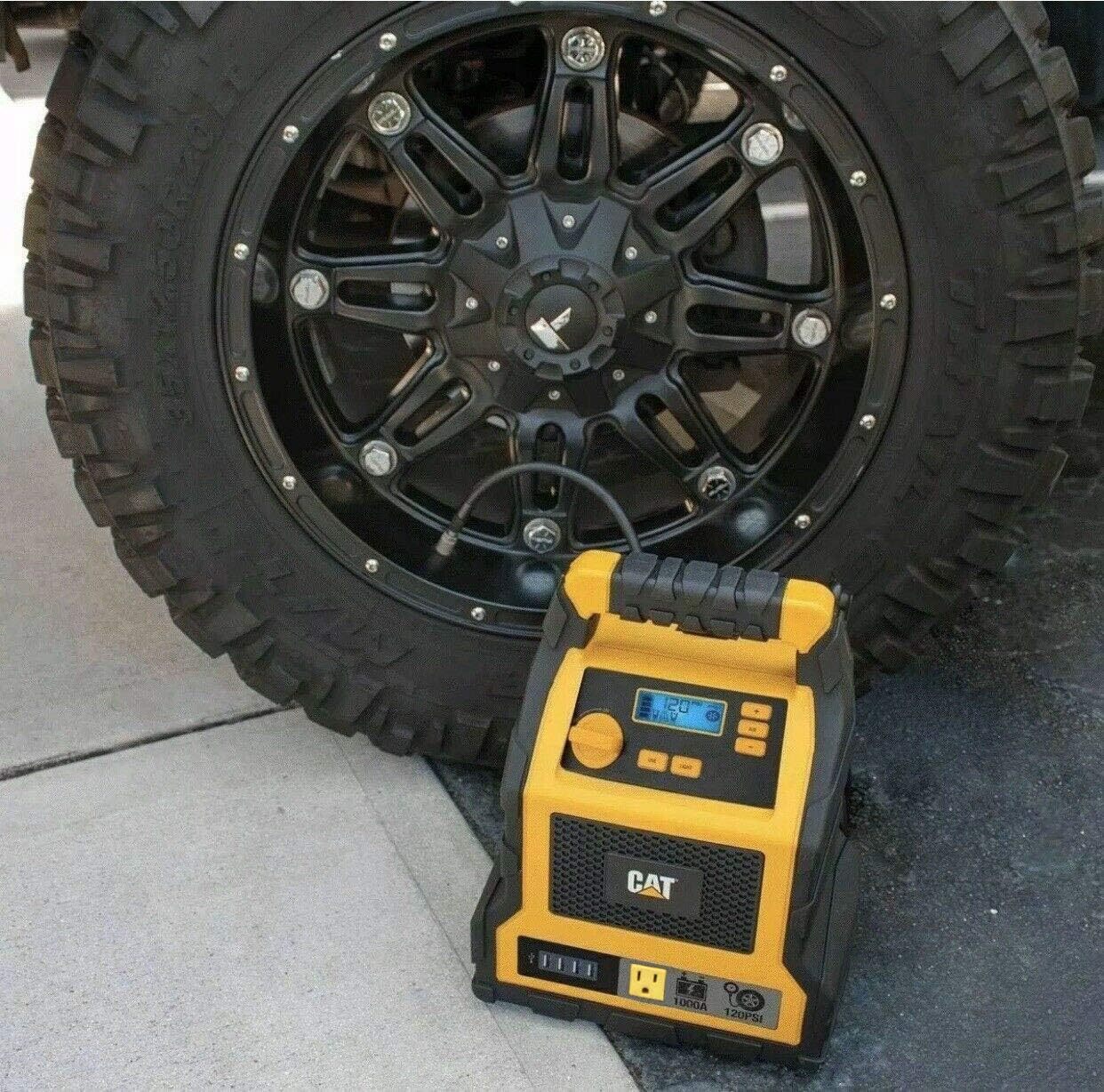
Figure 4: The power station placed next to a vehicle tire, with the air compressor hose connected to the tire valve for inflation.
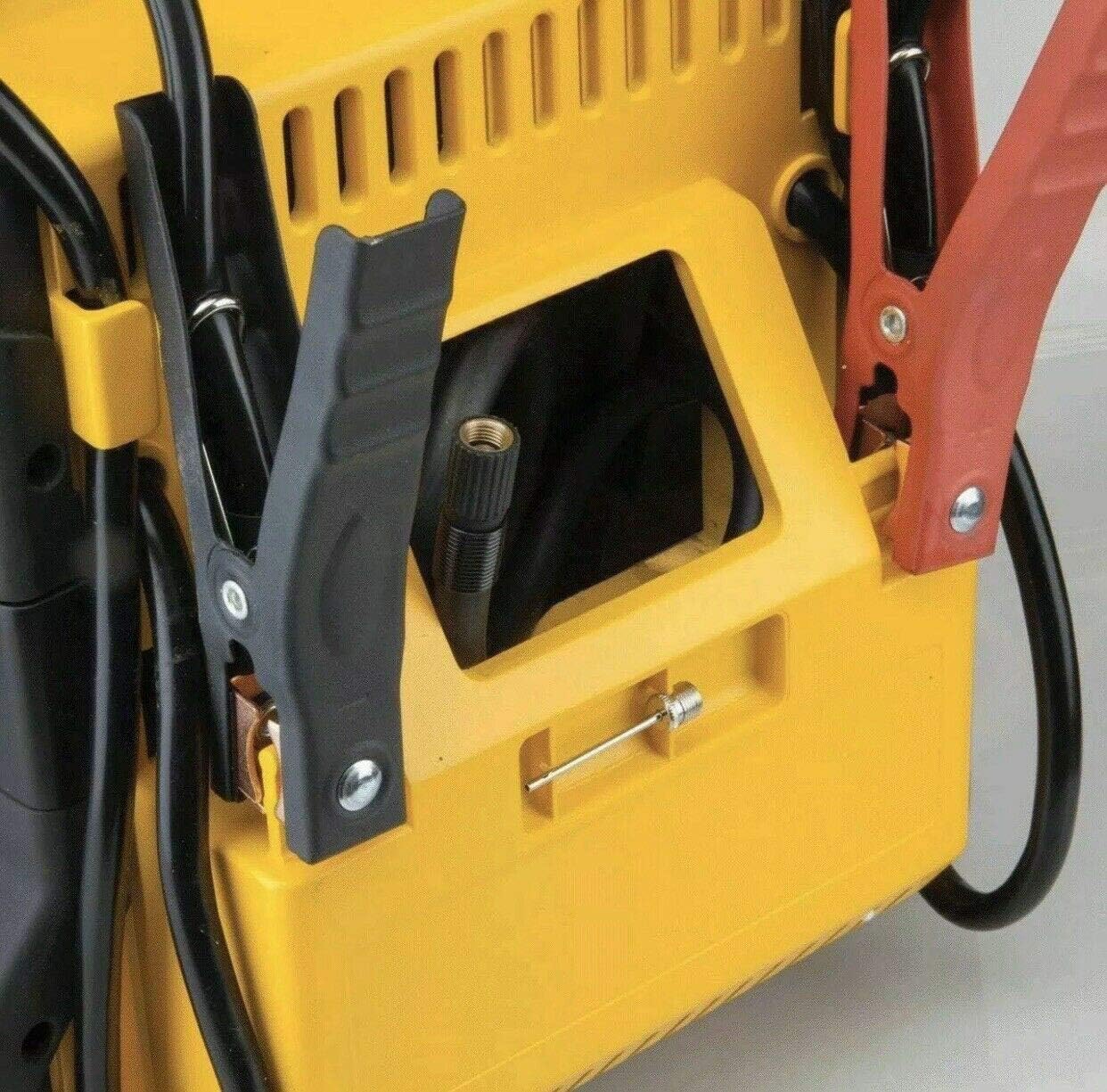
Figure 5: A detailed view of the side of the power station, showing the integrated storage for the air compressor hose and the nozzle adapter.
Using the AC Outlet and USB Ports
- AC Outlet: Plug your 120-volt AC device into the AC outlet. Press the "AC POWER" button to activate the outlet. Ensure the device's power consumption does not exceed the unit's maximum output (200W).
- USB Ports: Connect your USB-powered devices (e.g., phones, tablets) to any of the four USB ports. The USB ports provide 2-amp output for efficient charging.

Figure 6: A composite image showing various uses of the power station, including charging a smartphone via its USB ports.
Maintenance
Proper maintenance ensures the longevity and optimal performance of your CAT Professional Power Station.
- Regular Charging: The internal battery should be charged regularly, especially when not in use. It is recommended to fully charge the unit every 3 months to maintain battery health and extend its lifespan.
- Cleaning: Use a dry, soft cloth to wipe down the unit. Do not use abrasive cleaners or solvents.
- Storage: Store the unit in a cool, dry place, away from direct sunlight and extreme temperatures. Ensure all cables and accessories are neatly stored.
Troubleshooting
This section addresses common issues you might encounter. For problems not listed here, contact customer support.
| Problem | Possible Cause | Solution |
|---|---|---|
| Unit does not turn on. | Battery is fully discharged. | Charge the unit fully. |
| Vehicle does not jump start. | Incorrect clamp connection; Vehicle battery severely discharged; Power station battery low. | Check connections; Allow power station to charge vehicle battery for a few minutes before attempting to start; Recharge power station. |
| Air compressor not inflating. | Hose not securely attached; Desired pressure already reached; Compressor malfunction. | Ensure secure connection; Check current tire pressure; Contact customer support if malfunction is suspected. |
| AC outlet or USB ports not providing power. | AC/USB power not activated; Device draws too much power; Power station battery low. | Press the respective power button; Check device's power requirements; Recharge power station. |
Specifications
| Feature | Detail |
|---|---|
| Brand | CAT |
| Model Number | CJ10000DCP |
| Jump Start Peak Amps | 1000 Amps |
| Jump Start Instantaneous Amps | 500 Amps |
| Air Compressor Pressure | 120 PSI |
| AC Outlet | 120-volt AC |
| USB Ports | 4 USB Ports, 2-amp output |
| Item Weight | 19.1 pounds |
| Product Dimensions | 154"D x 12"W x 10"H |
| Date First Available | May 18, 2020 |
Warranty
The product packaging indicates a 1 Year Warranty. Please retain your proof of purchase for warranty claims. For specific warranty terms and conditions, refer to the documentation included with your product or contact the manufacturer directly.
Support
For technical assistance, replacement parts, or further inquiries, please contact CAT customer support. Visit the official CAT website for the most up-to-date contact information.
You can also visit the CAT Store on Amazon for more product information.
Related documentsCJ10000DCP


Ask a question about this manual
Ask about setup, troubleshooting, compatibility, parts, safety, or missing instructions. Manuals+ will review the question and use this page’s manual context to help answer it.