
Product Overview
The Delta In2ition 2-in-1 Dual Hand Held Shower Head offers a versatile showering experience with its integrated design. It features a main shower head and a detachable hand shower, allowing for independent or simultaneous use. This model incorporates Delta's H2Okinetic PowerDrench Spray technology for enhanced coverage, intensity, and warmth, along with MagnaTite Docking for secure hand shower placement and Touch-Clean spray holes for easy maintenance.

Image: The Delta In2ition 2-in-1 Dual Hand Held Shower Head in chrome finish, showing the main shower head and the detachable hand shower with its hose.
Key Features
- 2-in-1 Functionality: Use the main shower head and the detachable hand shower independently or together.
- H2Okinetic PowerDrench Spray: Provides 3X more coverage than a standard shower head for increased warmth and intensity.
- 5 Spray Settings: Includes H2OKinetic PowerDrench, full body, massaging, soft waterfall, and pause.
- MagnaTite Docking: A powerful integrated magnet securely holds the hand shower in place.
- Touch-Clean Spray Holes: Allows for easy removal of mineral buildup with a simple wipe.
- 60-82 inch Stretchable Metal Hose: Included for flexible use of the hand shower.

Image: Visual representation of the Delta In2ition shower head demonstrating multiple spray patterns available.
Setup and Installation
This shower head is designed for wall-mounted installation. Basic plumbing knowledge and tools are required. If you are unsure about any steps, it is recommended to consult a qualified plumber.
Materials Needed (Not Included):
- Plumber's tape (thread seal tape)
- Adjustable wrench
- Soft cloth
Installation Steps:
- Prepare the Area: Ensure the water supply to your shower is turned off. Remove your existing shower head by unscrewing it counter-clockwise from the shower arm. Clean any old plumber's tape or debris from the shower arm threads.
- Apply Plumber's Tape: Wrap plumber's tape clockwise around the threads of the shower arm 3-4 times.
- Attach the Shower Mount: Screw the main shower head assembly onto the shower arm by hand until snug. Use an adjustable wrench to tighten it an additional 1/4 to 1/2 turn. Do not overtighten, as this can damage the threads.
- Connect the Hose: Attach one end of the metal hose to the hand shower and the other end to the designated connection point on the main shower head assembly. Hand-tighten both connections, then use a wrench for a final snug turn.
- Test for Leaks: Turn on the water supply and check for any leaks at the connections. If leaks occur, tighten slightly more or reapply plumber's tape.

Image: The Delta In2ition shower head installed, showing the main shower head spraying and the hand shower detached and in use.
Operating Instructions
Your Delta In2ition shower head offers multiple spray functions and the flexibility of a 2-in-1 design.
Selecting Spray Settings:
Rotate the dial on the face of the main shower head to cycle through the 5 available spray settings:
- H2Okinetic PowerDrench Spray: A powerful, sculpted spray for maximum coverage and warmth.
- Full Body Spray: A traditional, invigorating spray.
- Massaging Spray: A focused, pulsating spray for muscle relief.
- Soft Waterfall Spray: A gentle, wide spray.
- Pause: Reduces water to a trickle, conserving water during tasks like lathering or shaving.

Image: Icon representing the Pause spray setting, which temporarily reduces water flow.
Using the 2-in-1 Functionality:
- Detaching the Hand Shower: Gently pull the hand shower from the main shower head. The MagnaTite docking system will release it smoothly.
- Re-docking the Hand Shower: Guide the hand shower back towards the main shower head. The integrated magnet will pull it securely into place.
- Flow Control: A diverter lever or button on the main unit allows you to switch water flow between the main shower head only, the hand shower only, or both simultaneously. Refer to the markings on your specific unit for exact operation.

Image: Close-up of the Delta In2ition shower head demonstrating the MagnaTite Docking feature, showing the magnetic connection point.
Maintenance
Regular cleaning will ensure optimal performance and appearance of your Delta In2ition shower head.
Cleaning the Spray Holes (Touch-Clean):
The soft rubber Touch-Clean spray holes are designed for easy maintenance. To remove mineral residue (calcium and lime buildup), simply wipe the spray holes with your finger or a soft cloth. No chemical cleaners or soaking are typically required.

Image: Illustration highlighting the Touch-Clean spray holes feature for easy mineral removal.
General Cleaning:
- Clean the chrome finish with a soft, damp cloth.
- Avoid abrasive cleaners, harsh chemicals, or scouring pads, as these can damage the finish.
- For stubborn spots, use a mild soap and water solution, then rinse thoroughly and dry with a soft cloth.
Troubleshooting
If you encounter issues with your shower head, refer to the following common solutions:
| Problem | Possible Cause | Solution |
|---|---|---|
| Low Water Flow | Mineral buildup in spray holes; partially closed water valve; clogged screen washer. | Clean spray holes using Touch-Clean feature. Ensure water supply valves are fully open. Check and clean the screen washer at the shower arm connection. |
| Leaking at Connections | Loose connections; insufficient plumber's tape; damaged washer. | Tighten connections. Reapply plumber's tape if necessary. Inspect washers for damage and replace if worn. |
| Hand Shower Not Docking Securely | Debris on magnetic surface; magnet issue. | Clean the magnetic surfaces on both the hand shower and the main unit. Ensure no obstructions. If the issue persists, contact customer support. |
Specifications
| Feature | Detail |
|---|---|
| Brand | Delta |
| Model Number | 58620-25-PK |
| Finish Type | Chrome |
| Material | Stainless Steel |
| Installation Type | Wall Mounted |
| Flow Rate | 2.5 Gallons Per Minute (GPM) |
| Number of Spray Settings | 5 |
| Hose Length | 60-82 Inches (stretchable) |
| Product Dimensions | 6.25"L x 5"W (Shower Head) |
| Item Weight | 3.19 pounds |
| Special Features | H2Okinetic PowerDrench Showers, MagnaTite Docking, Touch-Clean spray holes, Pause setting |
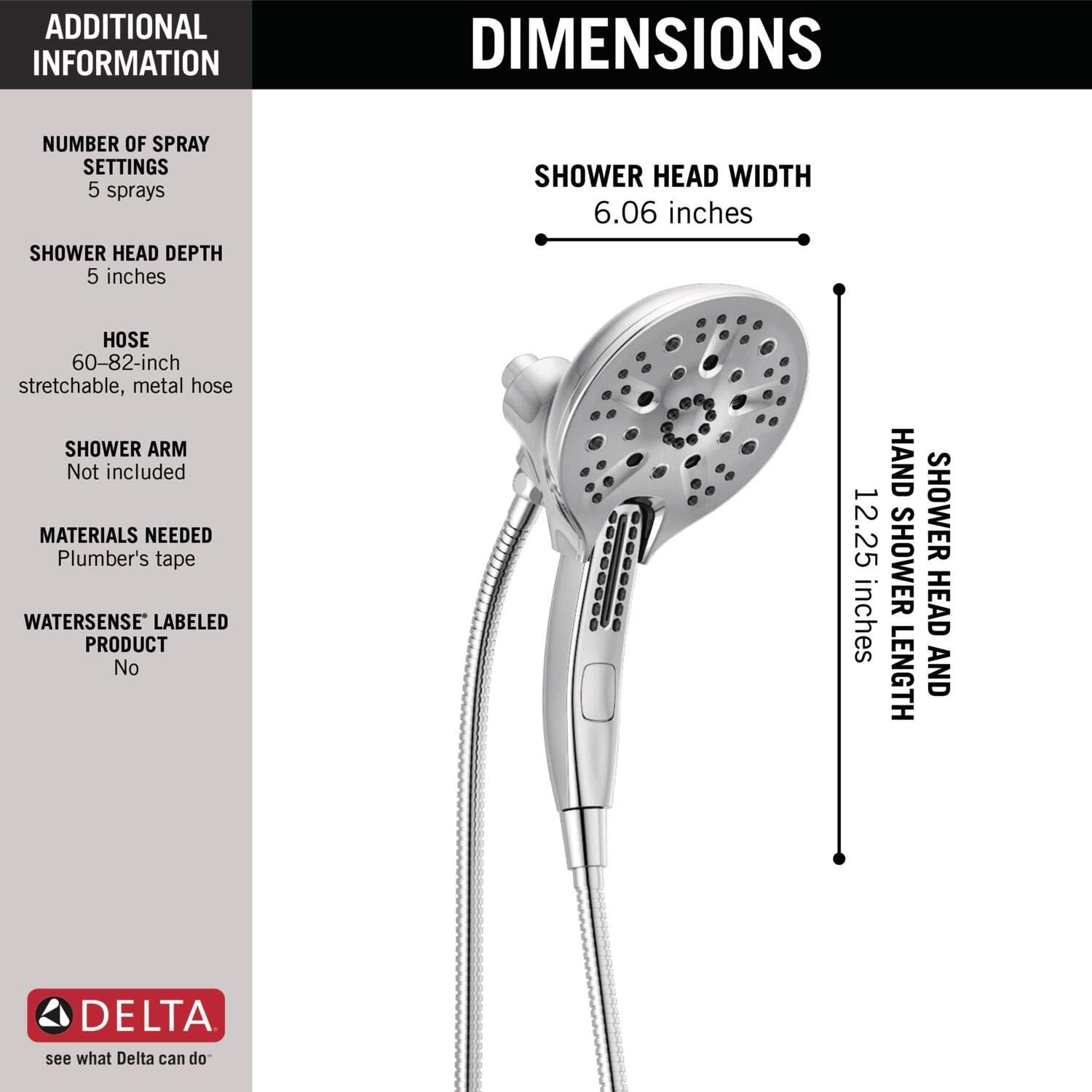
Image: Diagram illustrating the dimensions of the Delta In2ition shower head and hand shower.
Warranty and Support
Warranty Information:
This Delta Faucet product is backed by a Lifetime Faucet and Finish Lifetime Limited Warranty. This warranty covers defects in material and manufacturing workmanship for as long as the original consumer purchaser owns the home in which the faucet was first installed. For full warranty details, please refer to the official Delta Faucet website or contact customer support.
Customer Support:
For further assistance, technical support, or warranty claims, please visit the official Delta Faucet website or contact their customer service department. Contact information can typically be found on the manufacturer's website or product packaging.


