
Introduction
Thank you for choosing the Music Hero TWS Beat True Wireless Stereo Earbuds. These earbuds offer a seamless audio experience with true wireless connectivity, a built-in microphone, and intuitive call control. This manual will guide you through the setup, operation, and maintenance of your new earbuds to ensure optimal performance.
Package Contents
Please check the box for the following items:
- Music Hero TWS Beat Earbuds (Left and Right)
- Charging Case
- USB Charging Cable
- User Manual

Image: Package contents showing the user manual, charging base, charging cable, and the earphones.
Product Overview
Familiarize yourself with the key components of your Music Hero TWS Beat Earbuds:
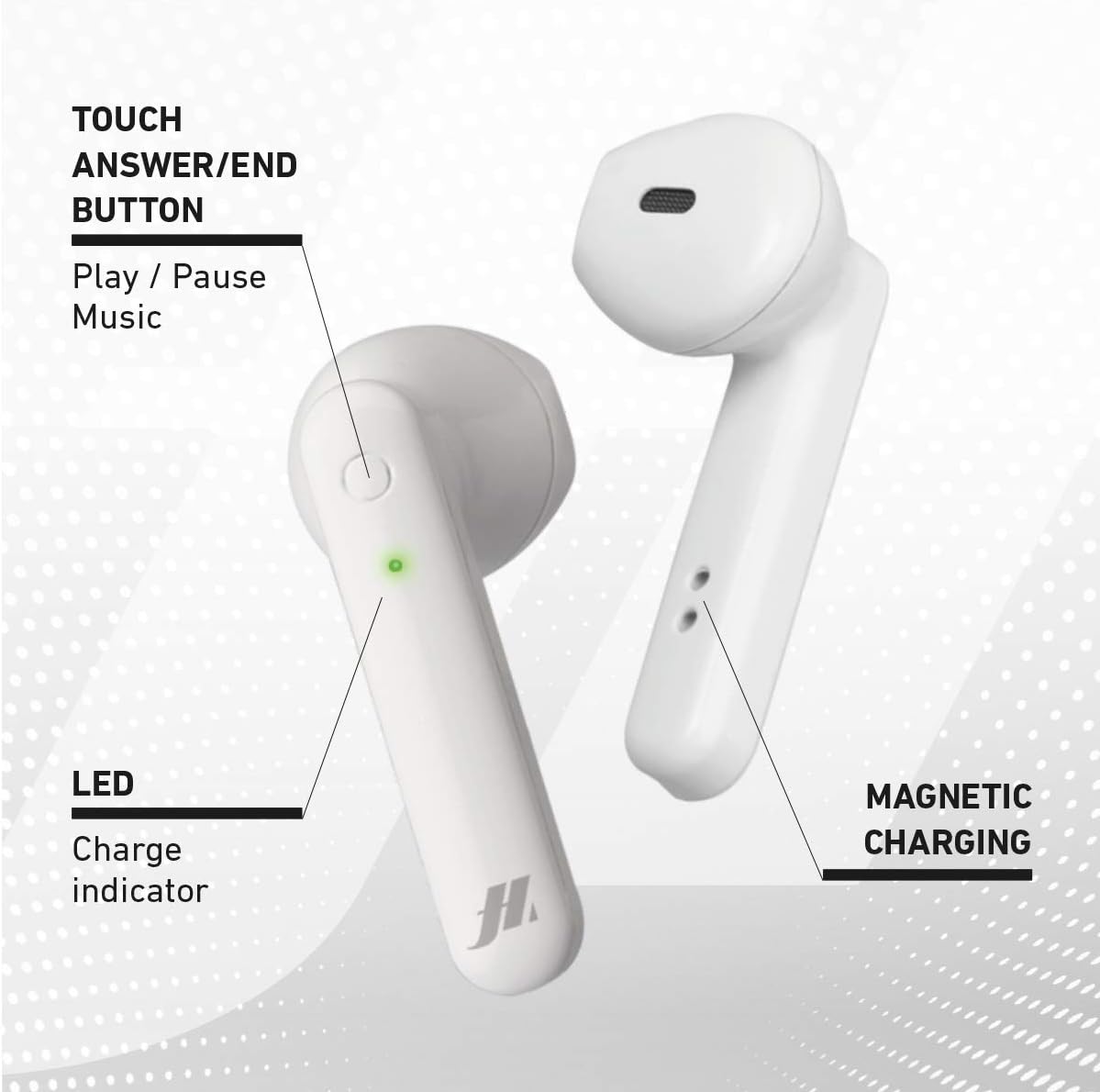
Image: Earbud features including the touch button, LED indicator, and magnetic charging points.
- Touch Answer/End Button: Used for music playback control (play/pause) and managing calls.
- LED Charge Indicator: Displays the charging status and connection status of the earbud.
- Magnetic Charging Contacts: For secure and efficient charging within the case.
Setup
1. Charging the Earbuds and Case
Before first use, fully charge the earbuds and the charging case.
- Place the earbuds into their respective slots in the charging case.
- Connect the USB charging cable to the charging port on the case and to a power source (e.g., USB wall adapter, computer USB port).
- The LED indicators on the earbuds and case will show the charging status.
- A full charge takes approximately 1 hour for the earbuds and 2.5 hours for the case.

Image: Earbuds charging inside the case, showing LED indicators.

Image: Battery life and charging times for the earbuds and case.
2. Pairing with Your Device
- Ensure the earbuds are charged.
- Open the charging case. The earbuds will automatically power on and enter pairing mode.
- On your device (smartphone, tablet, etc.), enable Bluetooth.
- Search for available Bluetooth devices and select "TWS Beat" from the list.
- Once connected, you will hear an audible confirmation, and the LED indicators on the earbuds will change.
Note: The earbuds automatically power on when removed from the case and are ready for use.
Operating Instructions
Power On/Off
- Power On: Remove the earbuds from the charging case. They will automatically power on.
- Power Off: Place the earbuds back into the charging case. They will automatically power off and begin charging.
Music Playback
- Play/Pause: Tap the touch button on either earbud once.
- Next Track: Double-tap the touch button on the right earbud.
- Previous Track: Double-tap the touch button on the left earbud.
- Volume Up: Triple-tap the touch button on the right earbud.
- Volume Down: Triple-tap the touch button on the left earbud.
Call Management
- Answer/End Call: Tap the touch button on either earbud once.
- Reject Call: Press and hold the touch button on either earbud for 2 seconds.
- Voice Assistant: Press and hold the touch button on either earbud for 3 seconds to activate your device's voice assistant.
- Redial Last Number: Quadruple-tap the touch button on either earbud.
Wearing the Earbuds
Insert the earbuds gently into your ears. Adjust them for a comfortable and secure fit to ensure optimal sound quality.

Image: Earbud worn in ear for proper fit.
Maintenance
- Cleaning: Regularly clean the earbuds and charging case with a soft, dry cloth. Do not use abrasive cleaners or immerse in water.
- Storage: When not in use, store the earbuds in their charging case to protect them and keep them charged.
- Avoid Extreme Conditions: Do not expose the earbuds to extreme temperatures, humidity, or direct sunlight. The earbuds are not water resistant.
Troubleshooting
| Problem | Solution |
|---|---|
| Earbuds do not power on. | Ensure the earbuds and charging case are fully charged. Place earbuds in the case and then remove them. |
| Earbuds do not pair with device. |
|
| Only one earbud is working. |
|
| Poor sound quality or disconnections. |
|
Specifications
| Brand: | MUSIC HERO |
| Model Name: | TWS Beat |
| Model Number: | V9 |
| Color: | White |
| Ear Placement: | In-ear |
| Form Factor: | In-ear |
| Noise Control: | Passive Noise Cancellation |
| Connectivity Technology: | Wireless |
| Wireless Communication: | Bluetooth |
| Bluetooth Version: | 5.3 |
| Bluetooth Range: | Up to 10 meters |
| Control Method: | Touch |
| Battery Life (Earbuds): | Up to 2.5 hours (music playback) |
| Charging Time (Earbuds): | Approx. 1 hour |
| Charging Time (Case): | Approx. 2.5 hours |
| Standby Time: | Up to 100 hours |
| Frequency Range: | 20 Hz - 20,000 Hz |
| Item Weight: | 40 Grams |
| Material: | Plastic |
| Water Resistance: | Not water resistant |
| Compatible Devices: | Phones, laptops, tablets, car audio systems |
Warranty and Support
The Music Hero TWS Beat Earbuds come with a 2-year manufacturer's warranty from the date of purchase. This warranty covers manufacturing defects and ensures the product functions as intended under normal use.
For warranty claims, technical support, or further assistance, please contact your retailer or visit the official MUSIC HERO website for customer service information.
Please retain your proof of purchase for warranty validation.
