Introduction
This manual provides detailed instructions for the proper use and maintenance of your Casio G-Shock DW-5610SU-3 digital watch. Designed for durability and functionality, this watch features shock resistance, 200-meter water resistance, an electro-luminescent backlight, and various timekeeping functions.

Image: Front view of the Casio G-Shock DW-5610SU-3 digital watch, showcasing its square case and digital display.
Button Functions
Your G-Shock watch has four buttons, typically labeled as follows:
- ADJUST (Top Left): Used to enter and exit setting modes, and to confirm settings.
- MODE (Bottom Left): Used to cycle through the watch's various modes (Timekeeping, Stopwatch, Countdown Timer, Alarm).
- LIGHT (Top Right): Activates the electro-luminescent backlight.
- START/STOP (Bottom Right): Used to start/stop stopwatch operations, change selections in setting modes, and activate the flash alert.

Image: Side view of the watch, highlighting the top left (ADJUST) and bottom left (MODE) buttons.

Image: Opposite side view of the watch, showing the top right (LIGHT) and bottom right (START/STOP) buttons.
Setup: Setting Time and Date
- In Timekeeping Mode, press and hold the ADJUST button until the city code starts to flash, indicating the setting screen.
- Use the START/STOP button to cycle through the settings (City Code, DST, 12/24-hour format, Seconds, Hour, Minute, Year, Month, Day).
- Use the LIGHT button to increase a value or the START/STOP button to decrease a value (for time/date settings).
- Once all settings are configured, press the ADJUST button to exit the setting mode.
Operating Instructions
Navigating Modes
Press the MODE button to cycle through the following modes:
- Timekeeping Mode (current time, date, day)
- Stopwatch Mode
- Countdown Timer Mode
- Alarm Mode
- Hourly Time Signal Mode
Using the Stopwatch
- Enter Stopwatch Mode by pressing the MODE button.
- Press the START/STOP button to start the stopwatch.
- Press the START/STOP button again to stop it.
- Press the ADJUST button to reset the stopwatch to zero.
- The stopwatch measures up to 23 hours, 59 minutes, 59.99 seconds.
Using the Countdown Timer
- Enter Countdown Timer Mode by pressing the MODE button.
- Press and hold the ADJUST button until the hour setting flashes.
- Use the LIGHT and START/STOP buttons to set the desired countdown time (up to 24 hours).
- Press ADJUST to confirm and exit the setting mode.
- Press START/STOP to start the countdown.
- Press START/STOP again to pause/resume.
- When the countdown reaches zero, an alarm will sound. Press any button to stop the alarm.
Setting Alarms
- Enter Alarm Mode by pressing the MODE button.
- Press and hold the ADJUST button until the hour setting flashes.
- Use the LIGHT and START/STOP buttons to set the alarm hour and minute.
- Press ADJUST to confirm and exit the setting mode.
- Press the START/STOP button to toggle the alarm ON/OFF. An indicator will show when the alarm is active.
Electro-luminescent Backlight
Press the LIGHT button to illuminate the display for easy viewing in low-light conditions. The backlight duration is typically a few seconds.
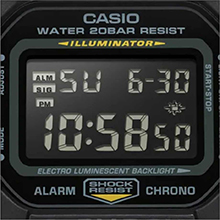
Image: Close-up of the watch display showing the electro-luminescent backlight active, illuminating the time and date.
Maintenance
Cleaning
Wipe the watch with a soft, dry cloth. For stubborn dirt, use a soft cloth dampened with water and a mild neutral detergent, then wipe dry. Avoid using volatile agents like thinner or benzine.
Water Resistance
This watch is water resistant to 200 meters. It is suitable for showering, swimming, and shallow diving. Do not operate buttons while the watch is wet or submerged to prevent water ingress.

Image: The Casio G-Shock DW-5610SU-3 watch partially submerged in water, illustrating its 200-meter water resistance.
Battery Replacement
The watch uses one CR2016 battery with an approximate life of 2 years. When the display becomes dim or functions malfunction, it may be time for a battery replacement. It is recommended to have the battery replaced by an authorized service center to ensure water resistance is maintained.
Troubleshooting
- Display is blank or dim: The battery may be low. Replace the battery.
- Buttons are unresponsive: Ensure the watch is not in a locked mode (if applicable, though this model typically doesn't have a lock). If issues persist, a full reset might be needed (consult service center).
- Time is inaccurate: Re-set the time and date as per the "Setting Time and Date" section. If inaccuracy continues, the watch may require servicing.
- Water inside the watch: Immediately take the watch to an authorized service center. Do not attempt to open it yourself.
Specifications
| Feature | Specification |
|---|---|
| Model Number | DW-5610SU-3 |
| Case/Bezel Material | Resin |
| Band Material | Resin |
| Glass Type | Mineral Glass |
| Water Resistance | 200 meters (20 BAR) |
| Shock Resistance | Yes |
| Backlight | Electro-luminescent backlight with Afterglow |
| Stopwatch | 1/100-second, measuring capacity 23:59'59.99" |
| Countdown Timer | Measuring unit 1 second, range 24 hours, auto-repeat |
| Alarm | Multi-function alarm, Hourly time signal |
| Calendar | Full auto-calendar (to year 2099) |
| Time Format | 12/24-hour format |
| Accuracy | ±15 seconds per month |
| Battery Type | CR2016 |
| Approx. Battery Life | 2 years |
| Case Dimensions (H×W×D) | 48.9 × 43.8 × 13.5 mm |
| Total Weight | 52 g |

Image: Diagram showing the dimensions of the Casio G-Shock DW-5610SU-3 watch, with a credit card for scale, indicating a case height of 48.9 mm and width of 43.8 mm.
Warranty and Support
Your Casio G-Shock DW-5610SU-3 watch comes with a Limited Warranty. For warranty claims, service, or technical support, please contact Casio India Co Pvt Ltd.
Manufacturer/Importer Contact:
Casio India Co Pvt Ltd
A-41, 1st Floor, MCIE, Mathura Road,
New Delhi-110044, India
For additional information and support, please visit the official Casio website or an authorized service center.


