
NOYAFA NF-8209
NOYAFA NF-8209 Network Cable Tester User Manual
Model: NF-8209
Introduction
The NOYAFA NF-8209 is a versatile network cable tester designed for comprehensive cable testing. It integrates digital, analog, and PoE signaling capabilities, making it suitable for various network environments. This device offers functions such as cable length measurement, fault testing, PoE testing, hub blink, and Non-Contact Voltage (NCV) detection, providing essential tools for network cabling professionals.

Image: The NOYAFA NF-8209 Network Cable Tester, showing its main components: the Emitter unit, the Receiver unit, and the Remote Adapter.
Package Contents
Upon opening the package, verify that all the following items are included:
- 1 x Transmitter (Emitter)
- 1 x Receiver
- 1 x Remote Adapter
- 1 x Earphone
- 1 Set of Cable Adapters
- 1 x Carry Bag
- 1 x User Manual

Image: Contents of the NOYAFA NF-8209 package, including the main units, remote, cables, earphone, carry bag, and user manual.
Setup
Before using the NF-8209, ensure batteries are installed in both the Transmitter and Receiver units. The Transmitter requires 3 AAA batteries, and the Receiver requires 1 9V battery (batteries are not included).
- Open the battery compartment on the back of the Transmitter and insert 3 AAA batteries, observing polarity.
- Open the battery compartment on the back of the Receiver and insert 1 9V battery, observing polarity.
- Close both battery compartments securely.
- Connect the desired network cable to the appropriate port on the Transmitter or Remote Adapter for testing.
Operating Instructions
1. Continuity Test (CONT)
This mode is used to test for open circuits, short circuits, and cross-connections in STP and UTP LAN cables.
- Connect one end of the network cable to the "CONT" port on the Transmitter.
- Connect the other end of the cable to the RJ45 port of the Remote Adapter.
- Press the "OK" button on the Transmitter to begin the test.
- The LCD will display the wiring status, indicating any faults such as open, short, or cross-connected wires.
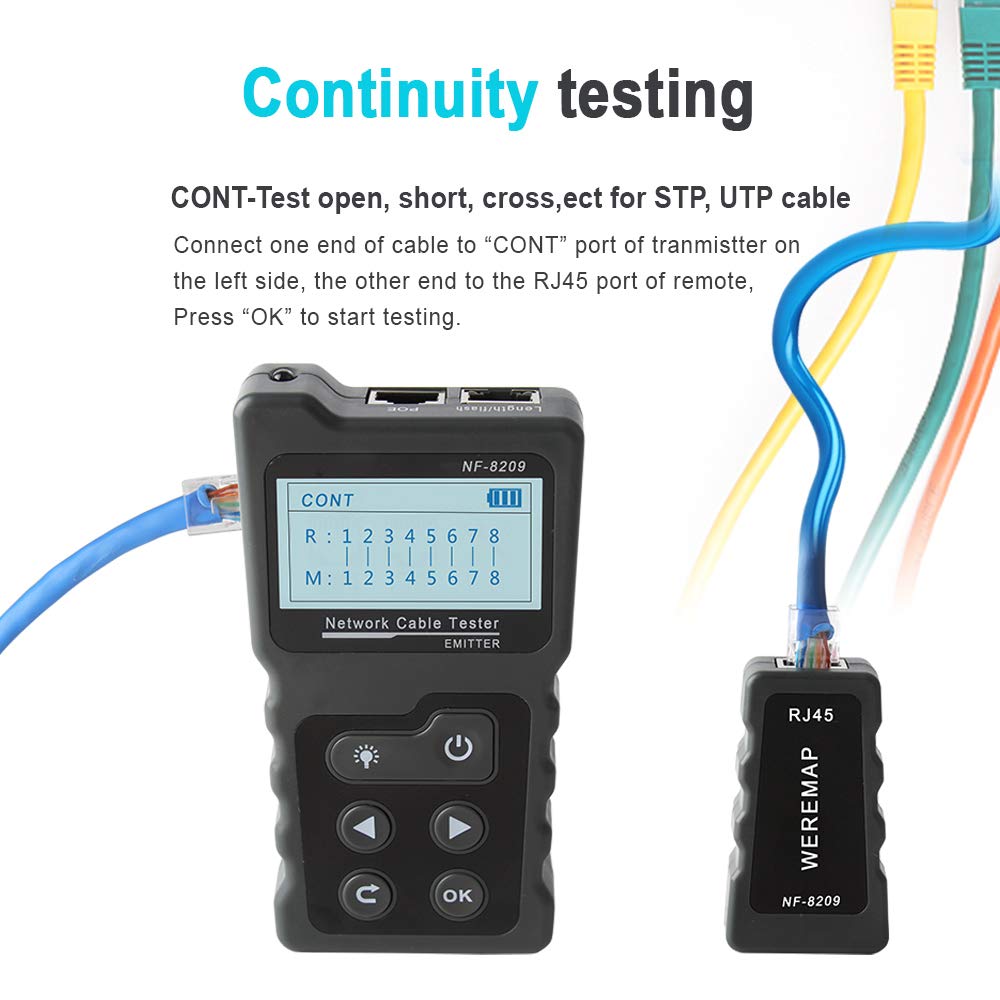
Image: The NF-8209 Emitter connected to a network cable for continuity testing, with the remote adapter connected to the other end.
Interpreting Continuity Test Results:
The LCD screen will display the wiring sequence (R for Remote, M for Main) and indicate any discrepancies. If the screen displays "Cable Open!", it means:
- All pins are open.
- No cable is connected.
- The remote is not connected.
- The cable is connected to the wrong port.

Image: Examples of continuity test results shown on the NF-8209 display, illustrating short circuits, cross-connections, and a good cable condition.
2. Cable Length Measurement (Length)
This function measures the length of LAN cables accurately, with a range of 2.5m to 200m.
- Ensure the LAN cable to be tested is de-energized.
- Disconnect the cable at the far end; no remote or other devices should be connected.
- Connect one end of the cable to the "Length" port on the Transmitter.
- Select the "Length" mode on the Transmitter.
- The LCD will display the measured cable length.
Note: If the cable length is outside the 2.5m-200m range, the display will show 0 meters.

Image: The NF-8209 Emitter connected to a coiled network cable, demonstrating the cable length measurement function.
3. Cable Scan (Scan)
The NF-8209 offers three modes for locating LAN cables: Digital, Analog, and PoE mode.
- Digital Mode: For precise cable tracing in complex environments.
- Analog Mode: For general cable tracing.
- PoE Mode: Specifically for tracing cables connected to Power over Ethernet (PoE) devices.
To use, connect the Transmitter to the cable and use the Receiver to trace the signal along the cable path.
4. PoE Testing
This function tests information about Power over Ethernet (PoE) devices, including PoE voltage, power supply polarity, and power supply mode. It can identify if the PSE (Power Sourcing Equipment) is AT or AF standard.
- Connect the network cable from the PoE switch to the "PoE" port on the Transmitter.
- Select the "PoE" mode on the Transmitter.
- The LCD will display details such as PoE voltage, pin polarity, and whether it's a standard (AT/AF) or non-standard PoE device.

Image: The NF-8209 Emitter connected to a network switch to perform a PoE test, displaying voltage and pin information.
5. Port Flash
This feature helps locate network ports by causing the port light on a switch or router to flash.
- Connect a network cable from the device to be identified to the "Length/Flash" port on the Transmitter.
- Select the "Flash" function from the main menu on the Transmitter.
- The corresponding port light on the connected switch or router will flash, allowing for easy identification.
Note: If a port's flash frequency matches the "Length/Flash" port on the transmitter (around 3 seconds), and other ports are flashing more quickly, you can easily identify your target port. This function is compatible with 10M/100M/1000M Hubs/Switches.

Image: The NF-8209 Emitter connected to a network switch, demonstrating the port flash function to identify the connected port.
6. Non-Contact Voltage (NCV) Function
The Receiver unit can detect the presence of AC voltage (50V-1000V) without direct contact.
- Press the "Power/Set" button on the Receiver to activate the NCV function.
- If the "NCV" indicator light on the Receiver illuminates, the NCV function is active.
- Hold the tip of the Receiver near an AC voltage source (e.g., power outlet, live wire).
- The Receiver will indicate the presence of AC voltage through visual and/or audible alerts.

Image: The NF-8209 Receiver being used to detect non-contact voltage near an electrical outlet, showing its NCV induction pen feature.
7. Settings
The Transmitter unit allows for various settings adjustments:
- Language: Select the desired operating language.
- Backlight Time: Adjust the duration the LCD backlight remains on.
- Auto-off Time: Set the time after which the device automatically powers off due to inactivity (15/30/60 minutes or OFF).
- Contrast: Adjust the display contrast for better readability.
- Version: View the device's firmware version.
Maintenance
To ensure the longevity and optimal performance of your NOYAFA NF-8209, follow these maintenance guidelines:
- Cleaning: Wipe the device with a soft, dry cloth. Do not use abrasive cleaners or solvents.
- Storage: Store the device in a cool, dry place, away from direct sunlight and extreme temperatures. Use the provided carry bag for protection.
- Battery Replacement: Replace batteries promptly when the low battery warning appears (Transmitter: 2.7V, Receiver: 6±0.5V). Remove batteries if the device will not be used for an extended period to prevent leakage.
- Handling: Handle the device with care to avoid physical damage. Do not drop or expose it to excessive shock.
Troubleshooting
If you encounter issues with your NF-8209, refer to the following common problems and solutions:
- Device not powering on:
- Check if batteries are installed correctly with proper polarity.
- Ensure batteries have sufficient charge. Replace if necessary.
- "Cable Open!" displayed during Continuity Test:
- Verify that both ends of the cable are securely connected to the Transmitter and Remote Adapter.
- Ensure the Remote Adapter is connected.
- Check if the cable itself is damaged (e.g., all pins open).
- Confirm the cable is connected to the correct "CONT" port on the Transmitter.
- Cable Length Measurement shows 0 meters:
- Ensure the cable length is within the measurable range of 2.5m to 200m.
- Verify that the far end of the cable is disconnected from any devices or the remote.
- Confirm the cable is de-energized.
- Inaccurate Scan results:
- Ensure the correct scan mode (Digital, Analog, PoE) is selected for the environment.
- Check for strong electromagnetic interference in the testing area.
- PoE Test not displaying information:
- Verify the PoE device is active and supplying power.
- Ensure the cable is correctly connected to the "PoE" port.
Specifications
General
- Item Name: Network Cable Tester
- Model: NF-8209
- Material: ABS
- Color: Black
- Power Source: Battery Powered
- Style: Digital
- Item Weight: 0.44 Kilograms (15.52 ounces)
- Package Dimensions: 10.67 x 6.54 x 1.93 inches
Transmitter (Emitter) Parameters
- Functions: Wiremap, Length Test, Cable Scan, PoE Testing, Port Flash, Lighting Function
- Cable Type Compatibility: CAT5e, CAT6, CAT6a (STP & UTP)
- Display: LCD with backlight
- Power Supply: AAA battery*3 (not included)
- Low Battery Warning: 2.7V
- Auto-off Time: 15/30/60 minutes/OFF
- Voltage Protection: DC 48V 5mA
- Max Working Current: <150mA
- Size: 130 x 70 x 28 mm
Receiver Parameters
- Sensitivity: Adjustable
- AC Voltage Detecting: Yes (NCV function)
- Lighting Function: Yes
- Power Supply: 9V*1pc (not included)
- Low Battery Warning: 6±0.5V
- Max Working Current: <100mA
- Size: 210 x 43 x 27 mm
Remote Adapter Parameters
- Wiremap Port: RJ45
- Voltage Protection: DC 48V 5mA
- Size: 65 x 37 x 23 mm
Warranty and Support
Information regarding product warranty and customer support for the NOYAFA NF-8209 is not available in the provided product details. Please refer to the manufacturer's official website or contact your point of purchase for warranty terms and support options.
Ask a question about this manual
Ask about setup, troubleshooting, compatibility, parts, safety, or missing instructions. Manuals+ will review the question and use this page’s manual context to help answer it.