
1. Product Overview
The CoFashion 5-in-1 Nail Art Machine integrates a nail dust collector, nail drill, UV LED nail lamp, desk light, and hand cushion into a single unit. This multifunctional device is designed to streamline various nail art processes.

Figure 1: Overview of the CoFashion 5-in-1 Nail Art Machine highlighting its five main functions.
2. Package Contents
Please verify that all items listed below are included in your package:
- 1 x Main Machine (Nail Dust Collector, UV LED Nail Lamp, Hand Cushion integrated)
- 1 x Nail Drill Handpiece
- 1 x Power Adapter
- 1 x Flexible Desk Lamp
- 6 x Nail Drill Bits
- 6 x Sanding Bands
- 2 x Nail Filters (one pre-installed, one spare)
- 1 x Pair of Fingerless UV Protection Gloves
- 1 x Nail Dust Brush
- 1 x Instruction Manual

Figure 2: Contents of the product package.
3. Safety Information
- Warning: Keep out of reach of children.
- Warning: Avoid contact with skin and eyes.
- Warning: If ingested, seek medical help immediately.
- Clean the filter dust regularly to ensure proper functioning.
- Allow the nail drill to rest for 20 minutes after every continuous use to prevent overheating.
- Use appropriate protective equipment (e.g., UV protection gloves) when operating the machine.
- Follow all instructions provided in this manual for safe operation.
4. Setup
- Install the Desk Lamp: Insert the flexible desk lamp into the designated port on the main unit.
- Connect Power: Plug the power adapter into the main unit's power port and then into a suitable electrical outlet.
- Install the Nail Drill: Connect the nail drill handpiece cable to the 'Motor' port on the main unit. Place the handpiece in its holder.
- Insert Drill Bit: Twist the nail drill handpiece to unlock, insert the desired drill bit, and twist to lock it securely.
Video 1: Demonstrates the setup process including connecting the desk lamp, power, and nail drill.

Figure 3: The 360° rotatable LED desk lamp provides adjustable lighting.
5. Operating Instructions
5.1. Nail Dust Collector
- Turn the 'FAN' knob to adjust the suction power. The dust collector operates at 40W.
- Place your hand or the area being worked on directly over the dust collection grate during filing or polishing to effectively capture dust.
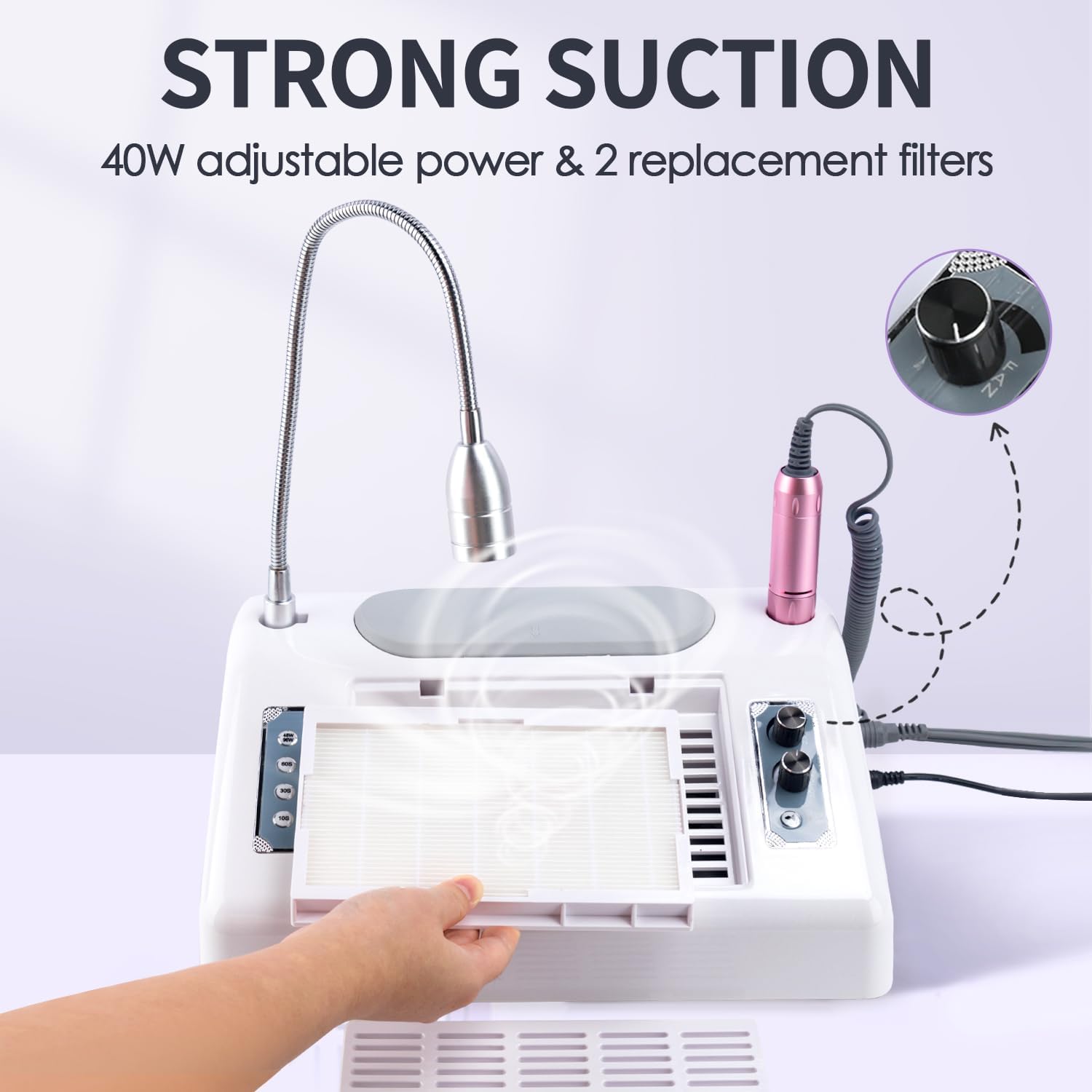
Figure 4: The powerful 40W nail dust collector with adjustable suction.
5.2. Nail Drill
- After installing a drill bit, turn the 'Motor' knob to adjust the rotation speed up to 30000 RPM.
- Use the F/R (Forward/Reverse) switch to change the rotation direction of the drill bit as needed.
- Different drill bits are included for various tasks:
- Mandrel + Sanding Band: For shortening and removing nail material.
- Large Barrel: For surface work and shortening.
- Small Barrel: For general surface work.
- Safety Bit: For polishing nail side edges.
- Cone: For polishing nail sidewalls and cuticles.
- Needle Head: For polishing nail edges.
- Ensure the nail drill rests for 20 minutes after 20 minutes of continuous use to prevent overheating and prolong its lifespan.

Figure 5: The 30000 RPM nail drill with variable speed control and interchangeable bits.
5.3. UV LED Nail Lamp
- Press the '48W/96W' button to switch between power modes.
- Select a curing time using the '10S', '30S', or '60S' buttons.
- The lamp features a smart infrared sensor; it will automatically turn on when hands are inserted and turn off when removed.
- Wear the provided fingerless UV protection gloves to protect your hands during curing.
- The lamp is suitable for curing various gel nail polishes, including clear base coat, topcoat, poly gel, acrylic nail, nail glue, glitter polish, and nail extension gel. Thicker gel polishes may require longer curing times.

Figure 6: The 48W/96W UV LED nail lamp with smart sensor and timer settings.
5.4. Desk Lamp
- Press the 'Desk Lamp' switch to turn the light on or off.
- Adjust the flexible neck of the lamp to direct light to your desired working area.
5.5. Hand Cushion
- The soft silicone hand cushion provides ergonomic support and comfort during nail art procedures.
6. Maintenance
6.1. Nail Dust Collector Filter Cleaning
- Clean the filter immediately after each use to maintain optimal suction performance.
- To clean, remove the filter from the unit. Use a hair dryer or the provided dust brush to remove accumulated dust.
- Important: Do not wash the filter with water under any circumstances.
- Nail salons are recommended to replace the filter every 2-3 months, depending on usage frequency.
Video 2: Demonstrates how to clean and replace the nail dust collector filter.

Figure 7: The nail dust filter is designed for effective dust absorption and easy cleaning.
6.2. General Cleaning
- Wipe the exterior of the machine with a soft, dry cloth.
- Do not use harsh chemicals or abrasive cleaners.
7. Troubleshooting
| Problem | Possible Cause | Solution |
|---|---|---|
| Machine does not power on. | Power adapter not connected properly or power outlet issue. | Ensure the power adapter is securely plugged into both the machine and a working electrical outlet. Check the power switch on the unit. |
| Nail drill is not rotating or overheats. | Motor connection loose, drill bit not properly inserted, or prolonged continuous use. | Check the motor cable connection. Ensure the drill bit is securely locked. Allow the drill to rest for 20 minutes after 20 minutes of use. If the issue persists, contact customer support. |
| Nail dust collector has weak suction. | Filter is clogged with dust. | Remove and clean the filter. Replace the filter if it is heavily soiled or damaged. |
| UV LED nail lamp or desk lamp not working. | Lamp switch off, loose connection, or component malfunction. | Ensure the respective lamp switch is on. Check connections. If the issue persists, contact customer support. |
8. Specifications
- Model Number: MR0063-5
- Product Dimensions: 11.81 x 10.83 x 4.72 inches (363 x 280 x 122 mm)
- Item Weight: 3.97 Pounds (1.8 Kilograms)
- Material: Plastic
- Nail Dust Collector Power: 40W
- Nail Drill Speed: 0-30000 RPM
- Nail Drill Power: 36W
- UV LED Nail Lamp Power: 48W/96W (Max)
- Desk Lamp Power: 6W
- Input Power: AC110V, 50HZ / AC220V, 60HZ
9. Warranty and Support
For warranty information, please refer to the product packaging or contact the manufacturer directly. If you encounter any issues or require technical assistance, please reach out to CoFashion customer support or your seller for guidance.