Product Overview
The MEIKEE 42W LED Security Light is an outdoor flood light designed for enhanced security and illumination. It features a built-in PIR motion sensor, three adjustable light heads, and is rated IP65 waterproof for reliable performance in various weather conditions. This light provides 3600 lumens of 6500K super bright white light, making it suitable for areas such as garages, yards, gardens, porches, and entryways.

Figure 1: Front view of the MEIKEE 42W LED Security Light.
Key Features
- Adjustable Heads: Three flexible light heads can be moved upwards, downwards, and horizontally up to 180° to customize the lighting angle.
- PIR Motion Sensor: Detects motion with a 180° wide angle and up to 40ft sensing range.
- Multiple Working Modes: Includes Day Mode (works day and night) and Night Mode (works only at night).
- Adjustable Illumination Time: Set the light duration from 5s, 45s, 120s, to 600s.
- High Brightness & Energy-saving: 42W with 56 LED chips provides 3600lm 6500K brightness, saving up to 85% on electricity.
- IP65 Waterproof: Designed to withstand various weather conditions.
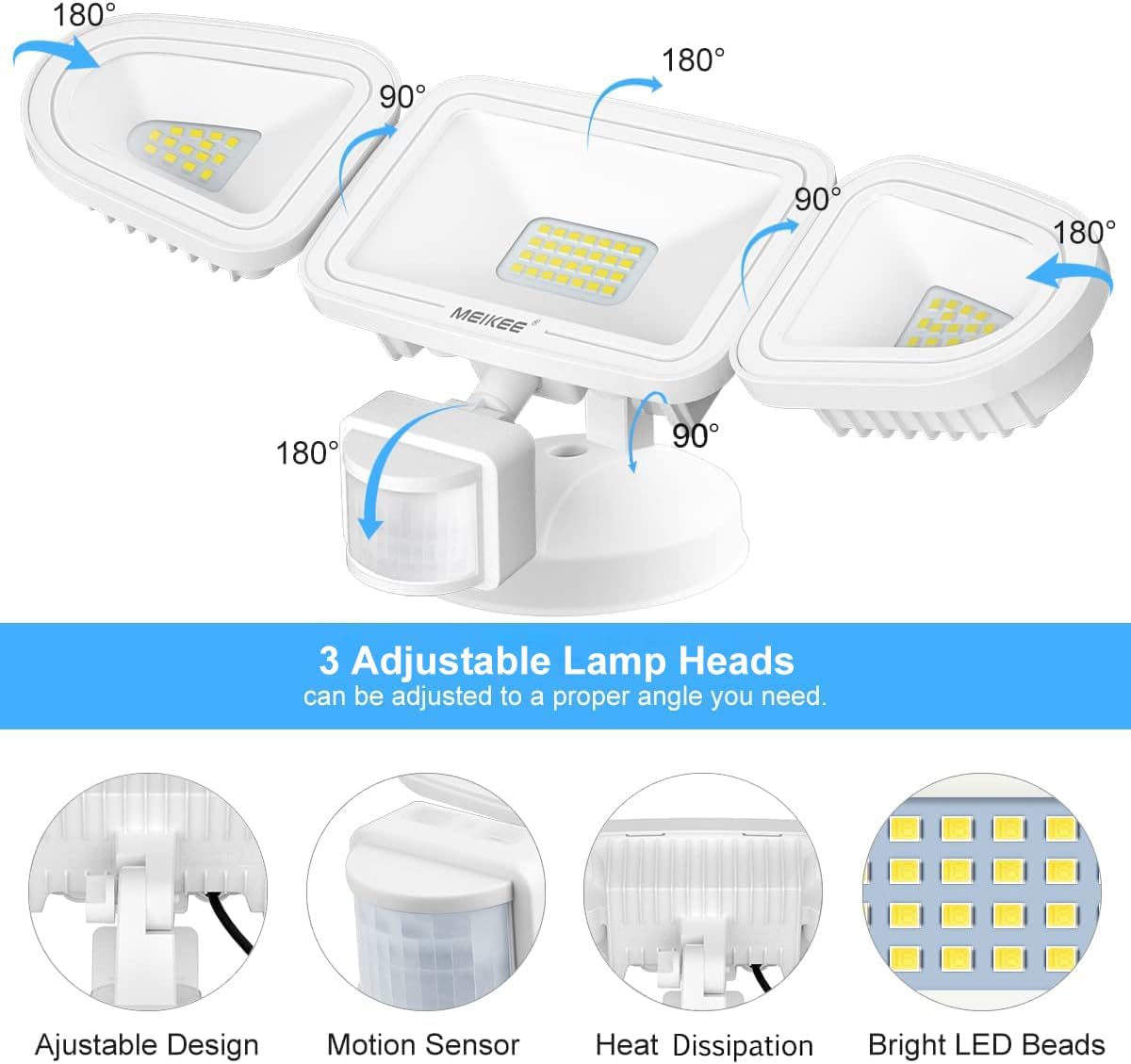
Figure 2: Illustration of adjustable lamp heads and other features.
Setup and Installation
The MEIKEE LED security light is designed for easy wall mounting. Follow these steps for proper installation:
- Prepare the Mounting Surface: Ensure the wall surface is clean and stable.
- Install the Mounting Bracket: Secure the mounting bracket to the wall using the provided screws. Ensure it is level and firmly attached.
- Wire the Light: Connect the light's wires to your household electrical wiring. Typically, this involves connecting the live wire, neutral wire, and ground wire (if applicable) according to local electrical codes. Use wire nuts to secure connections.
- Attach the Light Fixture: Mount the light fixture onto the installed bracket, ensuring all wires are tucked safely inside the junction box or mounting base. Secure the fixture with screws.
- Adjust Light Heads and Sensor: Once mounted, adjust the three light heads and the motion sensor to your desired angles for optimal coverage. The light heads can rotate up to 180 degrees horizontally and 90 degrees vertically. The motion sensor can also be adjusted.

Figure 3: Step-by-step installation guide.
Video 1: Official MEIKEE installation and feature overview. This video demonstrates the installation process and highlights key features of the MEIKEE 42W Motion Sensor Flood Lights.
Operating Instructions
The MEIKEE security light offers multiple modes and adjustable settings for optimal performance.
Sensor Modes:
- Day Mode: The light will activate upon motion detection during both daytime and nighttime. This mode ensures 24-hour security.
- Night Mode: The light will only activate upon motion detection during nighttime or in low-light conditions. This conserves energy during the day.
Illumination Time Setting:
You can set how long the light stays on after motion is detected. The available settings are 5 seconds, 45 seconds, 120 seconds, and 600 seconds. Use the control panel on the sensor to select your desired duration.
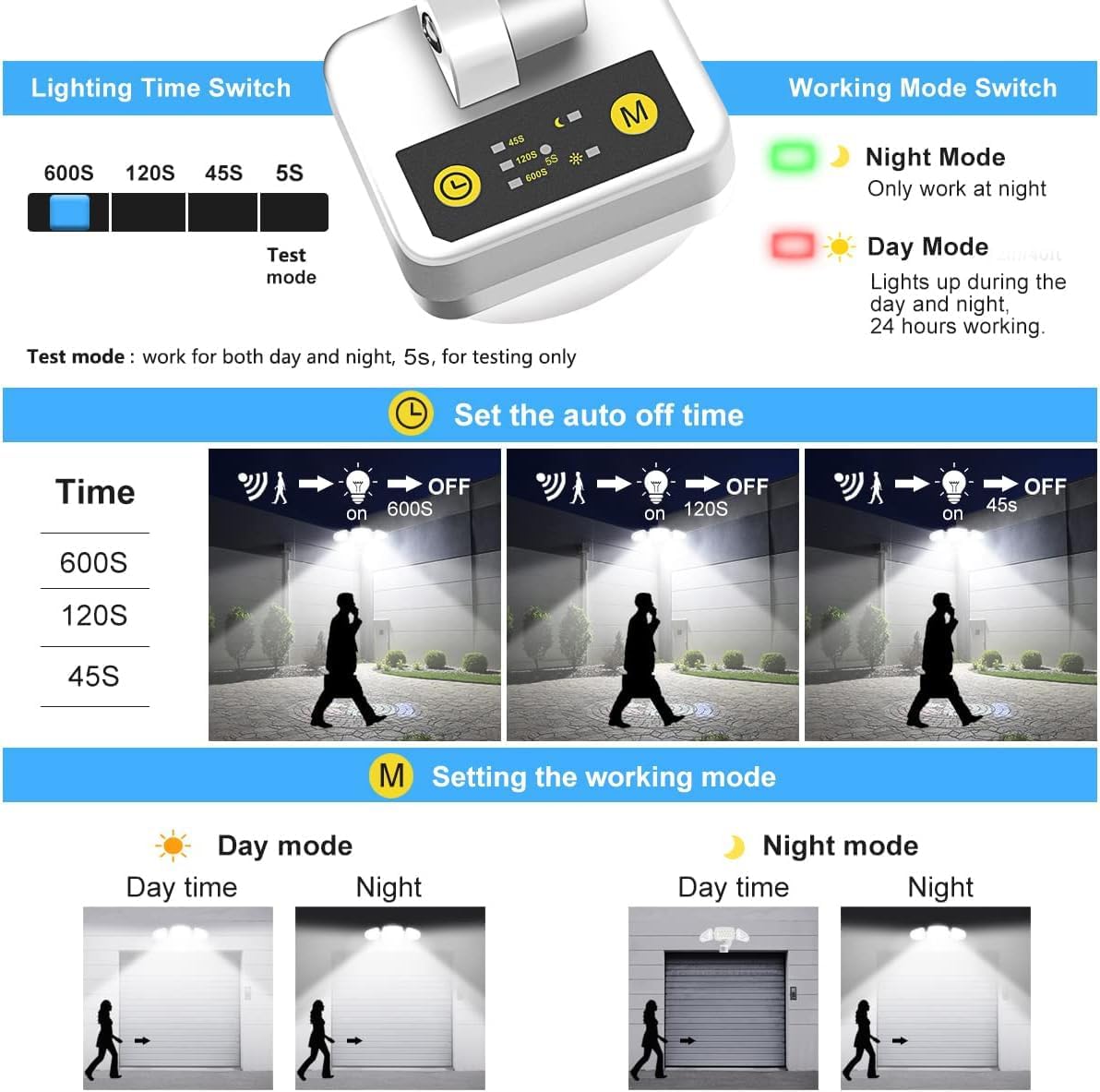
Figure 4: Control panel for setting illumination time and working mode.

Figure 5: Motion sensor detection range and angle.
Maintenance
To ensure optimal performance and longevity of your MEIKEE LED Security Light, follow these simple maintenance guidelines:
- Regular Cleaning: Periodically wipe the light fixture and motion sensor lens with a soft, damp cloth to remove dust, dirt, and debris. Avoid using abrasive cleaners or solvents that could damage the finish or electronic components.
- Inspect for Damage: Annually inspect the light for any signs of physical damage, loose wiring, or corrosion. If any damage is found, consult a qualified electrician for repair or replacement.
- Clear Obstructions: Ensure that no plants, branches, or other objects are obstructing the motion sensor's field of view, as this can affect its detection capabilities.

Figure 6: The IP65 waterproof design ensures durability in various weather conditions.
Troubleshooting
If you encounter issues with your MEIKEE LED Security Light, refer to the following common problems and solutions:
| Problem | Possible Cause | Solution |
|---|---|---|
| Light does not turn on. | No power, incorrect wiring, sensor obstructed, or sensor setting. | Check power supply and circuit breaker. Verify wiring connections. Ensure sensor is not obstructed. Adjust sensor mode (e.g., switch from Night Mode to Day Mode for testing). |
| Light stays on continuously. | Continuous motion detected, incorrect time setting, or sensor malfunction. | Ensure no constant motion in the detection zone. Adjust illumination time setting to a shorter duration. If the issue persists, the sensor may be faulty. |
| Light flickers or dims. | Unstable power supply, loose connection, or extreme temperature. | Check electrical connections for tightness. Ensure stable power. If flickering persists, consult an electrician. |
| Motion sensor not detecting. | Incorrect sensor angle, obstruction, or sensitivity setting. | Adjust the sensor head to cover the desired area. Remove any obstructions. Ensure the sensor is clean. |
Specifications
| Attribute | Value |
|---|---|
| Brand | MEIKEE |
| Model Number | 68100242-NW-US-A |
| Wattage | 42 watts |
| Brightness | 3600 Lumens |
| Color Temperature | 6500K (White light) |
| Voltage | 120 Volts (AC) |
| Material | Aluminum, Acrylonitrile Butadiene Styrene |
| Water Resistance Level | IP65 Waterproof |
| Motion Sensing Range | Up to 40ft |
| Motion Sensing Angle | 180° |
| Product Dimensions | 7.68"L x 5.51"W x 5.51"H |
| Item Weight | 1.72 pounds |
| Installation Type | Wall Mounted |
| Included Components | 42W motion sensor light*1, Screw pack*1 |

Figure 7: Product dimensions and package contents.
Warranty and Support
Warranty Information:
MEIKEE products are covered by a 2-year limited warranty from the date of purchase. This warranty covers defects in materials and workmanship under normal use.
Customer Support:
For any questions, technical assistance, or warranty claims, please contact MEIKEE customer service. You can send an email via Amazon or use the email address provided in the product instruction manual. Our support team aims to provide a timely response within 24 hours.
For more information and to explore other MEIKEE products, visit the official MEIKEE store on Amazon: Visit the MEIKEE Store.


