
1. Important Safety Information
Please read all safety information carefully before using the Wellue Fingertip Pulse Oximeter FS20F. This device is intended for sports and aviation use only and is not intended for medical use. It is not designed to diagnose, treat, cure, or prevent any disease or health condition.
- Do not use this device during an MRI or CT scan.
- This device is not intended for continuous monitoring or in situations requiring alarms.
- Keep the device out of reach of children.
- Do not use on infants or neonates.
- Avoid using on an injured finger or a finger with nail polish or artificial nails, as this may affect accuracy.
- Do not use the oximeter if it is wet or damaged.
- Do not use in flammable environments.
- Ensure the finger fits properly into the probe. Avoid using on fingers that are too large or too small.
- Do not use on fingers with edema, low perfusion, tremor, low blood pressure, anemia, hypothermia, or severe peripheral vascular disease, as these conditions may affect measurement accuracy.
- Limit continuous use on the same finger to no more than 5 minutes to avoid discomfort or potential skin irritation.
2. Product Overview
The Wellue Fingertip Pulse Oximeter FS20F measures blood oxygen saturation (SpO2) and pulse rate (PR) through the finger. It features a clear OLED display and Bluetooth connectivity for app integration.
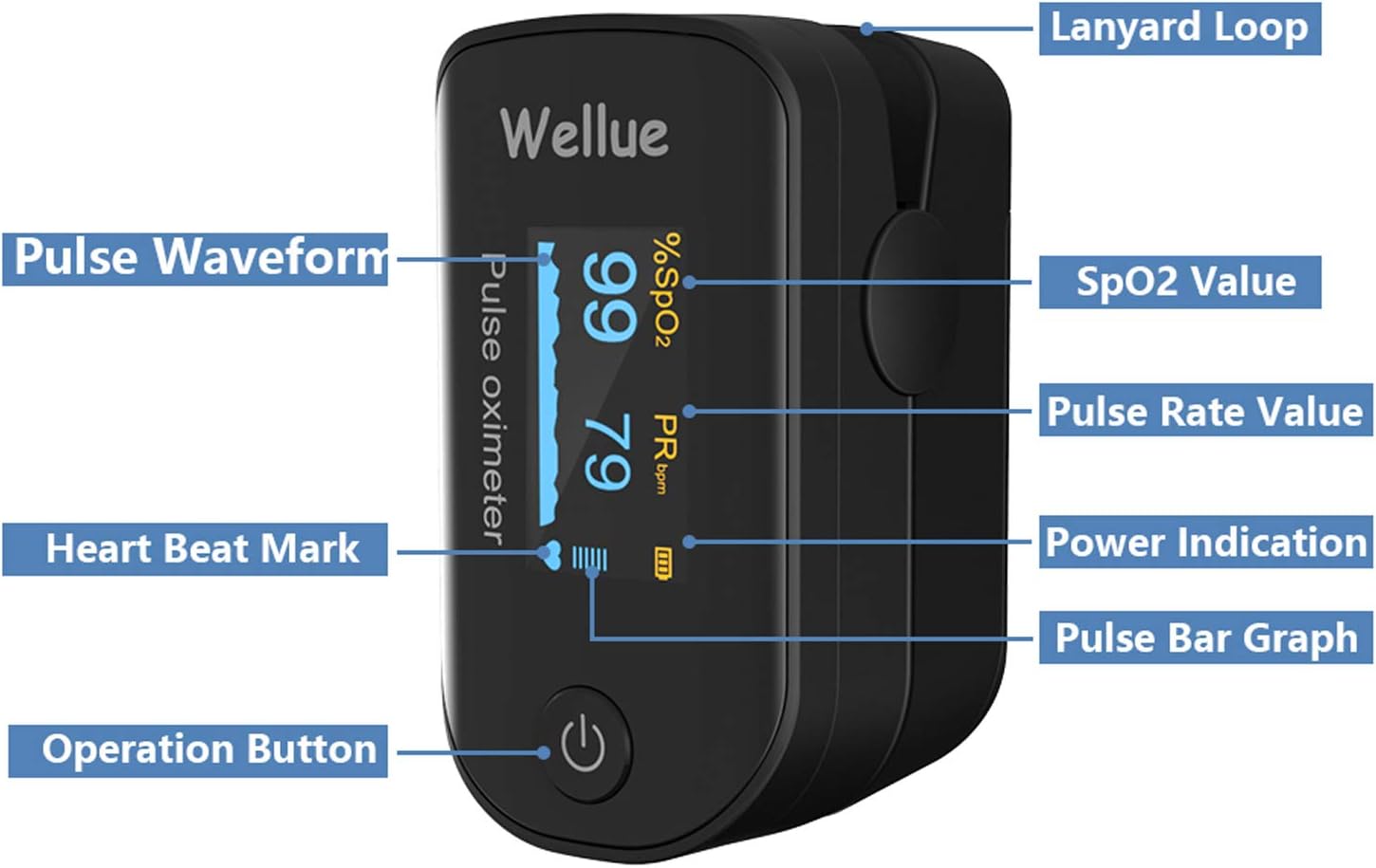
Figure 2.1: Device Components. This image shows the Wellue Fingertip Pulse Oximeter with labels pointing to its key components: Lanyard Loop, Pulse Waveform, SpO2 Value, Pulse Rate Value, Heart Beat Mark, Power Indication, Pulse Bar Graph, and Operation Button.
Display Information
The OLED display provides clear readings of:
- SpO2 Value: Blood oxygen saturation level.
- PR Value: Pulse Rate (beats per minute).
- Pulse Waveform: A graphical representation of your pulse.
- Pulse Bar Graph: Visual indication of pulse strength.
- Battery Indicator: Shows remaining battery life.
- Heart Beat Mark: A flashing icon indicating each heartbeat.
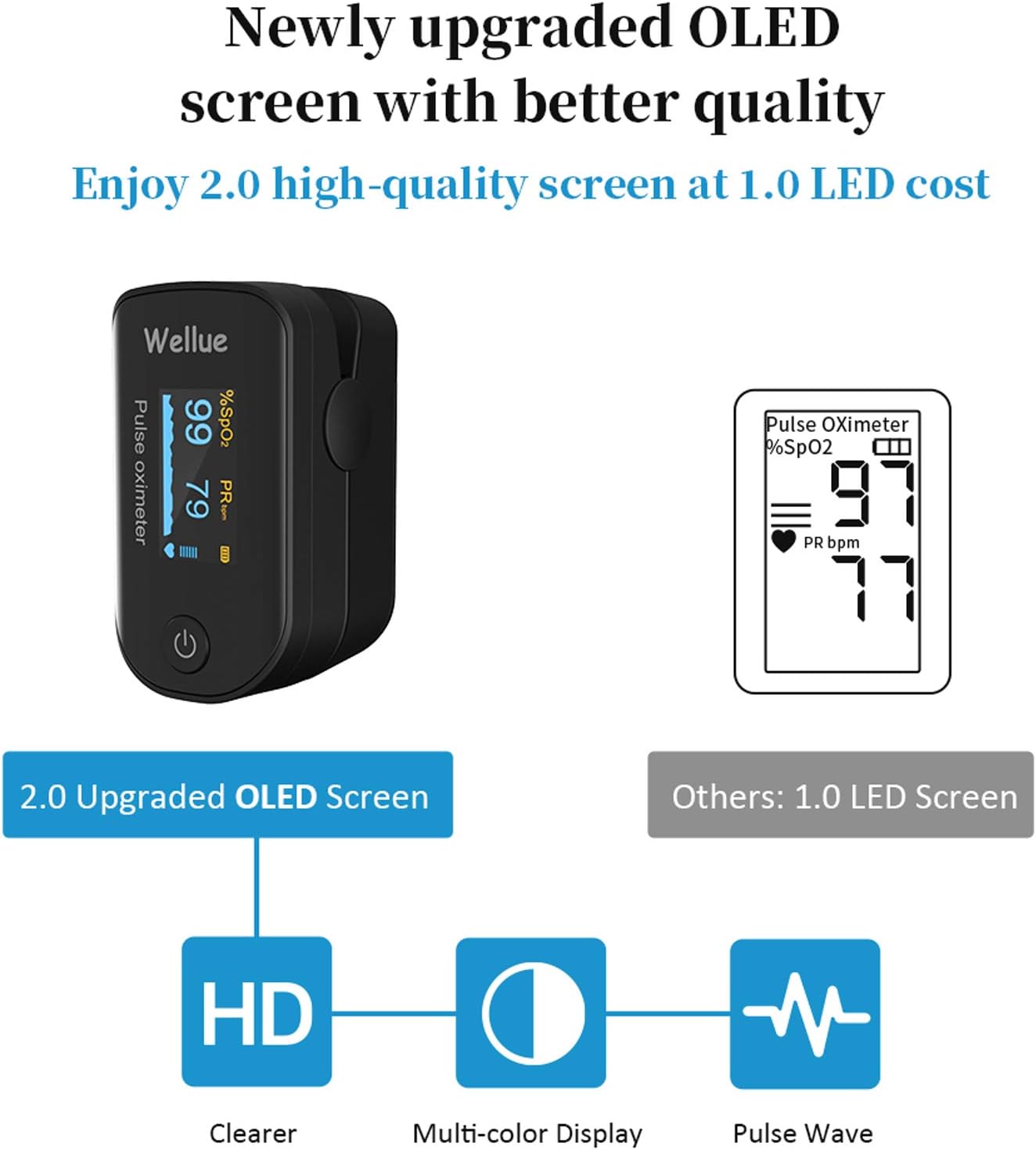
Figure 2.2: Upgraded OLED Screen. This image highlights the enhanced OLED screen of the Wellue Pulse Oximeter, offering clearer display, multi-color options, and pulse wave visualization compared to older LED screens.
3. Setup Instructions
3.1 Package Contents
Before use, verify that all items are present:
- Wellue Fingertip Pulse Oximeter FS20F
- 2 x AAA Batteries
- Lanyard
- User Manual

Figure 3.1: Package Contents. This image displays the Wellue Pulse Oximeter, two AAA batteries, a lanyard, and the user manual, as they appear when unboxed.
3.2 Battery Installation
- Open the battery cover located on the back of the device.
- Insert the two AAA batteries, ensuring correct polarity (+/-) as indicated inside the compartment.
- Close the battery cover securely.
3.3 Lanyard Attachment
Thread the thin end of the lanyard through the loop on the oximeter. Then, thread the thicker end of the lanyard through the thin loop and pull to secure it. This allows for convenient carrying.
3.4 App Download and Connection
The Wellue Pulse Oximeter FS20F can connect to a free mobile application for Android and iOS devices. This app allows for real-time data viewing, continuous recording (when the app is running), and report generation.
- Download the official Wellue app from your device's app store (Google Play Store for Android or Apple App Store for iOS).
- Enable Bluetooth on your smartphone.
- Open the Wellue app and follow the on-screen instructions to pair your oximeter. The device name will typically appear as 'Wellue Oximeter' or similar.
4. Operating Instructions
4.1 Taking a Measurement
- Open the clamp of the oximeter.
- Insert one of your fingers (preferably the index, middle, or ring finger) into the rubber opening of the oximeter, ensuring your fingertip is placed against the stopper.
- Release the clamp.
- Press the power button on the front panel to turn on the device.
- Keep your hand still during the measurement. Readings for SpO2 and PR will appear on the display within a few seconds.
4.2 App Functionality
When connected via Bluetooth, the app provides enhanced features:
- Real-time Data: View SpO2, PR, and pulse waveform directly on your smartphone.
- Continuous Recording: The app can record data for up to 10 hours continuously. Note: Recording only occurs when the app is actively running on your device.
- Graphic Reports: Access historical data and trends in a graphical format.
- Data Sharing: Generate and share reports (e.g., PDF format) of your blood oxygen and pulse rate data.

Figure 4.1: Oximeter and App in Use. This image shows the Wellue Pulse Oximeter displaying SpO2 and PR readings alongside a smartphone screen showing the connected app with real-time oxygen level and pulse rate graphs.

Figure 4.2: Recording Data in App. This image illustrates the Wellue Pulse Oximeter being used on a finger while a smartphone displays the app interface, showing recorded oxygen level and pulse rate data over time.

Figure 4.3: Viewing and Sharing Reports. This image demonstrates the Wellue app's capability to display detailed oxygen level and pulse rate reports, with an overlay showing options to share the report in PDF format.
4.3 Automatic Power Off
The device will automatically power off after approximately 8 seconds of inactivity (when no finger is detected), conserving battery life.
5. Maintenance
5.1 Cleaning
To clean the oximeter, gently wipe the surface with a soft cloth dampened with 75% alcohol. Do not immerse the device in any liquid. Ensure the device is completely dry before storage or next use.
5.2 Battery Replacement and Storage
Replace batteries when the low battery indicator appears on the display. If the device will not be used for an extended period, remove the batteries to prevent leakage and damage. Store the oximeter in a cool, dry place, away from direct sunlight and extreme temperatures.
6. Troubleshooting
If you encounter issues with your Wellue Fingertip Pulse Oximeter, refer to the table below for common problems and solutions:
| Problem | Possible Cause | Solution |
|---|---|---|
| No display after pressing power button | Batteries are dead or incorrectly installed. | Replace batteries or ensure correct polarity. |
| Unstable or inaccurate readings | Finger not inserted correctly, finger too cold, patient movement, nail polish/artificial nails. | Reinsert finger properly, warm finger, remain still, remove nail polish/artificial nails. |
| No SpO2 or PR reading | Finger not inserted, probe not connected (internal issue). | Ensure finger is fully inserted. If problem persists, contact support. |
| Bluetooth connection issues | Bluetooth off on phone, app not open, device not discoverable. | Ensure phone Bluetooth is on, open app, restart oximeter. |
7. Specifications
- Model: FS20F
- Brand: Wellue
- Display Type: OLED
- SpO2 Measuring Range: 70% - 100%
- Pulse Rate Measuring Range: 25 bpm - 250 bpm
- Power Requirements: 2 x AAA 1.5V alkaline batteries
- Power Consumption: Less than 30mA
- Automatic Power Off: Approximately 8 seconds of inactivity
- Dimensions: Approximately 3.23 x 2.24 x 2.17 inches
- Weight: Approximately 2.89 ounces (including batteries)
- Operating Temperature: 5°C to 40°C (41°F to 104°F)
- Storage Temperature: -10°C to 50°C (14°F to 122°F)
8. Warranty and Support
Specific warranty information for the Wellue Fingertip Pulse Oximeter FS20F is typically provided with the product packaging or on the manufacturer's official website. Please refer to these resources for detailed warranty terms and conditions.
For technical support, troubleshooting assistance beyond this manual, or inquiries regarding your device, please contact Wellue customer service through their official website or the contact information provided in your product documentation.


