1. Introduction
This manual provides instructions for the proper use and care of your Wellue Fingertip Pulse Oximeter, Model POD-2. This device is designed to non-invasively measure arterial oxygen saturation (SpO2) and pulse rate. It is intended for sports and aviation use only and is not a medical device. It is not intended for medical diagnosis or treatment.

Image: The Wellue Fingertip Pulse Oximeter, a compact black device with an OLED display showing SpO2 and pulse rate readings.
2. Important Safety Information
- Not a Medical Device: This device is for sports and aviation use only. It is not intended for medical use, diagnosis, or treatment. Consult a medical professional for any health concerns.
- Proper Finger Placement: Ensure the finger is clean, dry, and free of nail polish or artificial nails for accurate readings.
- Avoid Strong Light: Do not use the oximeter in strong ambient light, as this may affect measurement accuracy.
- Movement: Avoid movement during measurement to ensure stable readings.
- Battery Safety: Use only specified batteries. Do not mix old and new batteries or different types of batteries. Dispose of batteries properly.
- Cleaning: Clean the device with a soft cloth and mild disinfectant. Do not immerse in water.
3. Package Contents
The package for your Wellue Fingertip Pulse Oximeter includes the following items:
- 1 x Wellue Fingertip Pulse Oximeter
- 1 x Lanyard
- 1 x User Manual
- 2 x AAA Batteries

Image: The product box showing accessories including the pulse oximeter, lanyard, user manual, and AAA batteries.
4. Product Overview
The Wellue Fingertip Pulse Oximeter features a compact design with an easy-to-read OLED display. It provides accurate measurements of blood oxygen saturation (SpO2), pulse rate (PR), and perfusion index (PI).
4.1 Display Information
- SpO2 Value: Blood Oxygen Saturation percentage.
- Pulse Rate Value (BPM): Heart rate in beats per minute.
- Pulse Bar: Visual representation of pulse strength.
- Perfusion Index (PI): Indication of pulse strength at the measurement site (visible with a long press).
- Low Battery Indicator: Alerts when batteries need replacement.
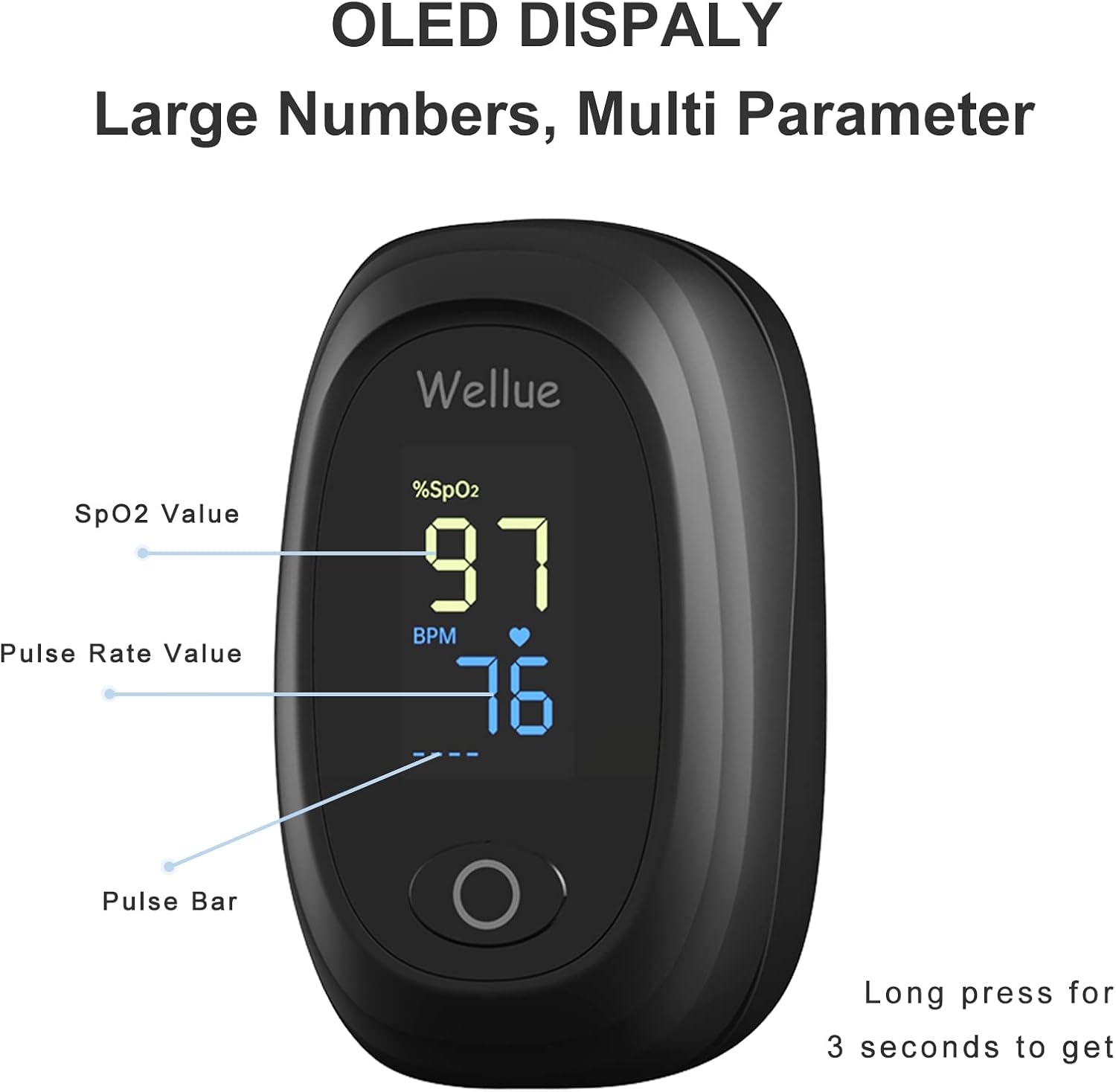
Image: Close-up of the Wellue Pulse Oximeter's OLED display, showing large numbers for SpO2 (97%) and BPM (76), along with a pulse bar. The image also indicates that a long press for 3 seconds can show additional parameters.

Image: An illustration highlighting the advanced technology of the oximeter, emphasizing high precision, fast measurement, large measuring range, and comfortable design.
5. Setup
5.1 Installing Batteries
- Open the battery compartment cover located on the back of the device.
- Insert two (2) AAA batteries according to the polarity indicators (+/-) inside the compartment.
- Close the battery compartment cover securely.
The device is ready for use once batteries are installed.
6. Operating Instructions
The Wellue Fingertip Pulse Oximeter is designed for simple one-button operation.
- Insert Finger: Open the clamp and place one of your fingers (preferably the index or middle finger) into the rubber opening of the oximeter. Ensure your finger is fully inserted and resting on the sensor.
- Start Measurement: Press the power button once. The device will automatically begin measuring your SpO2 and pulse rate.
- Read Results: Wait approximately 8 seconds for the readings to stabilize. The SpO2 value and pulse rate will be displayed on the OLED screen.
- View Perfusion Index (PI): While the device is on and measuring, long-press the power button for 3 seconds to switch the display to show the Perfusion Index (PI). Long-press again to return to SpO2 and Pulse Rate display.
- Automatic Power Off: The device will automatically power off after 8 seconds of inactivity or when the finger is removed.

Image: A three-step visual guide showing how to insert a finger into the oximeter, wait for readings, and long-press the button to get SpO2.
6.1 Warning Function
The device features a warning function where the screen flashes if oxygen levels or pulse rates fall outside predefined ranges:
- SpO2 Warning: The screen flashes if SpO2 falls below 90%.
- Pulse Rate Warning: The screen flashes if Pulse Rate is below 35 bpm or above 100 bpm.

Image: A visual representation of the warning thresholds for SpO2 (below 90%) and Pulse Rate (below 50 or above 120), indicating when the display will flash.
7. Maintenance
- Cleaning: Regularly clean the surface of the oximeter with a soft cloth dampened with medical alcohol or a mild disinfectant. Do not use abrasive cleaners or immerse the device in liquid.
- Storage: Store the device in a cool, dry place, away from direct sunlight, extreme temperatures, and humidity.
- Battery Replacement: Replace batteries when the low battery indicator appears on the display. Remove batteries if the device will not be used for an extended period to prevent leakage.
- Inspection: Periodically check the device for any signs of damage. Do not use if damaged.
8. Troubleshooting
| Problem | Possible Cause | Solution |
|---|---|---|
| No display after power on | Batteries are dead or incorrectly installed. | Replace batteries or re-install them correctly, observing polarity. |
| Inaccurate readings | Finger not properly inserted, movement during measurement, nail polish, cold fingers, or strong ambient light. | Re-insert finger correctly, remain still, remove nail polish, warm hands, or move to a less brightly lit area. |
| "Finger Out" message | Finger not detected or removed. | Ensure finger is fully inserted into the device. |
| Device powers off unexpectedly | Automatic power-off feature (8 seconds of inactivity) or low battery. | This is normal behavior. If it happens during measurement, check battery level. |
9. Specifications
- Model Name: POD-2 oximeter
- Item Model Number: ustw-0302-0329
- Brand: Wellue
- Color: Black
- Measuring Range:
- SpO2: 35-100%
- Pulse Rate: 30-240 bpm
- Batteries: 2 AAA batteries required (included)
- Package Dimensions: 3.86 x 2.91 x 1.73 inches
- Item Weight: 4.97 ounces
- Date First Available: February 3, 2021
10. Warranty and Support
Specific warranty details for the Wellue Fingertip Pulse Oximeter (Model POD-2) are not provided in this manual. For warranty information, technical support, or customer service inquiries, please refer to the official Wellue website or contact their customer support directly.
You can visit the official Wellue store on Amazon for more information: Wellue Store


