Introduction
The TOSHIBA TF-43A810U21 43-inch 4K UHD TV with Fire TV Edition offers a seamless entertainment experience by integrating live over-the-air TV with streaming content directly on the home screen. This smart television provides breathtaking 4K Ultra HD picture quality with over 8 million pixels, delivering stunning clarity, deep contrast, and vivid colors. The built-in Fire TV experience includes a Voice Remote with Alexa, allowing for easy navigation, app launching, content search, input switching, and smart home device control using voice commands. The TV receives automatic over-the-air software updates, ensuring access to the latest Alexa skills and features.

Front view of the TOSHIBA TF-43A810U21 43-inch 4K UHD Fire TV Edition Television.
What's in the Box
Your TOSHIBA TF-43A810U21 package includes the following items:
- TOSHIBA 43-inch 4K UHD Fire TV Edition Television
- Voice Remote with Alexa (requires 2 AAA batteries, included)
- TV Stand (with necessary screws)
Setup Guide
Follow these steps to set up your new TOSHIBA 4K UHD Fire TV Edition television:
- Unpacking: Carefully remove the TV and all accessories from the packaging.
- Attaching the Stand: Place the TV face down on a soft, clean surface. Attach the included stand to the bottom of the TV using the provided screws. Ensure the stand is securely fastened.
- Connecting Power: Plug the power cord into the TV's power input, then into a wall outlet.
- Connecting Devices:
- Antenna/Cable: Connect an HD antenna (sold separately) to the ANT/CABLE IN port for live over-the-air TV.
- HDMI Devices: Connect external devices like Blu-ray players, game consoles, or soundbars to the HDMI IN ports. This model includes HDMI 1 (ARC) for audio return channel functionality.
- USB Devices: Use the USB port for media playback or connecting compatible accessories.
- Ethernet (LAN): For a stable internet connection, connect an Ethernet cable to the LAN port.
- Audio Out: Use the Digital Audio Out (Optical) or Audio Out (3.5mm) for external audio systems.
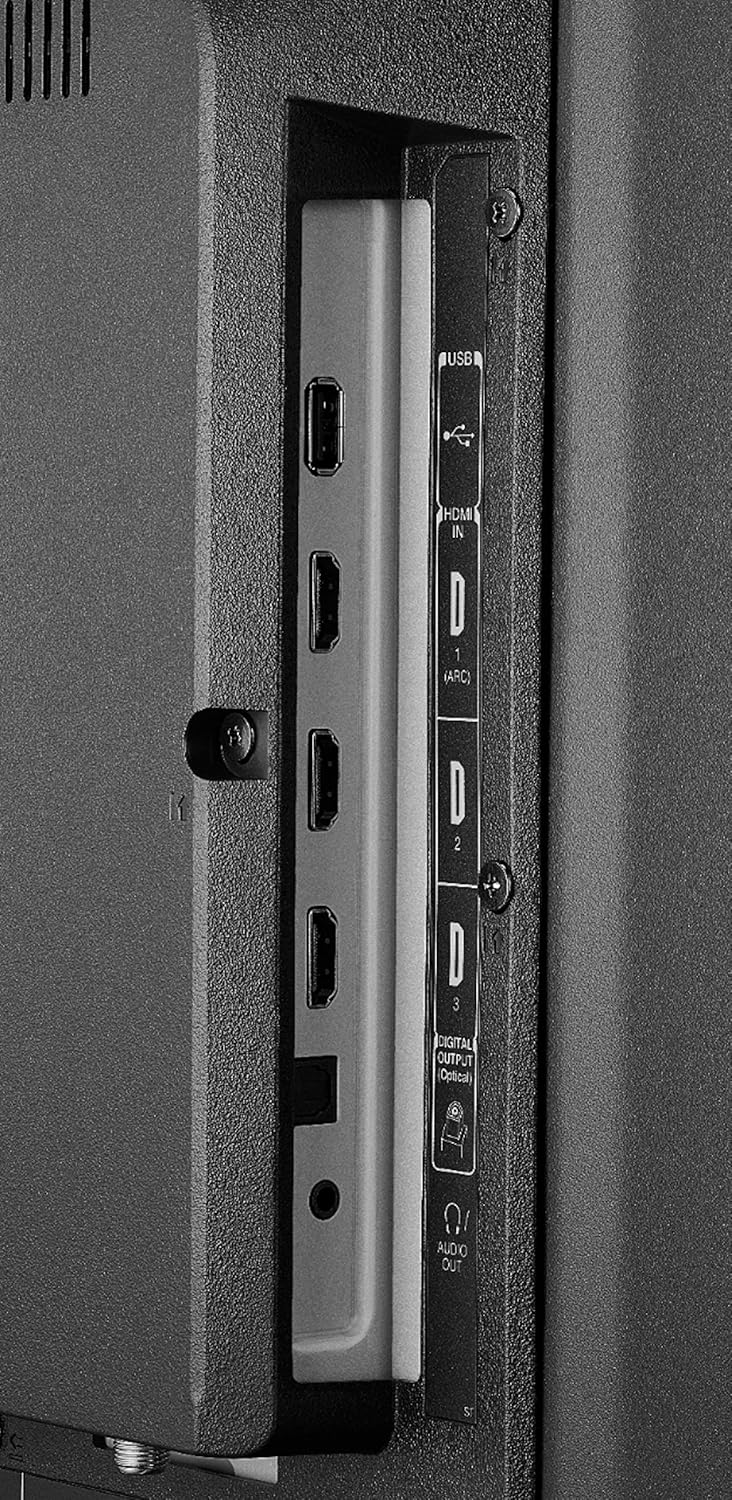
Side view showing HDMI and USB ports.

Back view showing AV IN, LAN, and ANT/CABLE IN ports.
- Initial Power On: Turn on the TV using the power button on the remote or the TV itself.
- Remote Pairing: Insert the included AAA batteries into the Voice Remote. To pair the remote, press and hold the Alexa Voice button (microphone icon) for a few seconds until the TV screen prompts you.
- Network Connection: Follow the on-screen instructions to connect your TV to your Wi-Fi network or confirm the Ethernet connection.
- Fire TV Account Setup: Sign in with your Amazon account to access Fire TV features and content.
Video demonstrating the remote pairing process and initial Fire TV interface navigation.
Operating Instructions
Your TOSHIBA Fire TV Edition TV is designed for intuitive operation. Here are key functions:
- Fire TV Home Screen: The home screen provides access to live TV, streaming apps, and your personalized content. Navigate using the directional pad on your remote.
- Alexa Voice Remote:
- Press and hold the Alexa Voice button (microphone icon) to speak commands. You can launch apps, search for titles, switch inputs, and control smart home devices.
- Dedicated buttons for Prime Video and Netflix provide instant access to these services.

The Alexa Voice Remote for easy control and navigation.
- Live TV: If an antenna is connected, access live over-the-air channels directly from the Fire TV home screen.
- Streaming Apps: Download and access a wide variety of streaming applications from the Appstore.
- Input Switching: Use the input button on the remote or voice command to switch between HDMI inputs, AV, and TV tuner.
- Settings: Access TV settings for picture, sound, network, and device preferences through the Fire TV interface.
Maintenance
Proper care ensures the longevity and optimal performance of your television:
- Cleaning the Screen: Gently wipe the screen with a soft, dry microfiber cloth. For stubborn smudges, lightly dampen the cloth with water or a screen-specific cleaning solution (do not spray directly onto the screen).
- Cleaning the Cabinet: Use a soft, dry cloth to clean the TV cabinet. Avoid using abrasive cleaners or solvents.
- Software Updates: Your TV receives automatic over-the-air software updates. Ensure your TV is connected to the internet to receive these updates, which improve performance and add new features.
- Ventilation: Ensure adequate ventilation around the TV. Do not block ventilation openings.
Troubleshooting
If you encounter issues with your TOSHIBA TF-43A810U21 TV, refer to the following common solutions:
- No Power:
- Check if the power cord is securely plugged into both the TV and the wall outlet.
- Verify the wall outlet is functioning by plugging in another device.
- No Picture/Sound:
- Ensure the correct input source is selected (e.g., HDMI 1, TV).
- Check all cable connections (HDMI, antenna, AV) are secure.
- If using external devices, ensure they are powered on and functioning correctly.
- Remote Not Responding:
- Replace the batteries in the remote control.
- Re-pair the remote with the TV by holding the Alexa Voice button for a few seconds.
- Network Connectivity Issues:
- Restart your Wi-Fi router and modem.
- Go to the TV's network settings and try reconnecting to your Wi-Fi network.
- If using an Ethernet connection, ensure the cable is securely connected.
- Picture Quality Issues:
- Adjust picture settings (brightness, contrast, color) in the TV's menu.
- Ensure the content you are watching is of high quality (e.g., 4K content for 4K resolution).
For further assistance, please refer to the official TOSHIBA support website or contact customer service.
Specifications
| Brand Name | TOSHIBA |
| Model Number | TF-43A810U21 |
| Screen Size | 42.5 Inches |
| Display Technology | LED |
| Resolution | 4K Ultra HD |
| Aspect Ratio | 16:9 |
| Connectivity Technology | Wi-Fi, Ethernet |
| Supported Internet Services | Amazon Instant Video, Hulu, Netflix (and more via Fire TV) |
| Special Feature | Flat Screen, Fire TV Edition, Alexa Voice Remote |
| Product Dimensions (L x W x H) | 38.1 x 9.3 x 23.9 inches |
| Item Weight | 18.7 Pounds |
| Color | Black |
| Batteries Required | 2 AAA batteries (included for remote) |
Warranty and Support
For detailed warranty information, please refer to the warranty card included with your product or visit the official TOSHIBA support website. You can also find additional support resources, FAQs, and contact information for customer service there.
Web-based services and content require high-speed Internet service. Some services may require a subscription.
Official TOSHIBA Store: Visit the TOSHIBA Store on Amazon


