
Waterdrop WD-G2P6MRO
Waterdrop WD-G2P600-RO Filter Instruction Manual
Brand: Waterdrop | Model: WD-G2P6MRO
1. Product Overview
The Waterdrop WD-G2P600-RO filter is a high-performance replacement filter designed specifically for the Waterdrop WD-G2P600-W Reverse Osmosis System. This filter utilizes advanced multi-stage filtration technology to provide clean, great-tasting water by effectively reducing a wide range of contaminants.

Image: The Waterdrop WD-G2P600-RO replacement filter, a tall white cylindrical cartridge.
Key features include:
- Long Service Life: Provides up to 24 months or 3,300 gallons of filtered water, depending on usage and water quality.
- Innovative Composite Filtration: Combines a 0.0001-micron high-precision reverse osmosis membrane, sediment PP membrane, activated carbon block, and PET pleated membrane for comprehensive purification.
- Effective Contaminant Reduction: Designed to intercept contaminants such as TDS, atrazine, salt, nitrates, PFAS, fluoride, radium, radioactive substances, and heavy metals.
- Premium Materials: Activated carbon block made from Sri Lankan coconut shells for improved water taste.
- Easy Installation: Features a twist-and-pull design for quick and tool-free replacement in approximately 3 seconds.
2. Compatibility
This Waterdrop WD-G2P600-RO filter is only compatible with the Waterdrop WD-G2P600-W Reverse Osmosis System and Waterdrop WD-G2P600 models. Ensure your existing system matches these models for proper fit and function.

Image: The WD-G2P600-RO filter shown alongside the compatible Waterdrop 600G Reverse Osmosis System, highlighting its exclusive compatibility.
3. Installation Guide
Replacing your Waterdrop WD-G2P600-RO filter is a simple process that requires no tools. Follow these steps:
- Turn off Water Supply: Locate the water supply valve to your Waterdrop Reverse Osmosis System and turn it off to prevent water flow during replacement.
- Release Pressure (if applicable): Consult your main RO system manual for instructions on releasing system pressure, if necessary.
- Remove Old Filter: Gently twist the old WD-G2P600-RO filter counter-clockwise until it unlocks from the system. Pull the filter downwards to remove it.
- Prepare New Filter: Remove the new WD-G2P600-RO filter from its packaging. Ensure the O-rings are properly seated.
- Insert New Filter: Align the new filter with the corresponding slot in the RO system. Push the filter upwards and then twist it clockwise until it locks securely into place. You should feel a click or resistance indicating it's seated correctly.
- Restore Water Supply: Slowly turn the water supply valve back on.
- Flush the Filter: Allow water to run through the new filter for approximately 5-10 minutes to flush out any carbon fines and air. This ensures optimal performance and taste.
- Check for Leaks: Inspect all connections for any signs of leaks.
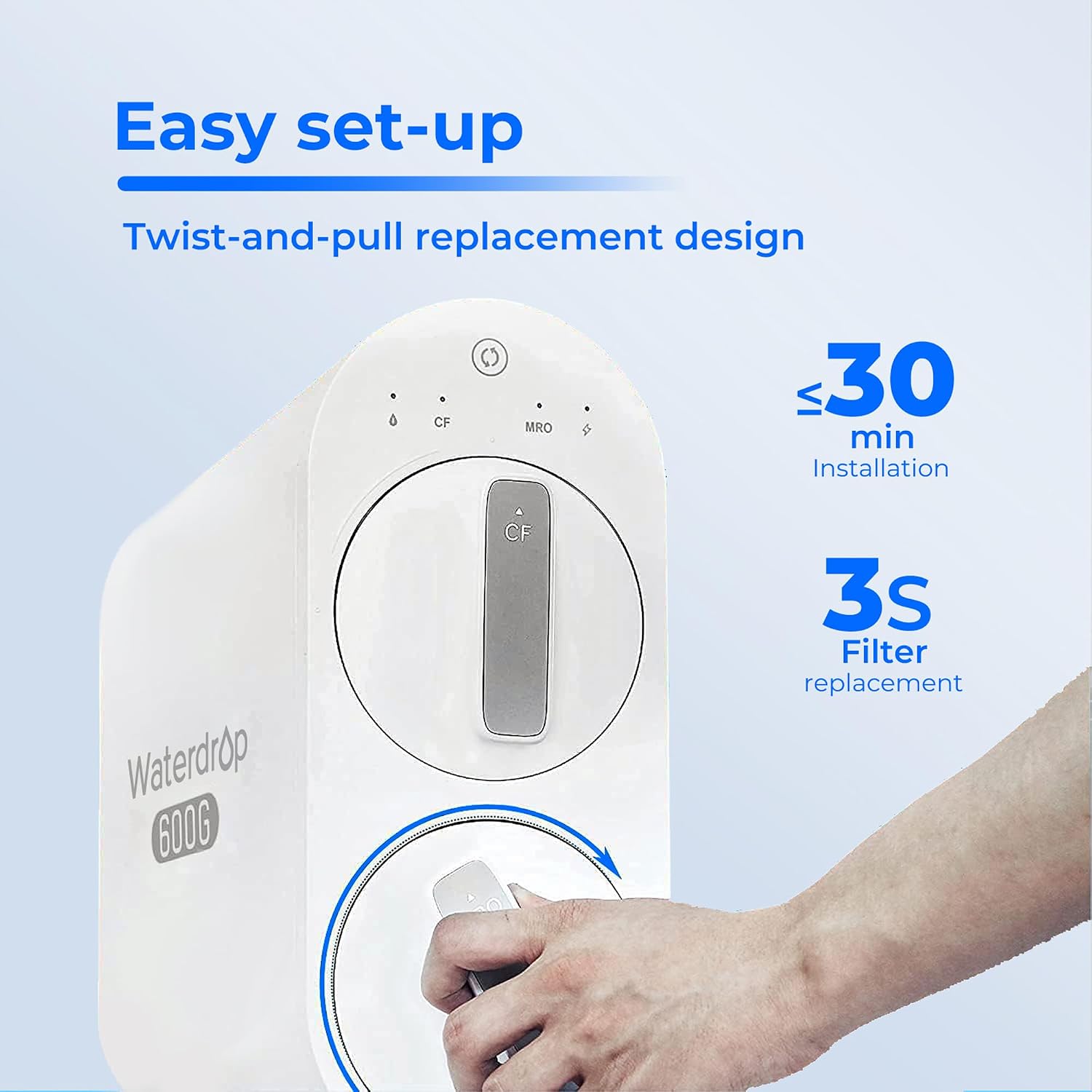
Image: A hand demonstrating the twist-and-pull motion for easy filter replacement, emphasizing the quick 3-second process.
4. Operating and Maintenance
Operating Conditions:
- Operating Temperature: 41-100°F (5-38°C)
- Working Pressure: 14.5-87 psi (0.1-0.6 MPa)
- Feed Water Requirement: Municipal tap water
Filter Lifetime and Replacement:
The WD-G2P600-RO filter has a service life of up to 24 months or 3,300 gallons, whichever comes first. The actual lifespan may vary based on your local water quality and daily water consumption.
It is crucial to replace the filter at the recommended intervals to ensure continued optimal performance and water quality. Your Waterdrop RO system may have an indicator light or an audible alert to signal when a filter replacement is due.

Image: Diagram illustrating the composite water filter technology layers, including sediment PP membrane, reverse osmosis membrane, activated carbon block, and PET pleated membrane, along with the types of pollutants they reduce.

Image: Visual representation of the advanced RO membrane with a larger filtration area and 0.0001µm filtration accuracy.
5. Specifications
| Feature | Detail |
|---|---|
| Model Number | WD-G2P6MRO |
| Compatible System | Waterdrop WD-G2P600-W, Waterdrop WD-G2P600 |
| Filter Life | 24 months or 3,300 gallons (whichever comes first) |
| Filtration Accuracy | 0.0001 micron (RO membrane) |
| Operating Temperature | 41-100°F (5-38°C) |
| Working Pressure | 14.5-87 psi (0.1-0.6 MPa) |
| Feed Water | Municipal tap water |
| Material | System cover: plastic; Filter media: reverse osmosis membrane, carbon block, PP cotton |
| Item Weight | 5.2 Pounds (approx. 2.36 kg) |
| Package Dimensions | 16.81 x 6.57 x 6.26 inches (approx. 42.7 x 16.7 x 15.9 cm) |
| UPC | 840814171851 |
6. Troubleshooting
If you experience issues with your Waterdrop RO system after filter replacement, consider the following common scenarios:
- Low Water Flow: Ensure the water supply valve is fully open. Check if the new filter is properly seated and locked. If the issue persists, the pre-filter (CF filter) might also need replacement, or there could be an issue with the main RO system.
- Unusual Taste or Odor: This typically indicates that the filter needs to be flushed longer after installation, or that the filter has reached the end of its service life and requires replacement.
- Leaks: Double-check that the filter is securely twisted into place. Ensure the O-rings on the filter are not damaged or dislodged. Turn off the water supply immediately if a leak is detected and re-seat the filter.
- System Indicator Lights/Beeps: Refer to your main Waterdrop WD-G2P600-W Reverse Osmosis System user manual for specific meanings of indicator lights or beeping sounds, as these often signal filter replacement or system status.
For more detailed troubleshooting or complex issues, please refer to the comprehensive user manual for your Waterdrop WD-G2P600-W Reverse Osmosis System or contact Waterdrop customer support.
7. Warranty and Support
Waterdrop products are designed for quality and reliability. For specific warranty information regarding your WD-G2P600-RO filter or the Waterdrop WD-G2P600-W Reverse Osmosis System, please refer to the warranty card included with your original product purchase or visit the official Waterdrop website.
For customer support, technical assistance, or to purchase additional replacement filters, you can visit the Waterdrop store on Amazon or their official website:
Related documentsWD-G2P6MRO


Ask a question about this manual
Ask about setup, troubleshooting, compatibility, parts, safety, or missing instructions. Manuals+ will review the question and use this page’s manual context to help answer it.