1. Introduction
The OnePlus 8 Glacial Green (Model IN2015) is an advanced Android smartphone designed for high performance and a smooth user experience. It features a 90Hz Fluid AMOLED display, a powerful Qualcomm Snapdragon 865 processor with 5G connectivity, and a versatile triple camera system.
This manual provides essential information for setting up, operating, maintaining, and troubleshooting your device.
2. What's in the Box
Upon unboxing your OnePlus 8, verify that all the following items are included:
- OnePlus 8 Glacial Green Smartphone
- Warp Charge 30 Power Adapter
- Warp Type-C Cable (Supports USB 2.0)
- Quick Start Guide
- Welcome Letter
- Safety Information and Warranty Card
- LOGO Sticker
- Screen Protector (pre-applied)
- SIM Tray Ejector
3. Device Overview

Figure 1: Front and Back view of the OnePlus 8 Glacial Green smartphone.
3.1 Physical Dimensions and Weight
- Dimensions: 6.31 x 2.87 x 0.31 inches
- Weight: 6.3 ounces (180 grams)
- Color: Glacial Green
3.2 Buttons and Ports

Figure 2: Bottom view showing the USB-C port, speaker, and SIM tray.
- Right Side: Power button, Alert Slider (for Ring/Vibrate/Silent modes).
- Left Side: Volume rocker.
- Bottom: USB-C port, single SIM card tray, primary microphone, bottom-firing speaker.
- Top: Secondary microphone.
- No dedicated 3.5mm audio jack.
3.3 Camera System
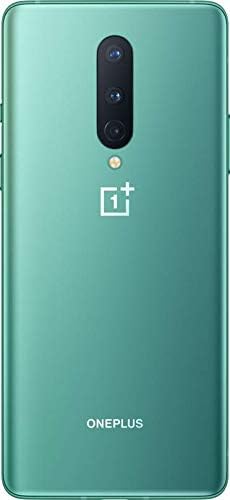
Figure 3: Back view highlighting the triple camera setup.
- Rear Cameras: Triple camera setup including a 48MP main sensor, a 16MP ultra-wide angle lens, and a 2MP macro lens. Features include Nightscape 2.0, Studio Lighting, Super Slow Motion (up to 460 FPS), RAW image capture, and AI Scene Detection.
- Front Camera: 16MP front camera.
4. Setup
4.1 Inserting the SIM Card
- Locate the SIM tray on the bottom edge of the device.
- Insert the SIM ejector tool into the small hole on the SIM tray.
- Gently push until the tray pops out.
- Place your Nano-SIM card into the tray with the gold contacts facing down. This model supports a single SIM card.
- Carefully reinsert the SIM tray into the device.
4.2 Powering On/Off
- To Power On: Press and hold the Power button on the right side until the OnePlus logo appears.
- To Power Off: Press and hold the Power button, then tap
Related Documents - IN2015

OnePlus Nord User Manual: Comprehensive Guide to Your Smartphone
Explore the OnePlus Nord User Manual for detailed instructions on setup, features, settings, app usage, safety precautions, and regulatory compliance for your OnePlus Nord smartphone.
OnePlus 10T 5G Användarhandbok: Kom igång, inställningar och funktioner
Komplett användarhandbok för OnePlus 10T 5G. Lär dig allt om installation, funktioner, inställningar, appar, säkerhet och felsökning för din OnePlus-smartphone.
OnePlus 7T Brugervejledning: Omfattende guide til din smartphone
Denne brugervejledning til OnePlus 7T giver detaljerede instruktioner om opsætning, brug af funktioner, indstillinger, apps, kamera, sikkerhed, vedligeholdelse og regulatorisk overholdelse for din OnePlus smartphone.
OnePlus 10 Pro Quick Start Guide
Concise guide to setting up and understanding the features of the OnePlus 10 Pro smartphone, covering device components and basic functions.
OnePlus 9 Příručka uživatele
Komplexní uživatelská příručka pro smartphone OnePlus 9, která pokrývá nastavení, funkce, aplikace a bezpečnostní pokyny pro optimální využití zařízení.
OnePlus Nord N10 5G Användarmanual
Denna användarmanual för OnePlus Nord N10 5G ger detaljerade instruktioner för att komma igång, konfigurera inställningar, använda appar, samt viktig säkerhetsinformation och tekniska specifikationer. Lär dig allt du behöver veta för att maximera din enhets potential.