Introduction
Thank you for choosing the Roborock H6 Cordless Stick Vacuum Cleaner. This manual provides essential information for the safe operation, maintenance, and troubleshooting of your new appliance. Please read it thoroughly before use and keep it for future reference.
The Roborock H6 combines powerful suction with a lightweight, versatile design, featuring a long-lasting LiPo battery for extended cleaning sessions. Its advanced filtration system ensures a cleaner home environment.
Package Contents
Before assembly, please verify that all components are present in your package:
- 1 x H6 Vacuum Cleaner (Main Unit)
- 1 x Mini Motorized Brush
- 1 x Carpet Brush
- 1 x Dusting Brush
- 1 x Crevice Tool
- 1 x Flexible Tube
- 1 x Extension Wand
- 1 x Power Adapter
- 1 x Wall-mounted Charging Dock
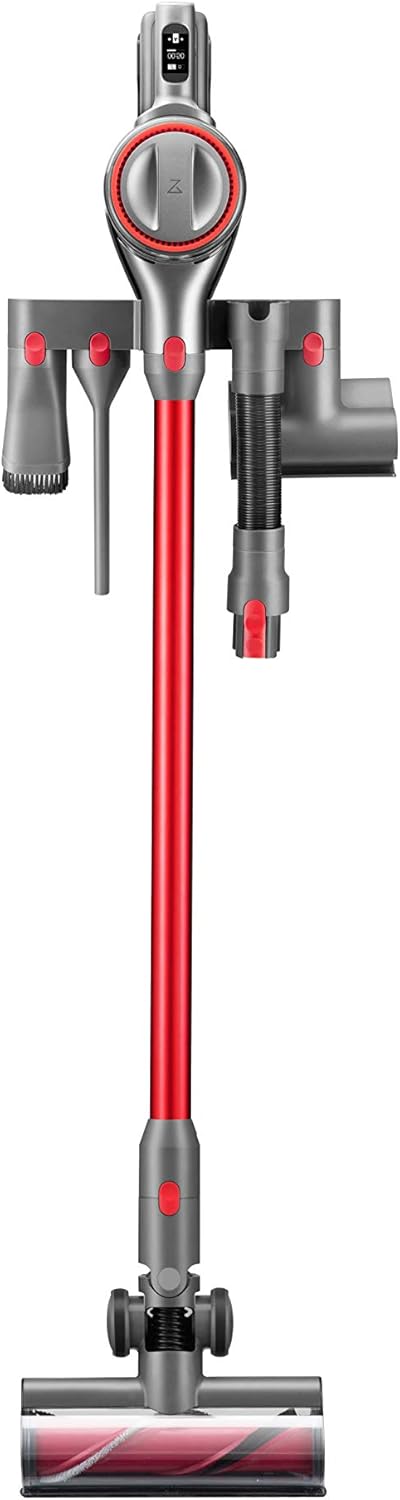
Image: All components included with the Roborock H6 vacuum cleaner, laid out for inspection.
Installation and Setup
Assembly
- Attach the extension wand to the main vacuum unit until it clicks into place.
- Connect the desired cleaning head (e.g., Carpet Brush or Multi-surface Floor Brush) to the other end of the extension wand.
- For handheld use, attach accessories directly to the main unit.

Image: The Roborock H6 assembled and stored on its wall-mounted charging dock with various accessories.
Charging
Before first use, fully charge the vacuum cleaner. Connect the power adapter to the charging dock and plug it into a wall outlet. Place the vacuum cleaner onto the charging dock. The OLED display will indicate charging status.
- Expected Charging Time: Approximately 4 hours for a full charge.
- Battery Type: Li-Po (Lithium-Polymer) battery.
Operating Instructions
Powering On/Off
Press the power button on the handle to turn the vacuum cleaner on or off.
Operating Modes
The Roborock H6 offers multiple cleaning modes to suit different needs:
- Eco Mode: Provides up to 90 minutes of runtime, ideal for light cleaning and extended use.
- Max Mode: Delivers maximum suction power (150 AW) for deep cleaning, with approximately 10 minutes of runtime.
- Standard Mode: A balanced mode for everyday cleaning.
Switch between modes using the mode selection button on the main unit.
Using Attachments
Select the appropriate attachment for your cleaning task:
- Carpet Brush: Designed for effective cleaning on carpets and rugs.
- Mini Motorized Brush: Excellent for removing pet hair and dust from upholstery and mattresses.
- Crevice Tool: Perfect for reaching narrow gaps, corners, and tight spaces, such as car interiors.
- Dusting Brush: Ideal for delicate surfaces, curtains, and shelves.
- Flexible Tube: Provides extended reach and flexibility for awkward angles.

Image: The Roborock H6 with the crevice tool attachment being used to clean between car seats.

Image: The main motorized floor brush of the Roborock H6 effectively cleaning debris from a carpeted floor.
OLED Display
The bright OLED display provides critical information at a glance, including:
- Battery level
- Remaining runtime
- Selected cleaning mode
- Maintenance alerts
Maintenance
Regular maintenance ensures optimal performance and extends the lifespan of your Roborock H6.
Emptying the Dustbin
Empty the dustbin regularly, especially when the debris reaches the MAX fill line. The dustbin capacity is 13.5 oz (0.4 liters).
- Press the dustbin release button to detach it from the main unit.
- Open the dustbin lid and empty contents into a trash bin.
- Close the lid and reattach the dustbin to the main unit.
Filter Cleaning
The Roborock H6 features a five-stage air purification system. Clean the filters periodically to maintain suction power and air quality.
- Remove the dustbin and locate the filters.
- Tap off loose dust from the pre-filter and cyclone assembly.
- Rinse the washable filters under running water. Ensure they are completely dry (allow 24 hours) before reinstallation.
- The HEPA filter should be cleaned as needed, typically by tapping out dust. Avoid washing the HEPA filter unless specified by the manufacturer.
Brush Bar Cleaning
Periodically check the brush bars for tangled hair or debris. Use scissors to cut away any tangled hair and remove it.
Battery Care
To prolong battery life:
- Avoid completely draining the battery before recharging.
- Store the vacuum in a cool, dry place when not in use.
- If storing for an extended period, charge the battery to about 50% and recharge every few months.
Troubleshooting
If you encounter issues with your Roborock H6, refer to the following common problems and solutions:
| Problem | Possible Cause | Solution |
|---|---|---|
| Vacuum does not turn on / OLED display is blank. | Battery is completely discharged; charging issue; faulty unit. | Ensure the vacuum is properly seated on the charging dock and the power adapter is connected. Allow sufficient charging time (4 hours). If the issue persists after charging, contact customer support. |
| Low suction power. | Full dustbin; clogged filters; blocked brush bar or hose. | Empty the dustbin. Clean all filters thoroughly. Check the brush bar and extension wand for any blockages and remove them. |
| Short battery runtime. | Battery degradation; frequent use of Max mode. | Ensure the battery is fully charged before use. Use Eco or Standard mode for longer cleaning sessions. If battery life significantly decreases, it may need replacement. |
| Unusual noise during operation. | Blockage in the air path; foreign object in brush bar. | Turn off the vacuum and check for any obstructions in the nozzle, wand, or brush bar. Remove any foreign objects. |
If the problem persists after attempting these solutions, please contact Roborock customer support.
Specifications
| Feature | Detail |
|---|---|
| Brand | Roborock |
| Model Number | H6M1A (R200001) |
| Dimensions (L x W x H) | 21.34 x 10.92 x 109.98 cm (8.4 x 4.3 x 43.3 inches) |
| Weight | 1.4 kg (3 lbs) |
| Suction Power | 150 AW (Air Watts) |
| Power / Voltage | 420 Watts / 22.2 Volts |
| Battery Type | Li-Po (Lithium-Polymer) |
| Expected Charging Time | 4 hours |
| Max Runtime | 90 minutes (Eco Mode) |
| Dustbin Capacity | 0.4 liters (13.5 oz) |
| Noise Level | 72 dB (Eco to Max Mode) |
| Display | OLED |
| Filtration System | 5-stage air purification, filters up to 99.97% of particles down to 0.3 microns. |
Warranty and Support
For warranty information, technical support, or service inquiries, please refer to the warranty card included with your product or visit the official Roborock website. Keep your purchase receipt as proof of purchase.
Roborock Official Website: us.roborock.com


