
1. Introduction
Thank you for choosing the VESSEL Electric Ball Grip Driver 220USB-5. This electric screwdriver combines the convenience of motorized tightening for speed with the precision of manual operation for final adjustments, making it ideal for a wide range of tasks including electrical work, panel assembly, machine maintenance, automotive repairs, and DIY projects. This manual provides essential information for safe and effective use, maintenance, and troubleshooting to ensure optimal performance and longevity of your tool.
2. Safety Information
Please read and understand all safety warnings and instructions before operating this product. Failure to follow these instructions may result in electric shock, fire, and/or serious injury.
- Always wear appropriate personal protective equipment, such as safety glasses, when operating the tool.
- Ensure the workpiece is stable and secured before beginning any task.
- Do not operate the tool in explosive atmospheres, such as in the presence of flammable liquids, gases, or dust.
- Keep children and bystanders away while operating a power tool.
- Avoid accidental starting. Ensure the switch is in the off-position before connecting to battery pack, picking up or carrying the tool.
- Use the correct bit for the application. Do not force the tool.
- Disconnect the battery pack from the tool before making any adjustments, changing accessories, or storing power tools.
- Store idle power tools out of the reach of children and do not allow persons unfamiliar with the power tool or these instructions to operate the power tool.
- Maintain power tools. Check for misalignment or binding of moving parts, breakage of parts and any other condition that may affect the power tool’s operation. If damaged, have the power tool repaired before use.
3. Package Contents
Verify that all items are present upon unpacking:
- VESSEL Electric Ball Grip Driver 220USB-5
- Screwdriver Bits: +1x100, +2x100 (x2), +3x100, -6x100 (total 5 bits)
- USB Charging Cable
- AC Adapter (included with 220USB-5 model only)
- Instruction Manual

Figure 1: VESSEL Electric Ball Grip Driver 220USB-5 with its included 5 bits.
4. Product Features
- Dual-Mode Operation: Seamlessly switch between electric motor-assisted tightening for speed and manual operation for precise final tightening.
- Ball Grip Design: Ergonomically designed ball grip for comfortable and secure handling.
- Bit Compatibility: Features a sleeve chuck compatible with commercially available double-ended and single-ended bits.
- Easy Control: Top-mounted slide switch for effortless forward and reverse rotation, even with gloves.
- Integrated LED Light: Automatically illuminates the work area when the switch is activated, remaining on for 5 seconds after operation stops.
- USB Charging: Conveniently rechargeable via a micro USB (Type-B) port.
- Torque Overload Protection: Automatic rotation stop when torque exceeds electric mode limits, indicated by a red LED.
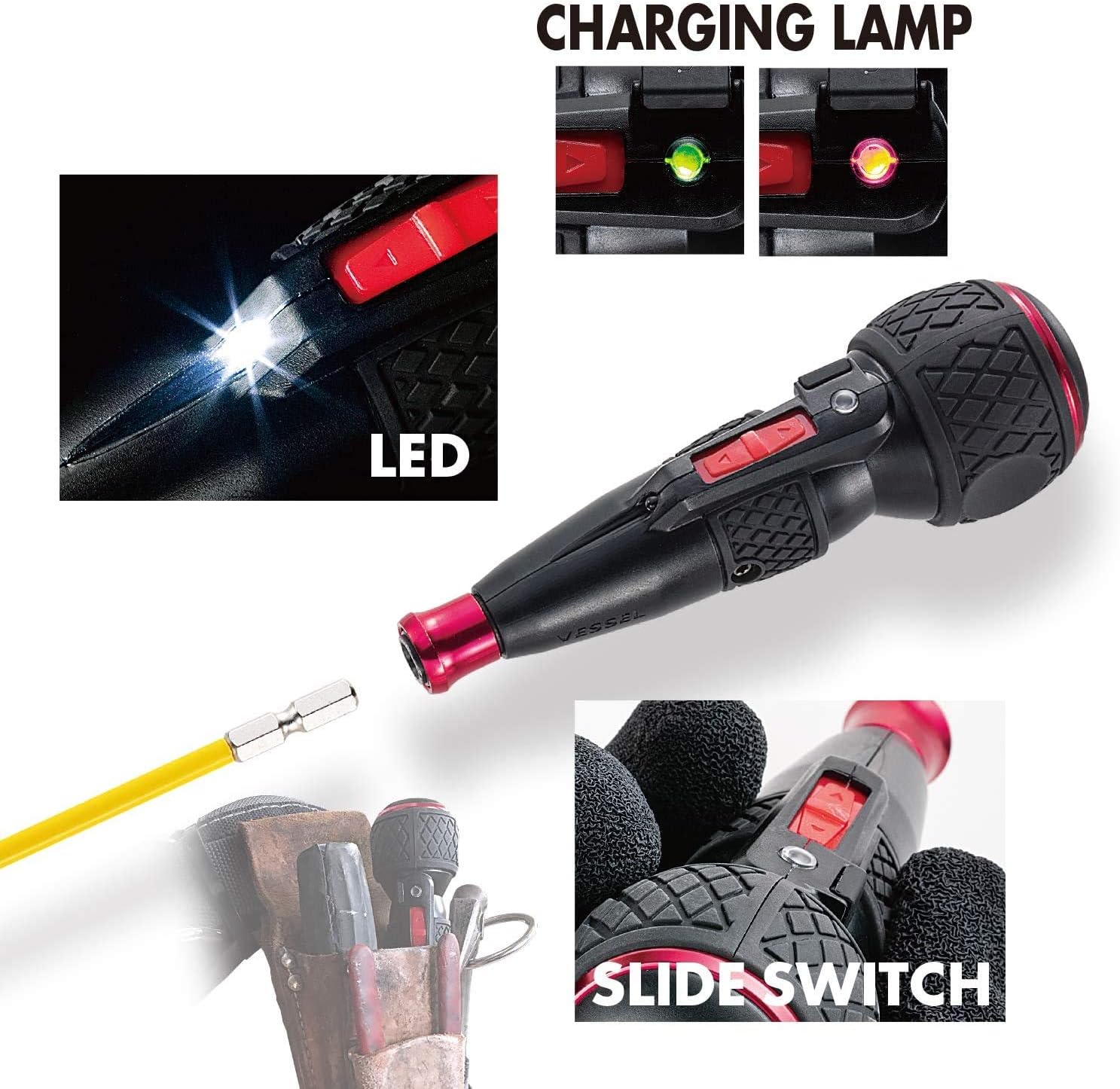
Figure 2: Key features of the 220USB-5, including the LED light, charging indicator, and slide switch for operation.
5. Setup
5.1 Initial Charging
Before first use, fully charge the driver. The battery charging lamp will indicate the charging status.
- Locate the micro USB (Type-B) charging port on the driver.
- Connect the provided USB charging cable to the driver and a compatible USB power source (e.g., AC adapter, computer USB port).
- The charging lamp will illuminate red during charging. It will turn green when fully charged.
- Charging can also be done using a mobile battery (up to 5V/1A).
Video 1: Product demonstration showing the charging process and LED indicators. This video illustrates how to charge the VESSEL 220USB-5 and the visual cues for charging status.
5.2 Bit Installation
The driver uses a sleeve chuck for quick and secure bit changes.
- Pull the sleeve chuck forward.
- Insert the desired 6.35mm hex bit into the chuck.
- Release the sleeve chuck to lock the bit in place. Ensure the bit is securely seated before use.
Video 2: Demonstration of bit installation and removal for the VESSEL Electric Ball Grip Driver. This video shows the ease of changing bits using the sleeve chuck mechanism.
6. Operating Instructions
6.1 Electric Mode Operation
For quick tightening of screws:
- Position the bit onto the screw head.
- Slide the top switch forward for tightening (clockwise) or backward for loosening (counter-clockwise).
- The motor will assist in driving the screw. The LED light will automatically turn on to illuminate the work area.
- If the electric torque limit is reached, the motor will stop, and a red LED will flash, indicating it's time for manual tightening.
6.2 Manual Mode Operation
For final tightening or when higher torque is required:
- After initial electric tightening, continue to turn the driver manually as you would with a standard screwdriver.
- The internal gears are designed to withstand up to 10 N·m of manual torque.

Figure 3: The electric driver being used for electrical panel work, demonstrating its application in tight spaces.

Figure 4: The driver in use on a ceiling fixture, highlighting its versatility for overhead tasks.

Figure 5: Using the driver for intricate wiring within a control panel, showcasing its precision capabilities.
7. Maintenance
- Cleaning: Wipe the tool with a soft, damp cloth. Do not use harsh chemicals or abrasive cleaners.
- Storage: Store the driver in a dry place, away from direct sunlight and extreme temperatures. Ensure the battery is partially charged before long-term storage.
- Bit Care: Keep bits clean and free from rust. Replace worn or damaged bits to prevent cam-out and damage to screw heads.
8. Troubleshooting
| Problem | Possible Cause | Solution |
|---|---|---|
| Driver does not turn on. | Battery is depleted. | Charge the battery fully. |
| Motor stops during operation. | Torque overload protection activated. | Switch to manual mode for final tightening. |
| Bit is loose or falls out. | Bit not properly inserted or chuck is worn. | Ensure bit is fully inserted and sleeve chuck is released. Replace chuck if worn. |
| LED light not working. | Battery low or LED malfunction. | Charge battery. If problem persists, contact customer support. |
9. Specifications
| Feature | Detail |
|---|---|
| Model Number | 220USB-5 |
| Brand | VESSEL |
| Product Weight | 160 g |
| Grip Length | 140 mm |
| Grip Diameter | φ45 mm |
| Sleeve Chuck | 6.35 mm Hex |
| Battery Capacity | Li-Ion 3.6V 800mAh |
| Max Electric Torque | 2 N·m |
| Max Manual Torque | 10 N·m |
| Charging Port | Micro USB (Type-B) |
| Charging Input | Max 5V/1A |
| Included Bits | +1x100, +2x100 (x2), +3x100, -6x100 (total 5 bits) |

Figure 6: Detailed dimensions and included bit types for the 220USB-5.
10. Accessories
VESSEL offers a range of accessories to enhance the functionality and portability of your 220USB-5 driver.
10.1 Tool Pouches
Specially designed tool pouches provide secure storage and easy access for your driver and bits.
- No.TPH-10: Holster designed to fit the 220USB-5 perfectly, with a slanted cut to prevent accidental switch activation. Features a 3-layer mesh structure for breathability and reduced battery heat, D-rings for fall prevention wires, and 2-way attachment (metal hook or belt loop). Can hold one driver and two bits.
- No.TPH-40: A larger holster capable of holding two drivers and two pliers/nippers. Also features the slanted cut, 3-layer mesh, D-rings, and 2-way attachment.
- No.TPB-10: A multi-purpose pouch for one driver, three pens, a smartphone, digital camera/tape measure, and license. Features D-rings and 2-way attachment.
- No.TPC-10: A compact case made of EVA material, designed to store the 220USB-5 body, bits, USB cable, and AC adapter. Includes a D-ring for attachment.
Video 3: Overview of VESSEL driver holders and pouches, demonstrating their features and how they can be worn. This video showcases various carrying solutions for the 220USB-5 and other tools.
10.2 Replacement Bits and Adapters
A variety of replacement bits are available to suit different applications, including specialized bits for wood screws and bolster bits for added leverage.
- Wood Screw Pilot Drills (No.AHD-3, No.AHD-4): Designed to prevent wood splitting and ensure smooth screw driving with the 220USB-5. Features a reverse taper shape for efficient drilling.
- Bolster Bits (No.USB162100S8, No.USB163100S8): Bits with an 8mm bolster for use with wrenches or spanners, providing extra torque for stubborn screws.
- Ball Quick Catcher (No.QB-22R, No.QB-22G, etc.): A convenient accessory for carrying multiple bits. Simply insert a bit to lock it, and it's easy to remove. Can also be used as a simple manual driver when a bit is attached.
Video 4: Introduction to VESSEL Gousai bits, highlighting their durability and precision. This video demonstrates the quality and variety of bits available from VESSEL.
11. Warranty and Support
For warranty information, product support, or service inquiries, please refer to the warranty card included with your product or visit the official VESSEL website. Keep your purchase receipt as proof of purchase.

