
HP 653200-26201-8GB-600GB
HP ProLiant DL380P G8 Server Instruction Manual
Model: DL380P G8 | Part Number: 653200-26201-8GB-600GB
1. Introduction
This manual provides essential instructions for the setup, operation, maintenance, and troubleshooting of your HP ProLiant DL380P G8 8-Bay 2.5" Server. Please read this manual thoroughly before operating the server to ensure proper functionality and longevity.
The HP ProLiant DL380P G8 is a versatile rack-mounted server designed for demanding business environments, featuring dual Intel Xeon E5-2620 processors, 8GB DDR3 RAM, a P420i RAID controller, and 600GB SAS storage.
2. Safety Information
- Always disconnect power before performing any maintenance or component installation.
- Ensure proper grounding to prevent electrical shock.
- Operate the server in a well-ventilated area to prevent overheating.
- Use only compatible components and accessories.
- Refer to local regulations for proper disposal of electronic waste.
3. Server Components Overview

Figure 3.1: Front View of HP ProLiant DL380P G8 Server. This image displays the front panel of the server, showing the 8-bay 2.5-inch drive cages, optical drive, and front panel controls/indicators.
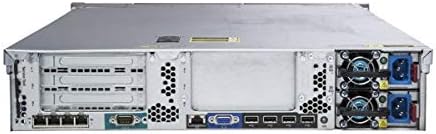
Figure 3.2: Rear View of HP ProLiant DL380P G8 Server. This image illustrates the rear panel, highlighting the dual power supply units, network ports, and other I/O connections.

Figure 3.3: Internal View of HP ProLiant DL380P G8 Server. This image shows the internal layout of the server, including the motherboard, CPU sockets, RAM slots, and cooling components.
Key Components:
- Processors: Two Intel Xeon E5-2620 2.0GHz 6-Core CPUs.
- Memory: 8GB DDR3 Registered Memory (expandable).
- Storage: 8-Bay 2.5" drive cage, equipped with 2x 300GB 10K SAS HDDs.
- RAID Controller: HP P420i with 512MB cache.
- Power Supplies: Two 750W hot-plug power supply units for redundancy.
- Network: Integrated Ethernet ports.
- Video: VGA port for display output.
4. Initial Setup
4.1 Rack Installation
The HP ProLiant DL380P G8 is designed for rack mounting. Ensure you have appropriate rack rails (not included with this renewed unit) and sufficient space for ventilation and cable management. Secure the server firmly in the rack using the provided mounting hardware for your rack rails.
4.2 Connecting Power
- Connect the power cables from the two 750W power supply units at the rear of the server to separate, grounded power outlets or a UPS.
- Ensure both power supply units are securely seated and their status LEDs indicate normal operation.
4.3 Connecting Peripherals
- Video: Connect a VGA monitor to the VGA port on the rear panel (or front panel for initial setup).
- Network: Connect Ethernet cables to the integrated network ports.
- USB: Connect a keyboard and mouse to the available USB ports.
4.4 Hard Drive Installation (if applicable)
This server is equipped with 8-bay 2.5" drive cages. If installing additional drives:
- Ensure the server is powered off and disconnected from power.
- Insert 2.5" SAS or SATA drives into the hot-plug drive bays.
- Secure the drive caddies.
- The HP P420i RAID controller will detect new drives. Refer to the controller's documentation for RAID configuration.
5. Operating the Server
5.1 Powering On/Off
- Power On: Press the power button on the front panel. The system status LED will illuminate.
- Normal Shutdown: Perform a graceful shutdown through the operating system.
- Force Shutdown: Press and hold the power button for 5 seconds. Use this only as a last resort to prevent data corruption.
5.2 BIOS/UEFI Access
During server startup, press the designated key (commonly F9, F10, or DEL) to enter the BIOS/UEFI setup utility. This allows configuration of boot order, hardware settings, and other system parameters.
5.3 Operating System Installation
The server does not come with an operating system pre-installed. You will need to install a compatible server operating system (e.g., Windows Server, Linux distributions) using an optical drive or a bootable USB device. Ensure all necessary drivers are installed after OS installation.
6. Maintenance
6.1 Cleaning
- Regularly clean dust from the server's air vents and fans using compressed air.
- Ensure the server environment is free from excessive dust and debris.
- Always power off and disconnect the server before cleaning internal components.
6.2 Firmware Updates
Periodically check the HP support website for firmware updates for the server, RAID controller, and other components. Keeping firmware up-to-date ensures optimal performance, stability, and security.
6.3 Component Replacement
The HP ProLiant DL380P G8 supports hot-swappable components like hard drives and power supplies. For other components like RAM or CPUs, ensure the server is powered off and disconnected from power before replacement. Refer to the official HP service manual for detailed component replacement procedures.
7. Troubleshooting
7.1 No Video Output
- Verify the monitor is powered on and connected securely to the server's VGA port.
- Test with a different VGA cable and monitor to rule out faulty peripherals.
- Ensure the server is powered on and system status lights are normal.
- If using a KVM switch, ensure it is functioning correctly and switched to the server's input.
7.2 Server Not Powering On
- Check that power cables are securely connected to both the server and the power source.
- Verify that the power outlets are functional.
- Check the status LEDs on the power supply units. If any are amber or off, a PSU may be faulty.
7.3 Drive Errors
- Check the drive status LEDs on the front panel.
- Consult the HP P420i RAID controller utility for detailed error messages and drive health status.
- If a drive has failed, replace it with a compatible drive and allow the RAID array to rebuild.
8. Technical Specifications
| Feature | Specification |
|---|---|
| Model | HP ProLiant DL380P G8 |
| Processors | 2x Intel Xeon E5-2620 2.0GHz 6-Core |
| RAM | 8GB DDR3 Registered Memory |
| Storage Bays | 8x 2.5" Hot-Plug Drive Bays |
| Included Storage | 2x 300GB 10K SAS HDD (600GB total) |
| RAID Controller | HP Smart Array P420i with 512MB Cache |
| Power Supplies | 2x 750W Hot-Plug Redundant PSU |
| Dimensions (LxWxH) | 35 x 24 x 7 inches |
| Operating System | None (Server OS required) |
| Hardware Platform | PC |
9. Warranty and Support
This product is a renewed item. For specific warranty details and support, please refer to the documentation provided by the seller, StrongIT. For technical assistance or inquiries regarding your renewed server, it is recommended to contact StrongIT directly. Their contact information may be found on your purchase invoice or through the platform where the server was acquired.
For general product information and official HP documentation for the ProLiant DL380P G8 series, please visit the HP Support website.
Related documents653200-26201-8GB-600GB


Ask a question about this manual
Ask about setup, troubleshooting, compatibility, parts, safety, or missing instructions. Manuals+ will review the question and use this page’s manual context to help answer it.