
Wildgame Innovations EZ12B2-20
Wildgame Innovations Switch LightsOut Trail Camera User Manual
Model: EZ12B2-20
Introduction
The Wildgame Innovations Switch LightsOut Trail Camera is designed for ease of use, allowing you to quickly deploy and monitor wildlife. This camera captures high-quality 12-megapixel images and 720p HD videos, featuring 36 invisible black LEDs for discreet night illumination up to 60 feet. Its simple three-button interface ensures a straightforward setup, automatically syncing date and time, including adjustments for daylight savings.
Package Contents
Please verify that all items are present and in good condition upon opening the package:
- Wildgame Innovations Switch LightsOut Trail Camera
- Adjustable Tree Strap
- User Manual (this document)
Setup
1. Installing Batteries
The Switch camera requires 8 AA batteries (not included). For optimal performance and battery life, it is recommended to use high-quality alkaline or lithium batteries.
- Locate the battery compartment on the camera.
- Open the compartment door.
- Insert the 8 AA batteries, ensuring correct polarity (+/-) as indicated inside the compartment.
- Close the battery compartment door securely to ensure water resistance.
2. Inserting an SD Card
A Class 4 or higher SD card (up to 32GB, not included) is required to store images and videos.
- Locate the SD card slot, typically near the battery compartment or control panel.
- Insert the SD card with the metal contacts facing down (or as indicated by the slot diagram) until it clicks into place.
- To remove, push the card in slightly until it springs out.
3. Mounting the Camera
The camera comes with an adjustable tree strap for easy mounting.
- Thread the adjustable tree strap through the slots on the back of the camera.
- Secure the camera to a tree or post at the desired height and angle. Ensure the camera is stable and pointed towards the area you wish to monitor.
- For optimal detection, position the camera approximately 3-6 feet off the ground, facing north or south to avoid direct sunlight interference.
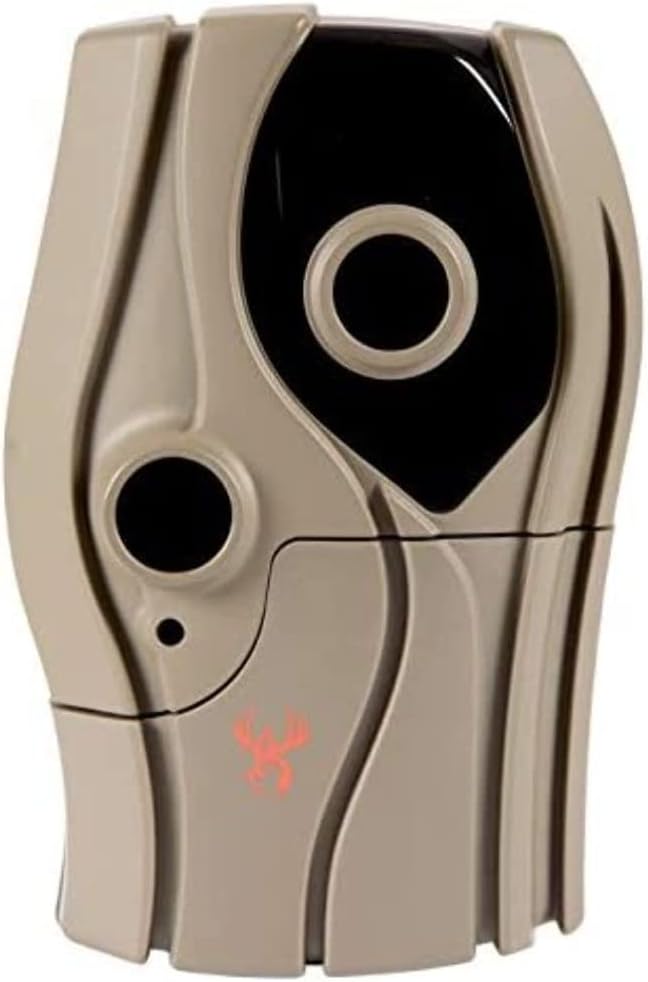
Front view of the Wildgame Innovations Switch LightsOut Trail Camera, showing the main lens, smaller sensor, and the Wildgame Innovations logo. This image illustrates the camera's compact and rugged design, suitable for outdoor use.
Operating the Camera
Basic Operation
The Switch camera features a simplified three-button interface for quick setup and operation.
- Power On: Open the camera's front cover to access the control panel. Locate the power switch and turn the camera ON.
- Select Mode: Use the mode selection button to choose between Photo, Video, or Photo+Video modes.
- Set Delay: Adjust the delay setting to determine the interval between captures after a trigger event.
- Set Time Zone: The camera automatically syncs date and time, including adjustments for daylight savings. Ensure your local time zone is correctly selected if an option is available.
- Deployment: Close the camera's front cover securely. The camera is now armed and ready to capture images or videos based on motion detection.
Image and Video Capture
- Image Resolution: Captures crisp 12-megapixel still images.
- Video Resolution: Records 720p HD video clips.
- Illumination: Equipped with 36 invisible black LEDs for night vision, providing illumination up to 60 feet without startling wildlife.
- Trigger Speed: Features a fast trigger speed of less than 1 second to minimize missed events.
Maintenance
- Cleaning: Periodically wipe the camera lens and sensor window with a soft, lint-free cloth. Avoid abrasive cleaners.
- Battery Replacement: Replace batteries when the low battery indicator appears or when performance degrades. Always replace all batteries at once with new ones of the same type.
- SD Card Management: Regularly check the SD card capacity. Format the SD card periodically to maintain optimal performance and prevent data corruption. Back up important files before formatting.
- Storage: When not in use, store the camera in a cool, dry place, away from direct sunlight and extreme temperatures. Remove batteries during extended storage.
Troubleshooting
| Problem | Possible Cause | Solution |
|---|---|---|
| Camera not powering on. | Dead or incorrectly installed batteries. | Replace all batteries with new ones, ensuring correct polarity. |
| No images/videos captured. | SD card full, corrupted, or not inserted correctly; camera not armed; no motion detected. | Check SD card insertion; format or replace SD card; ensure camera is in an active mode and armed; verify placement for motion detection. |
| Poor image/video quality at night. | Low batteries; obstruction of IR LEDs; subject too far. | Replace batteries; clear any debris from LEDs; ensure subject is within 60ft illumination range. |
| False triggers. | Camera facing direct sunlight; moving branches/foliage; heat sources. | Reposition camera to avoid direct sunlight; clear foliage in front of camera; avoid placing near heat sources. |
Specifications
| Effective Still Resolution | 12 MP |
| Video Capture Resolution | 720p HD |
| Illumination Type | 36 Invisible Black LEDs |
| Illumination Range | 60 Feet |
| Trigger Speed | <1 second |
| Power Source | 8 AA Batteries (not included) |
| Flash Memory Type | Supports SD Card (up to 32GB) |
| Water Resistance Level | Water Resistant (IP54) |
| Mounting Type | Tree Mount (Adjustable Tree Strap included) |
| Item Weight | 1.2 Pounds |
| Item Dimensions (LxWxH) | 1 x 1 x 1 inches |
| Model Number | WGICM0687 (EZ12B2-20) |
Warranty and Support
This Wildgame Innovations product is covered by a 1-Year Manufacturer's Warranty from the date of purchase. This warranty covers defects in materials and workmanship under normal use.
For warranty claims, technical support, or any questions regarding your Wildgame Innovations Switch LightsOut Trail Camera, please contact Wildgame Innovations customer service directly. Refer to the official Wildgame Innovations website for the most current contact information.
Please retain your proof of purchase for warranty purposes.
Related documentsEZ12B2-20

Ask a question about this manual
Ask about setup, troubleshooting, compatibility, parts, safety, or missing instructions. Manuals+ will review the question and use this page’s manual context to help answer it.