
1. Introduction
This manual provides detailed instructions for the safe and effective use of your BTMETER BT-1500 Industrial Laser Thermometer Gun. This non-contact infrared thermometer is designed for accurate temperature measurement in various industrial and professional applications. Please read this manual thoroughly before operation and retain it for future reference.

Figure 1: The BTMETER BT-1500 in use for diverse applications, including cooking, HVAC, and industrial processes.
2. Safety Information
WARNING: Class II Laser Product
- Do not stare directly into the laser beam.
- Avoid direct eye exposure to the laser.
- Do not aim the laser at people or animals.
- This device is intended for measuring the temperature of inanimate objects only. It is not designed for human or animal temperature measurement.
- Keep out of reach of children.
- Use caution when operating near reflective surfaces, as the laser can reflect.
The BT-1500 uses a Class II laser with an optical power of <0.5mW and a wavelength of 630-670nm.
3. Product Overview
The BTMETER BT-1500 is a high-performance infrared thermometer featuring a wide temperature range, dual laser targeting, and multiple measurement modes for industrial applications.
3.1 Key Features
- Wide Temperature Range: Measures from -50°C to 1500°C (-58°F to 2732°F).
- High Accuracy: Provides measurements with an accuracy of ±2% or ±2°C (±3.6°F).
- Dual Laser Targeting: Two non-contact digital lasers for precise targeting and instant measurement within 0.25 seconds.
- Distance to Spot Ratio (D:S): 30:1, allowing for accurate measurements from a safe distance.
- Multiple Measurement Modes: Includes MIN (Minimum), MAX (Maximum), AVG (Average), and DIF (Difference) temperature readings.
- Adjustable Alarms: High/Low/Difference temperature alarms to alert users when temperatures exceed or fall below set thresholds.
- Backlit LCD Screen & Flashlight: Large, backlit display and integrated flashlight for visibility in low-light conditions.
- Auto Power OFF: Extends battery life.
- Low Power Indicator: Alerts when battery is low.
3.2 Component Identification
Refer to the diagram below for identification of the main components of your BT-1500 thermometer.

Figure 2: Labeled diagram of the BTMETER BT-1500 Infrared Thermometer, showing the LCD Display, Laser ON/OFF, Trigger, Backlight/UP button, Mode Select, T/UP button, Emissivity/Flashlight button, and Battery door.
- LCD Display
- Laser ON/OFF Button
- Measurement Trigger
- Backlight / Up Button
- Mode Select Button
- Temperature Unit / Up Button
- Emissivity / Flashlight Button
- Battery Door
4. Setup
4.1 Battery Installation
The BT-1500 requires one 9V battery (included). To install or replace the battery:
- Locate the battery door (8) at the bottom of the handle.
- Open the battery door.
- Connect the 9V battery to the terminal inside the compartment, ensuring correct polarity.
- Place the battery into the compartment and close the battery door securely.
A low power indicator will appear on the display when the battery needs replacement.
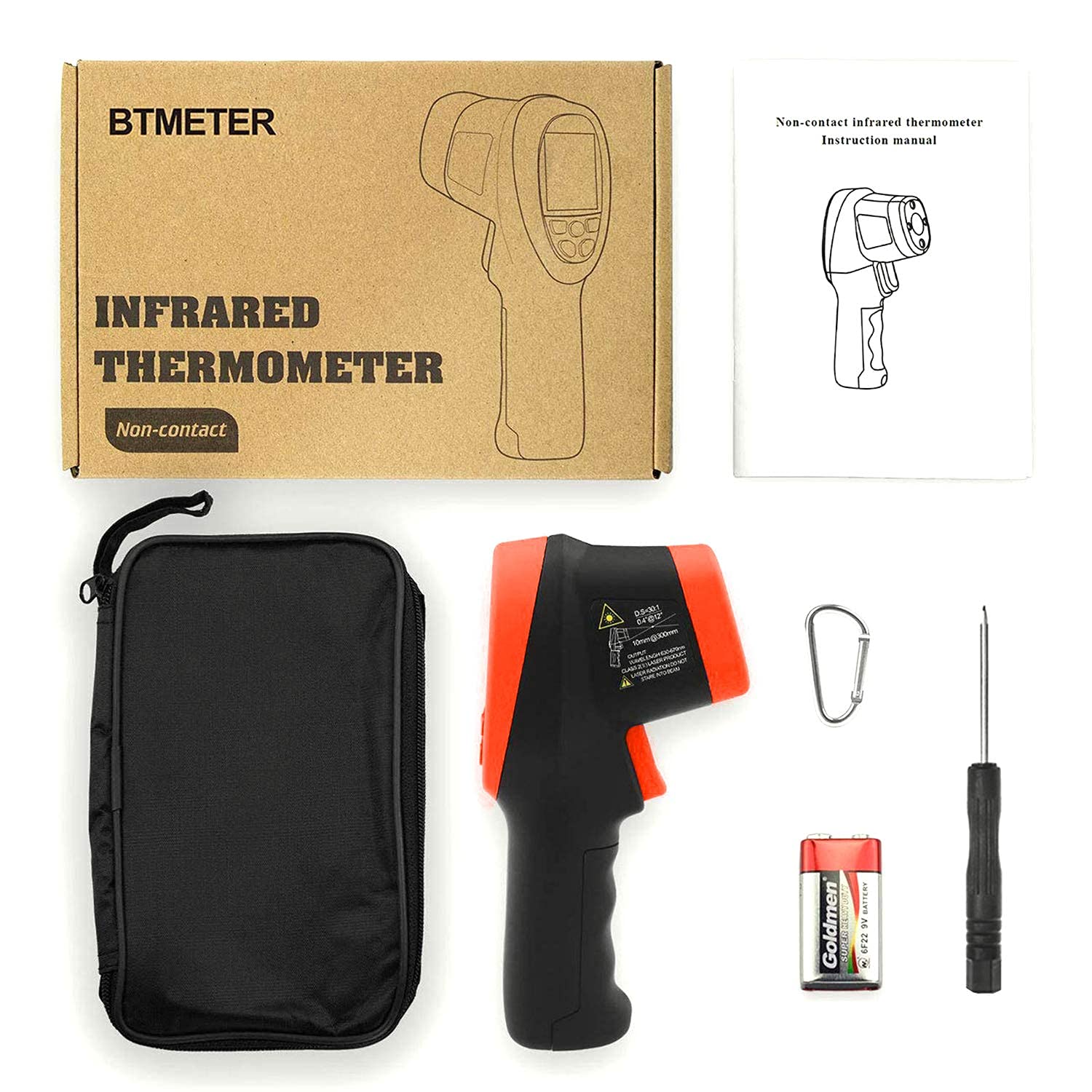
Figure 3: Package contents, showing the BT-1500 thermometer, carrying case, 9V battery, and screwdriver.
5. Operating Instructions
5.1 Taking a Measurement
- Point the thermometer at the target surface.
- Press and hold the Measurement Trigger (3). The laser pointers will activate, indicating the measurement area.
- The measured temperature will be displayed on the LCD screen (1).
- Release the trigger to hold the reading on the display. The device will automatically power off after a period of inactivity to conserve battery.

Figure 4: Close-up view of the dual laser pointers on the BT-1500, indicating the measurement target area.
5.2 Switching Temperature Units (°C/°F)
To switch between Celsius (°C) and Fahrenheit (°F):
- While the device is on, press the T/UP button (6) to toggle the temperature unit.

Figure 5: The BT-1500 display showing temperature readings in both Celsius and Fahrenheit, demonstrating the unit switchable feature.
5.3 Mode Selection (MIN/MAX/AVG/DIF)
Press the Mode Select button (5) repeatedly to cycle through the available measurement modes:
- MIN: Displays the minimum temperature recorded during a continuous measurement.
- MAX: Displays the maximum temperature recorded during a continuous measurement.
- AVG: Displays the average temperature recorded during a continuous measurement.
- DIF: Displays the difference between the maximum and minimum temperatures recorded.

Figure 6: The BT-1500 display illustrating the MIN, MAX, AVG, and DIF measurement modes, useful for tracking temperature variations.
5.4 Setting High/Low Temperature Alarms
The BT-1500 allows you to set high and low temperature alarms. When the measured temperature exceeds the high alarm or falls below the low alarm, an audible alert will sound.
- Press the Mode Select button (5) until the alarm setting mode is displayed (e.g., "HAL" for High Alarm, "LAL" for Low Alarm).
- Use the Backlight/UP button (4) and T/UP button (6) to adjust the alarm threshold values.
- Press the Mode Select button (5) again to confirm and exit the alarm setting.
5.5 Using the Flashlight
To activate the built-in flashlight for illumination in dark environments:
- Press the Emissivity/Flashlight button (7). Press again to turn off.
6. Measurement Principles
6.1 Distance to Spot Ratio (D:S)
The BT-1500 has a Distance to Spot (D:S) ratio of 30:1. This means that from a distance of 30 units, the thermometer will measure a spot diameter of 1 unit. For example, at 30 inches, it measures a 1-inch spot. To ensure accurate readings, make sure the target area is larger than the spot size at your measurement distance.

Figure 7: Illustration of the 30:1 Distance to Spot ratio, showing how the measurement area expands with distance from the target.
6.2 Emissivity
Emissivity (ε) is a measure of an object's ability to emit infrared energy. Different materials have different emissivity values. The BT-1500 has an adjustable emissivity setting to improve accuracy for various surfaces. The default emissivity is typically 0.95, suitable for most organic materials, painted surfaces, and plastics.
To adjust emissivity:
- Press the Emissivity/Flashlight button (7) to enter emissivity adjustment mode. The emissivity value will flash on the display.
- Use the Backlight/UP button (4) and T/UP button (6) to increase or decrease the emissivity value.
- Press the Emissivity/Flashlight button (7) again to confirm and exit.
Consult an emissivity table for common materials if precise measurements are required for specific surfaces.
7. Maintenance
7.1 Cleaning
To clean the thermometer, wipe the casing with a soft, damp cloth. Do not use abrasive cleaners or immerse the device in water. Keep the laser lens clean and free of dust or debris for accurate readings.
7.2 Battery Replacement
Replace the 9V battery when the low power indicator appears on the display. Refer to section 4.1 for battery installation instructions.
7.3 Storage
When not in use for extended periods, remove the battery and store the thermometer in a cool, dry place, away from direct sunlight and extreme temperatures.
8. Troubleshooting
| Problem | Possible Cause | Solution |
|---|---|---|
| Device does not turn on. | Dead or incorrectly installed battery. | Check battery polarity. Replace with a new 9V battery. |
| Inaccurate readings. |
|
|
| Laser or flashlight not working. | Malfunction or low battery. | Ensure battery is fully charged. If problem persists, contact customer support. |
| Display shows "ERR" or other error codes. | Measurement outside range or internal error. | Ensure target temperature is within the device's specified range. If error persists, try resetting the device by removing and reinserting the battery. Contact support if the issue continues. |
9. Specifications
| Feature | Detail |
|---|---|
| Model | BT-1500 |
| Temperature Range | -50°C to 1500°C (-58°F to 2732°F) |
| Accuracy | ±2% or ±2°C (±3.6°F) |
| Distance to Spot Ratio (D:S) | 30:1 |
| Response Time | 0.25 seconds |
| Emissivity | Adjustable |
| Laser Type | Class II, <0.5mW, 630-670nm |
| Power Source | 1 x 9V Battery (included) |
| Auto Power Off | Yes |
| Display Type | Digital, Backlit LCD |
| Material | Metal (Outer Material Type) |
| Item Weight | 160 Grams |
| Dimensions (Approx.) | 7.6 inches (Length) |
| Certifications | CE, WEEE |
10. Warranty and Support
For warranty information and technical support, please contact BTMETER customer service. Details are typically available on the product packaging or the official BTMETER website. Keep your purchase receipt as proof of purchase.
For general inquiries or assistance, you may visit the BTMETER official website or contact their support channels.


