
Introduction
This manual provides detailed instructions for the installation, operation, and maintenance of your Suuwer S705 5-1-1 Day Programmable Thermostat. Designed for conventional single-stage heating and air conditioning systems (1 Heat/1 Cool), this thermostat offers precise temperature control and programmable scheduling to enhance your home comfort and energy efficiency.
Please read this manual thoroughly before installation and operation to ensure proper functionality and to avoid potential issues.
Key Features
- 5-1-1 Day Programmable: Separate programs for weekdays and weekends with 4 program periods per day (wake, leave, return, sleep).
- Single-Stage System Compatibility: Designed for 1 Heat/1 Cool conventional systems, including Gas/Oil/Electric Furnace (Heat only), Boiler Radiant (Heat only), Furnace Forced-Air (Heat Only), Gas Fireplace (24 Volts), Cooling Only, and 1H/1C Heat Pump (without aux) Systems.
- Accurate Temperature Control: Maintains consistent comfort with +/-1-degree F accuracy.
- Adjustable Temperature Swing: Customizable heat or cool swing set up from 0.2°F to 2°F.
- Compressor Delay Protection: 5-minute compressor delay protection (selectable ON or OFF).
- Digital Display: Large, clear backlit digital display (4.5 inches) for easy readability, especially for middle-aged and elderly users.
- Room Temperature Calibration: Allows for adjustment of room temperature calibration.
- Reminders: Built-in battery change and filter change reminders (set 50-2000 hours).
- Dual Power Options: Can be powered by 24VAC or 2 AAA Batteries. No common wire (c-wire) required on most single-stage systems.
Compatible and Incompatible Systems
Ensure your existing system is compatible with the Suuwer S705 thermostat. This thermostat is designed for systems wired with 2 to 5 wires. Systems with 6 to 8 wires are not supported.
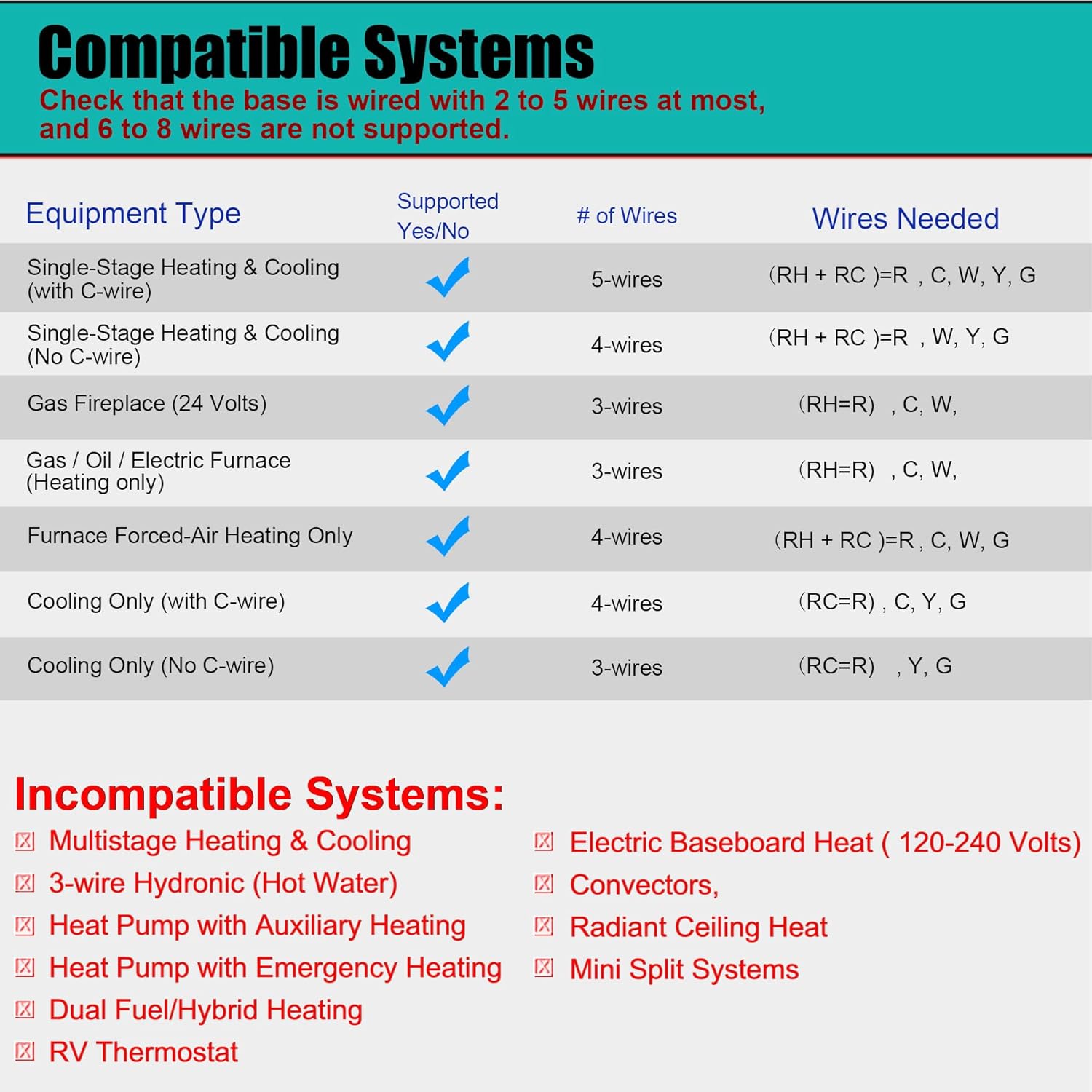
Image: Compatible Systems Diagram. This diagram illustrates various equipment types and the number of wires required for compatibility, along with a list of incompatible systems.
Compatible Systems:
| Equipment Type | # of Wires | Wires Needed |
|---|---|---|
| Single-Stage Heating & Cooling (with C-wire) | 5-wires | (RH + RC)=R, C, W, Y, G |
| Single-Stage Heating & Cooling (No C-wire) | 4-wires | (RH + RC)=R, W, Y, G |
| Gas Fireplace (24 Volts) | 3-wires | (RH=R), C, W |
| Boiler Radiant Heating Only | 3-wires | (RH=R), C, W |
| Furnace Forced-Air Heating Only | 4-wires | (RH + RC)=R, C, W, G |
| Cooling Only (with C-wire) | 4-wires | (RC=R), C, Y, G |
| Cooling Only (No C-wire) | 3-wires | (RC=R), Y, G |
Incompatible Systems:
- Multistage systems (1H/2C, 2H/2C)
- HVAC heat pump systems (2H/1C, 4H/2C)
- PTACs
- 3-wire hydronic (hot water)
- Dual fuel/hybrid heating
- Line voltage systems (120-240V electric baseboards heat)
- Mini split heat pump air conditioner
- RV air conditioners (Mach and Roughneck series)

Image: How to tell if your system isn't compatible. This image provides visual cues for identifying incompatible wiring, such as stranded wires or labels indicating 110V/120V.
Setup and Installation
Installation of the Suuwer S705 thermostat is designed to be straightforward, typically taking about 30 minutes. If you are inexperienced with electrical wiring, it is advised to consult a professional.
Installation Steps:
- Power Off: Before beginning, turn off power to your heating and cooling system at the main fuse or circuit breaker panel.
- Remove Old Thermostat: Carefully remove your old thermostat cover and disconnect the wires, noting the terminal labels for each wire. It is recommended to take a picture of your old wiring for reference.
- Mount New Thermostat Base: Mount the new thermostat base plate to the wall using the provided screws and anchors. Ensure it is level.
- Wire Connections: Connect the wires from your wall to the corresponding terminals on the new thermostat base. Refer to the wiring diagram below.
- Install Batteries: Insert 2 AAA alkaline batteries (not supplied) into the battery compartment.
- Attach Thermostat to Base: Secure the thermostat body onto the mounted base plate.
- Restore Power: Turn the power back on at the main fuse or circuit breaker panel.

Image: How to Install It. This image provides a detailed wiring diagram, showing how to connect the thermostat to your HVAC system, including common wire (C-wire) considerations.
Battery Installation:
The thermostat is dual-powered by 24VAC or 2 AAA batteries. The batteries provide backup power and are required if a C-wire is not present in heat-only or cool-only systems. The battery compartment is easily accessible at the bottom of the unit.

Image: Easy to Use and Read. This image highlights the large digital display and the convenient battery compartment at the bottom of the thermostat.
Operating Instructions
The Suuwer S705 thermostat features a user-friendly interface with a large display and intuitive buttons for setting and adjusting your comfort preferences.

Image: Main Product View. This image shows the front of the thermostat with its clear blue backlit display, indicating current room temperature, set temperature, time, and system mode.
Setting the Time and Day:
Use the 'Set Time' button and the up/down arrows to adjust the current time and day of the week. The display will show the current time and day.
Programming Your Schedule (5-1-1 Day):
The thermostat allows for separate programming for weekdays (Monday-Friday), Saturday, and Sunday, with four distinct periods per day: Wake, Leave, Return, and Sleep. Each period can have its own temperature setting.

Image: Comfort That Fits Your Schedule. This image illustrates the 5-1-1 day programmable feature, showing different temperature settings for various times of the day across weekdays and weekends.
- Press the 'Set Sched' button to enter programming mode.
- Use the 'Next Step' or 'Prev Step' buttons to navigate through the programming periods (Wake, Leave, Return, Sleep) for each day.
- Use the up/down arrows to adjust the desired temperature for the selected period.
- Repeat for all periods and days.
- Press 'Menu' to exit programming mode.
Adjusting Temperature Swing:
The temperature swing, also known as cycle rate, determines how frequently your system turns on and off. A smaller swing setting results in more frequent cycles, while a larger setting results in fewer cycles. The swing is adjustable from 0.2°F to 2°F, with a factory default of 0.5°F for heating or cooling.

Image: Adjusting the Heat or Cool Temperature Swing. This image explains the concept of temperature swing and how adjusting it affects the cycling of your heating or cooling system.
System Mode Selection:
Use the 'SYSTEM' switch to select between COOL, HEAT, or OFF modes.
Fan Operation:
Use the 'FAN' switch to select between ON (fan runs continuously) or AUTO (fan runs only when heating or cooling is active).
Maintenance
- Battery Replacement: The thermostat has a built-in battery change reminder. When the low battery indicator appears on the display, replace the 2 AAA alkaline batteries promptly to ensure continuous operation.
- Filter Change Reminder: The thermostat includes a filter change reminder, which can be set from 50 to 2000 hours. When the reminder appears, check and replace your system's air filter as needed to maintain optimal performance and air quality.
- Cleaning: Clean the thermostat's exterior with a soft, damp cloth. Do not use abrasive cleaners or solvents.
Troubleshooting
If you encounter issues with your Suuwer S705 thermostat, consider the following common solutions:
- No Display/Power: Check if the batteries are correctly installed and fresh. If using 24VAC power, ensure the circuit breaker for your HVAC system is not tripped.
- System Not Responding: Verify that the system switch is set to HEAT or COOL, not OFF. Check that the fan switch is set to AUTO or ON. Ensure the set temperature is appropriately above (for heating) or below (for cooling) the current room temperature.
- Inaccurate Temperature Reading: The thermostat allows for room temperature calibration adjustment. Refer to the technical support section or the full installation manual for instructions on how to calibrate the temperature.
- Programming Issues: Double-check your programmed schedule to ensure the times and temperatures are set as desired.
- System Compatibility: Re-verify that your HVAC system is compatible with this thermostat (single-stage, 2-5 wires). Refer to the 'Compatible and Incompatible Systems' section.
For further assistance, please refer to the detailed installation manual included with your product or contact Suuwer customer support.
Specifications
| Feature | Detail |
|---|---|
| Model Name | S705 Programmable Thermostat |
| Product Dimensions | 0.98"D x 4.72"W x 3.86"H |
| Controller Type | Push Button |
| Color | Off-white (Blue Backlight) |
| Specific Uses For Product | Single-Stage Heating (Gas/Oil/Electric Furnace), Ventilation, and Air Conditioning |
| Temperature Control Type | Heating and Cooling |
| Power Source | Battery Powered (2 AAA Batteries) or 24VAC Power |
| Voltage | 24 Volts (AC) |
| Material | Plastic |
| Display Type | Digital |
| Screen Size | 4.5 Inches |
| Mounting Type | Wall Mount |
| Item Weight | 8.1 ounces |
| Temperature Display Range | 41°F to 95°F |
| Temperature Control Range | 44°F to 90°F |
Warranty and Support
The Suuwer S705 Programmable Thermostat comes with a 2-year Worry-Free Warranty. If you encounter any problems or have questions regarding your thermostat, please do not hesitate to contact Suuwer customer service. We are committed to providing support and will respond to inquiries within 24 hours.
For contact information, please refer to the packaging or the official Suuwer website.