
Apera Instruments AI5630
Apera Instruments PH9500 Research-Grade Benchtop pH Meter Kit User Manual
Model: AI5630 | Brand: Apera Instruments
Introduction
The Apera PH9500 is a research-grade benchtop pH meter designed for laboratory professionals, offering long-term reliability in high-accuracy pH measurement. This manual provides detailed instructions for the setup, operation, maintenance, and troubleshooting of your PH9500 meter kit to ensure optimal performance and accurate results.
What's in the Box
Your Apera PH9500 Meter Kit includes the following components:
- Apera PH9500 Meter
- Swiss LabSen 211 glass-body pH electrode
- Apera TestBench (flexible electrode holder, buffer organizers, intelligent magnetic stirrer)
- pH standard buffers (4.00, 7.00, 10.01)
- Power adapter
- USB cable for data output
- Instruction Manual
Setup
Follow these steps to set up your PH9500 Benchtop pH Meter Kit:
- Unpacking: Carefully remove all components from the packaging. Inspect for any damage.
- Assemble TestBench: Place the PH9500 meter onto the Apera TestBench. Attach the flexible electrode holder to the TestBench.
- Connect Electrode: Connect the Swiss LabSen 211 pH electrode to the designated port on the meter. Ensure a secure connection.
- Power Connection: Connect the power adapter to the meter and plug it into a suitable power outlet.
- Buffer Placement: Place the pH standard buffer solutions (4.00, 7.00, 10.01) into their respective organizers on the TestBench for easy access during calibration.
- Initial Electrode Preparation: Before first use, remove the protective cap from the pH electrode and rinse it with distilled water. Condition the electrode according to the electrode's specific instructions, typically by soaking in a storage solution for a few hours.

Image: The Apera PH9500 Benchtop pH Meter Kit showing the main unit, electrode holder, electrode, beaker, and buffer solution containers.
Operating Instructions
Basic pH Measurement
- Power On: Press the power button to turn on the PH9500 meter.
- Electrode Rinse: Rinse the pH electrode thoroughly with distilled water before each measurement.
- Sample Immersion: Immerse the electrode into the sample solution, ensuring the sensing bulb and reference junction are fully submerged.
- Stirring (Optional): If using the integrated magnetic stirrer, activate it to ensure homogeneous mixing of the sample.
- Reading Stability: Wait for the reading on the display to stabilize. The meter will indicate when the reading is stable.
- Record Reading: Note down the stable pH value and temperature.
- Electrode Rinse & Storage: After measurement, rinse the electrode with distilled water and place it back into its storage solution or protective cap.
Calibration
The PH9500 supports 1 to 5 points of automatic calibration with a choice of 5 pH standard buffers. Regular calibration is crucial for accurate measurements.
- Prepare Buffers: Ensure your pH standard buffers (e.g., 4.00, 7.00, 10.01) are at room temperature.
- Enter Calibration Mode: Press the "CAL" button on the meter.
- First Point Calibration: Rinse the electrode and immerse it into the first buffer solution (e.g., pH 7.00). The meter will automatically recognize the buffer and begin calibration. Wait for the stability indicator.
- Subsequent Points: Rinse the electrode and immerse it into the next buffer solution (e.g., pH 4.00 or pH 10.01). Repeat the process for all desired calibration points.
- Completion: The meter will indicate when calibration is complete. You can view the slope and offset values after calibration to assess electrode performance.
- Self-Diagnosis: The meter features smart self-diagnosis to ensure successful calibrations, providing prompts if issues arise.
GLP Data Management and Output
The PH9500 offers comprehensive GLP data management, including manual and automatic data logging with storage for up to 500 sets of data.
- Data Logging: Use the meter's interface to initiate manual or automatic data logging. Refer to the on-screen prompts for specific instructions.
- Data Export: Data can be exported to a pin-type mini printer or a PC for further analysis and reporting.
- PC Connection: Connect the meter to your PC using the provided USB cable. You may need to install specific drivers and software provided by Apera Instruments for data transfer.
- Software Usage: Utilize the Apera Instruments software to retrieve, view, and manage logged data. This software allows for detailed analysis and report generation.
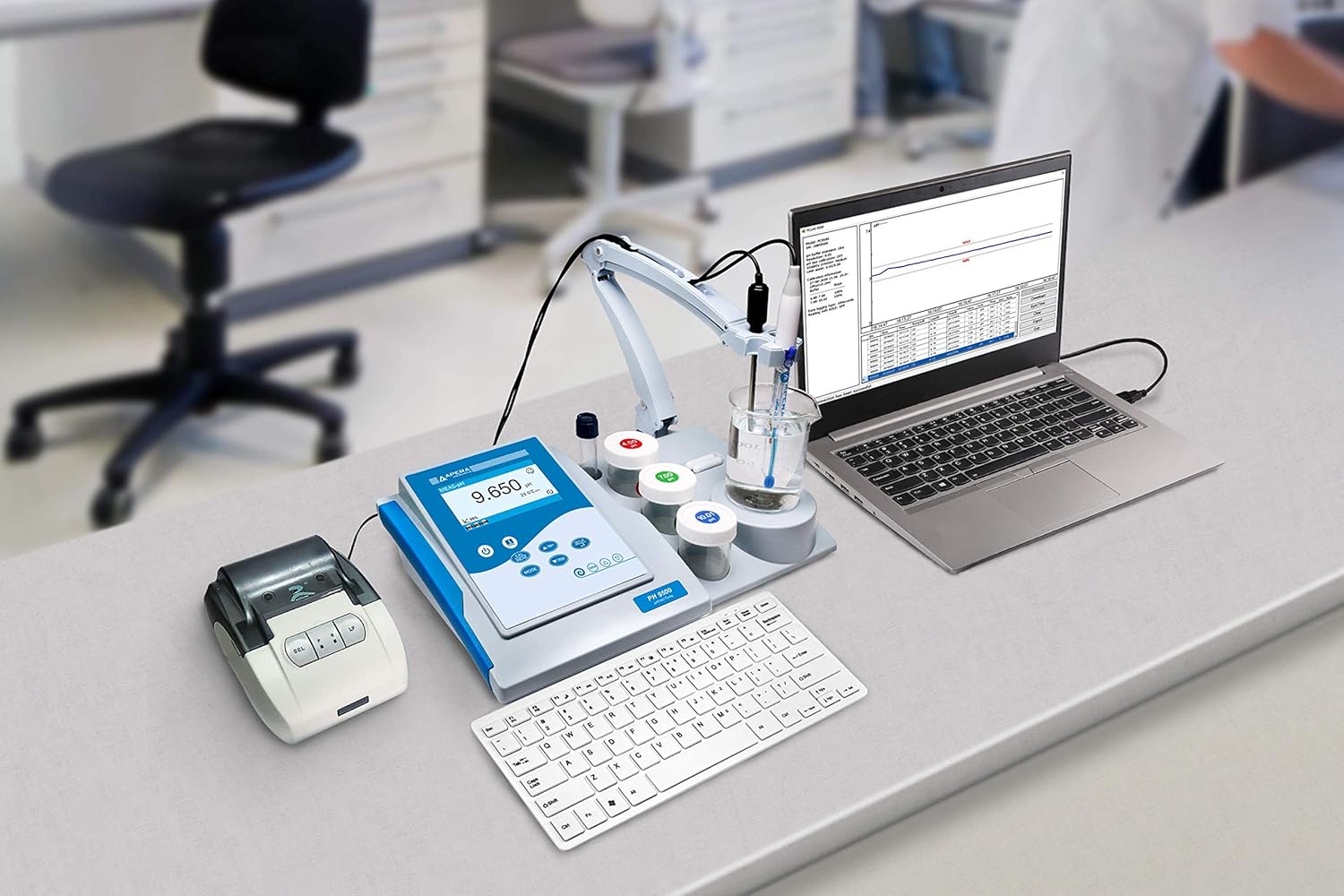
Image: The Apera PH9500 meter connected to a laptop and a printer, illustrating its data output functionality.
Maintenance
Proper maintenance ensures the longevity and accuracy of your PH9500 meter and electrode.
- Electrode Cleaning: Regularly clean the pH electrode. For general cleaning, rinse with distilled water. For stubborn deposits, consult the electrode's specific cleaning instructions or Apera Instruments' recommendations.
- Electrode Storage: Always store the pH electrode in its designated storage solution or protective cap to prevent the sensing bulb from drying out. Never store in distilled water.
- Buffer Solutions: Use fresh, unexpired pH buffer solutions for calibration. Do not reuse buffer solutions.
- Meter Cleaning: Wipe the meter's surface with a soft, damp cloth. Avoid using abrasive cleaners or solvents.
- Battery/Power: Ensure the meter is properly powered. If using batteries (if applicable), replace them when indicated.
Troubleshooting
This section addresses common issues you might encounter with your PH9500 meter.
| Problem | Possible Cause | Solution |
|---|---|---|
| Inaccurate/Unstable Readings |
|
|
| Calibration Failure |
|
|
| Difficulty Transferring Data to PC |
|
|
Specifications
Key specifications for the Apera Instruments PH9500 Benchtop pH Meter Kit:
- Model Number: AI5630
- pH Accuracy: 0.003 pH (with Swiss LabSen 211 electrode)
- Data Storage: 500 sets (manual/auto. data logger)
- Data Output: USB to PC or pin-type mini printer
- Calibration Points: 1 to 5 points automatic calibration
- Buffer Recognition: Choice of 5 pH standard buffers
- Display: Intuitive user interface with plain language and graphic screen prompts
- Supported Languages: English, Spanish, German, Chinese
- Electrode: Swiss LabSen 211 glass-body pH electrode with blue impact-resistant glass membrane and Long-life reference system
- Integrated Features: Flexible electrode holder, buffer organizers, intelligent magnetic stirrer (Apera TestBench)
- Package Dimensions: 13.12 x 10.17 x 6.78 inches
- Item Weight: 8.41 Pounds
- Country of Origin: China
Warranty and Support
Apera Instruments is committed to providing reliable products and excellent customer support.
- Warranty Information: For detailed warranty terms and conditions, please refer to the warranty card included with your product or visit the official Apera Instruments website.
- Technical Support: If you encounter any issues or have questions regarding the operation or maintenance of your PH9500 meter, please contact Apera Instruments customer support. Contact information can typically be found on their official website or in the product packaging.
- Online Resources: Visit the Apera Instruments website for additional resources, FAQs, and software updates.
Ask a question about this manual
Ask about setup, troubleshooting, compatibility, parts, safety, or missing instructions. Manuals+ will review the question and use this page’s manual context to help answer it.