
ELRO AS90S
ELRO AS90S Home+ Wireless Smart Alarm System User Manual
Comprehensive guide for installation, operation, and maintenance of your ELRO AS90S Home+ Alarm System.
1. Product Overview
The ELRO AS90S Home+ wireless alarm system is a reliable all-in-one solution designed to secure your home or office. This comprehensive system includes a base unit, a control panel, a motion detector, three door/window sensors, and a remote control. It is designed for easy self-installation, typically within 15 minutes, and can be expanded with additional sensors and accessories as needed.
Upon detection of an intruder, the base unit activates an audible alarm of at least 100 dB, sufficient to deter intruders. Additionally, you will receive an alarm notification directly on your smartphone. The ELRO Home+ alarm system features a backup battery and, with a GSM module (SIM card not included), ensures continued operation during power outages.
The dedicated ELRO Home+ App, available for free on the App Store and Google Playstore, allows you to arm and disarm the system remotely. It also sends push notifications for detected intrusions and enables easy adjustment of system and accessory settings.

Figure 1.1: Overview of the ELRO AS90S Home+ Smart Alarm System components, including the base unit, control panel, motion detector, door/window contacts, and remote control.
2. Package Contents
Verify that all items listed below are included in your ELRO AS90S Home+ alarm system package:
- Base Unit
- Control Panel
- Motion Detector
- 3 x Door/Window Sensors
- Remote Control
- UTP Cable
- Batteries
- Power Adapter
- Mounting Hardware
- Alarm/Warning Sticker
- Instruction Manual (this document)
3. Components Overview
3.1. Base Unit
The Base Unit is the central hub of your ELRO Home+ alarm system. All sensors connect wirelessly to this unit, which then transmits information to the ELRO Home+ application on your smartphone.

Figure 3.1.1: The ELRO AS90S Base Unit, designed to be placed within your WiFi network for optimal connectivity.

Figure 3.1.2: Physical dimensions of the ELRO AS90S Base Unit, measuring 145 mm by 145 mm.

Figure 3.1.3: Detailed view of the ELRO AS90S Base Unit's features, including (1) DC 5V / 2A power adapter port, (2) LAN 1x RJ45 cable port, (3) GSM SIM card slot, (4) 100 dB(A) siren, and (5) Lithium Polymer battery for backup power.
3.2. Control Panel
The modernly designed Control Panel can be mounted near your entrance. It allows you to arm or disarm your system using a personal code.

Figure 3.2.1: The ELRO AS90S Control Panel, used to arm or disarm your alarm system.

Figure 3.2.2: Physical dimensions of the ELRO AS90S Control Panel, measuring 80 mm by 38.2 mm.
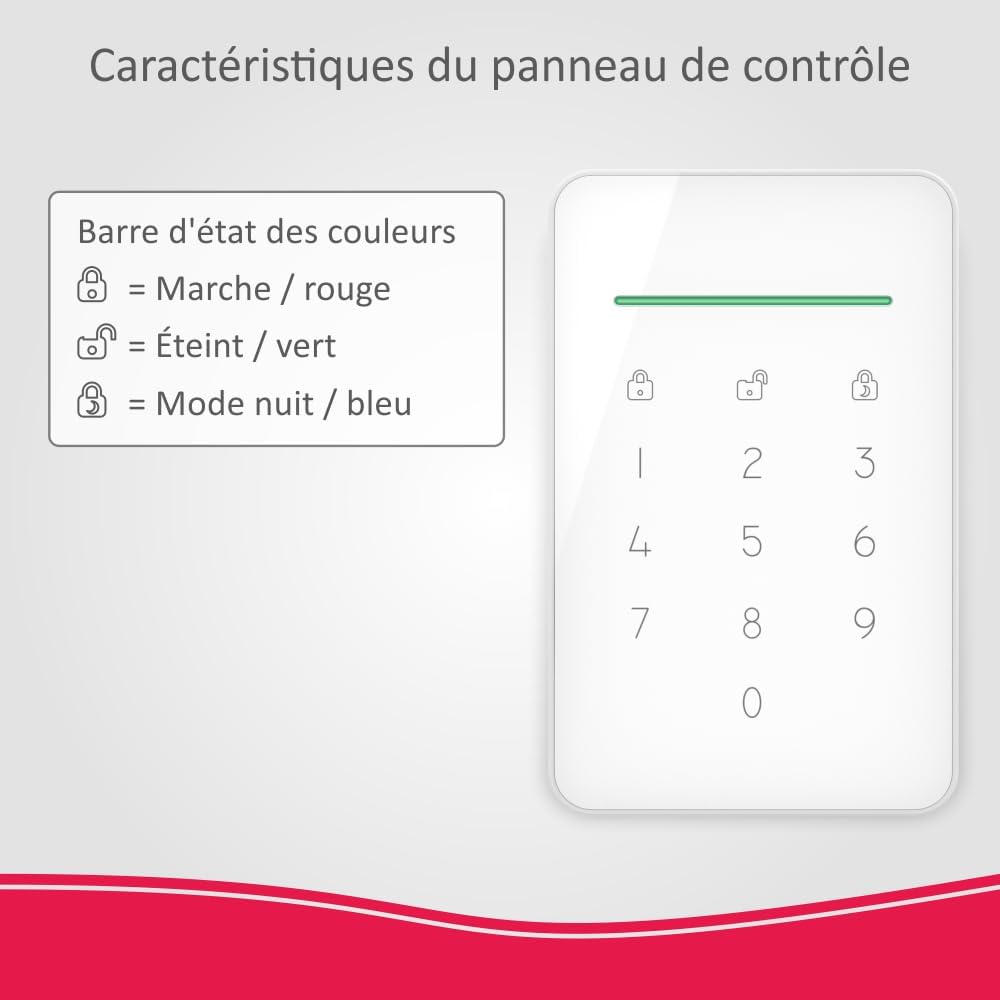
Figure 3.2.3: Explanation of the ELRO AS90S Control Panel's color status bar: Armed (red), Disarmed (green), and Night Mode (blue).
3.3. Motion Detector
The Motion Detector registers movement within a designated area of your home, triggering the alarm if the system is armed.

Figure 3.3.1: The ELRO AS90S Motion Detector, used to secure a specific zone.

Figure 3.3.2: Physical dimensions of the ELRO AS90S Motion Detector, measuring 99 mm by 53 mm.

Figure 3.3.3: Detection range of the ELRO AS90S Motion Detector, covering 9 meters with a 110° angle. It features easy aiming with a magnetic "click" mount, typically installed at 1.8-2.2 meters height.
3.4. Door/Window Sensors (3 included)
These sensors trigger the alarm if a window or door is opened while the system is armed.

Figure 3.4.1: The ELRO AS90S Door/Window Sensor, used to secure doors and windows.

Figure 3.4.2: Physical dimensions of the ELRO AS90S Door/Window Sensor, with the main unit measuring 80 mm by 38.2 mm, and the smaller magnet unit measuring 14.8 mm. The maximum gap between the two parts should be 9 mm.
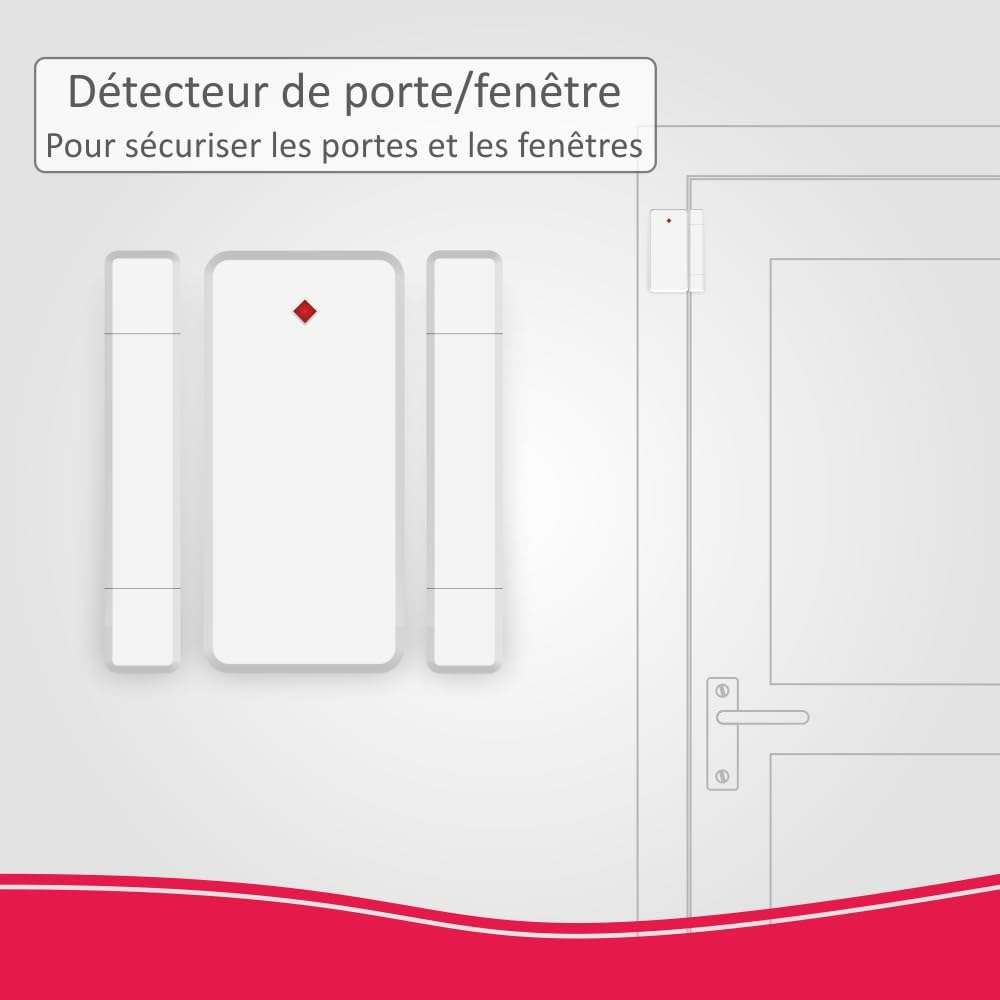
Figure 3.4.3: Example installation of the ELRO AS90S Door/Window Sensor on a door frame.
3.5. Remote Control
The Remote Control provides a convenient way to arm or disarm your alarm system.

Figure 3.5.1: The ELRO AS90S Remote Control, used to arm or disarm your system.

Figure 3.5.2: Physical dimensions of the ELRO AS90S Remote Control, measuring 58 mm by 33 mm.

Figure 3.5.3: Functions of the ELRO AS90S Remote Control buttons: Arm, Disarm, Night Mode, and S.O.S./Panic.
4. Setup and Installation
Installing the ELRO Home+ alarm system is straightforward. All included system components are pre-connected to the base unit, making the setup process quick and easy.
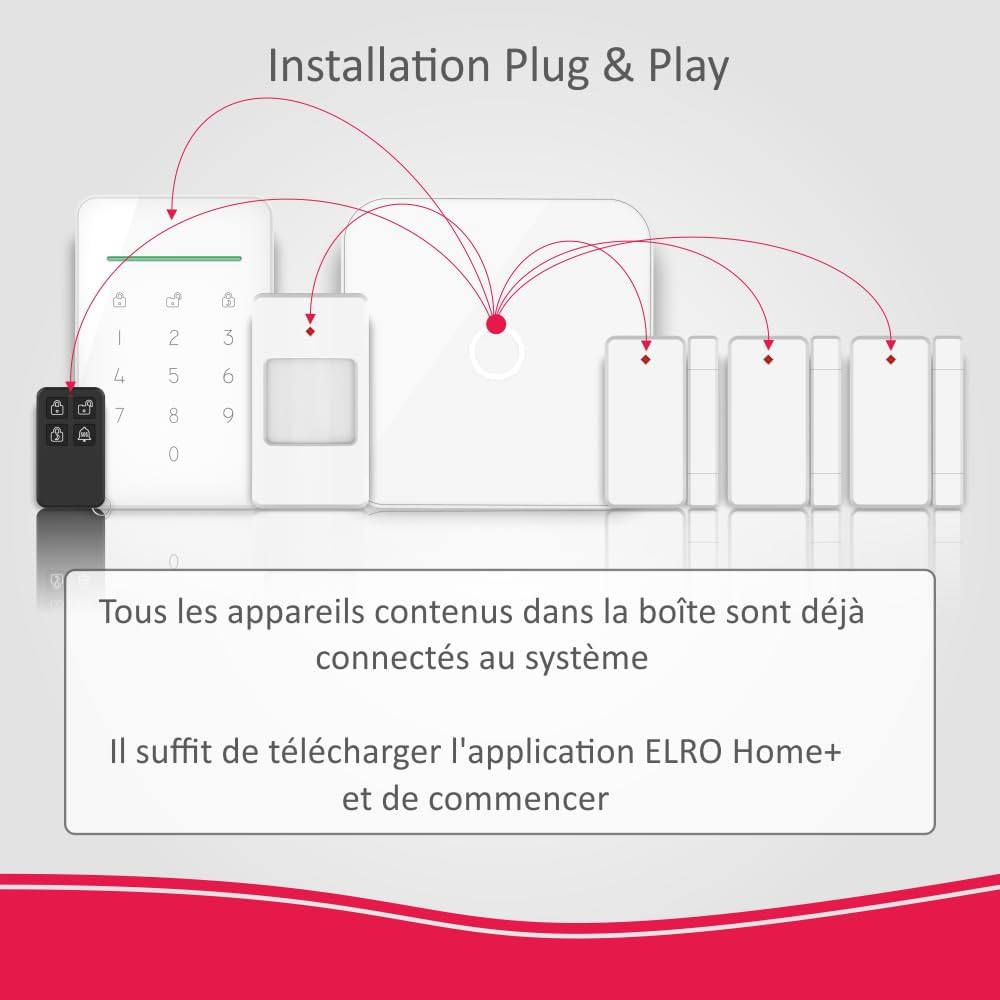
Figure 4.1: Plug & Play installation diagram for the ELRO AS90S system. All devices in the box are pre-connected to the system. Simply download the ELRO Home+ app and begin setup.
- Activate Components: Activate all sensors and the base unit.
- Download App: Download the free ELRO Home+ App from the App Store (for iOS) or Google Playstore (for Android).
- Connect to Smartphone: Follow the in-app instructions to connect the system to your smartphone.
- Strategic Placement: Place all components in strategic locations within your home to ensure optimal coverage and security.
The system can typically be installed and operational within 15 minutes.
5. Operation
The ELRO AS90S Home+ alarm system offers various operational modes and features for comprehensive security management.
5.1. Arming and Disarming
- Full Arm Mode: Activates all sensors for complete protection.
- Disarm Mode: Deactivates the alarm system.
- Night Mode: Allows certain sensors (e.g., perimeter sensors like door/window contacts) to remain active while others (e.g., motion detectors in living areas) are disarmed, enabling free movement within the home at night.
You can arm or disarm the system using the Control Panel (with a personal code), the Remote Control, or through the ELRO Home+ App.
5.2. App Functionality
The ELRO Home+ App provides full control and monitoring capabilities:

Figure 5.2.1: The ELRO Home+ App interface, allowing users to arm, disarm, set home arm mode, and check system status. The app is available for free on Google Play and the App Store.
- Remote Control: Arm and disarm the system from anywhere.
- Instant Notifications: Receive push notifications on your smartphone when an intrusion is detected.
- Settings Adjustment: Easily adjust system parameters and accessory settings.
- User Management: Create unique users to track who arms or disarms the alarm.
5.3. Advanced Features
- Integrated Siren: The base unit features a powerful 100 dB integrated siren.
- Forced Alarm: Enter a special PIN on the control panel to disarm the system under duress. All users will be notified that a forced alarm deactivation occurred.
- Entry/Exit Delay: Customizable arming and disarming delays (from 0 seconds to 9 minutes and 50 seconds), with an optional countdown beep.
- Adjustable Siren Duration: The duration of the siren alarm is adjustable. A silent alarm option (push notification only) is also available.
- Stable Wireless Connection: Provides a stable wireless connection between the base unit and accessories with a range of 300 meters (without obstacles).
6. Compatible Accessories
The ELRO Home+ alarm system is highly expandable. You can enhance your security setup with the following compatible accessories:

Figure 6.1: Overview of compatible accessories for the ELRO AS90S Home+ system, including the AS90CA HD Security Camera, AS90SRA Indoor Siren, AS90KEA Control Panel, AS90RE Remote Control, AS90MA Door/Window Sensor, AS90PLE Smart Plug, and AS90PR Motion Detector.
- ELRO AS90CA Home+ Full HD Pan/Tilt Security Camera
- ELRO AS90MA Home+ Door/Window Sensor
- ELRO AS90PR Home+ Motion Detector
- ELRO AS90KEA Home+ Control Panel
- ELRO AS90SRA Home+ Indoor Siren
- ELRO AS90PL Home+ Smart Plug
7. Specifications
| Feature | Specification |
|---|---|
| Brand | ELRO |
| Model Number | AS90S |
| Manufacturer | ELRO EUROPE |
| Product Dimensions (L x W x H) | 14.5 x 14.5 x 3.3 cm (Base Unit) |
| Weight | 1.27 Kilograms |
| Color | White |
| Power Source | AC/DC |
| Installation Method | DIY Wireless |
| Connectivity Technology | WiFi |
| Compatible Devices | Tablet, Smartphone |
| Siren Output | 100 dB |
| Wireless Range | 300 meters (without obstacles) |
| Battery (included) | 3 CR123A (for certain components) |
| Battery Composition | Alkaline |
8. Troubleshooting
This section provides solutions to common issues you might encounter with your ELRO AS90S Home+ alarm system.
8.1. System Not Responding
- Check Power: Ensure the base unit is properly connected to power and that the power adapter is functioning. Verify the backup battery is charged.
- Check Internet Connection: Confirm your home WiFi network is active and the base unit is connected. If using GSM, ensure the SIM card is correctly inserted and has active service.
- Restart System: Disconnect power from the base unit, remove the backup battery, wait 30 seconds, then reinsert the battery and reconnect power.
8.2. Sensor Not Triggering Alarm
- Check Battery: Replace batteries in the sensor if necessary.
- Check Placement: Ensure motion detectors are placed correctly to cover the desired area and that door/window sensors are aligned with a maximum 9mm gap when closed.
- Re-pair Sensor: If a sensor is not communicating, try re-pairing it with the base unit via the ELRO Home+ App. Refer to the app's instructions for pairing new devices.
- Check System Mode: Ensure the system is in the correct arming mode (Full Arm or Night Mode) for the specific sensor to be active.
8.3. App Connectivity Issues
- Internet Connection: Verify your smartphone has a stable internet connection (WiFi or mobile data).
- App Version: Ensure your ELRO Home+ App is updated to the latest version.
- Login Credentials: Double-check your login details for the app.
- Server Status: In rare cases, there might be a temporary server issue. Try again after some time.
8.4. False Alarms
- Motion Detector Placement: Ensure motion detectors are not facing direct sunlight, heat sources, or areas with pets if they are not pet-immune models.
- Door/Window Sensor Alignment: Re-check the alignment and gap of door/window sensors. Strong vibrations or loose mounting can cause false triggers.
- Environmental Factors: High winds causing doors/windows to rattle, or large temperature fluctuations can sometimes affect sensors.
9. Warranty and Support
The ELRO AS90S Home+ alarm system comes with a 2-year manufacturer's warranty.
For technical assistance, troubleshooting, or any questions regarding your ELRO product, please contact ELRO customer support. They offer excellent technical support via phone and email in multiple languages, including English.
Please refer to the ELRO official website or the ELRO Home+ App for the most up-to-date contact information and additional support resources.
Related documentsAS90S


Ask a question about this manual
Ask about setup, troubleshooting, compatibility, parts, safety, or missing instructions. Manuals+ will review the question and use this page’s manual context to help answer it.