
1. Product Overview
The Baseus W09 TWS Wireless Earphones (Model: Encok W09) are designed for convenient audio playback and communication. These in-ear earphones feature touch control and connect wirelessly via Bluetooth, offering a stereo bass sound experience.

Image 1: The Baseus W09 TWS Wireless Earphones securely placed within their charging case. The case is open, revealing both earbuds.
2. Setup
2.1 Charging the Earphones and Case
Before initial use, ensure both the earphones and the charging case are fully charged. The charging case contains a built-in Lithium Ion battery.
- Place the earphones into the charging case.
- Connect the charging case to a power source using a compatible charging cable (not specified, assume USB).
- A full charge typically takes approximately 1.5 hours.
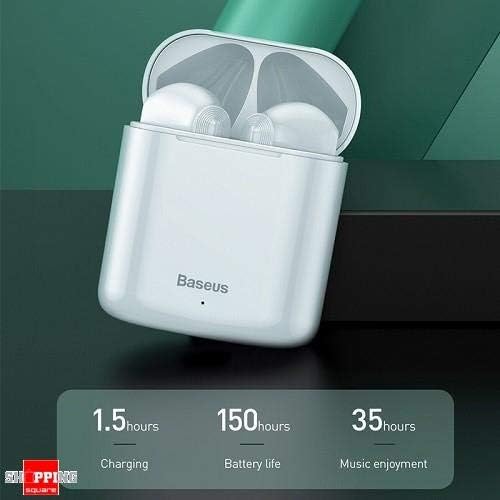
Image 2: The Baseus W09 charging case, illustrating its charging time of 1.5 hours, a standby battery life of 150 hours, and 35 hours of music enjoyment.
2.2 Bluetooth Pairing
The Baseus W09 earphones are designed for quick and instant connection.
- Ensure the earphones are charged.
- Open the charging case.
- Remove the earphones from the charging case. They will automatically enter pairing mode.
- On your device (smartphone, tablet, etc.), enable Bluetooth and search for available devices.
- Select "Baseus Encok W09" or a similar name from the list to connect.
- Once connected, you will hear an audio prompt, and the earphones will be ready for use.

Image 3: A hand demonstrating the "Pick up and Connect" feature, showing an earphone being removed from its charging case, initiating quick Bluetooth connection.
3. Operating Instructions
3.1 Wearing the Earphones
Gently insert each earphone into the corresponding ear canal (L for left, R for right). Adjust them for a comfortable and secure fit to ensure optimal sound quality and stability.
3.2 Touch Control Functions
The Baseus W09 earphones feature intelligent touch controls for various functions. Specific gestures may vary; please refer to the product packaging or the official Baseus website for detailed touch control instructions.
- Play/Pause: Typically a single tap on either earphone.
- Answer/End Call: Usually a single tap during an incoming call.
- Next/Previous Track: Often a double or triple tap on a specific earphone.
- Activate Voice Assistant: May involve a long press or specific tap sequence.
3.3 Battery Life
The Baseus W09 earphones and charging case offer extended usage times:
- Music Enjoyment: Up to 35 hours (with charging case).
- Standby Time: Up to 150 hours.
4. Maintenance
4.1 Cleaning
- Use a soft, dry, lint-free cloth to clean the earphones and charging case.
- Do not use abrasive cleaners, alcohol, or chemical solvents.
- Ensure no moisture enters the earphone speakers or charging ports.
4.2 Storage
- When not in use, store the earphones in their charging case to protect them and keep them charged.
- Store in a cool, dry place away from direct sunlight and extreme temperatures.
5. Troubleshooting
If you encounter issues with your Baseus W09 earphones, try the following steps:
- No Sound: Ensure earphones are charged, connected to your device, and volume is up on both the earphones and your device.
- Cannot Pair: Make sure Bluetooth is enabled on your device and the earphones are in pairing mode. Try turning Bluetooth off and on again on your device.
- Intermittent Connection: Ensure there are no obstructions between the earphones and your device. Try moving closer to your device.
- Charging Issues: Check the charging cable and power adapter. Ensure the charging contacts on the earphones and case are clean.
- Reset: If issues persist, try resetting the earphones. Refer to the official Baseus website or product packaging for specific reset instructions.
6. Specifications
| Feature | Detail |
|---|---|
| Brand | Baseus |
| Model Number | Encok W09 |
| Type | In Ear |
| Connectivity Technology | Wireless (Bluetooth) |
| Control Method | Touch |
| Microphone Included | Yes |
| Noise Cancelling | No |
| Battery Type | Lithium Ion (included) |
| Charging Time | Approx. 1.5 hours |
| Music Enjoyment Time | Up to 35 hours (with charging case) |
| Standby Time | Up to 150 hours |
| Compatible With | All Bluetooth-enabled devices |
| Color | White |
| Package Dimensions | 14.6 x 11 x 4 cm |
| Item Weight | 170 g |
7. Warranty and Support
For warranty information, technical support, or further assistance, please refer to the documentation included with your product or visit the official Baseus website. Keep your proof of purchase for warranty claims.


