
XZENT X-MAP27-MH1
XZENT X-MAP27-MH1 Micro SD Card User Manual
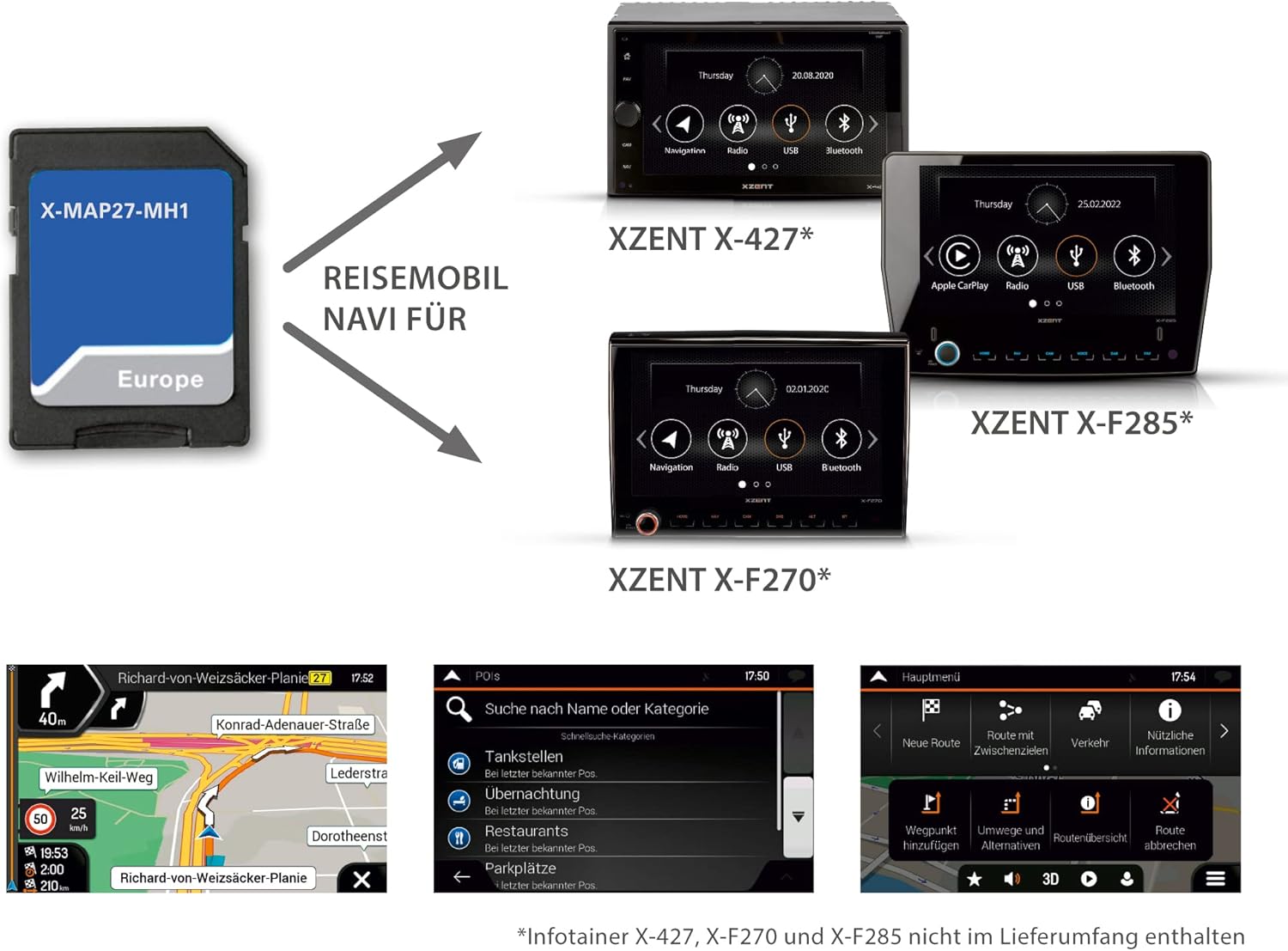
Motorhome Navigation for XZENT X-427 and X-F270
Introduction
This manual provides essential information for the proper use, installation, and maintenance of your XZENT X-MAP27-MH1 Micro SD Card. This product is designed to enhance your XZENT X-427 and X-F270 navigation systems with dedicated motorhome navigation features, comprehensive European maps, and a specialized Camping P.O.I. (Points of Interest) package.
Please read this manual thoroughly before using the product to ensure safe and optimal performance.
Important Safety Information
WARNING!
- This product is exclusively intended for fixed installation and use in vehicles. Incorrect use may lead to hazardous situations.
- Always refer to the enclosed operating manual and vehicle-specific installation instructions for safe and proper setup.
- Ensure the product is used strictly as described in this manual and the product description regarding its intended purpose.
- The packaging may contain polybutyl. Keep it away from children.
- Small parts may be present in the packaging. Keep them away from children to prevent choking hazards.
- Loose ceramic-magnet systems on loudspeakers can be damaged by mechanical stress (e.g., dropping, impact). Splinters may cause eye injury.
- Strong magnets can attract objects made of steel or iron. Keep tools, knives, and other sharp or pointed objects away from loudspeakers.
- Neodymium magnets are not nickel-coated. Nickel is a strong allergen; avoid skin contact.
- Prolonged and loud listening to audio playback can cause hearing damage and/or tinnitus. Set the volume to a normal, comfortable level.
- This product complies with applicable EU regulations and harmonized standards for its product category.
What's Included
The XZENT X-MAP27-MH1 package includes:
- X-MAP27-MH1 Micro SD Card with pre-loaded motorhome navigation software, European maps, and Camping P.O.I. package.
- Quick Start Guide.


Setup and Installation
The X-MAP27-MH1 Micro SD card is designed for use with specific XZENT infotainment systems. Follow these general steps for installation:
- Identify Compatible Unit: Ensure your XZENT unit is either an X-427 or X-F270 model.
- Locate SD Card Slot: Refer to your XZENT infotainment system's manual to locate the Micro SD card slot. This is typically found on the front panel or behind a removable cover.
- Insert Micro SD Card: Carefully insert the X-MAP27-MH1 Micro SD card into the designated slot until it clicks into place. Do not force the card.
- System Recognition: Power on your XZENT unit. The system should automatically detect the new navigation data. Follow any on-screen prompts to activate or configure the navigation software.
Operating the Navigation System
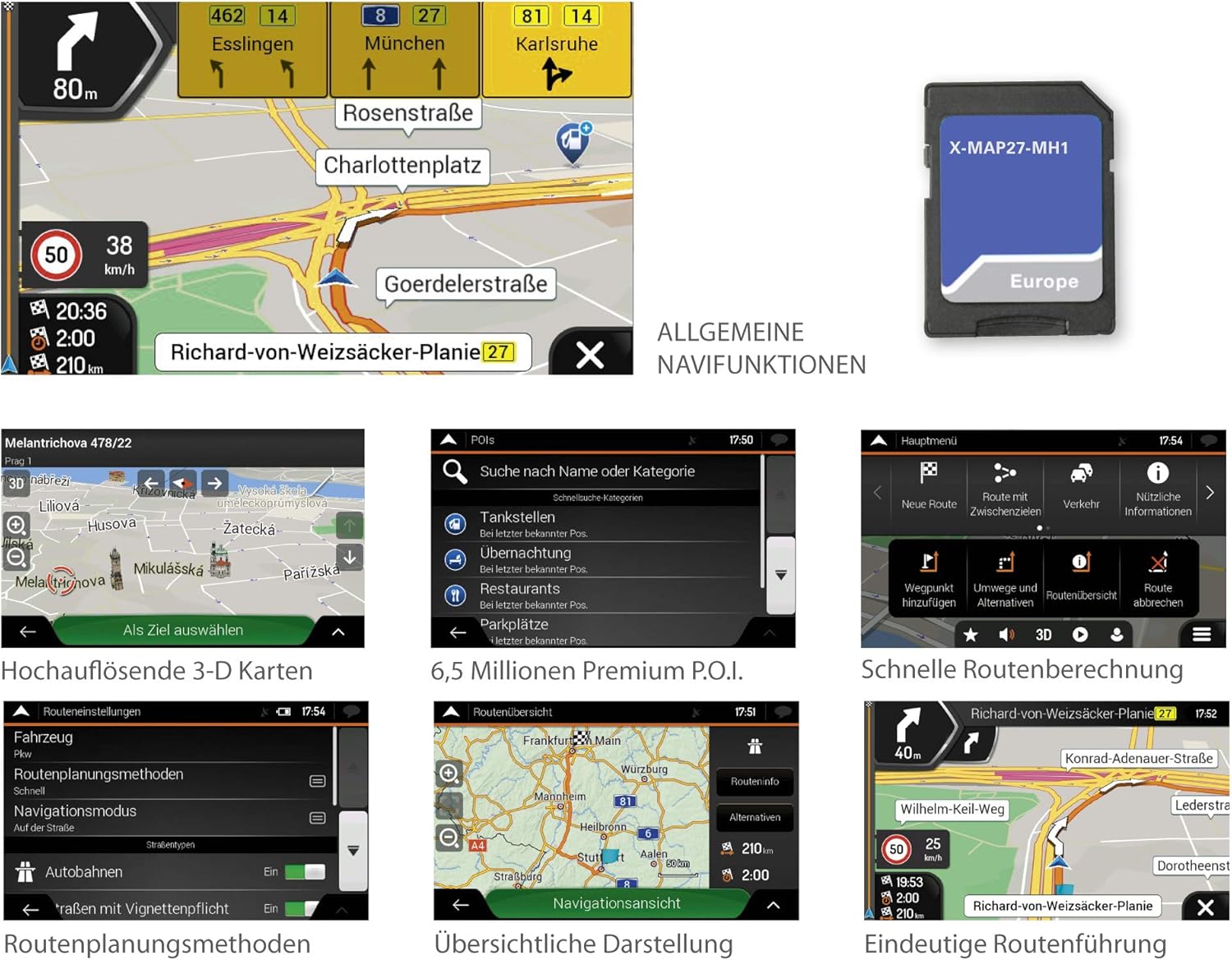
Once the Micro SD card is installed and recognized, you can access the navigation features through your XZENT unit's interface. The X-MAP27-MH1 provides both general navigation functions and specialized motorhome features.
General Navigation Functions
- Route Calculation: Enter your destination to calculate routes. The system supports various routing options.
- Lane Assist: Provides visual guidance for lane changes and complex intersections.
- POI Search: Search for points of interest such as fuel stations, restaurants, parking, and accommodation.
- Map Views: Switch between 2D and 3D map views for better orientation.
- Traffic Information: Access real-time traffic data to avoid congestion (if supported by your XZENT unit and service).

Specialized Motorhome Navigation
The X-MAP27-MH1 is optimized for motorhome travel, offering features to ensure safe and efficient routing for larger vehicles.
- Vehicle Profile Settings: Configure your motorhome's dimensions (height, width, length), weight, and axle load to ensure routes are calculated to avoid unsuitable roads, low bridges, or weight-restricted areas.
- Camping P.O.I. Database: Access a dedicated database of camping sites, motorhome parking areas, and other relevant points of interest for motorhome travelers.
- Route Planning for Motorhomes: The system considers your vehicle's profile when calculating routes, providing safer and more appropriate directions.
Maintenance and Map Updates
The X-MAP27-MH1 Micro SD card requires minimal maintenance. Keep the card clean and free from dust or moisture. Avoid touching the gold contacts.
Map Updates: The product includes 1 year of free map updates. To ensure your navigation system has the latest maps and P.O.I. data, regularly check for updates. Instructions for downloading and installing updates are typically provided on the XZENT support website or through the navigation software's update utility.
For detailed instructions on map updates, please refer to the official XZENT support resources.
Troubleshooting
If you encounter issues with your X-MAP27-MH1 Micro SD card or navigation system, consider the following troubleshooting steps:
- Card Not Recognized:
- Ensure the Micro SD card is fully and correctly inserted into the slot.
- Power cycle your XZENT unit (turn off and on again).
- Check if the card's contacts are clean. Gently wipe with a soft, dry cloth if necessary.
- Verify that your XZENT unit (X-427 or X-F270) is compatible with the X-MAP27-MH1.
- Navigation Software Not Starting:
- Ensure the Micro SD card is inserted before powering on the unit.
- Check for any error messages on the screen.
- If a software update was interrupted, try re-downloading and installing it.
- Incorrect Route Calculation:
- Verify that your motorhome's dimensions and weight are correctly entered in the vehicle profile settings.
- Ensure you have the latest map updates installed.
- Slow Performance:
- Ensure the Micro SD card is genuine and not corrupted.
- Close any unnecessary applications running on your XZENT unit (if applicable).
If these steps do not resolve the issue, please contact XZENT customer support for further assistance.
Specifications
| Feature | Detail |
|---|---|
| Model Name | X-MAP27-MH1 |
| Product Type | Micro SD Card with Navigation Software |
| Compatibility | XZENT X-427, XZENT X-F270 (and X-F285 as shown in image) |
| Map Coverage | Europe |
| Special Features | Motorhome Navigation, Camping POI database, Lane Assist |
| Connectivity | USB (for updates via compatible device) |
| Included Components | X-MAP27-MH1 Micro SD card, Quick Start Guide |
| Item Weight | 6.3 ounces (approx. 178 grams) |
| Package Dimensions | 9.29 x 8.46 x 1.85 inches |
| Manufacturer | XZENT |
| First Available Date | April 16, 2025 |
Warranty and Support
For warranty information and technical support, please contact the manufacturer or authorized service centers. The product includes 1 year of free map updates from the date of activation.
Manufacturer & EU Importer:
ACR Brändli + Vögeli AGBohrturmweg 1
5330 Bad Zurzach
Switzerland
E-Mail: info@acr.eu
Website: https://www.acr.eu
Support Inquiries: https://www.acr.eu/support/
EU Representative for Product Compliance:
ACR S + V GmbHIndustriestr. 35
79787 Lauchringen
Germany
E-Mail for Product Compliance: compliance@acr.eu
For the most current support information and resources, always refer to the official XZENT or ACR Brändli + Vögeli AG websites.
Ask a question about this manual
Ask about setup, troubleshooting, compatibility, parts, safety, or missing instructions. Manuals+ will review the question and use this page’s manual context to help answer it.