
Tengchi R18
Tengchi RCA to HDMI Converter User Manual
Model: R18 | Brand: Tengchi
1. Introduction
The Tengchi RCA to HDMI Converter is designed to convert analog composite video and audio signals into a digital HDMI 1080p output. This allows older devices with RCA (Yellow, White, Red) outputs to be connected to modern HD televisions, monitors, or projectors that only have HDMI inputs. It is a plug-and-play device, requiring no additional drivers for installation.
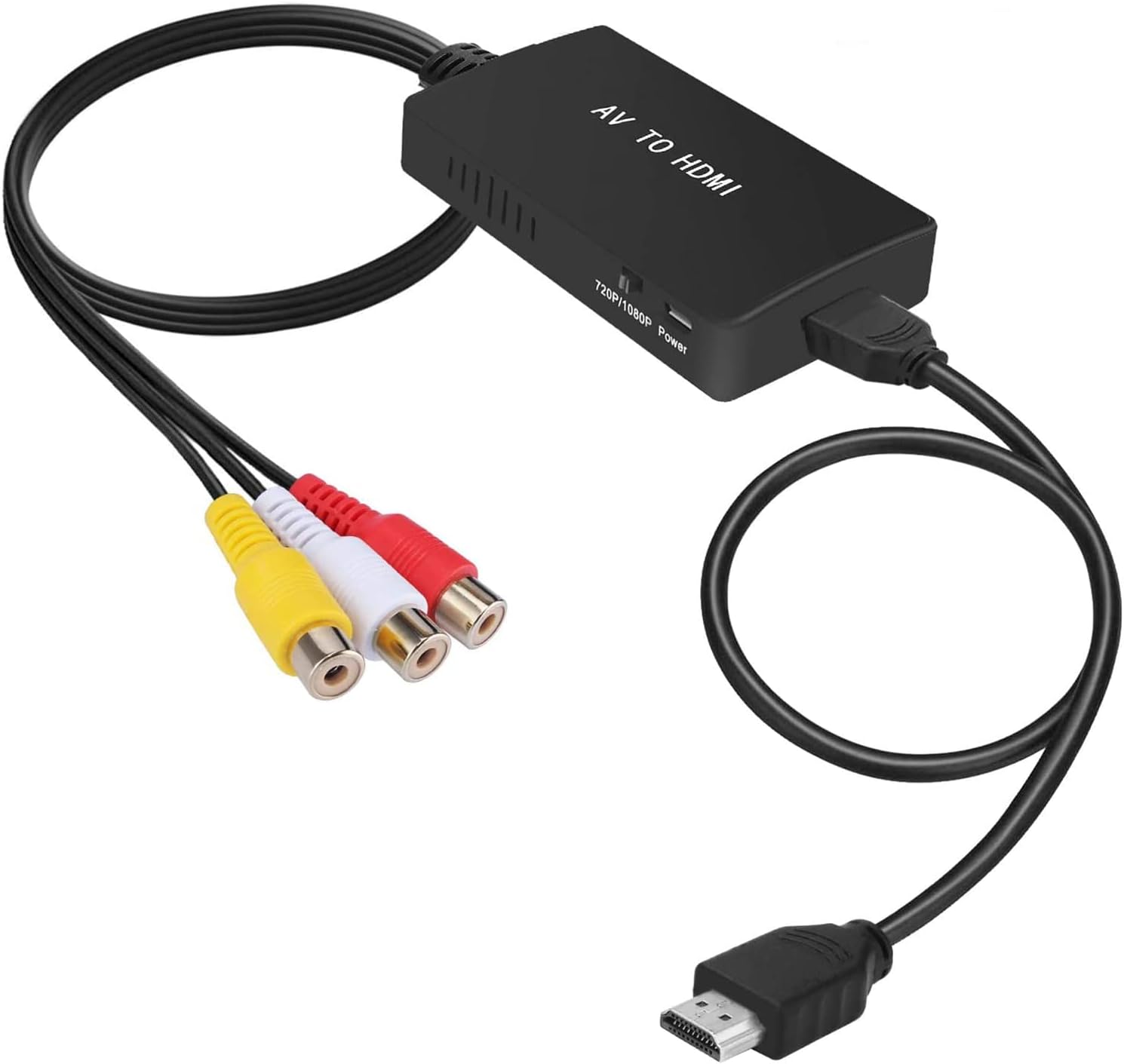
2. Package Contents
Upon opening the package, you should find the following items:
- 1x RCA Female to HDMI Converter
- 1x HDMI Cable
- 1x USB Power Cable
- 1x User Manual

3. Specifications
| Feature | Detail |
|---|---|
| Product Dimensions | 5.91 x 5.91 x 0.71 inches |
| Item Weight | 4.6 ounces |
| Model Number | R18 |
| Compatible Devices | PS1/2/3, VHS, VCR, Blue-Ray DVD Players |
| Specific Uses For Product | TV, Xbox, DVD Player |
| Connector Type | RCA Female to HDMI Female |
| Color | Black |
| Input Ports | 1x RCA Female (Yellow, White, Red) |
| Output Ports | 1x HDMI 1.3 1080p |
| Supported TV Formats | PAL, NTSC3.58, NTSC4.43, SECAM, PAL/M, PAL/N |

4. Setup Instructions
Follow these steps to connect your Tengchi RCA to HDMI Converter:
- Connect RCA Cables: Plug the RCA (Yellow for video, White for left audio, Red for right audio) cables from your source device (e.g., VCR, DVD player, game console) into the corresponding female RCA input ports on the converter.
- Connect HDMI Cable: Connect one end of the HDMI cable (included) to the HDMI output port on the converter. Connect the other end of the HDMI cable to an available HDMI input port on your HD TV, monitor, or projector.
- Provide Power: Connect the included USB power cable to the converter's power input port. Plug the other end of the USB cable into a 5V 1A USB power source (not included), such as a USB port on your TV or a USB wall adapter. The converter requires external power to function.
- Select Input on Display: Switch your TV or monitor's input source to the HDMI port where the converter is connected.


For a visual guide on setting up the converter, please watch the official product video below:
5. Operating Instructions
The Tengchi RCA to HDMI Converter is designed for simple operation:
- Automatic Conversion: The converter automatically detects and converts the analog composite signal to a 1080p HDMI signal.
- Resolution Switch: The converter features a switch to select between 720p and 1080p output resolutions. Choose the resolution that best suits your display and source device for optimal picture quality.
- Standard TV Format Support: The converter supports various standard TV formats including PAL, NTSC3.58, NTSC4.43, SECAM, PAL/M, and PAL/N. This ensures broad compatibility with different regional video standards.

6. Troubleshooting
If you encounter issues with your converter, please refer to the following common solutions:
- No Picture/Signal:
- Ensure all RCA and HDMI cables are securely connected to their respective ports.
- Verify that the USB power cable is connected to a 5V 1A power source and the converter's power light (if any) is on.
- Confirm that your TV/monitor input is set to the correct HDMI port.
- Try switching the 720p/1080p resolution switch on the converter. Some older TVs might prefer 720p.
- Black and White Picture / No Color:
- This often indicates an issue with the video signal format. Ensure the converter is set to the correct PAL/NTSC standard for your source device. The converter supports multiple formats, but incorrect selection can lead to monochrome output.
- Check that the yellow RCA cable (video) is securely connected.
- Flickering Picture / Unstable Signal:
- Ensure the power supply is stable and sufficient (5V 1A).
- Check for loose cable connections.
- Try a different HDMI cable or HDMI port on your TV.
- No Audio / Distorted Audio:
- Verify that the white (left audio) and red (right audio) RCA cables are correctly and securely connected.
- Check the audio settings on your TV/monitor.
- Compatibility with Wii Consoles:
Please note that the Tengchi RCA to HDMI Converter is designed for composite video (Yellow RCA). The Nintendo Wii console typically outputs video via component cables (Red, Green, Blue for video, plus Red, White for audio). While some Wii models might have composite output, the primary and higher quality output is component. This converter is not compatible with component video signals. If you are using a Wii, ensure you are using a Wii AV cable that specifically outputs composite video (Yellow, White, Red) and not component video. If your Wii only outputs component, a different type of converter (component to HDMI) would be required.
- Picture Quality Not Improved:
This converter converts an analog signal to digital; it does not upscale the resolution or improve the original quality of the analog signal. The output quality will be limited by the input quality of your source device. For example, a VHS tape will still appear as a VHS quality video on an HD screen, albeit converted to 1080p.
7. Maintenance
To ensure the longevity and optimal performance of your Tengchi RCA to HDMI Converter, follow these maintenance guidelines:
- Keep the device in a cool, dry place, away from direct sunlight, high temperatures, and humidity.
- Avoid exposing the converter to water or other liquids.
- Do not disassemble or attempt to repair the device yourself. This will void the warranty.
- Clean the converter with a soft, dry cloth. Do not use harsh chemicals or abrasive cleaners.
- Disconnect the power when the device is not in use for extended periods.
8. Warranty and Support
The Tengchi RCA to HDMI Converter comes with a ONE YEAR WARRANTY. If you are not satisfied for any reason whatsoever, or if you encounter any issues not covered in this manual, please do not hesitate to contact us. Our customer support team is available to assist you with any quality concerns or purchase errors.
To contact support, please refer to your purchase platform or the contact information provided with your product packaging.
Ask a question about this manual
Ask about setup, troubleshooting, compatibility, parts, safety, or missing instructions. Manuals+ will review the question and use this page’s manual context to help answer it.