
1. Introduction
The Blackstar Sonnet 120 is a 120-watt acoustic guitar combo amplifier designed to deliver natural and dynamic acoustic sound. It features two independent channels, four built-in reverbs, and versatile connectivity options including USB and Bluetooth. This manual provides essential information for the safe setup, operation, and maintenance of your amplifier.
2. Important Safety Instructions
- Read these instructions thoroughly before operating the amplifier.
- Keep these instructions for future reference.
- Heed all warnings on the amplifier and in this manual.
- Follow all instructions.
- Do not use this apparatus near water.
- Clean only with a dry cloth.
- Do not block any ventilation openings. Install in accordance with the manufacturer’s instructions.
- Do not install near any heat sources such as radiators, heat registers, stoves, or other apparatus (including amplifiers) that produce heat.
- Do not defeat the safety purpose of the polarized or grounding-type plug. A polarized plug has two blades with one wider than the other. A grounding-type plug has two blades and a third grounding prong. The wide blade or the third prong are provided for your safety. If the provided plug does not fit into your outlet, consult an electrician for replacement of the obsolete outlet.
- Protect the power cord from being walked on or pinched, particularly at plugs, convenience receptacles, and the point where they exit from the apparatus.
- Only use attachments/accessories specified by the manufacturer.
- Use only with the cart, stand, tripod, bracket, or table specified by the manufacturer, or sold with the apparatus. When a cart is used, use caution when moving the cart/apparatus combination to avoid injury from tip-over.
- Unplug this apparatus during lightning storms or when unused for long periods of time.
- Refer all servicing to qualified service personnel. Servicing is required when the apparatus has been damaged in any way, such as power-supply cord or plug is damaged, liquid has been spilled or objects have fallen into the apparatus, the apparatus has been exposed to rain or moisture, does not operate normally, or has been dropped.
3. Features
The Blackstar Sonnet 120 amplifier includes the following features:
- Powerful 120W amplifier for rich and dynamic acoustic sound.
- Equipped with an 8-inch speaker and two tweeters for full-range audio.
- Two independent channels with separate microphone and instrument inputs for versatility.
- 3-band EQ and 2-band EQ with Shape buttons for precise tone shaping.
- Highpass Filter and Brilliance control to fine-tune acoustic instrument frequencies.
- Four built-in reverbs (Hall, Plate, Studio, Chamber) for sound enhancement.
- USB and XLR D.I. outputs for recording and mixer connections.
- Line input and Bluetooth connectivity options for versatile use.
- Tilt-back stand for optimal on-stage use.
- Stylish blonde finish.
4. Setup
4.1 Unpacking and Placement
Carefully remove the amplifier from its packaging. Place the amplifier on a stable, flat surface. Ensure adequate ventilation around the unit. The integrated tilt-back stand can be used to angle the amplifier for improved sound projection during performances.
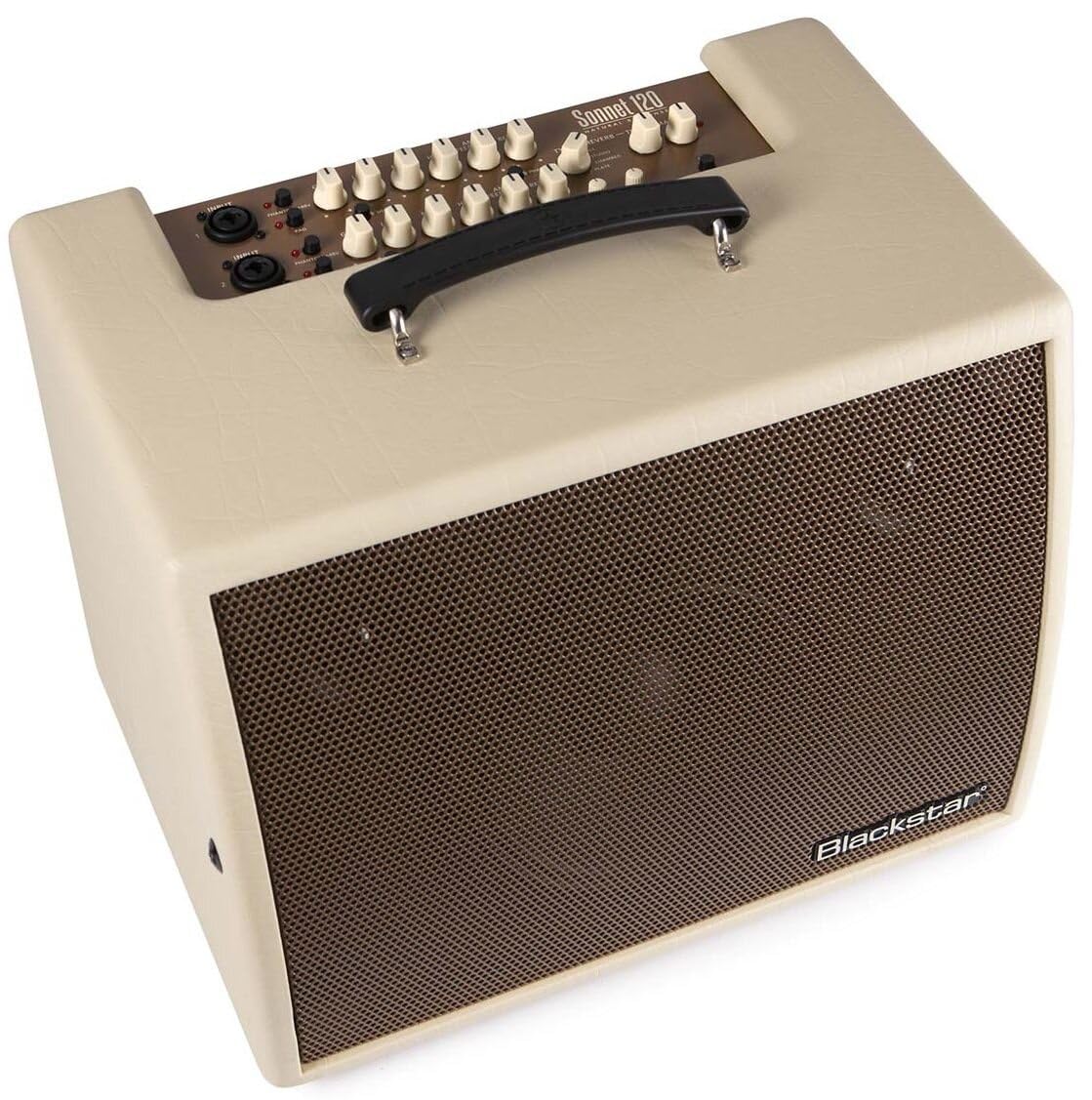
Figure 4.1: Front view of the Blackstar Sonnet 120 amplifier in Blonde finish.
4.2 Power Connection
Connect the supplied power cord to the MAINS INPUT on the rear panel of the amplifier and then to a suitable AC power outlet. Ensure the power switch is in the OFF position before connecting.
4.3 Connecting Instruments and Microphones
The Sonnet 120 features two independent channels. Each channel has a combination XLR/TRS input jack.
- Channel 1 & 2 Input: Connect your acoustic guitar, other acoustic instrument, or microphone to these inputs.
- PAD Button: Engages a 10dB attenuation for high-output instruments to prevent clipping.
- Phantom Power (+48V): Activates 48V phantom power for condenser microphones connected to the XLR input.

Figure 4.3: Close-up of the amplifier's control panel, showing input jacks and various controls.

Figure 4.4: Rear panel of the amplifier, detailing the power input, effects loops, and D.I. outputs.
5. Operating Instructions
5.1 Powering On/Off
After all connections are made, switch the POWER button on the rear panel to the ON position. The amplifier will power on. To power off, switch the POWER button to the OFF position.
5.2 Adjusting Volume and Tone
- GAIN: Adjusts the input sensitivity for each channel. Set to achieve a strong signal without clipping.
- LOW, MID, HIGH (EQ): These knobs control the bass, midrange, and treble frequencies for each channel. Adjust to shape your desired tone.
- SHAPE Button: Provides an alternative EQ curve for Channel 1 (3-band EQ) and Channel 2 (2-band EQ).
- MASTER: Controls the overall output volume of the amplifier.
5.3 Using Reverb
The Sonnet 120 offers four reverb types:
- TYPE: Selects between Hall, Plate, Studio, and Chamber reverb effects.
- REVERB: Adjusts the amount of reverb applied to the signal.
- TIME: Controls the decay time of the selected reverb effect.
5.4 Anti-Feedback Control
The ANTI-FEEDBACK knob helps to reduce unwanted feedback. Rotate this knob to find the optimal setting that eliminates feedback without significantly altering your tone.
5.5 Phase Button, Highpass Filter, and Brilliance
- PHASE Button: Inverts the phase of the input signal, which can help reduce feedback in certain situations.
- HIGHPASS FILTER: Cuts low frequencies, useful for cleaning up muddy tones or reducing rumble.
- BRILLIANCE: Adds high-frequency sparkle to the sound.
5.6 Bluetooth Pairing
Press the BLUETOOTH button to activate Bluetooth pairing mode. Search for 'Blackstar Sonnet 120' on your device and connect. The LED will indicate pairing status.
5.7 USB Audio Connection
Connect a USB cable from the USB AUDIO port on the rear panel to your computer. The amplifier can function as an audio interface for recording or playback.
5.8 XLR D.I. Outputs
The XLR D.I. OUTPUTS (MIX D.I. OUTPUT and XLR GROUND LIFT) allow you to send the amplifier's signal directly to a mixing console or recording interface. The Ground Lift switch can help eliminate hum caused by ground loops.
6. Maintenance
- Cleaning: Use a dry, soft cloth to clean the exterior of the amplifier. Do not use abrasive cleaners or solvents.
- Storage: Store the amplifier in a dry environment, away from extreme temperatures and humidity.
- Ventilation: Ensure that the amplifier's ventilation openings are not obstructed during use or storage.
7. Troubleshooting
| Problem | Possible Cause | Solution |
|---|---|---|
| No sound output | Power not connected, volume knobs low, instrument cable faulty, speaker cable disconnected (internal). | Check power connection, increase MASTER and channel GAIN, test instrument cable, contact service if internal issue suspected. |
| Distorted sound | GAIN too high, PAD not engaged for high-output instrument, faulty instrument or cable. | Reduce GAIN, engage PAD button, test with different instrument/cable. |
| Feedback | Microphone/instrument too close to speaker, high volume, room acoustics. | Adjust ANTI-FEEDBACK knob, use PHASE button, reposition instrument/microphone, reduce volume. |
| Bluetooth connection issues | Device not in pairing mode, amplifier not discoverable, interference. | Ensure Bluetooth button is pressed, check device's Bluetooth settings, move closer to amplifier, restart both devices. |
8. Specifications
| Specification | Value |
|---|---|
| Model Number | SONN120BL |
| Output Wattage | 120 Watts |
| Item Weight | 24.2 pounds |
| Product Dimensions | 14 x 18.7 x 16.5 inches |
| Color | Blonde |
| Material Type | Wood |
| Compatible Devices | Guitar |
| Connector Type | USB, XLR |
| Power Source | Corded Electric |

Figure 8.1: Dimensions of the Blackstar Sonnet 120 amplifier.
9. Warranty and Support
For warranty information and technical support, please refer to the official Blackstar website or contact your authorized Blackstar dealer. Keep your proof of purchase for any warranty claims.


