Introduction
Thank you for choosing the Salter 9182 SV3R Glass Analyser Bathroom Scale. This scale is designed to provide accurate measurements of your weight and various body composition metrics, including body fat, body water, muscle mass, bone mass, and Body Mass Index (BMI). It features an 8-user memory and an athlete mode, making it suitable for multiple users to track their progress. Please read this manual thoroughly before use to ensure proper operation and to achieve the most accurate results.
Important Safety Information
- Do not use this scale if you have a pacemaker or any other implanted medical device.
- Do not use this scale if you are pregnant.
- The body fat, body water, muscle mass, bone mass, and BMI measurements are not calibrated for individuals under 20 years of age. Weight measurements are suitable for individuals over 16 years of age.
- Always ensure the scale is placed on a hard, flat, and stable surface for accurate readings. Uneven or soft surfaces like carpet can significantly affect accuracy.
- Keep the scale dry and clean. Avoid exposing it to excessive moisture.
Setup
1. Unpacking and Battery Installation
Your Salter 9182 SV3R scale comes with the necessary CR2 batteries included. Locate the battery compartment on the underside of the scale. Remove any protective plastic strips from the battery before first use. Ensure the battery is inserted with the correct polarity.

Image: The Salter 9182 SV3R scale, showing its sleek design and the included CR2032 battery.
2. Scale Placement
For optimal accuracy, place the scale on a hard, flat, and stable surface. Avoid placing it on carpets or uneven flooring. If you must use the scale on carpet, attach the provided carpet feet to the underside of the scale. These feet help to stabilize the scale and reduce measurement inaccuracies caused by soft surfaces.
3. Unit Selection
On the underside of the scale, locate the switch to select your preferred unit of measurement: Kilograms (KG), Stones (ST), or Pounds (LB).
4. Setting Up User Profiles (for Body Analysis)
The scale can store data for up to 8 users. To set up a user profile:
- Press the '↑' or '↓' button (located on the back edge, faintly etched) to select an empty program slot (1-8).
- Press the 'Set' button (middle button).
- Use the '↑' or '↓' buttons to select your gender (male/female icon).
- Press 'Set'.
- Use the '↑' or '↓' buttons to set your height in centimeters (cm).
- Press 'Set'.
- Use the '↑' or '↓' buttons to set your age.
- Press 'Set' to confirm and save the profile.
Repeat these steps for each user.
Operation
1. Instant Weight Reading
To obtain a quick weight measurement without body analysis:
- Gently tap the scale with your foot or step on it briefly to activate the display.
- Wait for the display to show '0.0' or '0.00'.
- Step onto the scale with bare feet, standing still and distributing your weight evenly.
- Your weight will be displayed. The scale will automatically turn off after a few seconds.

Image: Step onto the scale with bare feet for an instant weight reading.
2. Full Body Analysis (Using User Profiles)
To measure weight and body composition metrics:
- Press the '↑' or '↓' button to select your user profile number (1-8). The scale will display your stored height and age to confirm the correct profile.
- Wait for the display to show '0.0' or '0.00'.
- Step onto the scale with bare feet, ensuring your feet are in contact with the metal electrodes on the glass platform. Stand still.
- The scale will first display your weight, then cycle through your body fat percentage, body water percentage, muscle mass, bone mass, and BMI.
- If your feet are not sufficiently moist, the scale may only display your weight. For accurate body analysis, ensure your feet are clean and slightly moist.

Image: The easy-to-read backlit display shows measurements and allows switching between metric and imperial units.

Image: The scale measures various body composition metrics including Body Fat, Body Water, Muscle Mass, Bone Mass, and BMI.
3. Athlete Mode
The scale includes an 'Athlete Mode' for individuals who engage in intense physical activity. This mode adjusts the body composition algorithm for more accurate readings for athletes. To activate athlete mode, ensure it is selected during your user profile setup if applicable.

Image: The scale supports 8 user memory and includes an Athlete Mode for tailored measurements.
Maintenance
1. Cleaning
The glass platform can be cleaned with a damp cloth and mild detergent. Do not use abrasive cleaners or immerse the scale in water. Wipe dry immediately after cleaning.
2. Battery Replacement
When the battery is low, a low battery indicator will appear on the display. Replace the CR2 battery promptly to ensure continued accurate operation. Always dispose of old batteries responsibly.
3. Storage
Store the scale in a cool, dry place. Avoid storing it vertically or in areas with extreme temperatures or humidity.
Troubleshooting
| Problem | Possible Cause | Solution |
|---|---|---|
| Inaccurate or inconsistent readings | Scale not on a flat, stable surface; carpet feet not used on carpet; feet not moist enough for analysis. | Ensure scale is on a hard, flat surface. Use carpet feet if on carpet. Ensure bare feet are clean and slightly moist for body analysis. |
| Display shows 'Lo' or no display | Low battery. | Replace the CR2 battery. |
| Scale only shows weight, no body analysis | Feet not making proper contact with electrodes; user profile not selected; feet too dry. | Ensure bare feet are fully on the electrodes. Select your user profile before stepping on. Lightly moisten feet if necessary. |
| Error message (e.g., 'Err') | Overload; unstable reading; internal error. | Ensure weight is within 150 kg capacity. Step off and then back on the scale. If persistent, contact customer support. |
Specifications
| Feature | Detail |
|---|---|
| Model Number | 9182 SV3R |
| Maximum Weight Capacity | 150 kg (330 lb / 23 st 8 lb) |
| Weight Increments | 0.1 kg / 0.2 lb |
| Body Composition Measurements | Body Fat, Body Water, Muscle Mass, Bone Mass, BMI |
| User Memory | 8 users |
| Display Type | Backlit LCD |
| Power Source | 1 x CR2 Battery (included) |
| Material | Toughened Glass Platform |
| Product Dimensions | 30 x 30 x 2.2 cm |
| Item Weight | 1.3 kg |
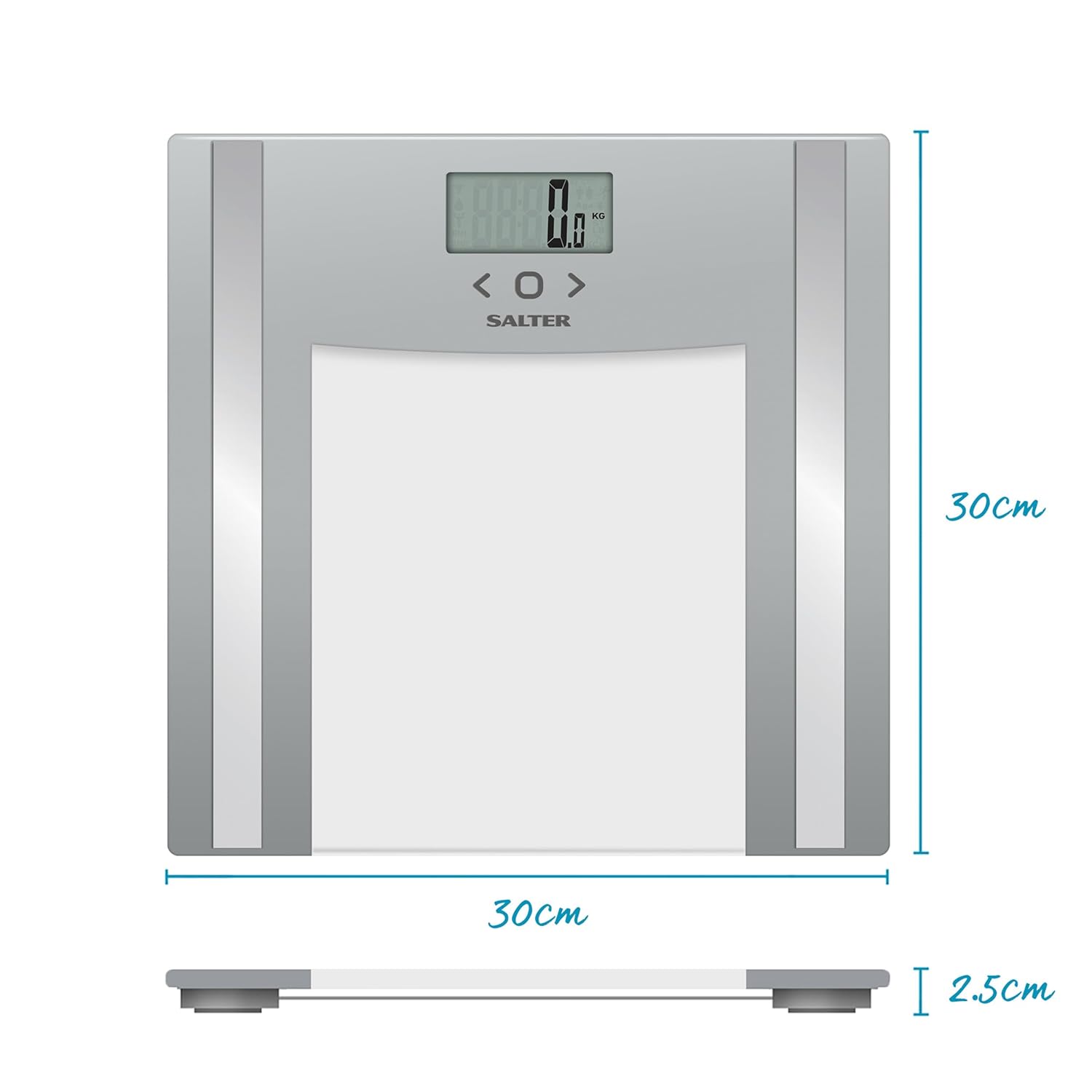
Image: Dimensions of the Salter 9182 SV3R Glass Analyser Bathroom Scale.
Warranty and Support
Salter products are manufactured to high quality standards. For information regarding warranty coverage or technical support, please refer to the warranty card included with your purchase or visit the official Salter website. Keep your proof of purchase for any warranty claims.
For further assistance, please contact Salter customer service through their official channels.


