
Introduction
This manual provides detailed instructions for the proper use and maintenance of your HOCO ES36 Wireless Earbuds. Please read this manual thoroughly before using the product to ensure optimal performance and longevity.

Image: The HOCO ES36 Wireless Earbuds resting inside their open charging case, displaying the earbuds and the case's interior.

Image: A close-up view of the HOCO ES36 Wireless Earbuds, highlighting their design and in-ear form factor.
Package Contents
- HOCO ES36 Wireless Earbuds (Left and Right)
- Wireless Charging Case
- Charging Cable
- User Manual (this document)
Setup
1. Charging the Earbuds and Case
Before first use, ensure both the earbuds and the charging case are fully charged. The charging case supports both wired charging via the included cable and wireless charging.
- Wired Charging: Connect the charging cable to the charging port on the case and to a USB power source. The indicator light on the case will show charging status.
- Wireless Charging: Place the charging case on a compatible wireless charging pad. Ensure the case is centered on the pad for efficient charging.

Image: The HOCO ES36 charging case placed on a wireless charging pad next to a smartphone, both receiving power wirelessly.
The earbuds will charge automatically when placed inside the charging case, provided the case has power.
2. Bluetooth Pairing
- Ensure the earbuds are in the charging case and the case is charged.
- Open the lid of the charging case. The earbuds will automatically power on and enter pairing mode.
- On your device (smartphone, tablet, etc.), go to Bluetooth settings and enable Bluetooth.
- Look for "HOCO ES36" or a similar name in the list of available devices and select it to connect.
- A pop-up window may appear on compatible devices, showing the connection status and battery levels.
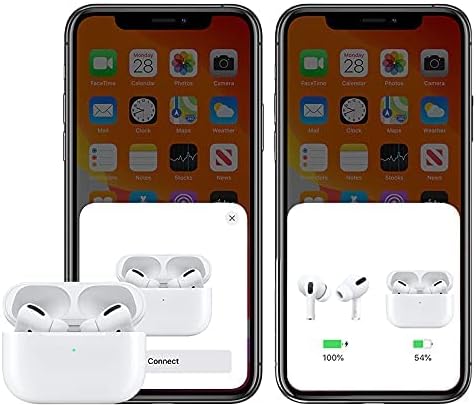
Image: A smartphone screen displaying a pop-up window indicating the HOCO ES36 earbuds are ready to connect, along with battery level indicators for both earbuds and the charging case.
Once paired, the earbuds will automatically connect to your device when the case lid is opened and Bluetooth is enabled on your device.
Operating Instructions
Automatic Functions
- Automatic Power On/Off: The earbuds power on automatically when removed from the case and power off when placed back into the case and the lid is closed.
- Automatic Pairing: After initial pairing, the earbuds will automatically connect to the last paired device when removed from the case.
- In-Ear Detection: Music playback may pause automatically when an earbud is removed from your ear and resume when reinserted (feature availability may vary).
- Master-Slave Switching: Both earbuds can function independently. You can use either the left or right earbud alone, and they will seamlessly switch roles.
Touch Controls
The HOCO ES36 earbuds feature touch-sensitive areas for controlling various functions. Specific touch gestures may vary slightly depending on your device and software version. Common functions include:
- Play/Pause: Single tap on either earbud.
- Next Track: Double tap on the right earbud.
- Previous Track: Double tap on the left earbud.
- Answer/End Call: Single tap on either earbud.
- Reject Call: Press and hold on either earbud.
- Activate Voice Assistant (Siri/Google Assistant): Triple tap on either earbud.

Image: The HOCO ES36 earbuds placed next to a smartphone displaying a music player interface, illustrating their use for audio playback.
Maintenance
- Cleaning: Regularly clean the earbuds and charging case with a soft, dry, lint-free cloth. Do not use abrasive materials or harsh chemicals.
- Storage: When not in use, store the earbuds in their charging case to protect them and keep them charged.
- Avoid Moisture: Keep the earbuds and case away from water and excessive moisture.
- Temperature: Avoid exposing the product to extreme temperatures (hot or cold).
Troubleshooting
| Problem | Solution |
|---|---|
| Earbuds not pairing |
|
| Only one earbud working |
|
| No sound |
|
| Charging case not charging |
|
Specifications
| Feature | Detail |
|---|---|
| Brand | HOCO |
| Model Name | Airpods Pro (ES36) |
| Item Model Number | ES36 |
| Connectivity Technology | Wireless |
| Wireless Communication Technology | Bluetooth 5.0 |
| Headphones Form Factor | In Ear |
| Headphones Ear Placement | In Ear |
| Noise Control | Active Noise Cancellation (Note: This typically refers to passive noise isolation for this product type unless specific ANC features are detailed by the manufacturer.) |
| Talk/Music Time | Approximately 3 hours |
| Standby Time | Approximately 150 hours |
| Charging | Supports Wireless Charging |
| Included Components | Cable, Wireless Charging Case |
| Color | White |
| Package Dimensions | 18.8 x 11.2 x 3.6 cm; 190 g |
Safety Information
Please observe the following safety guidelines to prevent damage to the product or injury to yourself:
- Do not disassemble, repair, or modify the product.
- Do not expose the product to fire or high temperatures.
- Avoid listening at high volume levels for extended periods to prevent hearing damage.
- Keep the product out of reach of children and pets.
- Dispose of the product and its components responsibly according to local regulations.
Warranty and Support
For warranty information and customer support, please refer to the documentation provided at the point of purchase or contact your retailer. HOCO products typically come with a limited warranty against manufacturing defects. Please retain your proof of purchase for warranty claims.


