
1. Introduction
This manual provides essential instructions for the safe and efficient operation of your Anker PowerCore 10K Wireless portable charger (Model A1615). This device offers both wireless and wired charging capabilities for a variety of compatible electronic devices. Please read this manual thoroughly before using the product and retain it for future reference.
2. Package Contents
Ensure all items are present in your package:
- PowerCore 10K Wireless Portable Charger
- USB-A to USB-C Cable
- Travel Pouch
- Welcome Guide (this manual)
- Worry-Free 18-Month Warranty Card
Note: A wall charger is not included and must be purchased separately.
3. Product Overview
The Anker PowerCore 10K Wireless features a compact design with multiple charging options.

Figure 1: Front view of the Anker PowerCore 10K Wireless portable charger, showing the Anker logo and wireless charging pad.
Components:
- Wireless Charging Pad: Located on the top surface, indicated by the Anker logo.
- Power Button: Activates the device and initiates wireless charging.
- LED Power Indicators: Four blue LEDs indicating remaining battery capacity.
- USB-A Output Ports (x2): For wired charging of devices.
- USB-C Input Port: For recharging the PowerCore itself.
- Anti-Slip Ring: Rubberized ring on the wireless charging pad to prevent devices from sliding.
4. Setup
4.1 Initial Charge
Before first use, fully charge your PowerCore 10K Wireless.
- Connect the provided USB-A to USB-C cable to the USB-C input port on the PowerCore.
- Connect the USB-A end of the cable to a compatible USB wall charger (not included). A 10W wall charger is recommended for optimal charging speed (approximately 5.5 hours for a full charge).
- The LED indicators will illuminate to show the charging progress. All four LEDs will be solid blue when fully charged.
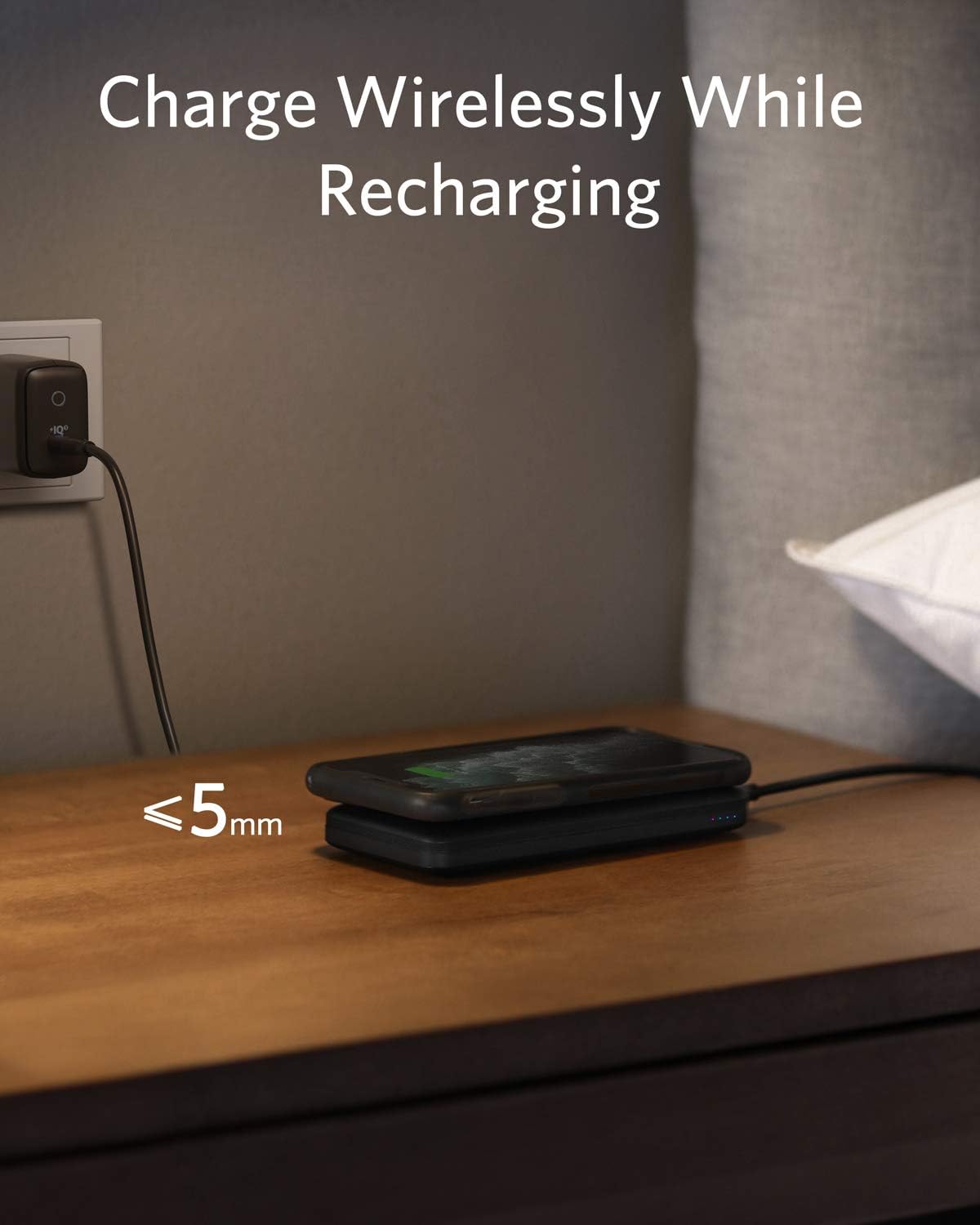
Figure 2: The PowerCore 10K Wireless connected to a wall charger for recharging, with a phone simultaneously charging wirelessly on top.
5. Operating Instructions
5.1 Wireless Charging
The PowerCore 10K Wireless supports 5W wireless charging for Qi-enabled devices.
- Press the power button on the side of the PowerCore to activate wireless charging.
- Place your Qi-enabled device (e.g., smartphone, wireless earbuds) directly on the center of the wireless charging pad, ensuring it aligns with the Anker logo.
- A red LED indicator next to the 25% battery LED will light up, indicating that wireless charging has begun. Your device's screen should also show a charging icon.
- For stable charging, ensure your device is centered on the pad. Cases thicker than 5mm, or cases made of metal, magnets, cards, or grips may interfere with wireless charging.
- Wireless charging for Apple Watch is not supported.

Figure 3: A smartphone being wirelessly charged on the Anker PowerCore 10K Wireless, demonstrating portability.
5.2 Wired Charging
The PowerCore 10K Wireless features two USB-A output ports for wired charging, with a total maximum output of 12W.
- Connect your device's charging cable to one of the USB-A output ports on the PowerCore.
- Connect the other end of the cable to your device.
- The PowerCore will automatically begin charging your device. The LED indicators will show the remaining battery capacity.

Figure 4: The Anker PowerCore 10K Wireless simultaneously charging a phone wirelessly and another device via a wired USB connection.
5.3 Simultaneous Charging (Pass-Through)
You can charge your device wirelessly while the PowerCore itself is being recharged.
- Connect the PowerCore's USB-C input port to a wall charger.
- Place your Qi-enabled device on the wireless charging pad.
- The PowerCore will simultaneously recharge itself while providing wireless power to your device.
6. Maintenance
- Store the PowerCore in a cool, dry place away from direct sunlight and extreme temperatures.
- Clean the device with a soft, dry cloth. Do not use harsh chemicals or abrasive materials.
- Avoid dropping or subjecting the device to strong impacts.
- To preserve battery lifespan, fully charge the PowerCore at least once every 3 months if not in regular use.
7. Troubleshooting
Device not charging wirelessly:
- Ensure the PowerCore is turned on by pressing the power button.
- Verify your device is Qi-enabled.
- Reposition your device on the center of the wireless charging pad.
- Remove any thick cases (over 5mm) or metallic objects, magnets, or cards from your device.
- Check if the PowerCore itself has sufficient charge (LED indicators).
Device not charging via USB-A ports:
- Ensure the PowerCore is turned on.
- Try a different USB cable.
- Try a different USB-A port.
- Check if the PowerCore itself has sufficient charge.
PowerCore not recharging:
- Ensure the USB-C cable is securely connected to both the PowerCore and the wall charger.
- Try a different USB-C cable and/or wall charger.
- Verify the wall charger is functioning correctly.
8. Specifications
| Feature | Detail |
|---|---|
| Model Number | A1615 |
| Battery Capacity | 10,000mAh |
| Wireless Output | 5W |
| USB-A Output | 12W Total Max Output (2 ports) |
| USB-C Input | 10W (for recharging PowerCore) |
| Dimensions | 5.43 x 2.62 x 0.49 inches |
| Weight | 7.4 ounces |
| Color | Black |
9. Warranty and Support
Anker provides an 18-month worry-free warranty for this product. For technical support, warranty claims, or further assistance, please refer to the contact information provided in your Welcome Guide or visit the official Anker website.


