
Severin KA 4814
SEVERIN KA 4814 Filter Coffee Machine User Manual
Model: KA 4814
Important Safety Instructions
Please read these instructions carefully before using the appliance and keep them for future reference. This appliance is intended for household use only.
- Always ensure the appliance is unplugged before cleaning or maintenance.
- Do not immerse the appliance in water or any other liquids.
- Keep out of reach of children.
- Do not operate the appliance if the power cord or plug is damaged.
- Use only original accessories and spare parts.
- Ensure the voltage indicated on the rating label matches your mains voltage.
Product Overview
The SEVERIN KA 4814 is a filter coffee machine with an integrated grinder, designed for convenience and exceptional coffee aroma. It features an LED touch screen, blooming function, and a thermal carafe.

Figure 1: Front view of the SEVERIN KA 4814 Filter Coffee Machine, showing the stainless steel and black housing, LED display, and thermal carafe.
Components:
- Bean Hopper with Lid
- Water Tank with Level Indicator
- LED Touch Display
- Control Panel Buttons
- Integrated Grinder
- Swiveling Filter Holder (for permanent or paper filter)
- Thermal Carafe with Brewing Lid
- Drip Stop System
- Power Cord

Figure 2: Close-up of the LED touch screen display, showing time, coffee strength, and power indicators.
Setup
- Unpacking: Carefully remove all packaging materials and check for any damage. Keep packaging for future transport if needed.
- First Use Cleaning: Before first use, clean all removable parts (carafe, filter holder) with warm soapy water. Wipe the exterior of the appliance with a damp cloth.
- Positioning: Place the coffee machine on a stable, level, and heat-resistant surface. Ensure adequate ventilation around the appliance.
- Power Connection: Plug the power cord into a suitable grounded wall outlet.
- Initial Rinse Cycle: Fill the water tank with fresh cold water up to the MAX mark. Do not add coffee beans or ground coffee. Run a full brewing cycle to clean the internal components. Discard the water.
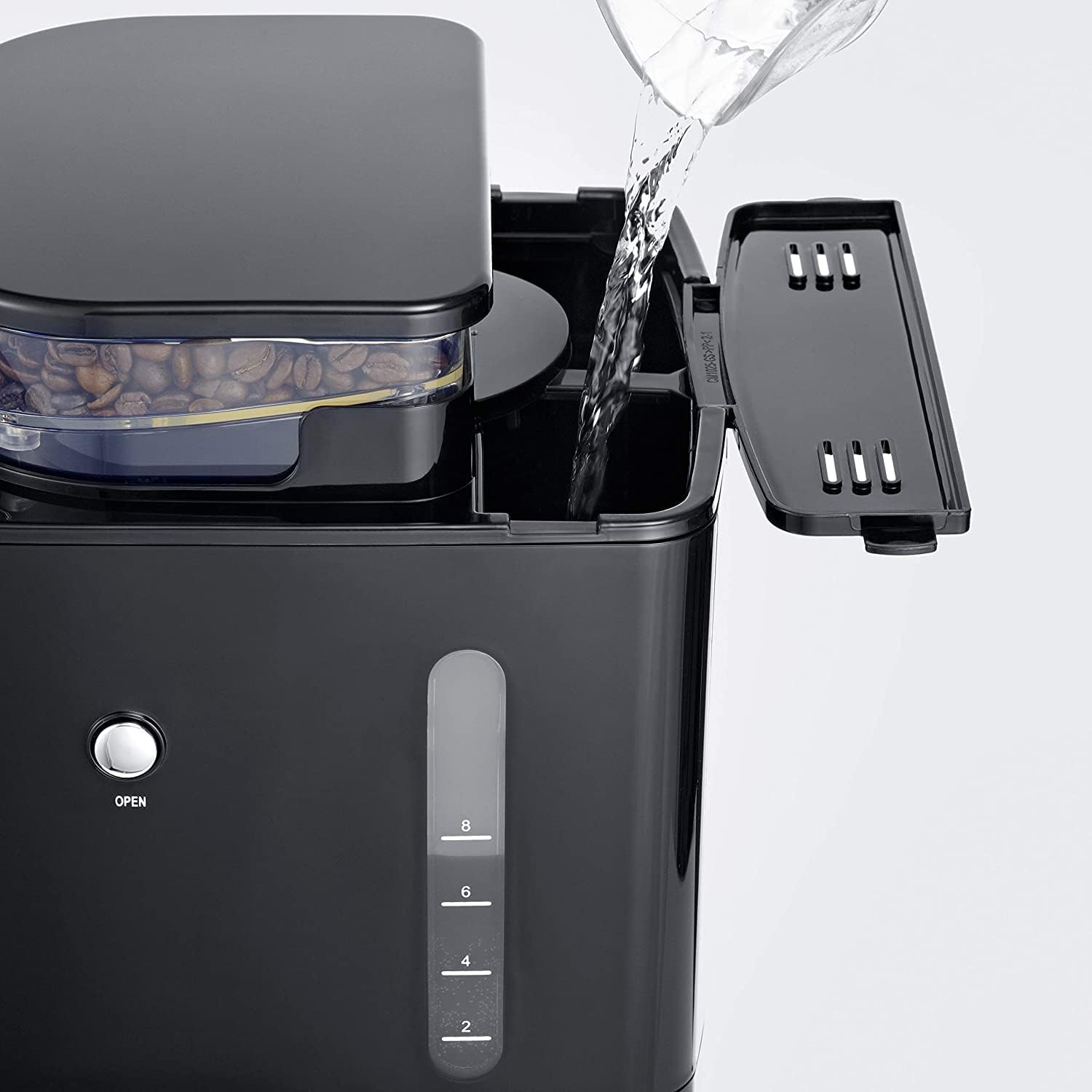
Figure 3: Illustrates pouring fresh water into the water tank, visible on the side of the machine.
Operating Instructions
Brewing Coffee with Fresh Beans:
- Fill Water Tank: Open the water tank lid and fill with fresh, cold water according to the desired number of cups (max. 1.0 L / 8 cups).
- Add Coffee Beans: Open the lid of the bean hopper and fill with whole coffee beans (max. 200g). Close the lid securely.

Figure 4: Coffee beans visible in the transparent hopper on top of the machine.
- Insert Filter: Place the permanent filter or a size 1x4 paper filter into the swiveling filter holder.
- Select Grind and Quantity: Use the controls on the LED display to adjust the desired grind fineness and coffee quantity (number of cups). The machine offers 3 aroma levels.
- Start Brewing: Press the start button. The machine will grind the beans, initiate the blooming function (pre-wetting for enhanced aroma), and then brew the coffee.
- Serving: Once brewing is complete, the machine will automatically shut off. The thermal carafe keeps coffee warm for an extended period.
Brewing Coffee with Pre-Ground Coffee:
- Fill Water Tank: As above, fill with fresh, cold water.
- Deactivate Grinder: Use the control panel to deactivate the integrated grinder function.
- Add Ground Coffee: Place a size 1x4 paper filter or the permanent filter into the filter holder. Add the desired amount of pre-ground coffee.


Figure 5: Left: Adding pre-ground coffee to a paper filter. Right: Adding pre-ground coffee to the reusable permanent filter.
- Start Brewing: Press the start button. The machine will brew the coffee using the pre-ground coffee.
Timer Function:
The LED touch screen allows you to set a timer for automatic brewing. This feature enables you to wake up to freshly brewed coffee.
- Prepare the machine with water and coffee (beans or ground) as described above.
- Press the timer button on the control panel.
- Use the adjustment buttons to set the desired brewing time.
- Confirm the setting. The machine will start brewing at the set time.
Maintenance and Cleaning
Regular cleaning ensures optimal performance and extends the lifespan of your coffee machine.
Daily Cleaning:
- Unplug: Always unplug the appliance from the power outlet before cleaning.
- Carafe and Filter Holder: Wash the thermal carafe and filter holder with warm soapy water after each use. Rinse thoroughly and dry.
- Bean Hopper: Empty any remaining coffee beans from the hopper. Wipe the inside with a dry cloth.
- Exterior: Wipe the exterior of the coffee machine with a damp cloth. Do not use abrasive cleaners or harsh chemicals.
Descaling:
Depending on water hardness and frequency of use, descaling should be performed regularly (e.g., every 2-3 months). Use a commercial descaling agent suitable for coffee machines or a mixture of vinegar and water (1:1 ratio).
- Fill the water tank with the descaling solution.
- Place the empty carafe under the filter holder.
- Run a brewing cycle without coffee.
- After the cycle, let the solution sit in the machine for about 15-30 minutes.
- Run two full cycles with fresh, clean water to rinse the machine thoroughly.
Troubleshooting
| Problem | Possible Cause | Solution |
|---|---|---|
| Coffee does not brew. | No water in tank; machine not plugged in; power outage. | Fill water tank; check power connection; check circuit breaker. |
| Coffee tastes weak. | Insufficient coffee quantity; grind too coarse; machine needs descaling. | Increase coffee amount; adjust grind fineness; descale the machine. |
| Grinder not working. | Bean hopper empty; grinder deactivated for pre-ground coffee; blockage. | Fill bean hopper; activate grinder function; check for bean blockage. |
| Water leaks from machine. | Filter holder not correctly seated; carafe not positioned correctly. | Ensure filter holder is securely in place; position carafe correctly. |
Specifications
- Model: KA 4814
- Power: 1000 Watts
- Capacity: 1.0 Liters (approx. 8 cups)
- Voltage: 230 Volts
- Material: Stainless steel, high-quality plastic
- Dimensions (L x W x H): 22 x 27 x 43.51 cm
- Weight: 4.7 Kilograms
- Features: Integrated grinder, LED touch screen, Timer function, Blooming function, Grinder deactivation, Permanent filter, Anti-drip system, Automatic shut-off.
Warranty and Support
This SEVERIN appliance comes with a standard manufacturer's warranty. Please refer to the warranty card included in your product packaging for specific terms and conditions.
Spare Parts Availability: Spare parts for this model are available for at least 1 year from the date of purchase.
For technical support, service, or spare parts inquiries, please contact SEVERIN customer service or visit the official SEVERIN website. You can find contact information on the SEVERIN website or in your product documentation.
Official Website: www.severin.com
Related documentsKA 4814


Ask a question about this manual
Ask about setup, troubleshooting, compatibility, parts, safety, or missing instructions. Manuals+ will review the question and use this page’s manual context to help answer it.