
Important Safety Information
Please read all instructions carefully before installation and use. Improper installation or use may result in property damage, serious injury, or death. If you do not understand these instructions or have doubts about the safety of the installation, please contact a qualified installer.
- Weight Capacity: Do not exceed the maximum load capacity of 60kg (132 lbs). This mount is designed for TVs between 37 and 75 inches.
- Wall Type: This mount is designed for installation on wood stud walls, solid concrete walls, or brick walls. Do not install on drywall alone.
- UL Safety Certified: PERLESMITH wall mounts are tested to 4 times their maximum load capacity according to American UL safety standards, ensuring durability and earthquake resistance.
- Children and Pets: Securing your TV to the wall is the best way to prevent tip-over, protecting children and pets from potential injury.


Pre-Installation Checklist
Before you begin installation, please verify the following:
- TV Size: Your TV should be between 37 and 75 inches.
- TV Weight: The combined weight of your TV and any accessories must not exceed 60kg (132 lbs).
- VESA Compatibility: Check the VESA mounting pattern on the back of your TV. This mount supports VESA patterns from 200x100mm up to 600x400mm.
- Wall Type: Confirm your wall is a wood stud, concrete, or brick wall.
- TV Back Profile: If your TV has an uneven back surface, use the included spacers to create a flat mounting area and facilitate cable management.
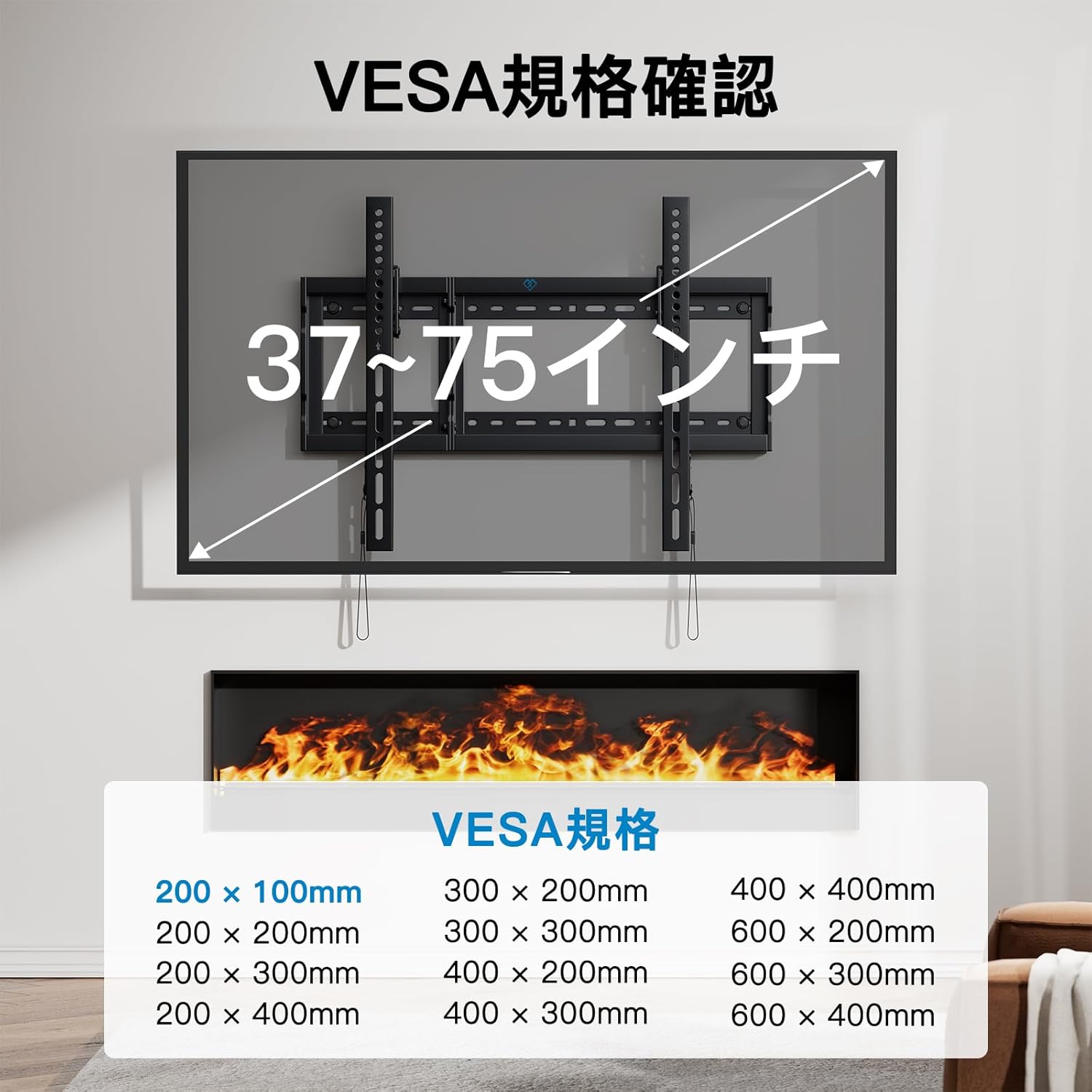
Installation Guide
The PERLESMITH TV wall mount is designed for easy installation. Follow these steps for a secure setup.

Step 1: Check Package Contents
Unpack all components and verify that all parts are present according to the included parts list. If any parts are missing or damaged, please contact customer support.
Step 2: Attach Brackets to TV
Carefully place your TV face down on a soft, clean surface. Attach the vertical TV brackets to the back of your TV using the appropriate screws and spacers (if needed) that match your TV's VESA pattern. Ensure the brackets are securely fastened and level.
Step 3: Mount Wall Plate
Determine the desired height for your TV. Using a stud finder, locate the wood studs in your wall (for wood stud installation) or mark the drilling points for concrete/brick walls. Drill pilot holes and securely fasten the wall plate to the wall using the provided lag bolts and washers. Ensure the wall plate is perfectly level.
Step 4: Hang TV on Wall Plate
With assistance, carefully lift the TV with the attached brackets and hook them onto the wall plate. Ensure the TV is properly seated and centered on the wall plate.
Step 5: Secure TV and Adjust Tilt
Once the TV is hung, engage the security locks on the bottom of the TV brackets to prevent accidental dislodgement. This mount features a convenient wire release system for tilt adjustment. Pull the release wires to adjust the TV's downward tilt angle (up to 7 degrees) for optimal viewing. Release the wires to lock the tilt in place.


Operating Instructions
This PERLESMITH wall mount allows for easy tilt adjustment to optimize your viewing experience.
Adjusting the Tilt Angle
To adjust the tilt angle, simply pull the wire release cords located at the bottom of the TV brackets. This will disengage the tilt lock, allowing you to manually adjust the TV's angle downwards by up to 7 degrees. Once the desired angle is achieved, release the cords to re-engage the lock. The tilt range may vary slightly depending on your TV size.

Maintenance
Regular maintenance helps ensure the longevity and safe operation of your TV wall mount.
- Cleaning: Wipe the mount with a soft, dry cloth. Do not use abrasive cleaners or solvents.
- Periodic Checks: Periodically check all screws and connections to ensure they are tight and secure. Over time, vibrations or movement may cause fasteners to loosen.
- Cable Management: Utilize the included cable holders to keep wiring neat and organized, preventing strain on cables and ports.
Troubleshooting
If you encounter any issues during or after installation, refer to the following common problems and solutions:
- TV is not level: Ensure the wall plate was installed level. If the wall plate is level, check if the TV brackets are properly aligned on the TV. Minor adjustments can sometimes be made by slightly loosening and re-tightening the bracket screws on the TV.
- Difficulty tilting the TV: Ensure the wire release cords are fully pulled to disengage the tilt lock. Check for any obstructions behind the TV that might be preventing movement.
- Missing parts or damaged components: Do not proceed with installation. Contact PERLESMITH customer support immediately for replacement parts.
- TV feels unstable: Double-check all wall plate and TV bracket connections. Ensure all screws are tightened securely. Verify that the wall type is appropriate and that the mount is installed into studs or solid concrete/brick.
Specifications
| Feature | Specification |
|---|---|
| Brand | PERLESMITH |
| Model Number | PSLTK4 |
| Mounting Type | Wall Mount |
| Movement Type | Tilt |
| Compatible TV Size | 37 - 75 inches |
| Maximum Load Capacity | 60 kg (132 lbs) |
| VESA Compatibility | 200x100mm to 600x400mm |
| Maximum Tilt Angle | 7 degrees (downward) |
| Distance from Wall | 37 mm (1.46 inches) |
| Material | Iron (Cold-rolled steel) |
| Color | Black |
| Product Dimensions | 3 x 4 x 1.27 cm (mount only); 1.67 kg |
| UPC | 619191098682 |
Warranty and Support
PERLESMITH stands behind the quality of its products.
- 3-Year Quality Guarantee: All PERLESMITH products come with a three-year quality guarantee service from the date of purchase.
- Customer Support: If you have any questions, concerns, or require assistance with assembly, missing parts, or product issues, please do not hesitate to contact our customer support team. We are committed to providing prompt and helpful service.


