
Panda PAN50SWF2
Panda 1.7 cu.ft Portable Washing Machine (Model: PAN50SWF2) Instruction Manual
High-End Fully Automatic Compact Washer with 11lbs Capacity and Folding Window
1. Product Overview
The Panda 1.7 cu.ft Portable Washing Machine is a compact, fully automatic appliance designed for convenience and efficiency in smaller living spaces. Its space-saving design makes it suitable for apartments, RVs, vacation homes, dorms, or as a secondary washer.
Key features include:
- Capacity: 1.7 cubic feet, accommodating up to 11 lbs of laundry.
- Control Panel: Electronic touchpad controls with an LED display for easy operation.
- Programs: 6 washing programs (Normal, Quick, Heavy, Bulky, Delicate, Spin Only) with an upgraded Extra Rinse function.
- Mobility: Equipped with 2 built-in rollers at the back bottom for easy movement.
- Safety: Features a Control Lock option and a large plastic folding window.
- Power: Operates on regular 3-prong 110 Voltage.

Image: Front view of the Panda 1.7 cu.ft Portable Washing Machine.
2. Setup and Installation
Before initial use, ensure all packaging materials are removed. A black rectangular plastic piece located at the bottom of the machine must be removed before operation.
2.1 Water Connection
The washing machine features 2 rear inlets for water connection. It comes with 2 inlet hoses and a standard faucet adapter kit.

Image: Two identical inlet hoses and a quick adapter set for faucet connection.
Connecting to a Faucet (Recommended for Apartments)
- Remove the aerator or nozzle from your tap.
- Screw the silver part of the quick faucet adapter to the tap and tighten firmly. The adapter has both female and male threads; choose the size that suits your tap.
- Connect one end of an inlet hose to the "COLD" connector on the back of the washer and tighten with a wrench.
- Block the "HOT" water inlet with the provided plug.
- Connect the other end of the inlet hose to the silver adapter already fixed on the faucet.
- When operating, always select "Cool" temperature on the control panel. You can adjust your desired water temperature (warm, hot, or cold) directly from your tap.

Image: Close-up of the cold water inlet on the back of the washer, showing a hose connected and the hot inlet plugged.

Image: Close-up of the quick adapter connected to a kitchen faucet, with the inlet hose attached.
Connecting to Separate Hot and Cold Water Supplies
For permanent installations with dedicated hot and cold water lines:
- Connect one inlet hose to the "COLD" water inlet on the washer and to the cold water supply.
- Connect the second inlet hose to the "HOT" water inlet on the washer and to the hot water supply.
- Ensure both connections are tight to prevent leaks.
2.2 Drain Hose Setup
Hook the drain hose up to a sink or laundry tub. Ensure the drain hose reaches a height of at least 30 inches during washing to properly drain water. Secure the drain hose to prevent it from dislodging during the cycle, which could lead to water spillage.

Image: The drain hose with its U-hook, designed to hang over a sink or tub edge.
2.3 Positioning and Mobility
The washer is equipped with two rear bottom wheels for easy mobility. To move the machine, tilt it backward at approximately a 70-degree angle and then pull or push it to the desired location. Ensure the machine is level before operation to prevent excessive vibration and noise.

Image: Close-up of the two rear bottom wheels on the washing machine, facilitating easy movement.
3. Operating Instructions
3.1 Control Panel Overview
The electronic touchpad control panel features an LED display and various buttons for selecting procedures, delay start, load size, temperature, program, and extra rinse options.

Image: Close-up of the washing machine's control panel, showing the LED display and various function buttons.
3.2 Loading Laundry
Open the folding lid and load clothes one by one into the stainless steel tub. It is important to clean all pockets and remove any small objects before loading to prevent damage to the machine or clothing.

Image: The washing machine with its folding lid open, showing the stainless steel tub interior.
3.3 Adding Detergent and Softener
The machine has a detergent box. Add appropriate amounts of HE (High-Efficiency) detergent to the detergent compartment. If desired, add fabric softener to the designated softener compartment. Close the detergent box and the main lid before starting the cycle.

Image: Close-up of the detergent dispenser drawer, showing compartments for detergent and softener.
3.4 Starting a Wash Cycle
- Press the "On/Off" button to power on the machine.
- Select your desired washing program (e.g., Normal, Heavy, Delicate) using the "Program" button.
- Adjust the load size and water temperature as needed. Remember to select "Cool" on the panel if using a faucet connection and adjusting temperature at the tap.
- Press the "Start/Pause" button to begin the cycle.
3.5 Adding Clothes During a Cycle
If you need to add clothes after a cycle has started:
- Press the "Start/Pause" button to pause the cycle.
- Open the lid, add the clothes, and close the lid securely.
- Press the "Start/Pause" button again to resume the cycle.
Note: If the lid is opened without pausing, the machine may beep and display an error code (e.g., E3). Closing the lid will stop the beeping and clear the error.
4. Maintenance
Regular maintenance ensures optimal performance and longevity of your washing machine.
4.1 Cleaning the Lint Filter
The washing machine has a lint filter located inside the tub. It is recommended to clean this filter after each wash load to prevent lint buildup and ensure efficient drainage.

Image: Interior view of the washing machine tub, highlighting the location of the lint filter.
4.2 Cleaning the Pump Filter
The pump filter, located at the bottom rear of the machine, should be cleaned once a month to prevent blockages and maintain proper drainage. Refer to the detailed instructions in the full manual for accessing and cleaning the pump filter.
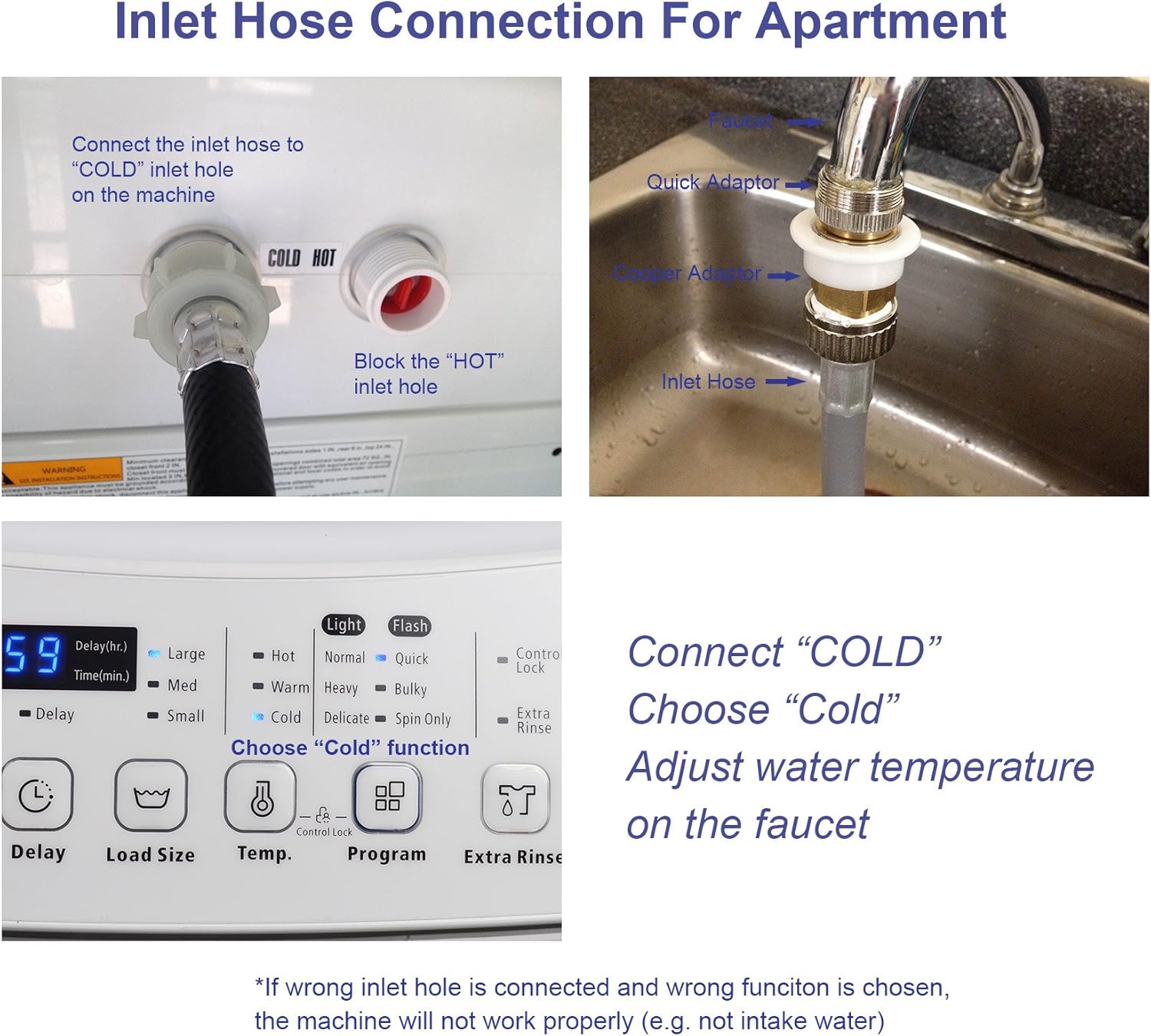
Image: Bottom rear section of the washing machine, indicating the access point for the pump filter.
5. Troubleshooting
This section addresses common issues you might encounter with your washing machine.
- Water Splashing/Leaking from Drum: Ensure the machine is perfectly level. Sometimes, powder detergent in a pile can cause splashing during the first fill; flattening it out or using liquid HE detergent can help.
- Drain Hose Issues: Always secure the drain hose firmly to the sink or tub to prevent it from dislodging and causing water spillage, especially when washing unattended.
- Insufficient Water Pressure: If the machine does not fill correctly, check that the water faucet is fully open and providing adequate pressure.
- Error Code E3: This code typically appears if the lid is opened during operation without first pressing the "Start/Pause" button. Close the lid firmly to clear the error and resume the cycle.
6. Specifications
| Feature | Detail |
|---|---|
| Product Dimensions | 20.5"D x 19.75"W x 37"H |
| Brand | Panda |
| Capacity | 1.7 Cubic Feet (11 lbs) |
| Special Features | Child Lock, Delay Start, Extra Rinse |
| Access Location | Top Load |
| Finish Type | Plastic |
| Color | White |
| Cycle Options | Normal, Quick, Heavy, Bulky, Delicate, Spin Only |
| Item Weight | 77.8 Pounds |
| Material | Plastic (Tub: Stainless Steel) |
| Controls Type | Touch Pad |
| Operation Mode | Fully Automatic |
| Max Rotational Speed | 800 RPM |
| Voltage | 110 Volts |
| Noise Level | 74 Decibels |
| Installation Type | Freestanding |
| Display | LED |
| Model Number | PAN50SWF2 |
| UPC | 855312007571 |
| Included Components | 2 inlet hoses with a standard size faucet adaptor, power cord |
7. Warranty and Support
7.1 Manufacturer Warranty
The Panda 1.7 cu.ft Portable Washing Machine comes with a 1 Year Manufacturer Warranty. Please retain your proof of purchase for warranty claims.
7.2 Customer Support
For any questions, technical assistance, or warranty service, please contact Panda customer support. Refer to the contact information provided with your product packaging or visit the official Panda website for details.
8. Product Video Demonstration
Watch this official product video for a visual guide on the Panda 1.7 cu.ft Portable Automatic Washing Machine's appearance, accessories, installation, operation, and maintenance.
Video: Official demonstration of the Panda 1.7 cu.ft Portable Automatic Washing Machine (Model PAN50SWF2).
Related documentsPAN50SWF2

Ask a question about this manual
Ask about setup, troubleshooting, compatibility, parts, safety, or missing instructions. Manuals+ will review the question and use this page’s manual context to help answer it.