
Introduction
The CHORTAU EC-10 Power Extension Cable is designed to extend the reach of your 12V DC power adapter for compatible devices, such as CHORTAU security cameras. This 33-foot (10-meter) cable features a 2.1mm x 5.5mm DC connector, ensuring a reliable power connection for your outdoor or indoor surveillance equipment.
Product Overview
The EC-10 extension cable provides additional length for your power supply, offering flexibility in device placement. It is specifically designed for 12V DC applications and features standard 2.1mm inner diameter and 5.5mm outer diameter connectors.
- Length: 33 feet (10 meters)
- Connector Specification: 2.1mm x 5.5mm DC
- Voltage Compatibility: 12V DC
- Connector Gender: Male-to-Female
- Compatibility: Suitable for CHORTAU SE2000 security cameras (ASINs: B07KP73NMS and B086WC1J6C) and other devices requiring a 12V DC power supply with 2.1mm x 5.5mm connectors.
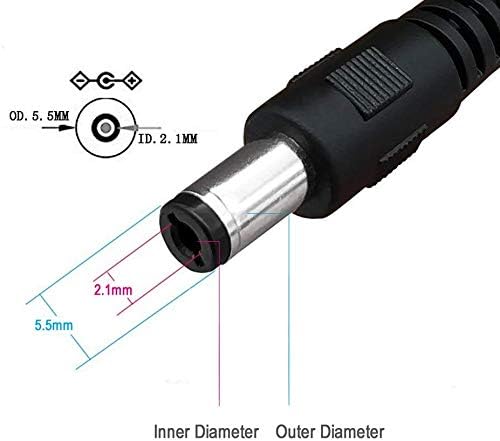
Image: Detailed view of the DC connector dimensions, illustrating the 2.1mm inner diameter and 5.5mm outer diameter for proper compatibility.
Setup Instructions
- Verify Compatibility: Ensure your device and its power adapter require a 12V DC power supply and have 2.1mm x 5.5mm DC connectors. Incompatible connectors or voltage can damage your equipment.
- Disconnect Power: Before connecting the extension cable, ensure the power adapter is unplugged from the wall outlet to prevent electrical hazards.
- Connect Extension Cable: Plug the male end of the CHORTAU EC-10 extension cable into the female port of your device's power input. Then, plug the female end of the extension cable into the male plug of your 12V DC power adapter.
- Secure Connections: Ensure all connections are firm and fully seated to prevent intermittent power supply.
- Restore Power: Plug the power adapter back into the wall outlet. Your device should now receive power through the extended cable.

Image: An example setup showing the CHORTAU power extension cable connecting a security camera to its power adapter, illustrating the connection points.
Operating Instructions
Once properly connected, the CHORTAU EC-10 Power Extension Cable operates passively to deliver power to your device. No user interaction is required for its operation. Ensure the cable is routed safely to avoid tripping hazards or damage.
Maintenance
- Regular Inspection: Periodically inspect the cable for any signs of wear, cuts, kinks, or damage to the insulation.
- Environmental Protection: If used outdoors, ensure connectors are protected from direct exposure to wet weather conditions to prevent corrosion and short circuits. While the cable itself is robust, the connection points are vulnerable to moisture.
- Cleaning: Keep the cable and connectors clean and free from dust and debris. Use a dry, soft cloth for cleaning.
- Storage: When not in use, coil the cable neatly without sharp bends and store it in a dry place.
Troubleshooting
No Power to Device
- Check Connections: Ensure both ends of the extension cable are securely plugged into the power adapter and the device.
- Verify Power Adapter: Confirm that the original power adapter is functioning correctly by testing it directly with the device (without the extension cable) if possible.
- Check Power Outlet: Ensure the wall outlet is supplying power. Test with another appliance.
- Inspect Cable for Damage: Look for any visible damage to the extension cable. A damaged cable may prevent power transmission.
- Compatibility Check: Double-check that the voltage (12V DC) and connector dimensions (2.1mm x 5.5mm) are correct for your device.
Specifications
| Model Number | EC-10 |
| Length | 33 feet (10 meters) |
| Connector Size | 2.1mm (Inner Diameter) x 5.5mm (Outer Diameter) |
| Voltage | 12 Volts DC |
| Connector Gender | Male-to-Female |
| Item Weight | 10.6 ounces |
| Package Dimensions | 7.91 x 2.56 x 1.57 inches |
| Manufacturer | CHORTAU |
Warranty and Support
CHORTAU offers a 30-day money-back guarantee and a 3-year warranty for this product. If you encounter any issues or have questions regarding the CHORTAU EC-10 Power Extension Cable, please contact CHORTAU customer support for assistance. Refer to your purchase documentation for specific contact details.