Introduction
Thank you for choosing the Vanguard VEO3+263CB Carbon Fiber Tripod. This manual provides detailed instructions for the proper setup, operation, and maintenance of your tripod to ensure optimal performance and longevity. Please read this manual thoroughly before using the product.
The VEO3+263CB is designed for photographers seeking versatility and stability, featuring a unique Multi-Angle Center Column (MACC) for diverse shooting angles, including overhead and macro photography.
Product Overview

Image: The Vanguard VEO3+263CB Carbon Fiber Tripod in its standard upright configuration, showcasing its robust design and included ball head.
Key Features
- Multi-Angle Center Column (MACC): Moves almost 360° in any direction for versatile shooting, from landscape to macro. Can be used as a multi-mount with the included VEO+ MA1 Adaptor.
- Carbon Fiber Construction: Extends to 68 inches with a maximum load capacity of 33 pounds. Folds compactly to 29.9 inches and weighs 4.7 pounds.
- Easy-Set Twist Locks: Solid and easy to clean twist locks for quick leg adjustments.
- Multiple Leg Angles: Three easy-set leg angles (23°, 50°, and 80°) with an innovative push-button lock for stability on uneven terrain.
- Interchangeable Feet: Includes rubber feet that can be replaced with included spiked feet for enhanced grip.
- Monopod Conversion: One tripod leg can be converted into a monopod for increased portability and flexibility.
- Removable Hook: Can be used to hang weight for additional stability in windy conditions.
- Arca-Compatible Ball Head: Features the VEO BH-160 Ball Head with a QS-60 V2 quick release plate for secure camera attachment.
- Premium Accessories: Comes with a padded tripod bag with a shoulder strap and an internal zip-up pocket.
What's in the Box
- Vanguard VEO3+263CB Carbon Fiber Tripod with VEO BH-160 Ball Head
- VEO+MA1 Adaptor
- Deluxe Tripod Bag
- Spiked Feet (set)
Setup
1. Unfolding the Tripod
- Release the leg locks on each leg.
- Extend each leg section to your desired height. Ensure all twist locks are securely tightened by twisting clockwise until firm.
- Adjust the leg angles by pressing the innovative push-button lock at the top of each leg. Select from 23°, 50°, or 80° to suit your shooting environment.
2. Attaching the Ball Head and Camera
- The VEO BH-160 Ball Head is pre-attached to the tripod. Ensure it is securely fastened.
- Attach the QS-60 V2 quick release plate to the base of your camera. Ensure it is tightened securely to prevent camera movement.
- Align the quick release plate with the clamp on the ball head and slide it in. Tighten the quick release lever to secure your camera.
3. Using the Multi-Angle Center Column (MACC)

Image: The tripod with its Multi-Angle Center Column extended horizontally, ideal for overhead or flat lay photography.
- To adjust the MACC, loosen the locking knob at the base of the center column.
- Tilt the center column to your desired angle. The MACC can pivot almost 360 degrees.
- Tighten the locking knob firmly to secure the MACC in position.
- For multi-mounting, attach the VEO+ MA1 Adaptor to the MACC. This allows for mounting additional accessories like lights or microphones.
Operating Instructions
1. Adjusting Height and Leg Angles
To change the tripod's height, loosen the twist locks on each leg section, extend or retract the legs, and then firmly tighten the twist locks. For different shooting perspectives, adjust the leg angles using the push-button locks. The 23° angle provides maximum height, 50° offers a mid-range height, and 80° allows for low-angle shooting.

Image: The tripod configured for low-angle photography, demonstrating the versatility of its leg angle adjustments and the Multi-Angle Center Column.
2. Monopod Conversion
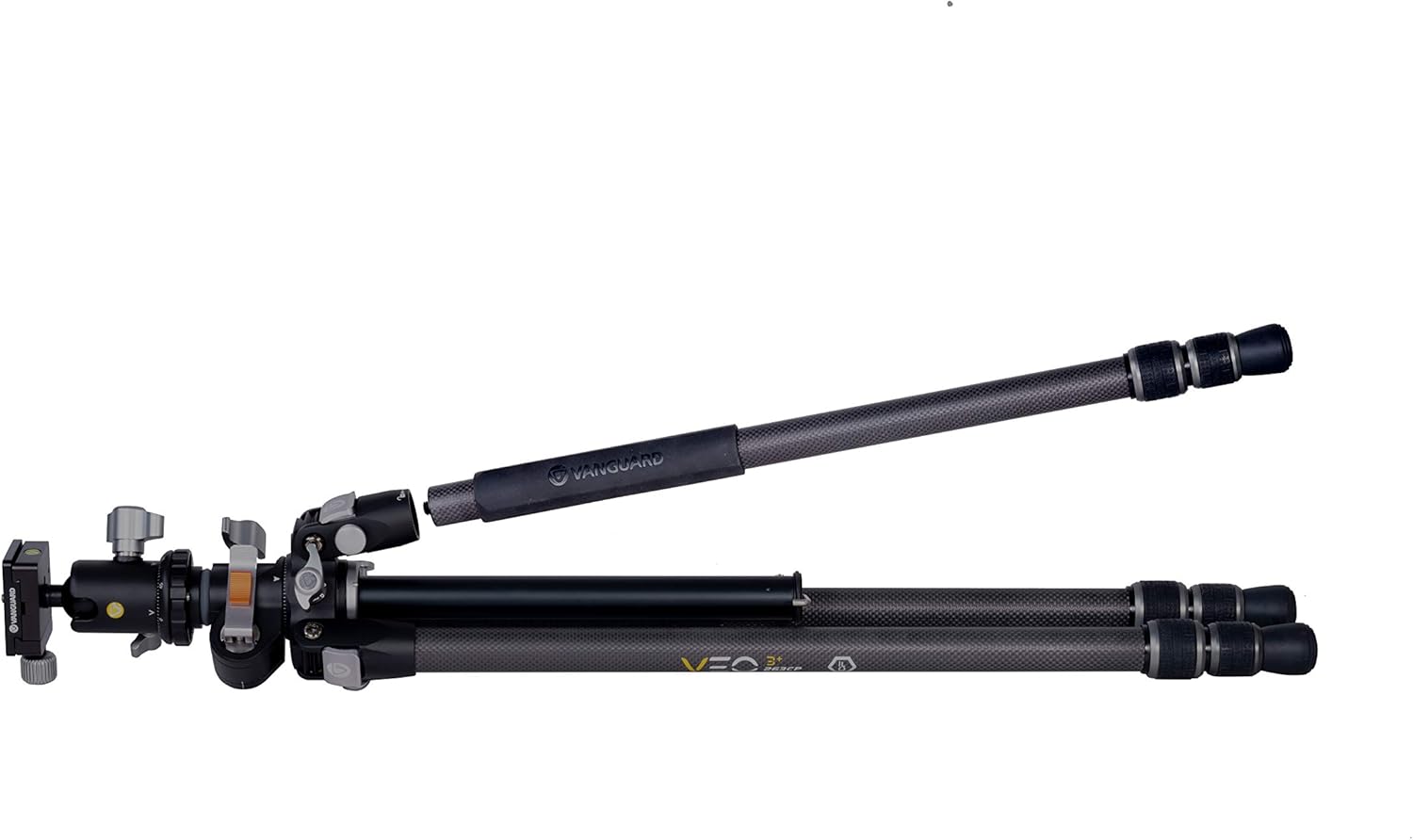
Image: One leg of the tripod detached, illustrating its capability to convert into a monopod for portable support.
One of the tripod legs can be detached and used as a monopod. To convert:
- Identify the leg with the colored ring or marking (usually one of the padded legs).
- Unscrew this leg from the tripod chassis.
- If desired, attach the ball head directly to the top of the detached leg for monopod use.
3. Enhancing Stability
For added stability, especially in windy conditions or when using heavy equipment, utilize the removable hook located at the bottom of the center column. Hang a weight, such as a camera bag, from this hook to lower the tripod's center of gravity.

Image: The tripod supporting a camera with a large lens and an external monitor, demonstrating its stability and multi-mounting capabilities.
Maintenance
Care and Cleaning
- After each use, especially in dusty or sandy environments, wipe down the tripod legs and joints with a clean, dry cloth.
- If the tripod gets wet, dry it thoroughly before storing to prevent corrosion.
- Periodically check all screws and fasteners to ensure they are tight. Do not overtighten.
- Avoid using harsh chemicals or abrasive materials for cleaning, as these can damage the carbon fiber finish or other components.
- For twist locks, if they become stiff, a small amount of silicone-based lubricant can be applied, but avoid oil-based lubricants which can attract dirt.
Troubleshooting
Common Issues and Solutions
- Issue: Tripod legs not extending/retracting smoothly.
Solution: Ensure twist locks are fully loosened. Clean any dirt or debris from the leg sections and twist lock mechanisms. - Issue: Tripod feels unstable.
Solution: Ensure all leg sections are fully extended and twist locks are securely tightened. Verify that leg angles are locked into position. Consider using the removable hook to add weight for increased stability. - Issue: Ball head not holding camera securely.
Solution: Ensure the quick release plate is firmly attached to your camera and the quick release lever on the ball head is fully tightened. Check that the ball head's main locking knob is tightened. - Issue: Multi-Angle Center Column (MACC) not holding position.
Solution: Ensure the MACC locking knob is tightened sufficiently after adjusting its angle.
Specifications
| Feature | Specification |
|---|---|
| Model Name | VEO3+263CB |
| Material | Carbon Fiber |
| Maximum Height | 68 Inches |
| Folded Length | 29.9 Inches |
| Item Weight | 4.7 Pounds |
| Weight Limit | 33 Pounds |
| Tripod Head Type | Ball Heads (VEO BH-160) |
| Product Dimensions | 31.22 x 6.22 x 5.03 inches |
Warranty and Support
Warranty Information
Vanguard products are manufactured to high-quality standards. For detailed warranty information specific to your VEO3+263CB tripod, please refer to the warranty card included with your product or visit the official Vanguard website.
Customer Support
Should you require further assistance, have questions about your product, or need to report an issue, please contact Vanguard customer support. You can find contact information and additional resources on the official Vanguard website: Vanguard Official Store.


