
1. Introduction
The NUMERIC Digital 600 EX V is an Uninterruptible Power Supply (UPS) designed to provide reliable backup power and protection for your electronic devices. This manual provides essential information for the safe and efficient operation of your UPS, including setup, operation, maintenance, and troubleshooting.
Key features of this UPS include cold start capability, extended battery run time models, full-time EMI/RFI suppression, microprocessor-based design, smart battery management, super boost automatic voltage regulator, and telephone/modem/fax/Ethernet line surge protection.
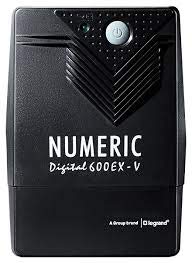
Figure 1.1: Front view of the NUMERIC Digital 600 EX V UPS, showing the power button and indicator lights.
2. Safety Information
Please read and follow all safety instructions carefully before installing or operating the UPS. Failure to do so may result in damage to the unit, connected equipment, or personal injury.
- Placement: Install the UPS in a well-ventilated area, away from direct sunlight, heat sources, and moisture. Ensure adequate clearance around the unit for proper airflow.
- Power Source: Connect the UPS to a grounded AC power outlet. Do not remove the grounding prong.
- Load Capacity: Do not overload the UPS. Ensure the total power consumption of connected devices does not exceed the UPS's rated capacity (0.6 Watts for this model).
- Battery: The UPS contains a sealed lead-acid battery. Do not attempt to open or service the battery yourself. Refer to qualified service personnel for battery replacement.
- Liquid and Foreign Objects: Keep liquids and foreign objects away from the UPS to prevent electric shock or damage.
- Emergency Shutdown: In an emergency, immediately disconnect the UPS from the AC power source and all connected equipment.
3. Package Contents
Verify that all items are present in the package:
- NUMERIC Digital 600 EX V UPS Unit
- User Manual (this document)
- Power Cord (if not integrated)
- Output Power Cables (if included)
If any items are missing or damaged, contact your dealer or NUMERIC customer support.
4. Product Features
The NUMERIC Digital 600 EX V UPS offers several advanced features to protect your equipment:
- Cold Start Capability: Allows the UPS to power on directly from its battery without AC input.
- Extended Battery Run Time Models: Provides longer backup duration during power outages.
- Full Time EMI/RFI Suppression: Filters out electromagnetic and radio frequency interference for cleaner power.
- Microprocessor Based Design: Ensures precise control and reliable performance.
- Smart Battery Management: Optimizes battery charging to extend battery life.
- Super Boost Automatic Voltage Regulator (AVR): Corrects minor power fluctuations without switching to battery power, preserving battery life.
- Telephone/Modem/Fax/Ethernet Line Surge Protection: Protects connected communication lines from power surges.
5. Setup Instructions
Follow these steps to set up your UPS:
- Unpack the UPS: Carefully remove the UPS from its packaging. Inspect for any shipping damage.
- Placement: Place the UPS on a flat, stable surface in a cool, dry, and well-ventilated area. Avoid placing it near windows or areas with excessive dust or moisture.
- Initial Charging: Connect the UPS to a standard grounded AC wall outlet. Allow the UPS to charge for at least 8 hours before connecting any equipment to ensure optimal battery performance. The UPS will charge whether it is turned on or off.
- Connect Equipment: After the initial charge, connect your computer, monitor, and other critical electronic devices to the UPS output receptacles. Ensure the total load does not exceed the UPS capacity.
- Connect Data Lines (Optional): If desired, connect your telephone, modem, fax, or Ethernet line through the surge protection ports on the UPS.

Figure 5.1: Side view of the NUMERIC Digital 600 EX V UPS, illustrating typical power input and output connections.
6. Operating the UPS
This section details how to power on and off your UPS and understand its indicators.
6.1 Powering On/Off
- To Power On: Press and hold the power button on the front panel for approximately 2 seconds until you hear a beep and the indicator light illuminates.
- To Power Off: Press and hold the power button for approximately 2 seconds until you hear a beep and the indicator light turns off.
6.2 Indicator Lights
The front panel features indicator lights to communicate the UPS status:
- Green LED (Solid): UPS is operating normally on AC power.
- Green LED (Flashing) & Audible Alarm: UPS is operating on battery power during an outage.
- Red LED (Solid) & Continuous Alarm: Battery low or UPS fault.
- Red LED (Flashing) & Intermittent Alarm: Overload condition.
7. Maintenance
Proper maintenance ensures the longevity and optimal performance of your UPS.
- Battery Care: The internal battery is designed for a specific lifespan. To maximize battery life, avoid frequent deep discharges. If the UPS is stored for an extended period, recharge it every three months for at least 8 hours.
- Cleaning: Periodically clean the exterior of the UPS with a soft, dry cloth. Do not use liquid or aerosol cleaners. Ensure ventilation openings are free from dust and debris.
- Battery Replacement: The battery is not user-replaceable. If the battery needs replacement, contact qualified service personnel.
8. Troubleshooting
This section provides solutions to common issues you might encounter with your UPS.
| Problem | Possible Cause | Solution |
|---|---|---|
| UPS does not turn on. | No AC input power; Battery discharged; UPS fault. | Check AC power connection and wall outlet. Allow UPS to charge for several hours. If problem persists, contact support. |
| UPS beeps intermittently on AC power. | Overload condition. | Disconnect non-essential equipment to reduce the load. Ensure total load is within UPS capacity. |
| Short battery backup time. | Battery not fully charged; Battery nearing end of life; Overload. | Ensure initial charge of 8 hours. Reduce connected load. If battery is old, consider professional replacement. |
| UPS continuously beeps and red LED is solid. | Battery low or internal fault. | Allow UPS to charge. If problem persists after charging, contact support. |
| Connected devices are not receiving power. | UPS is off; Output receptacles not connected; UPS fault. | Ensure UPS is powered on. Verify all cables are securely connected. |
9. Technical Specifications
Detailed specifications for the NUMERIC Digital 600 EX V UPS:
| Specification | Value |
|---|---|
| Brand | NUMERIC |
| Model | 600 EX V |
| Product Dimensions (LxWxH) | 28 x 18 x 10 cm |
| Item Weight | 5 kg |
| Output Power Capacity | 0.6 Watts |
| Voltage | 12 Volts |
| Battery Cell Composition | Sealed Lead Acid |
| Charging Time | 2 INR (Approximate, refer to full manual for details) |
| Material | Plastic |
| Form Factor | Rack (Note: This may refer to a rack-mountable option or general form factor, actual unit is typically tower) |
| Color | Black |
| Date First Available | 17 December 2019 |
10. Warranty and Support
The NUMERIC Digital 600 EX V UPS typically comes with a 2-Year Warranty. Please retain your purchase receipt for warranty claims.
For technical assistance, warranty service, or to report issues, please contact NUMERIC customer support. Refer to the contact information provided with your product packaging or visit the official NUMERIC website for the most up-to-date support details.
When contacting support, please have your product model (600 EX V) and serial number ready.


