1. Product Overview
The SpeaKa Professional SP-7870508 is a high-quality HDMI connection cable designed for reliable audio and video transmission. This cable features gold-plated connectors for optimal signal integrity and supports advanced functionalities such as Audio Return Channel (ARC) and HDMI Ethernet Channel. Its compact 0.3-meter length and angled connector design make it suitable for installations where space is limited or a specific cable routing is required.
Key Features:
- Angled HDMI Connector: One connector is angled at 90 degrees for convenient installation in tight spaces.
- HDMI Ethernet Channel (HEC): Allows for network data transmission over the HDMI cable.
- 3D Support: Compatible with 3D video formats.
- 4K2K Resolution: Supports resolutions up to 4K2K (3840 x 2160) at 30Hz.
- Audio Return Channel (ARC): Enables audio to be sent from a TV to an audio receiver via a single HDMI cable.
- Gold-Plated Connectors: Ensures corrosion resistance and enhanced signal transfer.

Figure 1: The SpeaKa Professional HDMI cable, featuring a 90-degree angled connector on one end and a straight connector on the other, both gold-plated. The cable is black and approximately 30 cm long.
2. Setup Instructions
This section details the steps for connecting your SpeaKa Professional HDMI cable to your devices.
2.1 Connecting the Cable
- Identify HDMI Ports: Locate the HDMI output port on your source device (e.g., Blu-ray player, game console, computer) and the HDMI input port on your display device (e.g., TV, monitor, projector). Ensure both devices are powered off before connecting.
- Connect Source Device: Insert one end of the SpeaKa Professional HDMI cable into the HDMI output port of your source device. The angled connector can be particularly useful for devices mounted close to a wall or in tight spaces.
- Connect Display Device: Insert the other end of the HDMI cable into the HDMI input port of your display device.
- Secure Connection: Ensure both connectors are fully seated in their respective ports to establish a stable connection. Do not force the connectors.
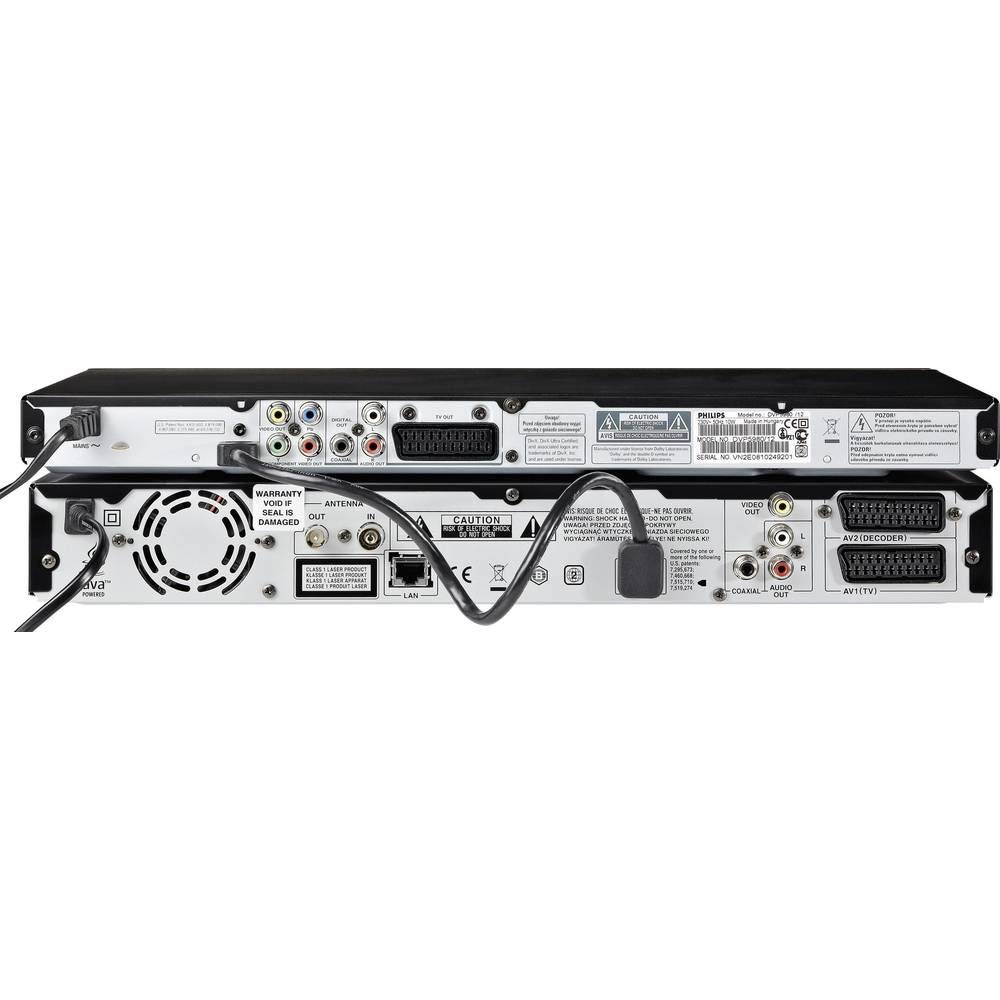
Figure 2: Example of HDMI cable connections on the rear panel of electronic devices. The image shows various ports, including HDMI, with cables properly inserted, illustrating a typical setup configuration.
2.2 Initial Power-Up
- Power On Devices: Turn on your display device first, then your source device.
- Select Input: On your display device, select the correct HDMI input source using your remote control or device menu.
- Verify Signal: Confirm that the audio and video signal from your source device is displayed correctly on your screen.
3. Operating Instructions
Once connected, the SpeaKa Professional HDMI cable facilitates the transmission of high-definition audio and video signals. No specific operational steps are required for the cable itself, as it functions passively to transmit data between compatible devices.
3.1 Audio Return Channel (ARC)
If your TV and audio receiver both support ARC, connect the HDMI cable to the designated "HDMI ARC" port on both devices. This allows audio from your TV's internal tuner or smart apps to be sent back to your audio receiver without needing a separate optical audio cable.
3.2 HDMI Ethernet Channel (HEC)
For devices that support HEC, this cable can share an internet connection among multiple HDMI-connected devices without the need for a separate Ethernet cable. Ensure both connected devices are HEC-compatible and configured correctly in their respective settings.
4. Maintenance and Care
Proper care of your HDMI cable will ensure its longevity and consistent performance.
- Handling: Always grasp the connector housing when plugging or unplugging the cable. Avoid pulling directly on the cable itself, as this can damage the internal wires or connectors.
- Cleaning: If connectors become dusty, gently wipe them with a dry, lint-free cloth. Do not use liquid cleaners directly on the connectors.
- Storage: When not in use, store the cable loosely coiled in a dry, cool place. Avoid sharp bends or kinks, which can damage the cable's internal structure.
- Environment: Keep the cable away from extreme temperatures, direct sunlight, and moisture.
5. Troubleshooting
If you encounter issues with your HDMI connection, refer to the following common troubleshooting steps:
- No Picture/Sound:
- Ensure both devices are powered on.
- Verify that the HDMI cable is securely connected to both the source and display devices.
- Check that the correct HDMI input is selected on your display device.
- Try connecting the cable to a different HDMI port on your display device, if available.
- Test the cable with another set of devices, if possible, to rule out a faulty cable or device.
- Intermittent Signal:
- Ensure the cable is not bent sharply or kinked.
- Check for any physical damage to the cable or connectors.
- Minimize interference by keeping the HDMI cable away from power cables or other electronic devices.
- Poor Picture Quality (Flickering, Artifacts):
- Ensure your source device is outputting a resolution supported by your display device.
- Check the display settings on both your source and display devices.
- ARC/HEC Not Working:
- Confirm that both your TV and audio device support ARC/HEC and that the cable is connected to the designated ARC-enabled HDMI ports.
- Enable ARC/HEC in the settings menus of both your TV and audio device.
6. Technical Specifications
Below are the detailed technical specifications for the SpeaKa Professional HDMI Connection Cable SP-7870508.
| Feature | Specification |
|---|---|
| Model Number | SP-7870508 |
| Cable Length | 0.3 meters (30 cm) |
| Connector 1 | HDMI Type A (Standard), Male, Straight |
| Connector 2 | HDMI Type A (Standard), Male, Angled (90 degrees) |
| Connector Plating | Gold |
| Color | Black |
| Supported Resolutions | Up to 3840 x 2160 (4K2K) at 30Hz |
| Supported Video Modes | 720p, 1080i, 1080p, 2160p |
| Data Transfer Rate | 10.2 Gbit/s |
| Features | 3D, Audio Return Channel (ARC), HDMI Ethernet Channel (HEC), Plug and Play |
| AWG Wire Size | 30 |

Figure 3: Technical drawing illustrating the dimensions of the HDMI connector, including measurements for width, height, and pin configuration. This diagram provides precise details for compatibility and design.
7. Warranty and Support
For information regarding warranty coverage and technical support for your SpeaKa Professional HDMI Connection Cable, please refer to the documentation provided with your purchase or visit the official SpeaKa Professional website. Contact details for customer service are typically available on the manufacturer's website.
Manufacturer: SpeaKa Professional
Date First Available: October 23, 2020


