
HOCO S3
HOCO S3 Nature Active Noise Reduction Bluetooth Headset
Instruction Manual
Introduction
Thank you for choosing the HOCO S3 Nature Active Noise Reduction Bluetooth Headset. This manual provides comprehensive instructions to help you set up, operate, and maintain your new headset, ensuring you get the best possible audio experience with precise sound quality and effective noise reduction.
Safety Information
- Do not expose the headset to extreme temperatures, humidity, or corrosive substances.
- Avoid dropping or subjecting the headset to strong impacts.
- Do not disassemble or attempt to repair the headset yourself. This will void the warranty.
- Clean the headset with a soft, dry cloth. Do not use harsh chemicals or abrasive materials.
- Listen at moderate volume levels to prevent hearing damage.
- Keep out of reach of children.
Package Contents
Please check the package for the following items:
- HOCO S3 Nature Bluetooth Headset
- USB Charging Cable
- Audio Cable (if included)
- Instruction Manual

Image: The HOCO S3 headset neatly packed in its carrying case, alongside the included USB charging cable and audio cable.
Product Overview
The HOCO S3 headset features an over-ear design with comfortable ear cushions and an adjustable headband. It integrates active noise reduction technology for an immersive audio experience.

Image: A front-side view of the HOCO S3 Nature Bluetooth Headset, showcasing its sleek black design and comfortable earcups.
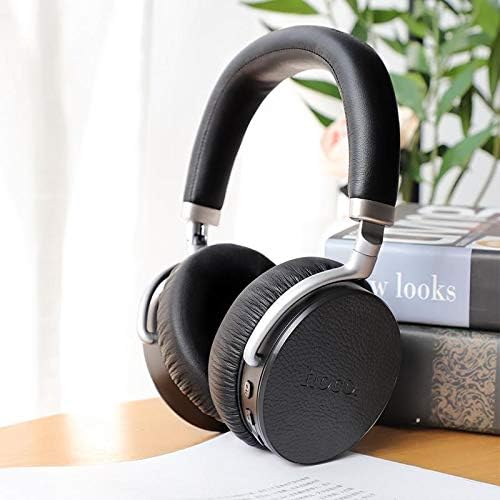
Image: A detailed view of the right ear cup of the HOCO S3 headset, highlighting the control buttons for power, volume, and active noise cancellation.
Setup
Charging the Headset
- Connect the small end of the USB charging cable to the charging port on the headset.
- Connect the large end of the USB charging cable to a USB power adapter (not included) or a computer's USB port.
- The LED indicator will illuminate to show charging status. It will turn off or change color when fully charged.
- A full charge provides approximately 6 hours of playback time.
Powering On/Off
- To Power On: Press and hold the Power button for approximately 3 seconds until the LED indicator flashes.
- To Power Off: Press and hold the Power button for approximately 3 seconds until the LED indicator turns off.
Bluetooth Pairing
- Ensure the headset is powered off.
- Press and hold the Power button for about 5-7 seconds until the LED indicator flashes red and blue alternately, indicating pairing mode.
- On your Bluetooth-enabled device (smartphone, tablet, laptop), go to the Bluetooth settings and turn on Bluetooth.
- Search for available devices. Select "HOCO S3" from the list.
- Once paired, the LED indicator will flash blue slowly, and you may hear a confirmation tone.
- The headset will automatically reconnect to the last paired device when powered on, if the device's Bluetooth is active and within range.
Operating
Music Playback Controls
- Play/Pause: Press the Multi-function button (usually the Power button) once.
- Next Track: Press and hold the Volume Up (+) button.
- Previous Track: Press and hold the Volume Down (-) button.
- Volume Up: Short press the Volume Up (+) button.
- Volume Down: Short press the Volume Down (-) button.
Call Management
- Answer/End Call: Press the Multi-function button once.
- Reject Call: Press and hold the Multi-function button for 2 seconds.
- Redial Last Number: Double-press the Multi-function button.
Active Noise Cancellation (ANC)
The HOCO S3 features active noise cancellation to reduce ambient noise, providing a more focused listening experience.
- Activate ANC: Locate the ANC switch or button on the headset (refer to product overview image for location). Slide the switch or press the button to turn ANC on. An indicator light may illuminate.
- Deactivate ANC: Slide the switch or press the button again to turn ANC off.

Image: A person comfortably wearing the HOCO S3 headset, demonstrating its over-ear fit and suitability for extended use.
Maintenance
Cleaning
- Wipe the headset regularly with a soft, dry, lint-free cloth.
- Do not use liquid cleaners, sprays, or solvents.
- For ear cushions, gently wipe with a slightly damp cloth if necessary, then dry immediately.
Storage
- When not in use, store the headset in its original carrying case or a protective pouch to prevent damage.
- Store in a cool, dry place away from direct sunlight and extreme temperatures.
- Avoid placing heavy objects on top of the headset.

Image: The HOCO S3 headset folded for compact storage, highlighting its portability.
Troubleshooting
| Problem | Possible Cause | Solution |
|---|---|---|
| Headset won't power on | Low battery | Charge the headset fully. |
| Cannot pair with device | Headset not in pairing mode / Device Bluetooth off / Too far from device | Ensure headset is in pairing mode (flashing red/blue). Turn on Bluetooth on your device. Move headset closer to device. |
| No sound | Volume too low / Not connected / Incorrect audio output selected | Increase headset and device volume. Re-pair the headset. Check device's audio output settings. |
| ANC not working effectively | ANC not activated / Environmental noise too high for full cancellation | Ensure ANC is switched on. ANC is most effective for low-frequency, constant noise. |
Specifications
| Feature | Detail |
|---|---|
| Brand | HOCO |
| Model Name | S3 |
| Connectivity Technology | Wireless (Bluetooth) |
| Noise Control | Active Noise Cancellation |
| Ear Placement | Over Ear |
| Form Factor | Over-Ear |
| Color | Black |
| Included Components | Headband, Ear Pads |
| Product Dimensions (Packaging) | 22.8 x 20.2 x 7.6 cm; 770 Grams |
Warranty and Support
For warranty information and technical support, please refer to the warranty card included with your product or visit the official HOCO website. Keep your proof of purchase for any warranty claims.
Related documentsS3

Ask a question about this manual
Ask about setup, troubleshooting, compatibility, parts, safety, or missing instructions. Manuals+ will review the question and use this page’s manual context to help answer it.