
Awei A831BL
Awei A831BL In-Ear Bluetooth Headset User Manual
Model: A831BL
Introduction
This manual provides detailed instructions for the proper use and maintenance of your Awei A831BL In-Ear Bluetooth Headset. Please read this manual carefully before using the device to ensure optimal performance and longevity.
Product Overview
The Awei A831BL is a wireless in-ear Bluetooth headset designed for mobile phone use, offering clear audio and a built-in microphone. It is suitable for various activities, including sports.
Key Features:
- Wireless Bluetooth connectivity
- In-ear design
- Integrated microphone for calls
- Up to 8 hours of continuous talk/music time
- Pure bass and high-quality sound
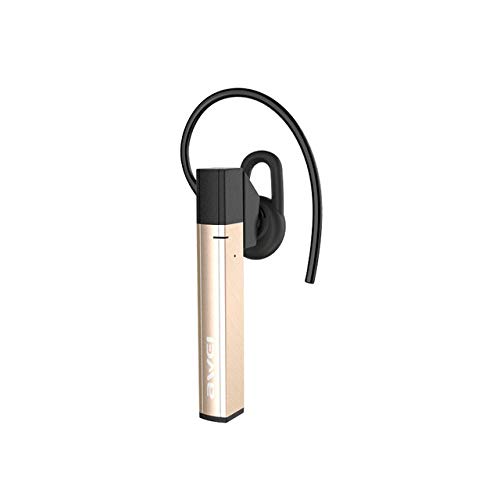
Figure 1: Awei A831BL In-Ear Bluetooth Headset. This image shows the compact design of the headset, highlighting its in-ear form factor and wireless nature.
Setup
1. Charging the Headset
Before first use, fully charge the headset. Connect the charging cable to the headset's charging port and the other end to a USB power source (e.g., computer, wall adapter). The indicator light will typically show red during charging and turn blue or off when fully charged.
2. Pairing with a Bluetooth Device
- Ensure the headset is turned off.
- Press and hold the multi-function button (usually the power button) for approximately 5-7 seconds until the indicator light flashes red and blue alternately. This indicates pairing mode.
- On your mobile phone or Bluetooth-enabled device, go to the Bluetooth settings and enable Bluetooth.
- Search for available devices. The headset should appear as "Awei A831BL" or similar.
- Select the headset from the list to connect. If prompted for a password, enter "0000".
- Once successfully paired, the indicator light will typically flash blue slowly or turn off, and you may hear an audible confirmation.
Note: The headset will automatically attempt to reconnect to the last paired device when turned on, if the device's Bluetooth is active and within range.
Operating Instructions
Power On/Off
- Power On: Press and hold the multi-function button for about 3 seconds until the blue indicator light flashes and you hear a power-on prompt.
- Power Off: Press and hold the multi-function button for about 3-4 seconds until the red indicator light flashes and you hear a power-off prompt.
Music Playback
- Play/Pause: Press the multi-function button once.
- Next Track: Press and hold the Volume Up (+) button.
- Previous Track: Press and hold the Volume Down (-) button.
- Volume Up: Short press the Volume Up (+) button.
- Volume Down: Short press the Volume Down (-) button.
Call Management
- Answer/End Call: Press the multi-function button once.
- Reject Call: Press and hold the multi-function button for about 2 seconds.
- Redial Last Number: Double-press the multi-function button.
Maintenance
- Keep the headset dry. Avoid exposure to moisture or liquids.
- Clean the headset with a soft, dry cloth. Do not use abrasive cleaners.
- Store the headset in a cool, dry place away from extreme temperatures.
- Avoid dropping or subjecting the headset to strong impacts.
- Do not attempt to disassemble or modify the headset, as this will void the warranty.
Troubleshooting
| Problem | Solution |
|---|---|
| Headset does not power on. | Ensure the headset is fully charged. Connect it to a power source and try again. |
| Cannot pair with device. |
|
| No sound or low volume. |
|
| Call quality is poor. |
|
Specifications
| Feature | Detail |
|---|---|
| Model Number | A831BL |
| Brand | Awei |
| Color | Gold |
| Connectivity Technology | Wireless (Bluetooth) |
| Headphone Form Factor | In-Ear |
| Microphone | Yes |
| Noise Cancellation | No |
| Battery Life (Talk/Music) | Up to 8 hours |
| Control Type | Volume Control |
| Material | Plastic |
| Included Components | Ear cushions |
| Product Dimensions | 16.8 x 10.4 x 3.6 cm; 150 grams |
Warranty and Support
For warranty information or technical support, please refer to the documentation included with your purchase or contact the manufacturer directly. Keep your proof of purchase for warranty claims.
Related documentsA831BL


Ask a question about this manual
Ask about setup, troubleshooting, compatibility, parts, safety, or missing instructions. Manuals+ will review the question and use this page’s manual context to help answer it.