
1. Introduction
Thank you for choosing the Petwant PF-105 Automatic 5-Meal Pet Feeder. This device is designed to provide scheduled meals for your cat or small dog, ensuring they are fed consistently even when you are away. Please read this manual thoroughly before operating the feeder to ensure proper use and maintenance.
2. Product Features
- 5 Separate Food Trays: Allows for up to 5 scheduled meals.
- User-Defined 24-Hour Feeding Time Setting: Customize meal schedules.
- 10-Second Voice Recording: Record a message to call your pet at meal times.
- Dual Power Supply System: Operates with an adapter or batteries for reliability.
- Suitable for Dry and Semi-Wet Food: Versatile for various pet food types.
- Automatic Standby Mode: Conserves power when not in operation.
- Memory Function: Retains settings even after power interruption.
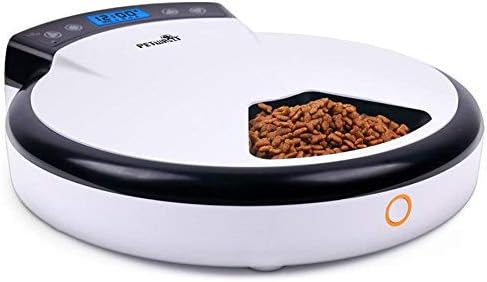
Figure 2.1: The Petwant PF-105 Automatic 5-Meal Pet Feeder, showcasing its compact design and a visible food compartment filled with kibble.
3. Package Contents
Please check the package for the following items:
- Petwant PF-105 Automatic Pet Feeder Unit
- Power Adapter
- User Manual (this document)
4. Setup
4.1 Power Supply
The feeder can be powered by the included AC adapter or by 4 x C-size batteries (not included). For optimal performance, it is recommended to use both power sources as a backup.
- Adapter: Plug the AC adapter into the power port on the feeder and then into a standard wall outlet.
- Batteries: Open the battery compartment on the bottom of the feeder and insert 4 C-size batteries, ensuring correct polarity.
4.2 Filling Food Trays
The feeder has five separate compartments for food. Lift the lid to access the trays.
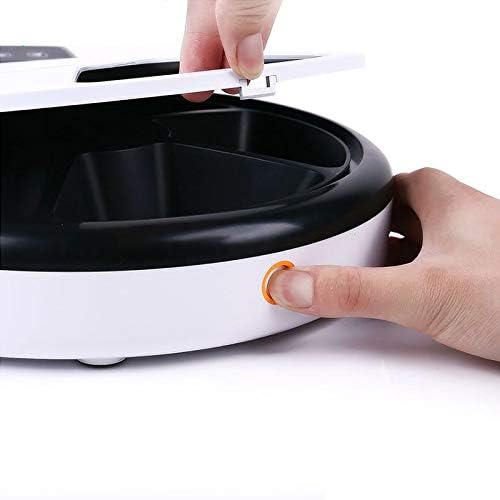
Figure 4.1: A hand demonstrating how to open the lid of the Petwant PF-105 feeder to access the food compartments.
- Gently press the release button (if present) or lift the lid to expose the rotating tray.
- Fill each of the five compartments with dry or semi-wet pet food. Do not overfill.
- Close the lid securely.
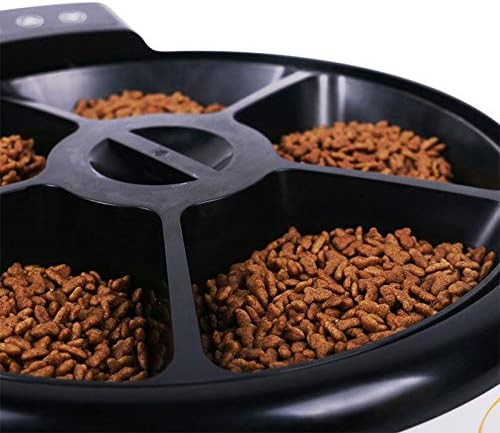
Figure 4.2: A detailed view of the five individual food compartments within the Petwant PF-105 feeder, each containing pet kibble.
5. Operating Instructions
5.1 Setting the Clock
Refer to the display and control panel on the feeder. Typically, there will be buttons for 'SET', 'UP', and 'DOWN'.
- Press the 'SET' button until the hour digit flashes.
- Use 'UP'/'DOWN' buttons to adjust the hour.
- Press 'SET' again to move to the minute digit and adjust.
- Press 'SET' to confirm and exit clock setting mode.
5.2 Programming Meal Times
The feeder allows you to set up to 5 distinct meal times.
- Press 'SET' repeatedly until 'MEAL 1' (or similar indicator) appears and the time flashes.
- Use 'UP'/'DOWN' to set the desired feeding time for Meal 1.
- Press 'SET' to confirm Meal 1 and move to Meal 2.
- Repeat for Meals 2 through 5. If a meal is not needed, set its time to 'OFF' or an invalid time (e.g., 00:00 if it means off).
- After setting all desired meals, press 'SET' to exit programming mode.
5.3 Recording a Voice Message
The feeder includes a 10-second voice recorder to call your pet at meal times.
- Locate the 'REC' (Record) button.
- Press and hold the 'REC' button. Speak clearly into the microphone for up to 10 seconds.
- Release the 'REC' button to save the message.
- To play back the message, press the 'PLAY' button (if available) or wait for the next scheduled meal.

Figure 5.1: A small dog enjoying a meal dispensed by the Petwant PF-105 automatic feeder, demonstrating its use in a pet's daily routine.
6. Maintenance and Cleaning
Regular cleaning ensures hygiene and extends the life of your feeder.
- Unplug and Remove Batteries: Always disconnect the power adapter and remove batteries before cleaning.
- Remove Food: Empty any remaining food from the trays.
- Clean Trays: The food tray can typically be removed for washing. Wash with mild soap and water. Rinse thoroughly and dry completely before reassembling.
- Clean Main Unit: Wipe the main unit with a damp cloth. Do not immerse the main unit in water, as it contains electronic components.
- Dry Completely: Ensure all parts are completely dry before reassembling and adding food.
7. Troubleshooting
- Feeder Not Dispensing Food:
- Check if meal times are correctly set.
- Ensure the feeder has power (adapter plugged in, batteries installed and charged).
- Verify that the food trays are not jammed or obstructed.
- Display Not Working:
- Check power supply. Replace batteries if using battery power.
- Ensure the adapter is securely connected.
- Voice Recording Not Playing:
- Ensure a message was successfully recorded. Try re-recording.
- Check volume settings if available.
- Food Getting Stuck:
- Ensure food is dry and not clumping.
- Clean the trays and dispensing mechanism.
8. Specifications
| Attribute | Detail |
|---|---|
| Brand | Petwant |
| Model | PF-105 |
| Capacity | 5 Liters |
| Operation Mode | Automatic |
| Target Species | Cat, Dog |
| Power Supply | AC Adapter, 4 x C-size Batteries (not included) |
9. Warranty and Support
For warranty information, technical support, or service inquiries, please contact the manufacturer directly using the contact details provided with your purchase or visit the official Petwant website. Please retain your proof of purchase for warranty claims.


