
1. Introduction
This manual provides comprehensive instructions for the proper setup, operation, maintenance, and troubleshooting of your new LIGE 9929 Casual Analog Men's Watch. Please read this manual carefully to ensure optimal performance and longevity of your timepiece. Keep this manual for future reference.
2. Product Overview
The LIGE 9929 is a stylish analog quartz watch designed for men, featuring a durable stainless steel construction and a multi-functional dial. It combines classic aesthetics with modern reliability.

Figure 2.1: The LIGE 9929 watch presented with its accompanying gift box and instruction card.

Figure 2.2: The LIGE 9929 watch displayed on a male wrist, showcasing its fit and appearance during wear.
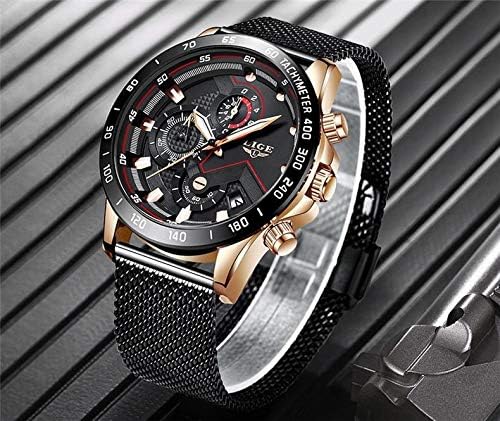
Figure 2.3: A side-angle view of the LIGE 9929 watch, highlighting its case profile and mesh strap texture.

Figure 2.4: A detailed close-up of the LIGE 9929 watch dial, showing the chronograph sub-dials, date window, and LIGE logo.
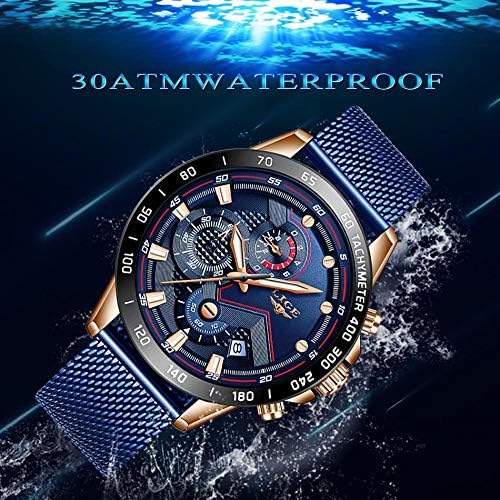
Figure 2.5: The LIGE 9929 watch partially submerged in water, illustrating its 30ATM water resistance capability.
3. Setup
3.1. Setting the Time
- Pull the crown (middle button on the right side of the watch) out to position 2.
- Rotate the crown clockwise or counter-clockwise to set the hour and minute hands to the correct time.
- Once the time is set, push the crown back into position 1 (normal operating position).
3.2. Setting the Date
- Pull the crown out to position 1 (first click).
- Rotate the crown clockwise to adjust the date. Avoid setting the date between 9 PM and 3 AM, as this can interfere with the automatic date change mechanism.
- Once the date is set, push the crown back into position 0 (fully pushed in).
3.3. Adjusting the Strap
The LIGE 9929 features a mesh strap with an adjustable clasp. To adjust:
- Use a small tool (e.g., a flat-head screwdriver) to lift the locking plate on the clasp.
- Slide the clasp along the mesh band to the desired length.
- Press the locking plate back down firmly to secure the clasp in place. Ensure it clicks securely.
4. Operating Instructions
4.1. Basic Timekeeping
The watch operates continuously once the time is set and the crown is pushed in. The hour, minute, and second hands display the current time.
4.2. Chronograph Function (if applicable)
The LIGE 9929 model may include a chronograph (stopwatch) function, indicated by the presence of additional pushers above and below the crown, and sub-dials on the main face.
- Start/Stop: Press the top pusher to start and stop the chronograph.
- Reset: Press the bottom pusher to reset the chronograph hands to zero when the chronograph is stopped.
Note: Refer to Figure 2.4 for visual identification of sub-dials and pushers.
5. Maintenance
5.1. Cleaning
- Wipe the watch case and strap regularly with a soft, dry cloth to remove dust and dirt.
- For stainless steel parts, a slightly damp cloth can be used, followed by immediate drying.
- Avoid using chemical cleaners, solvents, or abrasive materials, as these can damage the watch's finish.
5.2. Water Resistance
The LIGE 9929 watch is rated for 30ATM water resistance (30 meters / 100 feet). This means it is suitable for daily use, splashes, rain, and brief immersion in water. However, it is not suitable for swimming, diving, or showering with hot water, as steam and prolonged exposure can compromise the seals.
- Ensure the crown is fully pushed in before any contact with water.
- Do not operate the pushers or crown while the watch is wet or submerged.
5.3. Battery Replacement
The watch is powered by a quartz movement, which requires a battery. When the watch stops or the second hand begins to jump erratically (indicating low battery), it is time for a replacement. Battery replacement should be performed by a qualified watch technician to ensure proper sealing and function.
5.4. Storage
When not in use, store your watch in a cool, dry place away from direct sunlight, extreme temperatures, and strong magnetic fields.
6. Troubleshooting
| Problem | Possible Cause | Solution |
|---|---|---|
| Watch has stopped | Depleted battery | Replace battery (professional service recommended). |
| Time is incorrect | Crown not fully pushed in; time not set correctly | Push crown in fully. Re-set the time as per Section 3.1. |
| Date does not change | Date set during restricted hours (9 PM - 3 AM); mechanism issue | Re-set the date outside of restricted hours. If problem persists, seek professional service. |
| Condensation inside watch | Exposure to extreme temperature changes; compromised water resistance | Avoid extreme temperature changes. Seek professional service immediately to prevent damage. |
7. Specifications
| Brand | LIGE |
| Model Number | LIGE 9929 |
| Display Type | Analog |
| Movement | Quartz |
| Case Material | Stainless Steel |
| Strap Material | Stainless Steel Mesh |
| Water Resistance | 30 ATM (30 meters / 100 feet) |
| Special Features | Chronograph, Date Display |
8. Warranty and Support
8.1. Warranty Information
LIGE watches typically come with a limited manufacturer's warranty covering defects in materials and workmanship under normal use. The specific terms and duration of your warranty may vary. Please refer to the warranty card included with your purchase for detailed information. Keep your proof of purchase for warranty claims.
8.2. Customer Support
For any questions, service requests, or technical support regarding your LIGE 9929 watch, please contact your retailer or visit the official LIGE website for contact information. When contacting support, please have your model number (LIGE 9929) and purchase details readily available.
You can often find support resources and FAQs on the official LIGE website: www.ligewatch.com (This is a placeholder URL, please verify the actual official website).


