
Introduction
This manual provides detailed instructions for the setup, operation, and maintenance of your Awei A500BL Wireless Bluetooth Headphone. Please read this guide thoroughly before using the product to ensure proper functionality and to maximize your listening experience.

Image: Front view of the Awei A500BL Wireless Bluetooth Headphone, showcasing its over-ear design and color scheme.
Package Contents
Verify that all items listed below are included in your package:
- 1x Awei A500BL Wireless Bluetooth Headphone
- 1x USB Charging Cable
- 1x 3.5mm Audio Cable
Product Overview
Familiarize yourself with the various components and controls of your Awei A500BL headphones.
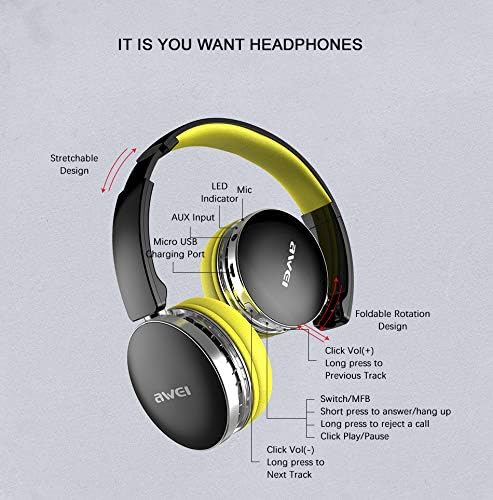
Image: Detailed diagram illustrating the location of buttons, ports, and indicators on the Awei A500BL headphone, including LED indicator, microphone, AUX input, Micro USB charging port, volume controls, multi-function button (MFB), and foldable rotation design.
Key features include:
- Stretchable Design: For comfortable fit.
- Foldable Rotation Design: For easy storage and portability.
- LED Indicator: Shows power and connection status.
- Microphone: For hands-free calls.
- AUX Input: For wired connection.
- Micro USB Charging Port: For battery charging.
- Volume Up/Next Track Button: Click for volume up, long press for next track.
- Multi-Function Button (MFB): Short press to answer/hang up calls, long press to reject a call, click for play/pause.
- Volume Down/Previous Track Button: Click for volume down, long press for previous track.
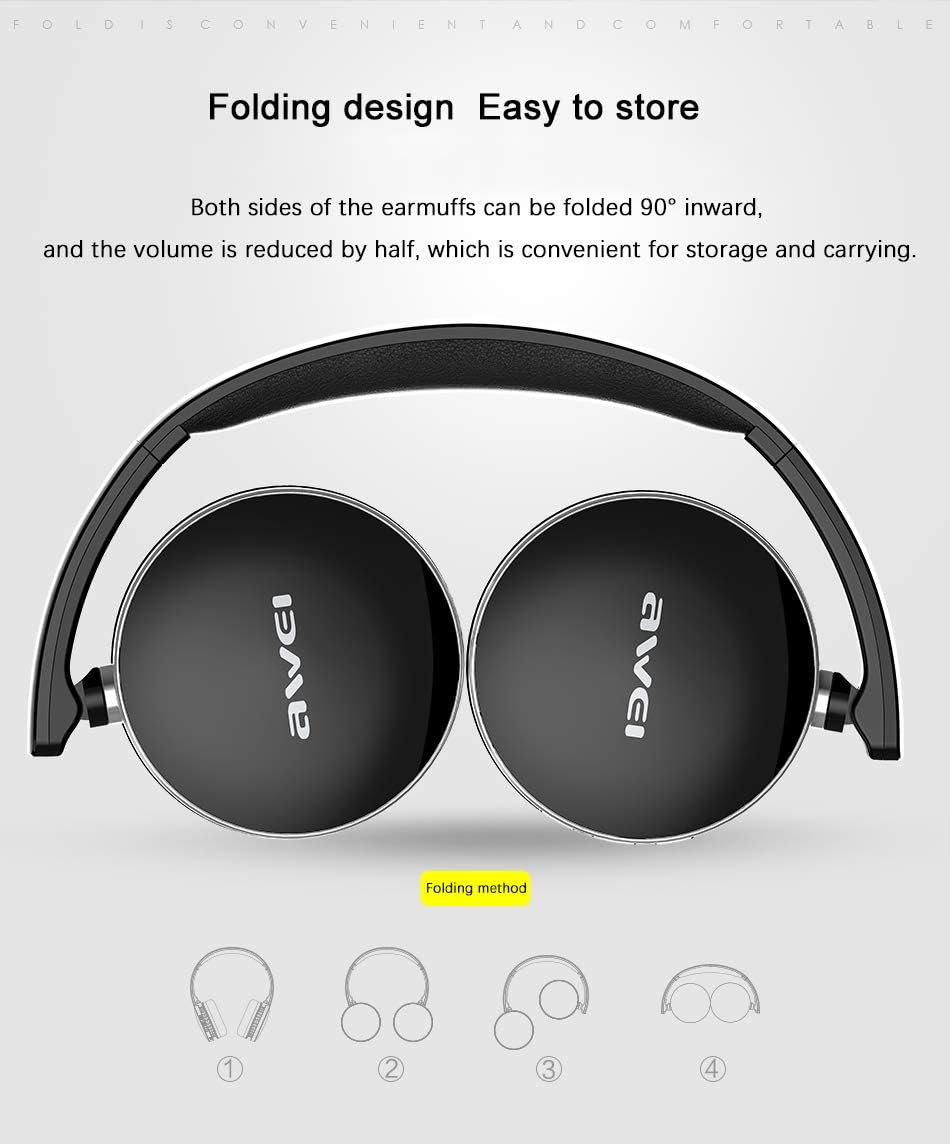
Image: Illustration demonstrating the 90-degree inward folding capability of the Awei A500BL headphone earcups, highlighting its compact storage design.
Setup
1. Charging the Headphone
Before first use, fully charge the headphone. Use the provided USB charging cable.
- Connect the Micro USB end of the charging cable to the charging port on the headphone.
- Connect the USB-A end of the charging cable to a USB power adapter (not included) or a computer's USB port.
- The LED indicator will illuminate during charging. It will change color or turn off once charging is complete.
- Charging typically takes 2-4 hours.
2. Bluetooth Pairing
To connect your headphone to a Bluetooth-enabled device:
- Ensure the headphone is fully charged and turned off.
- Press and hold the Multi-Function Button (MFB) for approximately 5-7 seconds until the LED indicator flashes red and blue alternately, indicating pairing mode.
- On your device (smartphone, tablet, computer), enable Bluetooth and search for available devices.
- Select "Awei A500BL" from the list of found devices.
- Once paired, the LED indicator will flash blue slowly or remain solid blue.
- If prompted for a password, enter "0000".
3. Wired Connection (AUX Mode)
You can also use the headphone with a wired connection:
- Connect one end of the 3.5mm audio cable to the AUX input port on the headphone.
- Connect the other end of the 3.5mm audio cable to the audio output jack of your device.
- The headphone will automatically switch to wired mode. Bluetooth functionality will be disabled.
Operating Instructions
Power On/Off
- Power On: Press and hold the MFB for approximately 3 seconds until the LED indicator flashes blue.
- Power Off: Press and hold the MFB for approximately 3 seconds until the LED indicator flashes red and then turns off.
Music Playback
- Play/Pause: Short press the MFB.
- Volume Up: Short press the "Vol+" button.
- Volume Down: Short press the "Vol-" button.
- Next Track: Long press the "Vol+" button.
- Previous Track: Long press the "Vol-" button.
Call Management
- Answer Call: Short press the MFB when an incoming call rings.
- End Call: Short press the MFB during a call.
- Reject Call: Long press the MFB when an incoming call rings.
- Redial Last Number: Double-press the MFB.
Maintenance and Care
- Keep the headphone dry. Avoid exposure to moisture or extreme temperatures.
- Clean the headphone with a soft, dry cloth. Do not use harsh chemicals or abrasive cleaners.
- Store the headphone in a cool, dry place when not in use. The foldable design allows for compact storage.
- Avoid dropping or subjecting the headphone to strong impacts.
- Do not attempt to disassemble or modify the headphone, as this will void the warranty.
Troubleshooting
| Problem | Solution |
|---|---|
| Headphone does not power on. | Ensure the headphone is fully charged. Connect it to a power source using the USB cable. |
| Cannot pair with a Bluetooth device. |
|
| No sound or low volume. |
|
| Poor sound quality. |
|
Specifications
| Feature | Detail |
|---|---|
| Brand | Awei |
| Model | A500BL |
| Wearing Type | Over-ear |
| Net Weight | 139g |
| Microphone | Yes |
| Bluetooth Version | V4.0 + EDR |
| Transmission Distance | 10m |
| Receive Sensitivity | 111dB |
| Impedance | 32Ω |
| Frequency Response | 20-20kHz |
| Battery Capacity | 300mAh, 3.7V |
| Charging Time | 2-4 hours |
| Working Time | 7-10 hours |
| Standby Time | 300-450 hours |
| Noise Control | Active Noise Cancellation (CVC6.0) |
| Connectivity Technology | Wireless (Bluetooth), Wired (3.5mm AUX) |
| Material | Plastic |
Warranty Information
Awei products are manufactured to the highest quality standards. This product is covered by a limited warranty against manufacturing defects from the date of purchase. Please retain your proof of purchase for warranty claims. The warranty does not cover damage caused by misuse, accident, unauthorized modification, or normal wear and tear. For specific warranty terms and conditions, please refer to the warranty card included with your product or contact customer support.
Customer Support
If you encounter any issues or have questions not covered in this manual, please contact Awei customer support. Visit the official Awei website for contact details, FAQs, and additional resources.
Website: www.awei.com (Example link, actual link may vary)
