
1. Introduction
Thank you for purchasing the KINGONE K9 Portable Bluetooth Speaker. This manual provides essential information for setting up, operating, and maintaining your device. Please read these instructions carefully before use to ensure optimal performance and longevity of your speaker.
2. Product Overview
2.1 Features
- Output Power: 5W x 2
- Bluetooth Version: 4.0
- Audio Input Modes: Bluetooth, Line-in (AUX), TF Card
- Built-in FM Radio function
- Charging: DC 5V 2A
- Battery Capacity: 2200mAh internal rechargeable Lithium Polymer battery
- Compact dimensions for portability
2.2 Speaker Components
Familiarize yourself with the speaker's controls and ports:

Image 2.2.1: Top Control Panel. This image displays the top surface of the KINGONE K9 speaker, highlighting the control buttons including power, mode selection, play/pause, and volume up/down.

Image 2.2.2: Side Input Ports. This image shows the side panel of the KINGONE K9 speaker, featuring the TF card slot, Line-in (AUX) port, and Micro USB charging port.
3. Setup
3.1 Charging the Speaker
- Connect the provided Micro USB cable to the charging port on the side of the speaker (refer to Image 2.2.2).
- Connect the other end of the USB cable to a DC 5V 2A power adapter (not included) or a compatible USB port.
- The charging indicator light will illuminate during charging and turn off when fully charged.
3.2 Powering On/Off
- To power on: Press and hold the Power button (usually marked with a circle icon) on the top panel until the indicator light turns on.
- To power off: Press and hold the Power button again until the indicator light turns off.
4. Operating Instructions
4.1 Bluetooth Pairing
- Ensure the speaker is powered on and in Bluetooth mode. If not, press the 'M' (Mode) button to switch to Bluetooth mode. The Bluetooth indicator light will flash, indicating it is ready for pairing.
- Enable Bluetooth on your mobile device (smartphone, tablet, computer).
- Search for available Bluetooth devices. Select "KINGONE K9" from the list.
- Once paired, the Bluetooth indicator light will stop flashing and remain solid. You can now play audio through the speaker.
4.2 Line-in (AUX) Mode
- Connect one end of a 3.5mm audio cable (not included) to the Line-in port on the speaker (refer to Image 2.2.2).
- Connect the other end of the audio cable to the audio output jack of your external device.
- Press the 'M' (Mode) button on the speaker to switch to Line-in mode. The speaker will automatically play audio from the connected device.
4.3 TF Card Mode
- Insert a TF (Micro SD) card with MP3 audio files into the TF card slot on the side of the speaker (refer to Image 2.2.2).
- Press the 'M' (Mode) button to switch to TF Card mode. The speaker will automatically begin playing music from the card.
4.4 FM Radio Mode
- Press the 'M' (Mode) button to switch to FM Radio mode.
- To automatically scan and save available FM stations, press and hold the Play/Pause button. The speaker will scan and store stations.
- Use the 'Previous Track' and 'Next Track' buttons to navigate between saved FM stations.
4.5 Volume and Track Control
- Volume Up: Press the '+' button.
- Volume Down: Press the '-' button.
- Next Track: Press the 'Next Track' button.
- Previous Track: Press the 'Previous Track' button.
- Play/Pause: Press the Play/Pause button.
5. Maintenance
- Keep the speaker away from water, moisture, and extreme temperatures.
- Clean the speaker with a soft, dry cloth. Do not use abrasive cleaners or solvents.
- Avoid dropping the speaker or subjecting it to strong impacts.
- When not in use for extended periods, charge the battery at least once every three months to maintain battery health.
6. Troubleshooting
| Problem | Possible Solution |
|---|---|
| Speaker does not power on. | Ensure the battery is charged. Connect the speaker to a power source and try again. |
| Cannot pair via Bluetooth. | Make sure the speaker is in Bluetooth pairing mode (flashing indicator). Ensure your device's Bluetooth is on and within range. Forget previous pairings on your device and try again. |
| No sound in Line-in mode. | Verify the audio cable is securely connected to both the speaker and the external device. Ensure the speaker is in Line-in mode. Check the volume levels on both the speaker and the external device. |
| Poor FM radio reception. | Move the speaker to a different location, away from potential interference. Re-scan for stations. |
| Sound distortion. | Reduce the volume on both the speaker and the connected device. Ensure the audio source is of good quality. |
7. Specifications
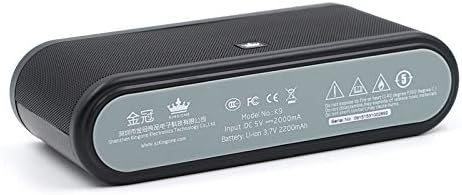
Image 7.1: Speaker Bottom Panel. This image shows the bottom panel of the KINGONE K9 speaker, displaying regulatory marks, model number, input voltage, and battery specifications.
| Specification | Value |
|---|---|
| Model | K9 |
| Output Power | 5W x 2 |
| Bluetooth Version | 4.0 |
| Audio Input Modes | Bluetooth, Line-in, TF Card |
| Charging Input | DC 5V 2A |
| Battery Capacity | 2200mAh Lithium Polymer |
| Dimensions (L x W x H) | 181mm x 46mm x 88mm |
| FM Radio | Yes |
| Connectivity Technology | Wireless |
8. Warranty and Support
For warranty information or technical support, please refer to the warranty card included with your product or visit the official KINGONE website. Keep your purchase receipt as proof of purchase for any warranty claims.