
1. Introduction
Thank you for choosing the FLEXISPOT EN2 Electric Height Adjustable Standing Desk. This manual provides essential information for the safe and efficient assembly, operation, and maintenance of your new desk. Please read these instructions carefully before use and retain them for future reference.
2. Safety Information
- This desk is designed to support a maximum weight of 176 lbs (79.8 kg). Exceeding this limit may result in damage or injury.
- During assembly, an electric drill may be required, which is not included in the package.
- The product will be delivered in two separate packages and may be shipped separately.
- The 5-year and 2-year warranties cover different components of the desk. Refer to the Warranty section for details.
- The height adjustment motor operates quietly, under 50 dB, at a speed of 0.6 inches (1.5 cm) per second.
- Each desk leg has undergone testing, enduring 20,000 lift cycles.
- To ensure proper assembly and stability, please follow the assembly instructions carefully.
3. Package Contents
Before beginning assembly, ensure all components are present and undamaged. The package includes:
- Whole-piece desktop (48 x 30 inches)
- Desk frame (legs and crossbar)
- 6-button digital controller with 4 memory presets
- Removable desktop power outlet (3 AC outlets, 2 USB charging ports)
- Cable management device
- Assembly hardware and tools (Allen wrench included, Phillips head screwdriver required but not included)
- Instruction manual
Note: The desktop and desk frame may arrive in separate packages.

Image: All components of the FLEXISPOT EN2 desk laid out for assembly, including the desktop, frame parts, and hardware.
4. Setup
4.1 Assembly
Follow the detailed instructions provided in the included assembly guide. Ensure all screws are tightened securely. An electric drill may be helpful for certain steps, but is not supplied.
4.2 Initial Placement & Leveling
Place the assembled desk in your desired location. The feet are adjustable to ensure the desk is level on uneven surfaces.

Image: Close-up of the adjustable feet on the desk's base, allowing for leveling on various floor types.
4.3 Power Connection
Connect the desk's power cable to a suitable wall outlet. The removable desktop power outlet can be clipped to the back or side of your desk for convenient access.
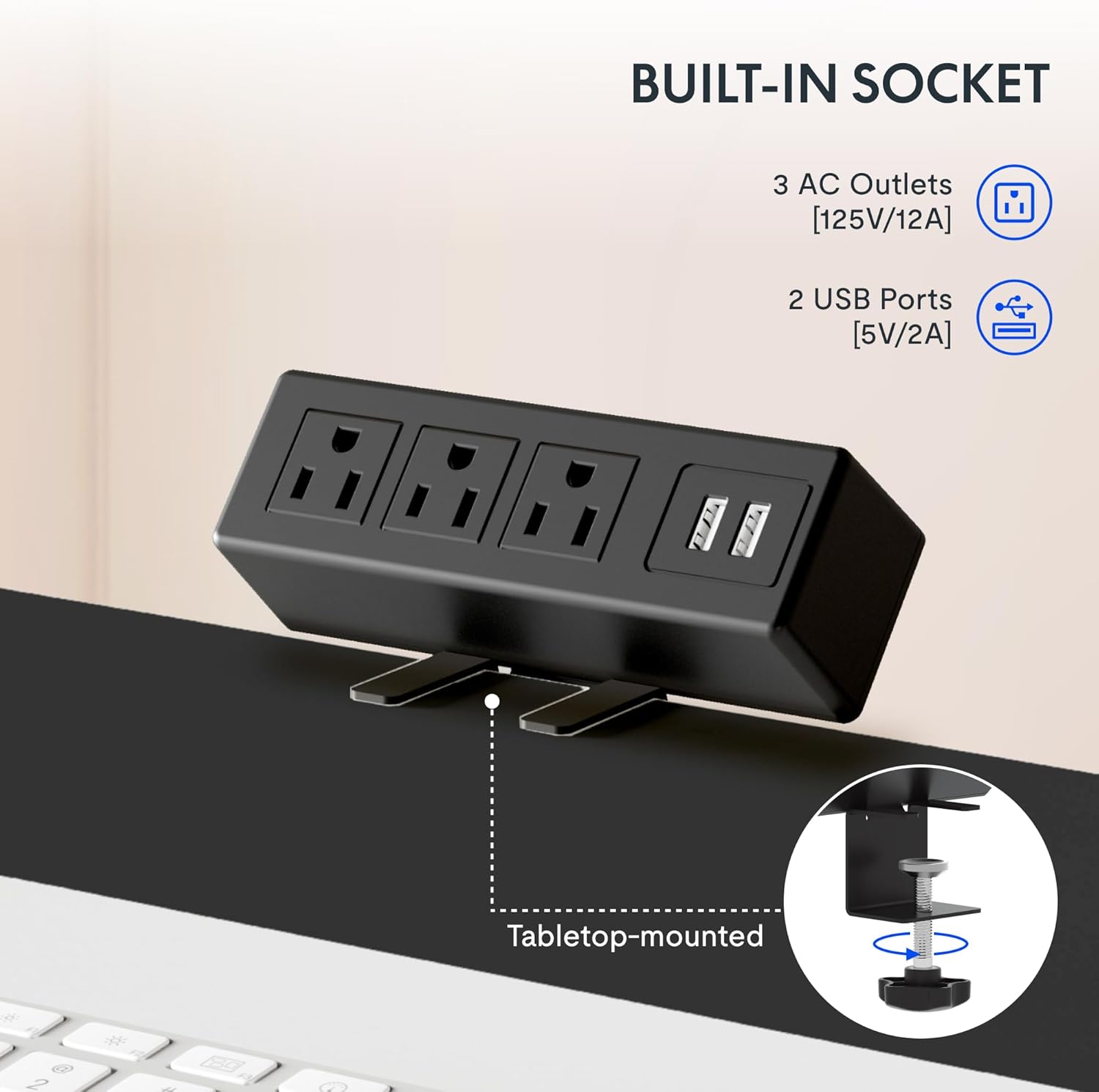
Image: The removable desktop power outlet, featuring three AC outlets and two USB ports, shown clamped to the desk edge.
4.4 Cable Management
Utilize the included cable management device to organize and tidy up your workspace. This helps prevent cable clutter and ensures a clean aesthetic.

Image: A cable management tray installed beneath the desk, designed to hold and organize power cords and other cables.
4.5 Optional Accessories
The desk includes hooks that can be installed on the sides for hanging headphones or other items.

Image: A black hook attached to the side of the desk, suitable for hanging headphones or other accessories.
4.6 Installation Video
For a visual guide on frame installation, please refer to the official FLEXISPOT installation video:
Video: Official FLEXISPOT Standing Desk Frame Installation Guide. This video demonstrates the step-by-step process of assembling the desk frame.
5. Operating Instructions
5.1 Height Adjustment
The desk features a 6-button digital controller for smooth and quiet height adjustments. Use the up (▲) and down (▼) arrow buttons to manually adjust the desk height.

Image: Close-up of the 6-button digital controller, showing the LED display, up/down arrows, and four programmable height setting buttons.
5.2 Memory Presets
The controller includes four programmable memory presets (1, 2, 3, 4). To save a desired height:
- Adjust the desk to your preferred height using the up/down arrows.
- Press the 'M' button (often indicated by a person icon or 'M').
- Immediately press one of the number buttons (1, 2, 3, or 4) to save the current height to that preset.
To recall a saved height, simply press the corresponding number button. The desk will automatically move to the programmed position.
5.3 Desktop Power Outlet
The integrated power outlet provides convenient access to power for your devices. It includes 3 standard AC outlets (125V/12A) and 2 USB charging ports (5V/2A).

Image: A detailed view of the desktop power outlet, highlighting the three AC sockets and two USB charging ports.
6. Maintenance
To ensure the longevity and optimal performance of your FLEXISPOT EN2 desk, follow these maintenance guidelines:
- Cleaning: Wipe the desktop and frame with a soft, damp cloth. Avoid harsh chemicals or abrasive cleaners that could damage the finish.
- Inspection: Periodically check all screws and connections to ensure they remain tight. Retighten if necessary.
- Cable Management: Regularly inspect cables for any signs of wear or damage. Ensure cables are neatly managed to prevent snagging during height adjustments.
- Weight Limit: Do not exceed the maximum weight capacity of 176 lbs (79.8 kg).
7. Troubleshooting
If you encounter any issues with your FLEXISPOT EN2 desk, please refer to the troubleshooting section in the comprehensive manual (if available) or contact customer support. Common issues may include:
- Desk not adjusting height.
- Error codes on the digital display.
- Unusual noises during operation.
Note: A slight 0-1 inch tolerance in desktop size is normal due to manual measurement.
8. Specifications
| Feature | Detail |
|---|---|
| Brand | FLEXISPOT |
| Model Number | EN2 |
| Desktop Dimensions | 48"W x 30"D (121.9 cm x 76.2 cm) |
| Desktop Material | Engineered Wood (FSC-Certified) |
| Frame Material | Alloy Steel |
| Color | Black Top + Black Frame |
| Height Adjustment Range | 28.1" to 45.7" (71.4 cm to 116.1 cm) |
| Lifting Mechanism | Electric |
| Maximum Weight Capacity | 176 lbs (79.8 kg) |
| Noise Level | Less than 50 dB |
| Control Type | 6-button digital controller with 4 memory presets |
| Power Outlet | 3 AC (125V/12A), 2 USB (5V/2A) |
| Assembly Required | Yes |
9. Warranty and Support
9.1 Warranty Information
FLEXISPOT provides the following warranty coverage for the EN2 Standing Desk:
- 5-Year Warranty: Covers frames, motors, and other mechanical devices.
- 2-Year Warranty: Covers controllers, switches, and electronics.
Please retain your proof of purchase for warranty claims.
9.2 Customer Support
For any questions, technical assistance, or warranty claims, please contact FLEXISPOT customer support. Refer to your product packaging or the official FLEXISPOT website for the most current contact information.


