
Introduction
Welcome to the user manual for your Marea B58001/1 Women's Smartwatch. This guide provides essential information on setting up, operating, maintaining, and troubleshooting your device to ensure optimal performance and a satisfying user experience. Please read this manual thoroughly before using your smartwatch.
Product Overview
The Marea B58001/1 is a stylish and functional smartwatch designed for women, featuring a round display and various health and activity tracking capabilities. It comes with a comfortable rubber strap and includes an additional mesh strap for versatility.
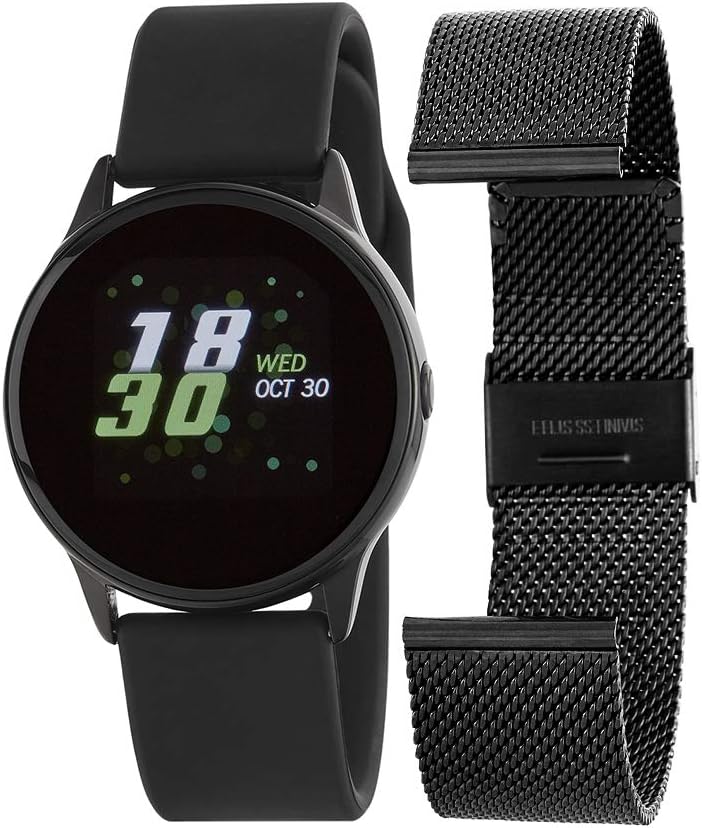
Image 1: Marea B58001/1 Smartwatch. The image shows the smartwatch with a black rubber strap, displaying the time "18:30" and date "WED OCT 30". Alongside it is an additional black mesh strap, offering an alternative style for the watch.
Key features include a 1.22-inch display, IP68 water resistance, and a battery life of 5-7 days. It supports activity tracking, heart rate monitoring, and smartphone notifications.
Setup
1. Unboxing and Initial Inspection
- Carefully remove all components from the original packaging.
- Verify that the smartwatch and its original case are present.
- Inspect the device for any visible damage.
2. Charging the Smartwatch
- Before first use, fully charge the smartwatch.
- Connect the charging cable to the charging port on the back of the watch and to a USB power source.
- The screen will indicate charging status. A full charge typically takes approximately 2 hours.
3. App Installation and Pairing
- Download the Companion App: Search for the official Marea smartwatch application in your smartphone's app store (compatible with Android and iOS devices).
- Enable Bluetooth: Ensure Bluetooth is enabled on your smartphone.
- Pairing: Open the Marea app, create an account if prompted, and follow the on-screen instructions to search for and connect to your B58001/1 smartwatch. The app will guide you through the pairing process.
- Permissions: Grant necessary permissions (e.g., location, notifications) to the app for full functionality.
Operating Instructions
1. Basic Navigation
- Touchscreen: The smartwatch features a responsive touchscreen for navigation. Swipe left, right, up, or down to access different menus and functions.
- Wake Screen: The display can be activated by raising your wrist or by pressing the side button (if present).
2. Key Features and Functions
- Activity Tracking: Monitors steps taken, distance traveled, and calories burned throughout the day. View daily summaries on the watch or in the app.
- Heart Rate Monitoring: Provides real-time heart rate data. Access this feature from the main menu or through a dedicated widget.
- Blood Pressure & Blood Oxygen: Measures blood pressure and blood oxygen levels. Consult a medical professional for accurate health assessments.
- Sleep Monitoring: Tracks sleep patterns and quality. Set sleep goals within the companion app for personalized insights.
- Sport Modes: Offers 7 different sport modes to track specific activities. Select the appropriate mode before starting your workout for accurate data.
- Notifications: Receive alerts for incoming calls, messages, and social media notifications directly on your wrist. Ensure notification permissions are enabled in the app.
- Alarms: Set alarms through the companion app to vibrate on your smartwatch.
- Chronograph: Utilize the stopwatch function for timing activities.
- Weather: Displays current weather information. Requires connection to your smartphone and location services enabled.
- Remote Control: Control music playback and remotely trigger your smartphone's camera directly from the smartwatch.
- Sedentary Reminder: The watch can remind you to move after periods of inactivity.
Maintenance
1. Cleaning Your Smartwatch
- Regularly clean the watch case and strap with a soft, damp cloth.
- Avoid using harsh chemicals, abrasive cleaners, or solvents, as these can damage the device.
- Ensure the charging contacts are clean and dry before charging.
2. Water Resistance (IP68)
- The Marea B58001/1 is rated IP68, meaning it is resistant to dust and can withstand immersion in water up to 1.5 meters for up to 30 minutes.
- It is suitable for daily use, such as hand washing or light rain.
- Avoid: Hot water, saunas, steam rooms, or diving. Water resistance is not permanent and may decrease over time with normal wear.
3. Storage
- When not in use for extended periods, store the smartwatch in a cool, dry place, away from direct sunlight.
- It is recommended to charge the device periodically to maintain battery health.
Troubleshooting
If you encounter issues with your Marea B58001/1 smartwatch, please refer to the following common solutions:
| Problem | Possible Solution |
|---|---|
| Smartwatch not turning on | Ensure the device is fully charged. Connect it to the charger for at least 30 minutes. |
| Cannot pair with smartphone |
|
| Inaccurate health data |
|
| Notifications not received |
|
Specifications
| Feature | Detail |
|---|---|
| Brand | Marea |
| Model Name | B58001/1 |
| Display Size | 1.22 Inches |
| Display Resolution | 240 x 240 |
| Water Resistance | IP68 |
| Battery Life (Average) | 5-7 days |
| Connectivity | Bluetooth |
| Compatible Devices | Smartphone, Tablet (Android, iOS) |
| Special Features | Chronograph, Water Resistant, Heart Rate Monitor, Blood Pressure, Blood Oxygen, Activity Tracker, Sleep Monitor, Notifications, Remote Camera/Music Control |
| Included Components | Original case |
| Strap Material | Rubber (additional mesh strap included) |
Warranty and Support
For warranty information, please refer to the documentation provided with your purchase or contact the retailer where you purchased the Marea B58001/1 smartwatch. For technical support or further assistance, please visit the official Marea website or contact their customer service department.


