
1. Introduction
Thank you for choosing the EPEVER 10A Solar Charge Controller. This device is a PWM charge controller designed for solar power systems, featuring an integrated LCD display and dual USB outputs. It is suitable for various applications, including solar home systems, traffic signals, and solar lighting. This manual provides essential information for the safe and efficient operation of your solar charge controller.

Image 1: The EPEVER Solar Charge Controller integrated into different solar power applications, demonstrating its versatility in residential and outdoor settings.
2. Product Features
The EPEVER 10A Solar Charge Controller incorporates advanced technology and robust design for reliable performance:
- High Quality & Safety: Constructed with high-quality components from ST, IR, and Infineon, ensuring product longevity and safety. Terminals are UL and VDE certified.
- LCD Display: A clear LCD shows real-time solar panel and battery performance data, including an energy statistics counter. User-friendly buttons facilitate comfortable and convenient operation.
- Dual USB Output: Features two USB charging ports (5V/2.4A total) for fast and efficient charging of compatible devices such as mobile phones, tablets, and MP3 players.
- 3-Stage PWM Charging: Supports three battery charging options: Sealed, Gel, and Flooded. Employs a 3-stage intelligent PWM charging process: Bulk, Boost/Equalize, and Float.
- Multiple Load Modes: Offers various load control modes including Light control, Light Time control, and Dual Time control.
- Multiple Protection Features: Includes comprehensive protection against PV Reverse Polarity, Battery Reverse Polarity, Battery Over Voltage, Battery Over Discharge, Battery Overheating, Load Short Circuit, Load Overload, and Controller Overheating. The controller can operate continuously at full load within an environment temperature range of -25 to 55 ℃.
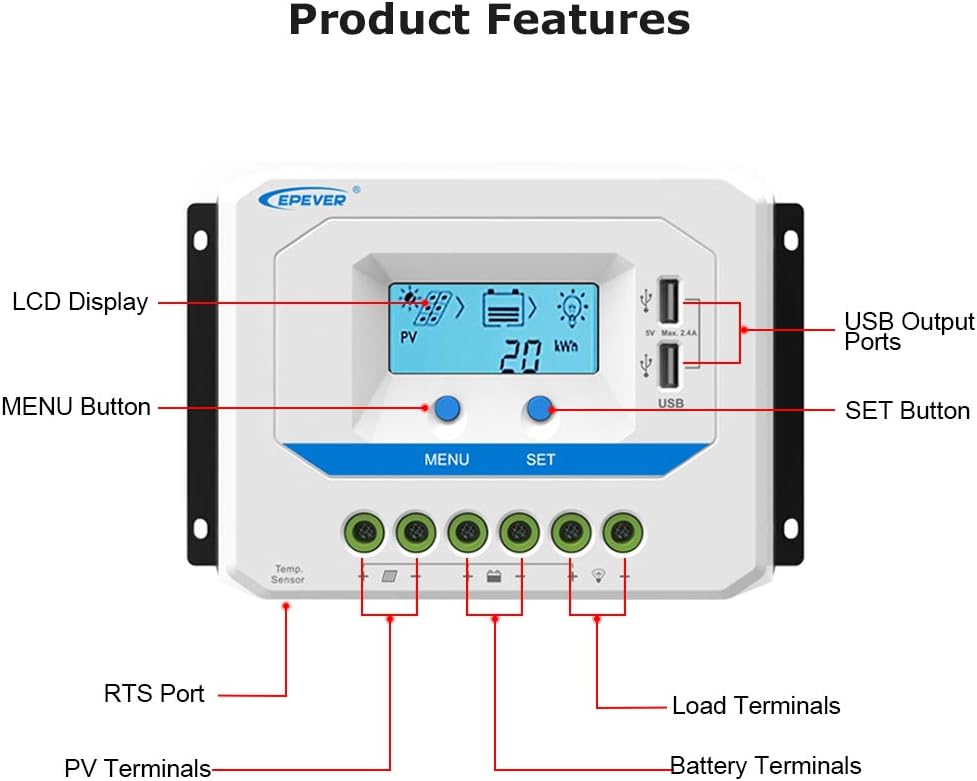
Image 2: A detailed view of the EPEVER Solar Charge Controller, highlighting its key components such as the LCD Display, MENU and SET buttons, USB Output Ports, RTS Port, PV Terminals, Battery Terminals, and Load Terminals.

Image 3: A close-up illustrating the dual USB charging ports and the heat dissipation aluminum alloy fins on the underside of the controller, emphasizing its charging capability and thermal management.
3. Setup and Installation
Proper installation is crucial for the safe and efficient operation of your solar charge controller. Please follow the connection sequence carefully:
- Connect the Battery: First, connect the battery to the charge controller. Ensure correct polarity (+ to + and - to -). The controller will automatically detect the system voltage.
- Connect the Solar Panel: Next, connect the solar panel to the charge controller. Again, observe correct polarity.
- Connect the Load: Finally, connect your DC load to the charge controller.
Important: When disconnecting the system, reverse the order: Disconnect the Solar Panel, then the Load, and finally the Battery.
Ensure that the wire size is appropriate for your system. Refer to the table below for recommended terminal sizes based on controller model:
| Controller Model | Terminals (mm²/AWG) |
|---|---|
| 1024AU | 4mm²/12AWG |
| 2024AU | 10mm²/8AWG |
| 3024/3048AU | 16mm²/6AWG |
| 402/4048AU | 16mm²/6AWG |
| 6024/6048AU | 25mm²/4AWG |

Image 4: A clear wiring diagram illustrating the correct connection sequence for the battery, solar panel, and load to the EPEVER Solar Charge Controller. Note the numbered sequence for installation and the reverse order for removal.
Video 1: This video provides a step-by-step guide on the operation and installation of the EPEVER PWM Solar Charge Controller, demonstrating how to connect components and navigate the interface.
4. Operating Instructions
The LCD display and buttons allow for easy monitoring and parameter setting:
- Navigating the Display: Use the 'MENU' button to cycle through different display interfaces, showing battery voltage, charging current, load status, and other system parameters.
- Setting Battery Type: To set the battery type (Sealed, Gel, or Flooded), press and hold the 'SET' button for 5 seconds. Use the 'MENU' button to select the desired type, then press 'SET' again to confirm or wait 5 seconds for automatic confirmation.
- Load Control Modes: The controller supports various load modes. To enter the load mode setting interface, press and hold the 'SET' button until the number begins flashing. Use the 'MENU' button to adjust the parameter, then press 'SET' to confirm. Available modes include:
- Light ON/OFF: Load is on for 1 hour after sunset.
- Load is on for X hours after sunset (e.g., 2 hours, 3 hours).
- Load is on for X hours before sunrise (e.g., 13 hours, 14 hours).
- Test mode: Load is always on.
- Manual mode: Load can be manually turned ON/OFF by pressing the 'SET' button.
- USB Charging: The dual USB ports provide 5V/2.4A (total) output for charging mobile phones, tablets, and other USB-powered devices.

Image 5: The LCD display of the EPEVER Solar Charge Controller showing the battery type selection interface, cycling through Sealed, Gel, and Flooded options.
5. Maintenance
To ensure optimal performance and longevity of your EPEVER Solar Charge Controller, regular maintenance is recommended:
- Clean the Controller: Periodically wipe the controller's exterior with a dry cloth to remove dust and debris. Ensure the heat sink fins are clear of obstructions for proper cooling.
- Check Connections: Regularly inspect all wiring connections (battery, solar panel, load) to ensure they are tight and free from corrosion. Loose connections can lead to voltage drops and overheating.
- Monitor Performance: Utilize the LCD display to regularly check system parameters such as battery voltage, charging current, and load status. Any significant deviations may indicate an issue.
- Environmental Conditions: Ensure the controller is installed in a well-ventilated area, away from direct sunlight, moisture, and corrosive gases. Maintain the operating temperature within the specified range (-25 to 55 ℃).
6. Troubleshooting
This section outlines common issues and their potential solutions:
| Problem | Possible Cause | Solution |
|---|---|---|
| Controller not powering on | Battery not connected or reverse polarity; Battery voltage too low | Check battery connections and polarity; Charge battery if voltage is below minimum operating level. |
| Battery not charging | Solar panel not connected or reverse polarity; Insufficient sunlight; Faulty solar panel or wiring | Verify solar panel connections and polarity; Ensure adequate sunlight; Inspect solar panel and wiring for damage. |
| Load not working | Load disconnected or short circuit; Battery voltage too low (LVD); Overload protection activated | Check load connections; Recharge battery; Reduce load or check for short circuits. |
| LCD display abnormal | Loose connection; Internal fault | Check all connections; If problem persists, contact customer support. |
7. Specifications
Key technical specifications for the EPEVER 10A Solar Charge Controller:
| Specification | Value |
|---|---|
| Brand | EPEVER |
| Model | 10A24V |
| Manufacturer | EPEVER® |
| Charging Port Type | USB |
| Voltage | 24 Volts |
| Display Type | LCD |
| Item Weight | 1.19 pounds |
| Package Dimensions | 15.71 x 6.5 x 2.28 inches |
| UPC | 732376582643 |
8. Warranty and Support
EPEVER products are designed for reliability and performance. For specific warranty details and support, please refer to the official EPEVER documentation or visit the official EPEVER store.


