1. Product Overview
The Vanguard Vesta FB 204ABS is a lightweight and functional camera tripod designed for ease of use and portability. It is ideal for cameras with 70 to 200 mm lenses, offering stable support for various photographic needs. Its compact folded dimensions make it convenient for transport.

Figure 1: The Vanguard Vesta FB 204ABS tripod in its standard upright position, showcasing its compact design and integrated ball head.
Key Features:
- Easy setup with Fliplock closures for quick leg extension and retraction.
- Compact folded dimensions for convenient transport and storage.
- Easy adjustment of leg angles to 21, 50, and 80 degrees for versatile shooting positions.
- The VESTA FB series can be folded 180 degrees, reducing storage space and enhancing portability.
- Lightweight aluminum construction with an integrated ball head for smooth camera positioning.
2. Setup Guide
2.1 Unpacking and Initial Inspection
- Carefully remove the tripod from its packaging.
- Inspect all components for any signs of damage during transit. Ensure all parts listed in the packing contents are present.
- Familiarize yourself with the main parts: the tripod legs, center column, and ball head.

Figure 2: The Vesta FB 204ABS tripod in its compact, folded position, ready for transport or storage.
2.2 Attaching Your Camera
- Locate the quick release plate on the ball head. Unscrew the locking knob and remove the plate.
- Attach the quick release plate to the bottom of your camera by screwing the D-ring screw into the camera's tripod mount. Ensure it is securely tightened.
- Align the quick release plate with the receiver on the ball head and slide it in until it clicks into place. Tighten the locking knob to secure the camera.
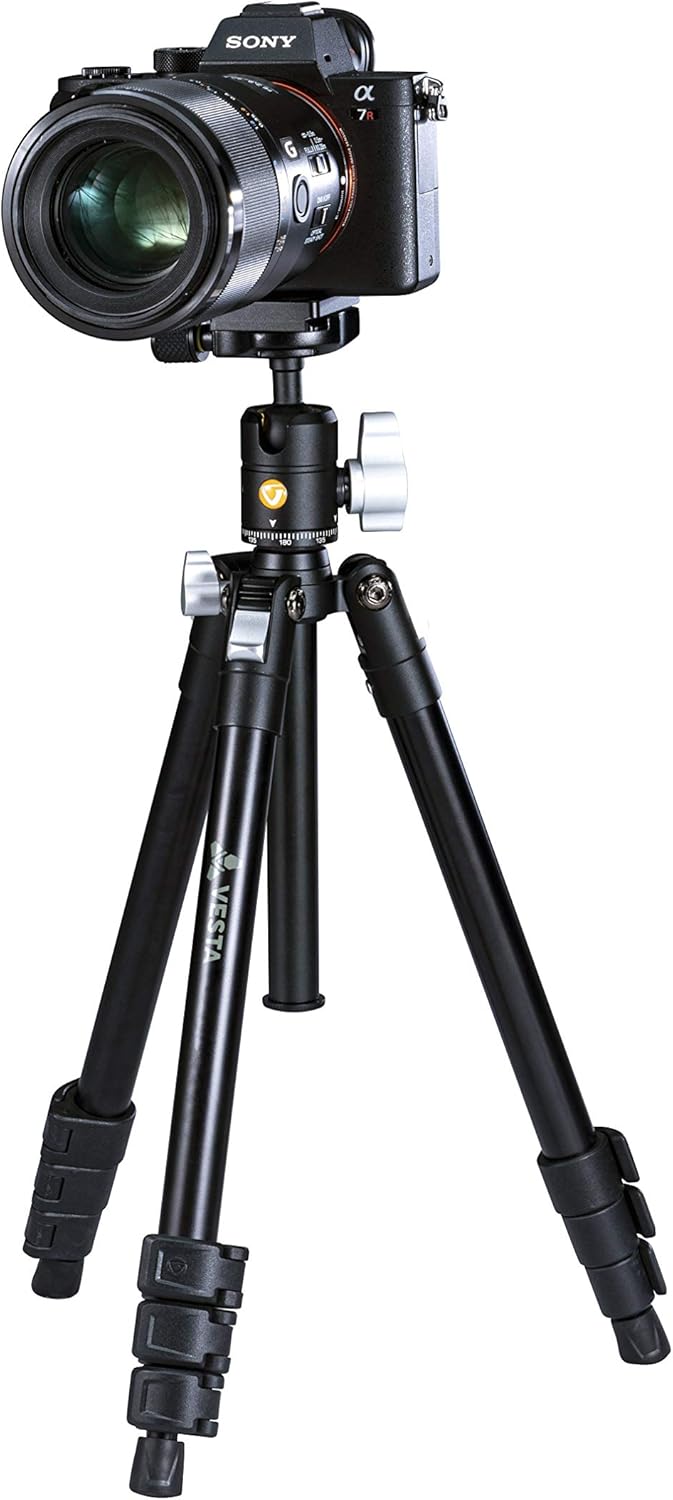
Figure 3: A camera securely mounted on the Vesta FB 204ABS tripod, demonstrating the quick release plate system.
3. Operating Instructions
3.1 Extending and Retracting Legs
- To extend a leg section, open the Fliplock closure. Pull the leg section out to the desired length.
- Close the Fliplock closure firmly to lock the leg section in place. Repeat for all leg sections on each leg.
- To retract, open the Fliplock, push the leg section back in, and close the Fliplock.
3.2 Adjusting Leg Angles
The Vesta FB 204ABS allows for three distinct leg angles: 21, 50, and 80 degrees.
- At the top of each leg, near the tripod collar, you will find a leg angle adjustment lock.
- Press the lock button or lever and move the leg to the desired angle until it clicks into position.
- Ensure all three legs are set to the same angle for maximum stability.

Figure 4: The tripod with legs set to a wider angle, providing increased stability for low-angle shots or uneven terrain.
3.3 Extending the Center Column
- To extend the center column, loosen the center column locking knob located on the tripod collar.
- Gently pull the center column upwards to the desired height.
- Tighten the center column locking knob firmly to secure the column in place.
- Caution: Extending the center column too high can reduce stability. Always ensure the tripod is stable before releasing your camera.

Figure 5: The tripod with its center column fully extended, demonstrating the maximum height capability.
3.4 Using the Ball Head
The integrated ball head allows for flexible positioning of your camera.
- Loosen the main locking knob on the ball head to allow free movement.
- Position your camera to the desired angle (tilt, pan, or rotate).
- Once the desired position is achieved, tighten the main locking knob firmly to secure the camera.
- Some ball heads also feature a separate panning lock for horizontal rotation. Loosen this knob for panning, and tighten it to lock.

Figure 6: A detailed view of the tripod's ball head, showing the main locking knob and quick release plate mechanism.
4. Maintenance
Proper maintenance will ensure the longevity and optimal performance of your Vanguard Vesta FB 204ABS tripod.
- Cleaning: After each use, especially in dusty, sandy, or wet environments, wipe down the tripod with a clean, dry cloth. For stubborn dirt, use a slightly damp cloth and then dry thoroughly. Avoid using harsh chemicals or abrasive cleaners.
- Lubrication: The moving parts of the tripod, such as the leg locks and ball head mechanisms, are designed for smooth operation. Do not apply lubricants unless specifically instructed by Vanguard support, as this can attract dirt and impair function.
- Storage: Store the tripod in a cool, dry place, away from direct sunlight and extreme temperatures. If storing for extended periods, ensure it is clean and dry.
- Inspection: Periodically check all screws, bolts, and locking mechanisms to ensure they are secure. Do not overtighten.
5. Troubleshooting
This section addresses common issues you might encounter with your tripod.
| Problem | Possible Cause | Solution |
|---|---|---|
| Leg sections do not extend or retract smoothly. | Dirt or debris inside the leg sections; Fliplock closures are too tight or too loose. | Clean the leg sections thoroughly. Adjust the tension of the Fliplock closures if they have adjustment screws. |
| Ball head movement is stiff or jerky. | Dirt or dust in the ball mechanism; locking knob not fully loosened. | Ensure the locking knob is fully loosened. Clean the exterior of the ball head. Do not attempt to disassemble or lubricate the ball head unless instructed by Vanguard. |
| Camera feels unstable on the tripod. | Quick release plate not securely attached; leg locks not fully engaged; center column extended too high. | Ensure the quick release plate is tightly screwed to the camera and securely locked into the ball head. Verify all leg locks are closed. Lower the center column if possible. |
| Tripod wobbles on flat surfaces. | Legs not fully extended or locked; uneven leg angles. | Ensure all leg sections are fully extended and their Fliplock closures are securely fastened. Verify all three legs are set to the same angle. |
6. Specifications
Detailed technical specifications for the Vanguard Vesta FB 204ABS tripod.
| Attribute | Value |
|---|---|
| Brand | VANGUARD |
| Model Name | Vesta FB 204ABS |
| Color | Black |
| Compatible Devices | Camera |
| Material | Acrylonitrile Butadiene Styrene (ABS) |
| Maximum Height | 101 Centimeters (approx. 39.8 inches) |
| Minimum Height | 31.5 Centimeters (approx. 12.4 inches) |
| Product Dimensions (L x W x H) | 31.5 x 8 x 8.5 cm (12.4 x 3.1 x 3.3 inches) |
| Item Weight | 800 grams (approx. 1.76 lbs) |
| Package Weight | 1.5 Kilograms (approx. 3.3 lbs) |
| Included Components | Tripod |
| International Article Code | 04719856247915 |
| ASIN | B081FQ1LPX |
| Manufacturer | VANGUARD |
7. Warranty and Support
7.1 Warranty Information
Vanguard products are manufactured to high quality standards and are warranted against defects in materials and workmanship. The specific warranty period and terms may vary by region and product. Please refer to the warranty card included with your product or visit the official Vanguard website for detailed warranty information applicable to your purchase. Keep your proof of purchase for warranty claims.
7.2 Customer Support
For technical assistance, spare parts, or any other inquiries regarding your Vanguard Vesta FB 204ABS tripod, please contact Vanguard customer support.
- Online Support: Visit the official Vanguard website for FAQs, product registration, and support contact forms.
- Contact Information: Specific contact details (phone numbers, email addresses) for your region can typically be found on the "Contact Us" section of the Vanguard website.
When contacting support, please have your product model (Vesta FB 204ABS) and proof of purchase readily available.


