
1. Product Overview
The Flysky FS-CVT01 is a compact and lightweight voltage collection module designed to provide real-time voltage telemetry data to compatible Flysky receivers and transmitters. This module is essential for monitoring battery voltage in remote-controlled vehicles such as cars, boats, and aircraft, ensuring safe operation and timely battery management.
It supports a wide voltage acquisition range and features reverse polarity detection for enhanced safety.
2. Product Features
- Wide Voltage Range: Capable of acquiring voltage from -100V to 100V DC.
- High Accuracy: Provides precise voltage readings with an accuracy of 0.1V DC.
- Reverse Polarity Detection: Automatically detects and indicates reverse connections by displaying a negative value, preventing damage.
- Low Power Consumption: Operates efficiently with an input power of 9mA (typical).
- Compact and Lightweight: Designed for minimal impact on vehicle performance, weighing only 6.0 grams.
- Broad Compatibility: Suitable for various RC models including cars, boats, and aircraft.
- Receiver Adaptation: Directly compatible with iA6B receivers and adaptable to iA10 receivers using the included conversion line.
3. Specifications
| Parameter | Value |
|---|---|
| Brand Name | Flysky |
| Item Name | FS-CVT01 |
| Acquisition Voltage Range | -100 ~ 100V DC |
| Accuracy | 0.1V DC |
| Module Input Power (Typical) | 9mA |
| Number of Series (MAX) | 15 |
| Weight | 6.0 g |
| Operating Input Power | 4.0-6.5V DC |
| Dimensions (L*W*H) | 31 * 15 * 8.5 mm |
| Color | Black |
| Manufacturer | NC |
4. Package Contents
- 1x Flysky FS-CVT01 Voltage Collection Module
- 1x Conversion Line (for iA10 receiver adaptation)
5. Safety Information
Please read and understand all safety instructions before using the FS-CVT01 module. Failure to do so may result in injury or damage to the product or connected devices.
- Ensure all connections are correct before applying power. Incorrect wiring can damage the module or receiver.
- Do not exceed the maximum input voltage of 100V DC.
- Keep the module away from water, moisture, and extreme temperatures.
- Handle with care to avoid physical damage to the module or its wires.
- This product is not a toy. Keep out of reach of children.
6. Setup and Installation
The FS-CVT01 module is designed for easy integration into your RC system. Follow these steps for proper installation:
6.1 Connecting to Flysky iA6B Receiver
- Locate an available telemetry port on your iA6B receiver. This is typically labeled "VCC" or a similar telemetry input.
- Connect the 3-pin servo connector from the FS-CVT01 module directly to the telemetry port on the iA6B receiver. Ensure the polarity is correct (signal, positive, negative).
- Connect the two bare wire leads from the FS-CVT01 module to the voltage source you wish to monitor (e.g., battery balance lead or main power leads). Pay close attention to positive (+) and negative (-) terminals. The module's reverse polarity detection will indicate if connected incorrectly.
- Power on your receiver and transmitter. The voltage data should now be available on your compatible Flysky transmitter's telemetry display.

Figure 1: The Flysky FS-CVT01 voltage collection module with its input and output wires. The 3-pin connector plugs into the receiver, and the two bare wires connect to the voltage source.
6.2 Connecting to Flysky iA10 Receiver
- For the iA10 receiver, you will need to use the included conversion line.
- Connect the 3-pin servo connector from the FS-CVT01 module to one end of the conversion line.
- Connect the other end of the conversion line to the appropriate telemetry input port on your iA10 receiver. Refer to your iA10 receiver manual for specific port identification.
- Connect the two bare wire leads from the FS-CVT01 module to the voltage source you wish to monitor, observing correct polarity.
- Power on your receiver and transmitter. Verify that voltage telemetry data is displayed on your transmitter.
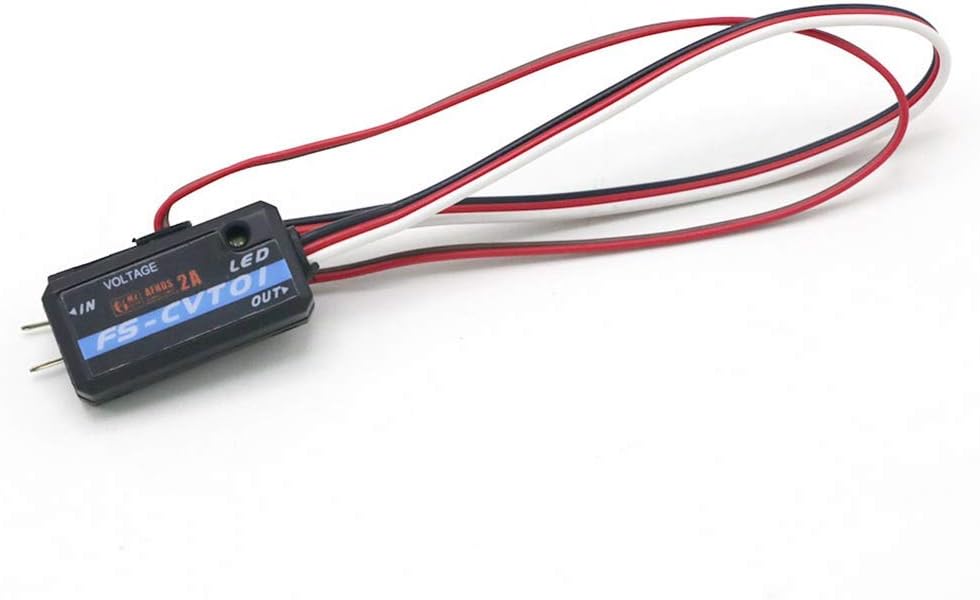
Figure 2: The FS-CVT01 module shown with a conversion cable, which is necessary for connecting to certain receivers like the iA10.
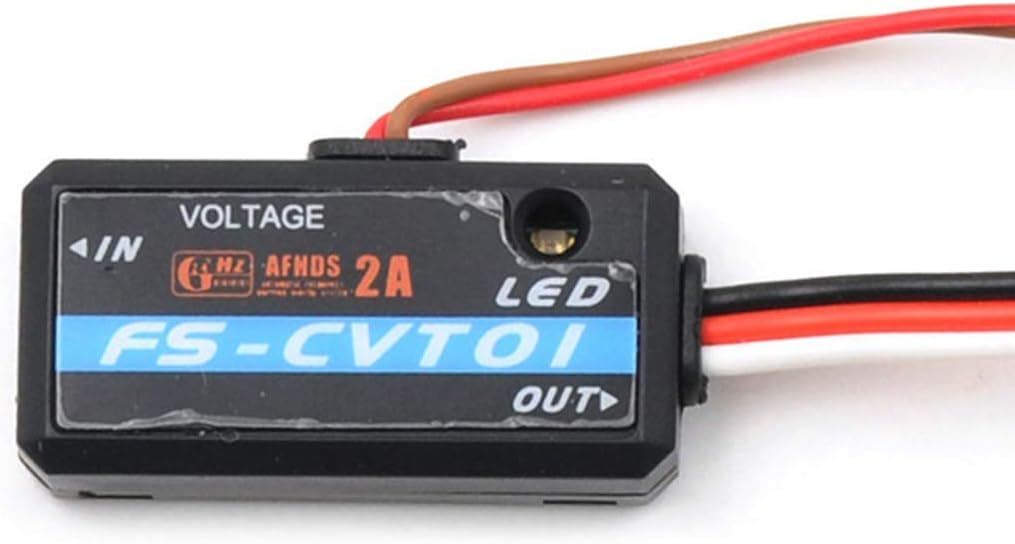
Figure 3: A detailed view of the FS-CVT01 module, highlighting the "VOLTAGE" input, "LED" indicator, and "OUT" connection point. The module is labeled "FS-CVT01" and indicates "AFHDS 2A".
7. Operating Instructions
Once the FS-CVT01 module is correctly installed and connected, it will begin collecting voltage data from the connected source. This data is then transmitted to your compatible Flysky transmitter via the receiver's telemetry function.
- Monitoring Voltage: Access the telemetry menu on your Flysky transmitter (e.g., FS-i6X, Radiomaster TX16S with Flysky protocol) to view the real-time voltage readings. The specific menu navigation may vary by transmitter model.
- Reverse Polarity Indication: If the voltage source is connected with reverse polarity, the module will still provide a reading, but it will be displayed as a negative value on your transmitter. This serves as a critical safety warning.
- Setting Alarms: Many Flysky transmitters allow you to set low voltage alarms. It is highly recommended to configure these alarms to alert you when your battery voltage drops below a safe operating threshold, preventing over-discharge and potential damage to your battery or model.
- Understanding Readings: Be aware that voltage readings under load (during flight or operation) will typically be lower than static, unloaded voltage readings. Always consider the dynamic nature of battery voltage when interpreting telemetry data.

Figure 4: Top-down view of the FS-CVT01 module, showing its compact size and the clear labeling of its connections.
8. Maintenance
The Flysky FS-CVT01 module is designed for durability and requires minimal maintenance. Follow these guidelines to ensure its longevity:
- Cleaning: If necessary, gently wipe the module with a dry, soft cloth. Do not use liquid cleaners or solvents.
- Storage: Store the module in a dry, cool place away from direct sunlight and extreme temperatures when not in use.
- Inspecting Connections: Periodically check all wire connections for signs of wear, fraying, or corrosion. Ensure they remain securely plugged in.
- Avoid Physical Stress: Do not bend or pull the wires excessively, as this can damage internal connections.
9. Troubleshooting
If you encounter issues with your FS-CVT01 module, refer to the following common problems and solutions:
| Problem | Possible Cause | Solution |
|---|---|---|
| No voltage reading on transmitter. |
|
|
| Voltage reading is negative. | Reverse polarity connection to voltage source. | Immediately disconnect power and reverse the connection of the two bare wires to the voltage source. The module is designed to withstand this, but prolonged incorrect connection is not recommended. |
| Inaccurate voltage readings. |
|
|
10. Warranty and Support
This product is manufactured by NC. For warranty information and technical support, please refer to the retailer or manufacturer's official website where the product was purchased. Keep your proof of purchase for any warranty claims.
For general inquiries or further assistance, you may also refer to the Flysky official resources or community forums for troubleshooting tips and user experiences.
11. Official Product Videos (Not Available)
No official product videos are available for this item at this time. Please refer to the text instructions and images for guidance.