
1. Introduction
This manual provides detailed instructions for the installation, setup, operation, and maintenance of your BYECOLD 40x24 Smart Bathroom Mirror. Please read this manual thoroughly before use to ensure proper function and safety.

Image: The BYECOLD Smart Bathroom Mirror, showcasing its illuminated design and integrated digital display for weather and time.
2. Safety Information
- The mirror has an IP54 rating, indicating it is waterproof and dustproof for bathroom use.
- The smart mirror is protected by an explosion-proof film to enhance safety.
- Ensure the power supply is disconnected before any installation or maintenance.
- Installation should be performed by a qualified electrician if hardwiring is chosen.
- This mirror is designed for horizontal hanging only.

Image: Demonstration of the mirror's enhanced safety feature, illustrating how the explosion-proof film prevents shattering into dangerous shards.
3. Product Features
- Smart Wi-Fi Connectivity: Connects to a 2.4GHz Wi-Fi network for weather display and app control.
- Weather Display: Shows current outdoor humidity, outdoor temperature, weather forecast, date, time, and indoor temperature.
- Anti-Fog Function: Integrated defogger for clear reflection in humid conditions.
- LED Backlighting: Energy-efficient LED lights provide ambient illumination.
- Two Color Temperatures: Switchable between 3000K Warm Light and 6000K Daylight.
- Touch Sensor Controls: Intuitive touch buttons for light, defogger, and display functions.
- Wisemirror App Control: Compatible with Android and iOS devices for advanced settings.
- Horizontal Hanging: Designed for horizontal wall mounting only.

Image: Overview of the mirror's key features, including weather display, time, dual color temperature, anti-fog, IP54 rating, LED backlighting, app control, and horizontal mounting.
4. Installation
The BYECOLD Smart Bathroom Mirror is designed for horizontal wall mounting only. Two installation methods are available:
- Plug-in Installation: The mirror is equipped with a US plug for direct connection to a standard electrical outlet.
- Hardwired Installation: For a seamless look, the plug can be cut, and the mirror's wires connected directly to a wall switch's wiring. This method is recommended to be installed by a professional electrician.
Ensure the mounting surface is sturdy and capable of supporting the mirror's weight (approximately 24.6 pounds).

Image: Visual guide illustrating the two available installation options: plug-in for convenience and hardwired for a concealed power connection.
5. Setup and Wi-Fi Connection
To utilize the smart features, connect your mirror to a 2.4GHz Wi-Fi network and use the Wisemirror App.
- Download the "Wisemirror" app from your device's app store (available for Android and iOS).
- Follow the in-app instructions to connect your mirror to your home's 2.4GHz Wi-Fi network. Note: The mirror only supports 2.4GHz networks.
- Once connected, the app will allow you to synchronize date, time, and weather forecast data to your mirror.

Image: The Wisemirror app on a smartphone, demonstrating its use for connecting the mirror to a 2.4GHz Wi-Fi network and controlling smart features.
6. Operation
The mirror features intuitive touch controls located on its surface.
- LED Light On/Off: Single click the power icon (⏻) to turn the LED backlighting on or off.
- Weather Display On/Off: Double click the power icon (⏻) to toggle the weather display on or off.
- Activate Defogging: Long press the power icon (⏻) to activate the defogging function. The defogger will automatically shut off after two hours.
- Change Light Color Temperature: Use the dedicated touch sensor (often represented by a gear or sun icon) to switch between 3000K Warm Light and 6000K Daylight.
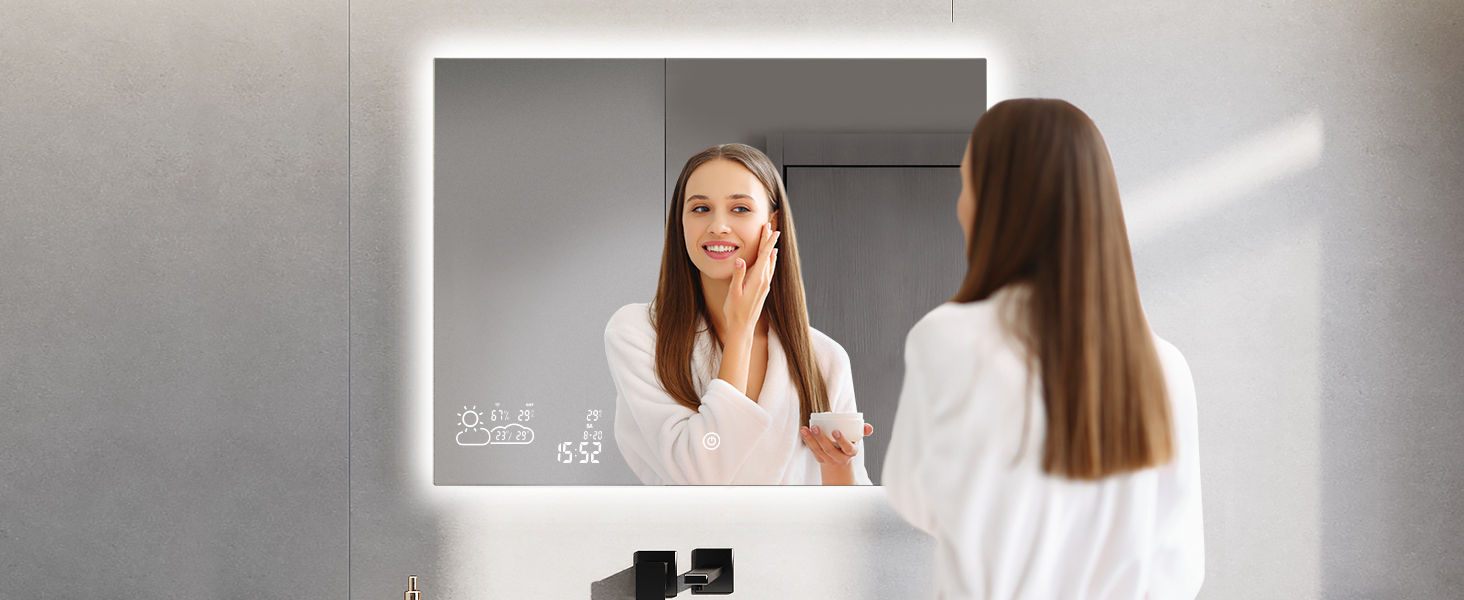
Image: Explanation of the mirror's touch controls, detailing single click, double click, and long press functions for various features.

Image: Visual comparison of the mirror's two color temperature settings: 6000K (Daylight) and 3000K (Warm Light).

Image: The mirror's heated defogging function in action, ensuring a clear view even in a steamy bathroom environment.
7. Maintenance
- Clean the mirror surface with a soft, damp cloth and a mild glass cleaner. Avoid abrasive cleaners or harsh chemicals.
- Ensure no liquid enters the electrical components or wiring during cleaning.
- Regularly check the power connections for any signs of wear or damage.

Image: A visual representation of the mirror's IP54 waterproof rating, showing an LED strip safely immersed in water.
8. Troubleshooting
| Problem | Possible Cause | Solution |
|---|---|---|
| Wi-Fi connection issues / Weather display not updating. | Incorrect Wi-Fi password, mirror not connected to 2.4GHz network, network interference, app synchronization issue. |
|
| Flickering LED lights. | This is often a stroboscopic effect visible only through camera lenses and not to the naked eye. | No action required if not visible to the naked eye. If visible, check power connections. |
| Quiet "trickling" or "Morse code" sound when mirror is on or weather display is off. | Internal electronic components operating. This is typically normal operational noise. | This is usually normal operation. If the sound becomes excessively loud or changes significantly, contact customer support. |
| Mirror does not respond to touch controls. | Temporary software glitch, power interruption. | Disconnect power to the mirror for 30 seconds, then reconnect. Test controls again. |
9. Specifications
- Brand: BYECOLD
- Model: 24"L x 40"W
- Product Dimensions: 24"L x 40"W
- Room Type: Bathroom
- Shape: Rectangular
- Frame Material: Aluminum
- Mounting Type: Wall Mount (Horizontal Only)
- Special Features: Fogless, Lighted, Wi-Fi Enabled Weather Forecast
- Color: Without Bluetooth Speakers (referring to the specific variant)
- Item Weight: 24.6 pounds (11.2 Kilograms)
- Assembly Required: Yes
- Waterproof Rating: IP54
- Light Color Temperature: 3000K Warm Light, 6000K Daylight
10. Warranty and Support
For warranty information, technical support, or any inquiries regarding your BYECOLD Smart Bathroom Mirror, please refer to the official BYECOLD brand store or contact BYECOLD customer service directly. Contact details are typically provided with your product packaging or on the manufacturer's website.
You can visit the BYECOLD Store for more information: BYECOLD Store on Amazon

