
1. Introduction
This manual provides essential information for the safe and effective installation, operation, and maintenance of your Aiphone QH-6KAT Security Intercom Door Phone. Please read this manual thoroughly before using the product and keep it for future reference.
The Aiphone QH-6KAT is a residential security master unit designed for condominiums, offering comprehensive communication and security features including intercom, emergency call, and detection for fire and gas leaks.
2. Safety Information
Important Safety Warnings:
- Installation of this unit requires an Electrical Engineer qualification and adherence to Fire Law Class A (Category 4) standards.
- Notification to the competent fire department is required prior to installation and operation.
- This device is designed for AC direct power connection. Ensure proper electrical wiring is performed by a qualified professional.
- Do not attempt to disassemble or modify the unit. This may cause malfunction, electric shock, or fire.
3. Product Overview
The Aiphone QH-6KAT is an exposed-type housing information panel that integrates various security and communication functions for residential units. It supports connections for two entrances, an optional handset (VHW-HSKA), and a monitor-less extension master unit (VH-RS).

Figure 1: Front view of the Aiphone QH-6KAT Security Intercom Door Phone.
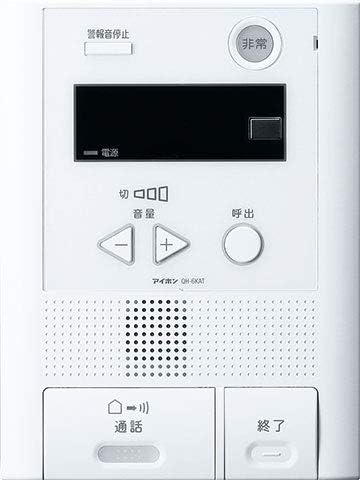
Figure 2: Aiphone QH-6KAT unit, showcasing its sleek and functional design.
4. Setup and Installation
The QH-6KAT unit is designed for AC direct power connection. Professional installation is required due to the electrical wiring and fire safety regulations.
4.1 Dimensions
- Product Dimensions (Length x Width x Height): 240 mm x 180 mm x 42 mm
- Item Weight: Approximately 1.36 kg
4.2 Wiring
This system is designed to minimize complex wiring, offering flexible installation options.

Figure 3: Illustration of minimal wiring requirements for certain configurations.
4.3 Installation Methods
The Aiphone system offers selectable installation methods to suit various residential environments.

Figure 4: Examples of selectable installation methods, including wall-mounted and desktop options.
5. Operating Instructions
5.1 Basic Functions
- Intercom: Communicate with visitors at the entrance.
- Emergency Call: Activate an emergency alert for various situations.
- Detection: The unit is compatible with sensors for fire, gas leaks, and general purpose calls (e.g., bath, toilet).
5.2 Button Functions (Refer to Figure 1)
- Emergency Button: Press in case of an emergency (e.g., fire, gas leak, personal emergency).
- Volume Control Buttons (+/-): Adjust the speaker volume.
- Call Button: Initiate a call to an external unit or another internal unit.
- Talk Button: Press to speak during an intercom call.
- End Button: Terminate an intercom call.
6. Maintenance
To ensure optimal performance and longevity of your Aiphone QH-6KAT unit, follow these general maintenance guidelines:
- Regularly wipe the unit with a soft, dry cloth to remove dust and dirt.
- Do not use abrasive cleaners, solvents, or strong chemicals, as these can damage the surface.
- Ensure that the speaker and microphone grilles are free from obstructions.
- Periodically check all connections for security, especially after any building maintenance.
7. Troubleshooting
If you experience issues with your Aiphone QH-6KAT unit, consider the following basic troubleshooting steps:
- No Power: Verify that the unit is properly connected to the AC power source. Check the circuit breaker if necessary.
- No Sound/Distorted Sound: Adjust the volume using the +/- buttons. Ensure the speaker and microphone are not obstructed.
- Call Not Connecting: Check the wiring connections if accessible, or contact a qualified technician.
- False Alarms: Ensure sensors are clean and free from environmental factors that might trigger them. If persistent, contact a professional.
For more complex issues or repairs, please contact a qualified Aiphone service technician. Do not attempt to repair the unit yourself.
8. Specifications
| Specification | Value |
|---|---|
| Product Model Number | QH-6KAT |
| Product Size | 4.2 x 18 x 24 cm |
| Item Weight | 1.36 Kilograms |
| Brand | Aiphone |
| Model Name | QH-6KAT |
| Connectivity Technology | Wireless |
| Power Source | Corded Electric |
| Number of Items | 1 |
| Included Components | Instruction manual, etc. |
9. Warranty and Support
Aiphone has been a leader in intercom systems for over 70 years, committed to providing reliable communication and security solutions. The company handles all aspects from manufacturing to after-sales support to ensure customer satisfaction.

Figure 5: Aiphone's dedicated customer support team.
For warranty information, technical support, or service inquiries, please refer to the contact details provided in the included documentation or visit the official Aiphone website. You can also explore the Aiphone Brand Store on Amazon for more information.
10. Aiphone's Global Presence
Aiphone intercoms are utilized in approximately 70 countries worldwide, including various notable locations, demonstrating the brand's global reach and reliability.

Figure 6: Aiphone intercoms are used in various prominent locations globally.


